SIPLACE Vision Customer_en.pdf - 第45页
Component Shapes Overview of Component Shapes Which Require Separate Grou p Descriptions Component Shape Description Rules S tudent Guide SIPLACE Vision (Customer) Edition 12/2008 EN Component Shapes 45 The X/Y body dime…
Component Shapes
Component Shape Description Rules Overview of Component Shapes Which Require Separate Group Descriptions
Student Guide SIPLACE Vision (Customer)
Component Shapes Edition 12/2008 EN
44
CO Height
The overall height Z (with lead 1) is used to calculate the Z-axis speed profile during (pickup and)
placement; to calculate the camera focal levels; the focus height position for the Coplanarity option and
the Z-position for the gantry positioning during placement with the TWIN head.
To define the heights of through-hole contacts, centering and locking pins, each case must be
considered individually and requires exact knowledge of the dimensions!
CO thickness
The Z body size (CO thickness 2) must be correctly programmed for the CO sensor installed in the C&P
20 head or for the CO sensor option on the DLM 1/2 C&P 12 head. In addition, take care that the height
is described correctly, so that the combination of CO and nozzles can be brought into the correct focal
range of the CO camera. The ICOS descriptions could include body dimensions with intermediate
values, by which the tolerance levels were set relatively high (common CS for R and C). In reality, these
values are the same as the overall Z value, since the additional lead heights are within the set height
tolerance.
Z body dimensions (component center height )
The Z body dimension (component center height ) must be described correctly, to guarantee various
functions, particularly the following:
Height measurement:
By the CO sensor on the C&P20 head or for the CO sensor option on the C&P12 head (DLM1 & 2).
Component measurement:
So that a combination of components and nozzles can be brought into the correct focal range of the
component camera.
Reliable pickup and optimum placement speed:
Overall height (with leads) is needed for calculating the Z-axis speed profile.
NOTE: In ICOS descriptions, the Z dimensions are not specified correctly. The tolerances were then set
appropriately larger.
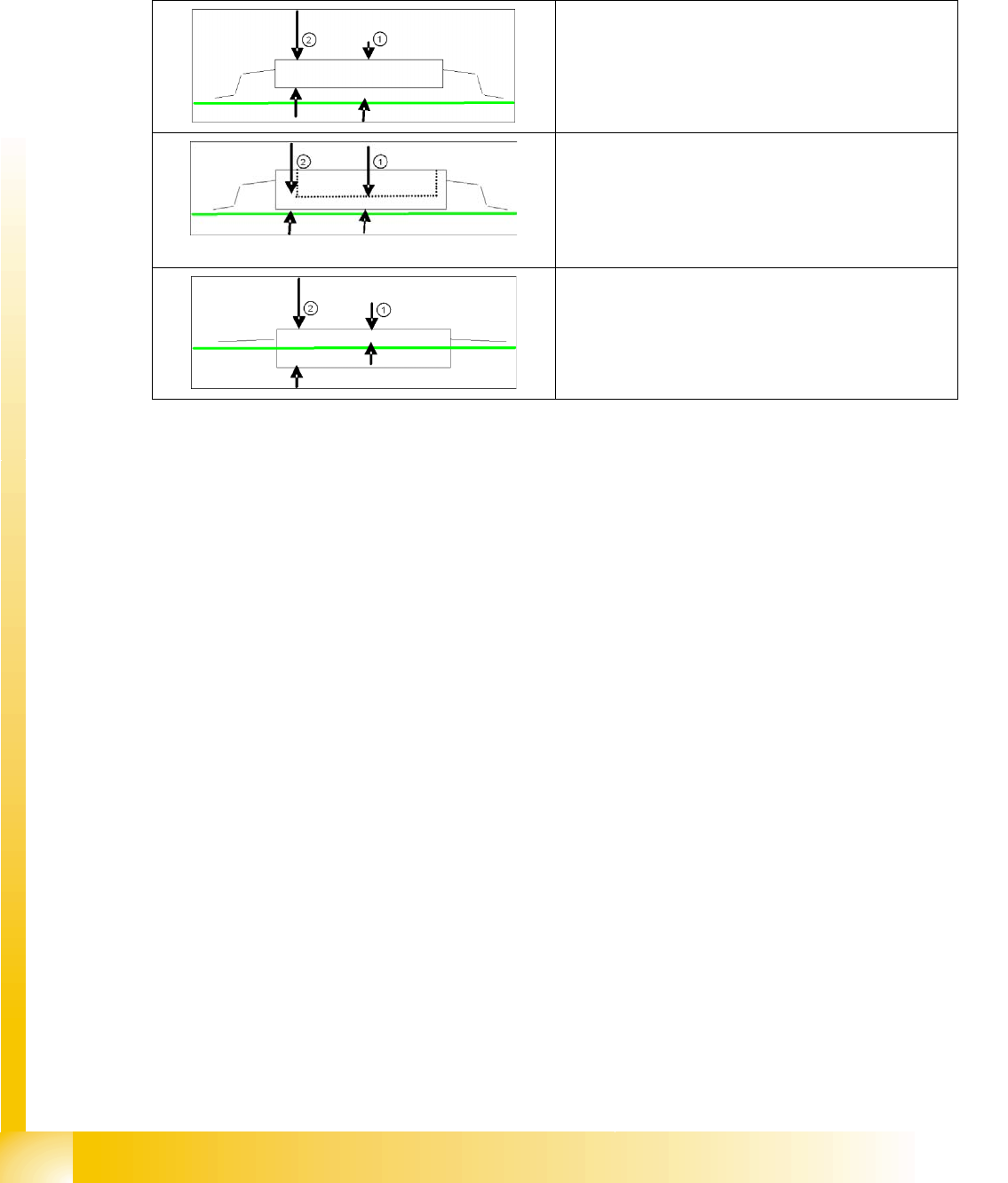
Standard SMD CO
1. CO Height
2. CO thickness (for CO sensors)
Socket SMD CO
1. CO height (if the component height is programmed as
high as the socket edge, this is to be programmed as
a positive (!) Z pickup position correction (inner depth
of socket). (This may be necessary for the
precedence finder from SIPLACE PRO 6.0)
2. (2) CO thickness (for CO sensors)
Special CO in PCB cuts-outs
1. CO Height
2. CO thickness (for CO sensors)
Component Shapes
Overview of Component Shapes Which Require Separate Group Descriptions Component Shape Description Rules
Student Guide SIPLACE Vision (Customer)
Edition 12/2008 EN Component Shapes
45
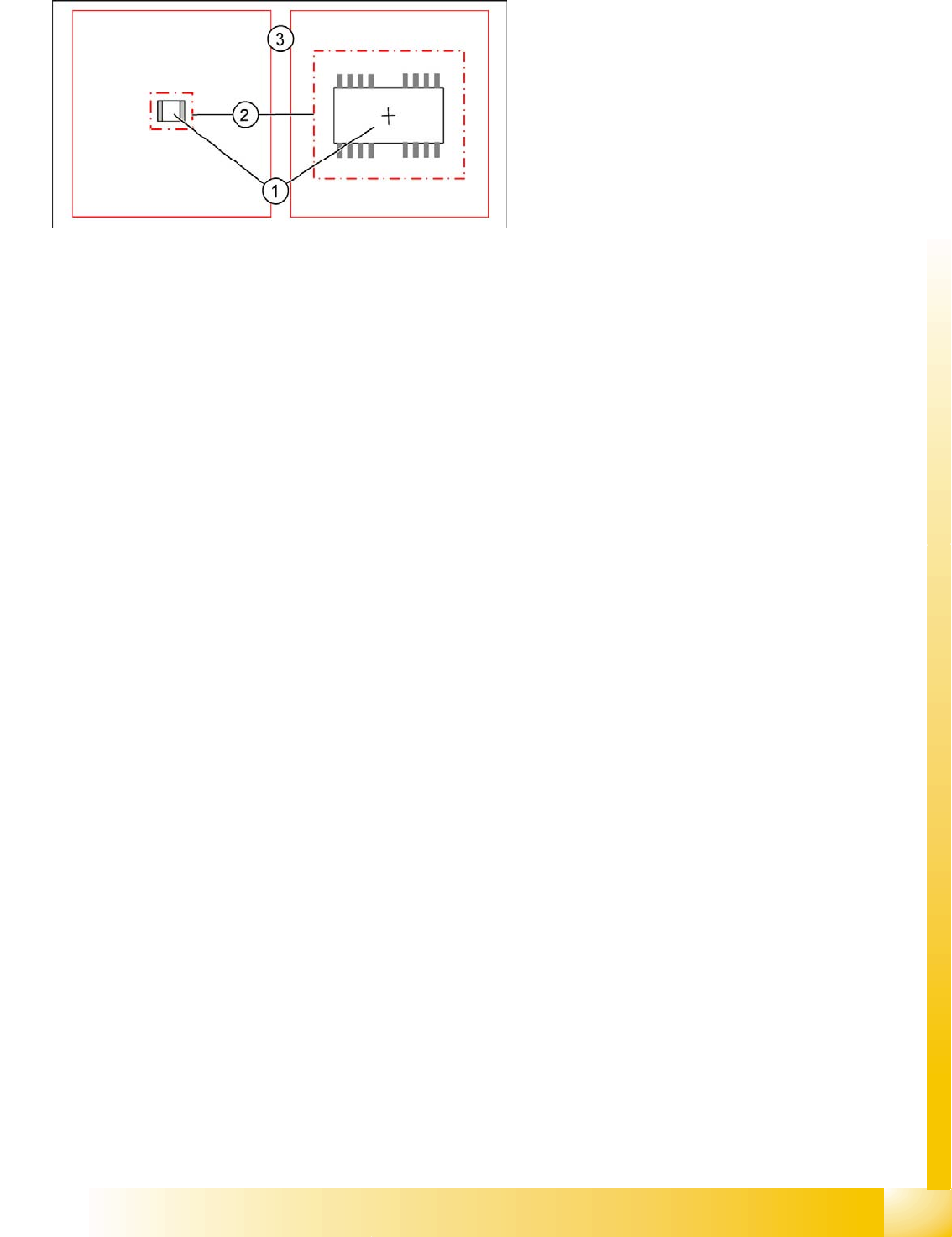
The X/Y body dimensions
The X/Y body dimensions are now understood to be dimensions for the plastic body (1).
Based on the calculated overall body dimensions, the camera field of vision (2) or so-called Region
of Interest (ROI) is set.
The component tolerance and packaging tolerance are taken into account in this calculation.
The component body is not measured optically. The dimensions are only needed to produce a
diagram for better assessment.
Angle of component
CS testing is normally performed at a definition angle of 0°.
However, the presentation angle can be adjusted in 90° steps for CS testing at any heads.
The optical centering of components is always performed in the pickup position when using DLM
C&P6/12 heads.
Optical centering for Twin heads is performed in the placement angle (next possible 90° angle).
When using the C&P20 head, optical centering is performed in the placement angle (next possible
90° angle).
Polarity detection - inspection mode
SC Bearbeitung des Kamerabildes 02 0305 SIPLACE Vision supports Pin 1 detection, provided
optically recognizable asymmetries have been programmed.
The selection of inspection mode in SIPLACE Pro applies only to SIPLACE Vision (not for older
Vision systems).
The programmed polarity parameters are shown in the board or setup CO displays, in graphics
mode. However, this does not affect the measurements in the Vision system.
Lead lengths
Provided the leads are aligned towards the outside, the lead lengths are added together with the body
dimensions to give the overall dimensions of the component shape. The overall dimensions can be
viewed in the component shape geometry menu. These values can not be edited.
Once the body dimensions for unleaded CSs have been successfully measured, you can generally
assume that the component has been correctly recorded and that it is not in an upright position or
tipped to one side on the nozzle.
Legend
1. X/Y dimensions of component body (without
leads)
2. Restricted camera search field, so-called.
Region of Interest (ROI)
3. Camera field of vision
Component Shapes
Component Shape Description Rules Lead Shapes
Student Guide SIPLACE Vision (Customer)
Component Shapes Edition 12/2008 EN
46
5.2.1 Lead Shapes
The lead shapes generally have predefined English names.
Gullwing, J-Lead, Wraparound, Ball (for BGAs) and Column are the most common examples.
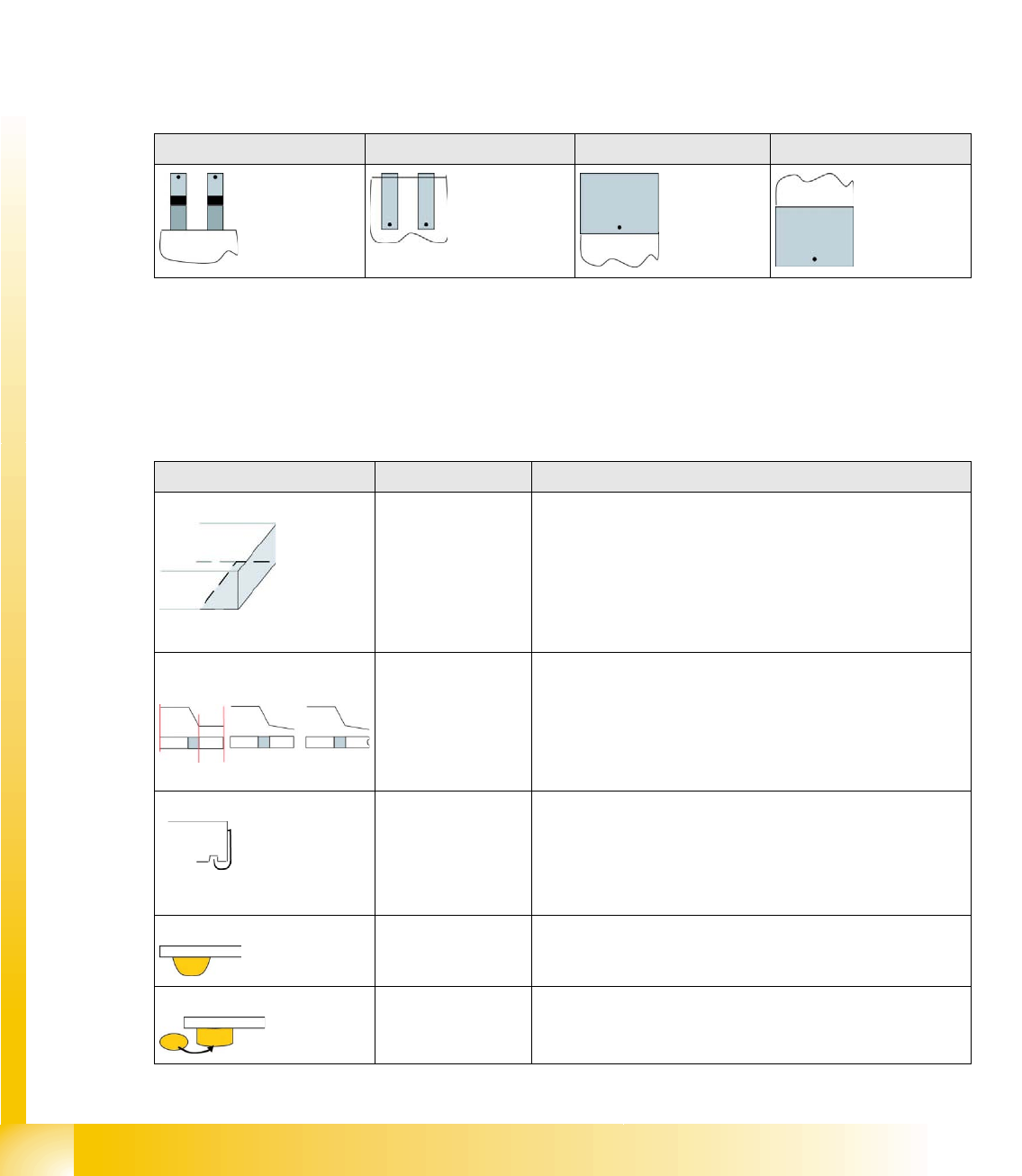
Lead angle
The lead angle is the angle at which the lead protrudes from the component body. Leads which point
towards the Y-axis (upwards) have an angle of 0°, although 90° was defined in the line computer CS
Editor.
The lead angle specified in SIPLACE Vision depends on the lead type. You need to specify the position
of the lead end.
The diagrams below each show the edge of a component body, with leads. The orientation of the lead
end in its 0° position is marked with a dot.
Blob - special features
The Blob (binary large object ) stands for a lead shape or structure which is saved as a graphic. It can
not be adequately described with the typical dimensions (e.g. lead width and length). In this case,
SIPLACE Vision automatically determines the characteristic contours for measuring the structure.
Overview of lead shapes
Gullwing: J-Lead: Wraparound: Blob:
Lead shape Typical CO Comment / special features
Wraparound: Chip / Melf /
(Moulded)
The surface or metal surface (often as wide as the body) of
this lead shape is folded around the edge of the component
(except with the type Moulded).
Wraparounds are defined only by the visible lead length. This
can be dark or bright!
The ends of the Wraparounds may contain notches, see
Gullwing.
Gullwing: Soxx / QFP The JEDEC description JESD30-B applies for this lead
shape. This indicates a thin lead, which is curved from the IC
surface to the contact surface. The contact length is always
shorter than the lead length. The ends of the Gullwing leads
may contain notches, in which case the CO can be described
as nonstandard.
J-Lead: PLCC / SOJ The J-shaped pins are curved into cavities under the body
surface. Only select this if the pins have the correct shape. J-
Leads are defined only by the visible lead length.
Balls: BGA Hemispherical leads under the CO body surface.
Columns: CCGA Column-shaped lead points under the component body
surface.