TM1467_ReleaseNote_PSC乮Print Stability Control乯-SyringeType-Function.pdf - 第13页
SMT Software Engineeri ng Group IMOperationsYAMAHAMOTORCO. ,LTD. MD OC-SOFT50033 13/30 If the Auto -running, the Rolling action and the T es t-printin g are executed when the initial solde r supply…

SMT Software Engineering Group
IMOperationsYAMAHAMOTORCO.,LTD.
MDOC-SOFT50033
12/30
Table4.2.2.2 Operation list of button pressing in [Unit] – [PSC] window
Item Content
Solder Supply The initial solder supply is executed. For more details, please refer to the “4.2.3
Initial solder supply function”.
Solder Scan The rolling width scan action is executed. For more details, please refer to the
“4.2.4 Scanning rolling width function”.
Solder Press The syringe is blown, and the solder is supplied. At this time, when the solder
cutter has been closing, it is opened automatically. But, solder is supplied only 2
seconds, and it is stopped supplying automatically. Because solder is not supply
too much. And next, the solder cutter is closed automatically.
Solder Cutter The solder cutter can be opened and closed. At this time, the status of solder
cutter sensor is displayed in the unit view at the center of window.
4.2.3 Initial solder supply function
This function is the function that the initial solder supply is executed automatically. If you execute this
function when the solder is setup, the variability at the supplied amount and the supply time by the
operator can be decreased.
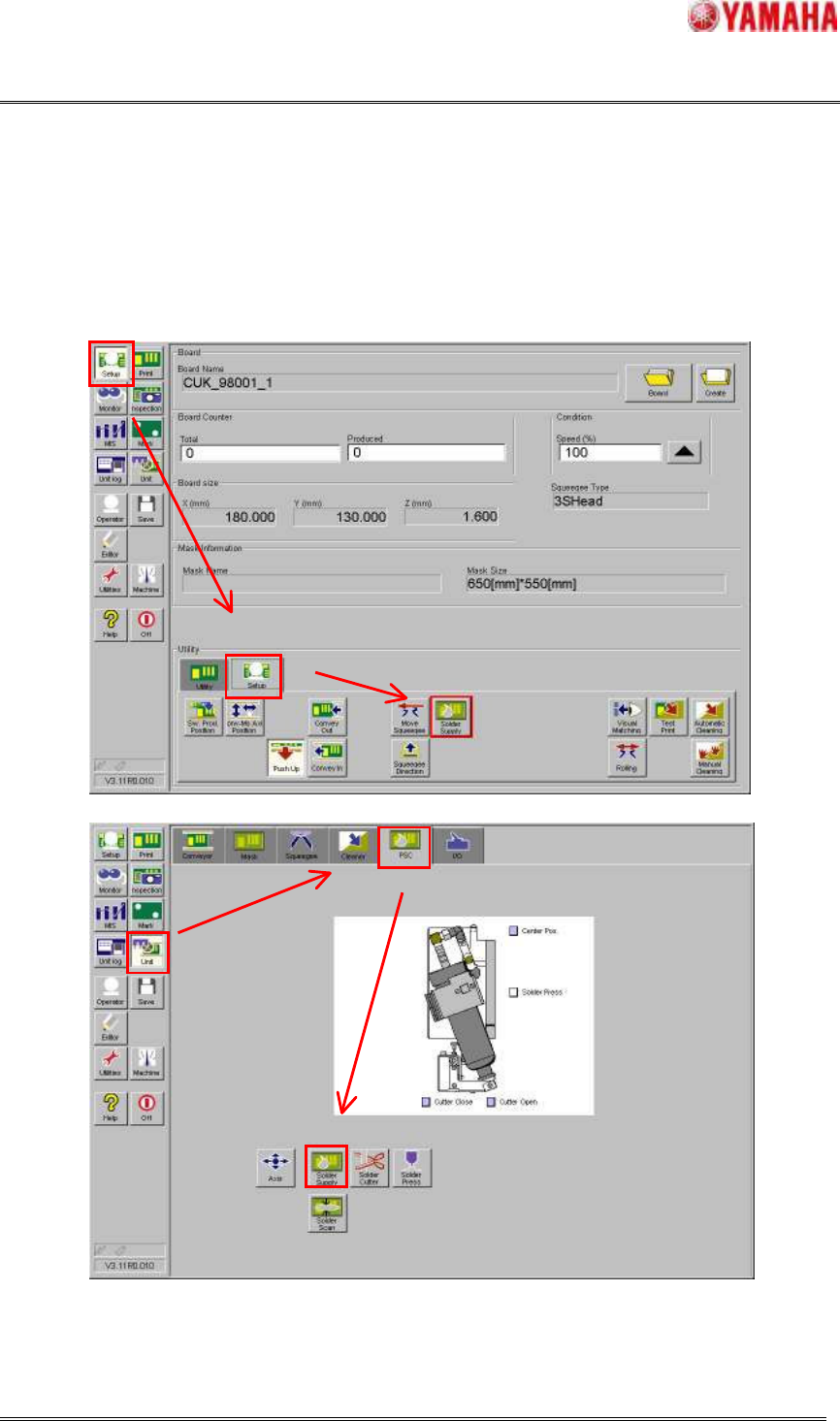
This function can be executed in [Setup] – [Setup] – [Solder Supply] or [Unit] – [PSC] – [Solder
Supply]. Please refer to Fig.4.2.3.1. The supplied amount (time) is calculated automatically from the
“Target Rolling Width (mm)” and the squeegee length.
NOTE: The following trouble occurs if the squeegee length set to the board data and the actual
squeegee length are different. Please correctly set actual length to board data.
・ When the squeegee length of set to the board data is shorter than actual
The solder supply amount is less than necessary amount.
・ When the squeegee length of set to the board data is longer than actual
The initial solder supply length exceeds the actual squeegee length, and the solder
supply unit might interfere in the mask frame or clamp unit. And more, the both sides
of the squeegee are dirty with the supplied solder and a defective printing might be
occurred.
If the initial solder supply is completed, the machine memorizes it and the solder do not need to be
supplied afterwards.
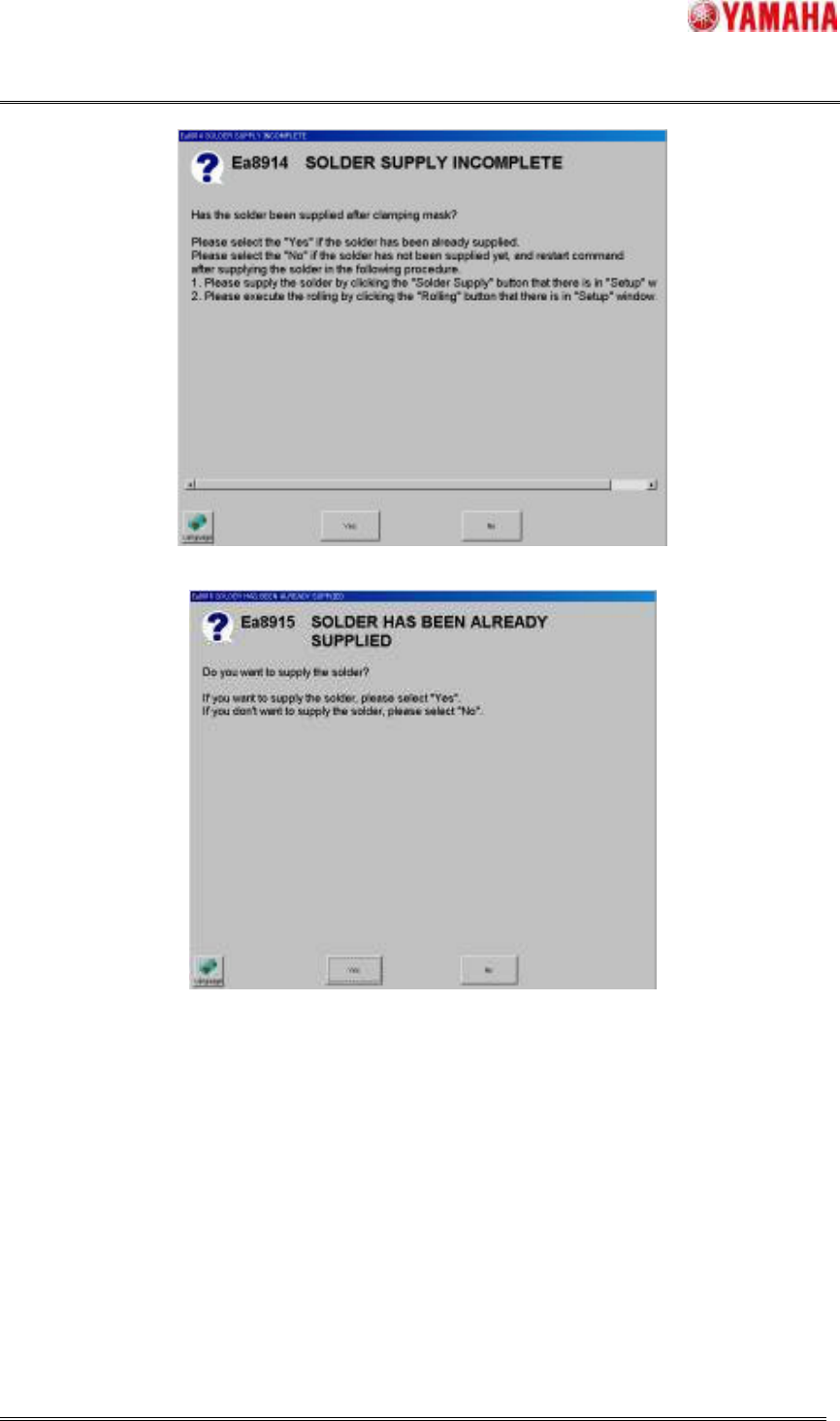
When the initial solder supply is executed again even though the solder has been already supplied,
message of “Ea8915 SOLDER HAS BEEN ALREADY SUPPLIED (refer to Fig.4.2.3.3)” is displayed.
But, if the mask has been unclamped, the machine forgets having supplied the solder on the mask.
SMT Software Engineering Group
IMOperationsYAMAHAMOTORCO.,LTD.
MDOC-SOFT50033
13/30
If the Auto-running, the Rolling action and the Test-printing are executed when the initial solder supply
has not been completed yet, the message of “Ea8914 SOLDER SUPPLY INCOMPLETE (refer to
Fig.4.2.3.2) ” is displayed and prompts the operator to restart these command after the initial solder
supply is executed. But, when the mask is unclamped reluctantly due to the air pressure decrease not
anticipated, these commands can be continued.
(a) [Setup] - [Setup] window
(b) [Unit] - [PSC] window
Fig.4.2.3.1 The initial solder supply action
SMT Software Engineering Group
IMOperationsYAMAHAMOTORCO.,LTD.
MDOC-SOFT50033
14/30
Fig.4.2.3.2 Message of “Ea8914 SOLDER SUPPLY INCOMPLETE”
Fig.4.2.3.3 Message of “Ea8915 SOLDER HAS BEEN ALREADY SUPPLIED”
4.2.4 Scanning rolling width function
This function is the function that the current rolling width on the mask is scanned by selecting the
location. Refer to Fig.4.2.4.1.
When scanning the rolling width has been successful, the message of “Ea8919 Succeeded in scanning
(Refer to Fig.4.2.4.2)” with this result is displayed. At this time, the printing direction is switched by the
location of scanning.