TM1467_ReleaseNote_PSC乮Print Stability Control乯-SyringeType-Function.pdf - 第7页
SMT Software Engineeri ng Group IMOperationsYAMAHAMOTORCO. ,LTD. MD OC-SOFT50033 7/30 4. Details 4.1 Operation while the Auto-running and the R olling The PSC action has two su pp ly modes as the a…
SMT Software Engineering Group
IMOperationsYAMAHAMOTORCO.,LTD.
MDOC-SOFT50033
6/30
NOTE: When “Feedback” mode is selected, this
parameter is hidden.
Solder Supply Timer (msec) 1500
0~99999
This is supply time in which solder is supplied at
once. The solder of about 10.0 (g) per 2000 (msec)
is supplied. (But, the solder supply amount
depends on the supply pressure, the kind of solder,
and the temperature.)
NOTE: When “Feedback” mode is selected, this
parameter is hidden.
Solder Supply Pressure (MPa) 0.150
0.000~0.400
The supply pressure of the solder used by this
board data can be input. Please use it as a memo.
(This value is not used to control pressure.)
Solder Supply Offset (mm) 0.000
-999.999~
999.999
This value changes the position in which solder is
supplied. When plus value is set, the supply
position is offset the direction that outward from
mask center.
NOTE: Please set an initial value usually.

SMT Software Engineering Group
IMOperationsYAMAHAMOTORCO.,LTD.
MDOC-SOFT50033
7/30
4. Details
4.1 Operation while the Auto-running and the Rolling
The PSC action has two supply modes as the above-mentioned. Those details are described in this
section.
Those modes have a merit and a demerit. Please select which mode to use as your operation and usage.
Interval mode
Because the solder of the decided time is supplied at decided interval, the used amount of the
solder in the syringe is easy manageable and the timing that solder in the syringe empties
cannot be forecasted. From the production planning, the usable number of the solder syringe is
forecast and can be managed inventory.
But, this function’s purpose of “the change of the solder rolling width on the mask is
suppressed within 1mm” is not accomplished.
Feedback mode
The change of the solder rolling width on the mask is suppressed within 1mm by scanning
the rolling width and supplying the solder automatically and the print quality can be improved.
But, neither the supply time nor the supply timing are necessarily fixed every time, the
timing that solder empties cannot be forecasted, too.
And, the rolling width scan action is executed after printing in the backward direction regardless of the
setting of the supply mode. The PSC action transition result of each printed board is displayed after the
PSC action (supplying the solder and scanning the rolling width) is executed while the Auto-running. This
PSC action transition result is displayed in the window of [Monitor] – [PSC Transition] and the window
of [MIS] – [Board Log]. For more details, please refer to “4.2.5 PSC action result output function”.
4.1.1 Interval mode
This mode is a mode that supplies the time specified by “Solder Supply Timer (msec)” at the interval
specified by “Solder Supply Interval (Board)”.
The rolling width scan action is executed after printing in the backward direction and its transition
result of each printed board is displayed after this action. Please use this result for the confirmation of the
change in the rolling width and the rough standard of decision of the “Solder Supply Timer (msec)” and
the “Solder Supply Interval (Board)”.
NOTE: When this mode is selected, all of the PSC actions are not executed during the Rolling
action or the Test-printing.
SMT Software Engineering Group
IMOperationsYAMAHAMOTORCO.,LTD.
MDOC-SOFT50033
8/30
When either of the following conditions is satisfied, the solder supply action in this mode is executed
while the Auto-running. The printing time doesn't increase so much while the Auto-running because the
solder supply action is executed at the same time as the board transfer action, the mark recognition
processing and so on.
Condition1 When "Solder Supply Counter" that is the number of printed board from the solder
supply at last time exceeds "Solder Supply Interval (Board)" and the printing in the
forward direction is finished.
Condition2 When the "Next Solder Supply" button has been pushed and the printing in the
forward direction is finished.
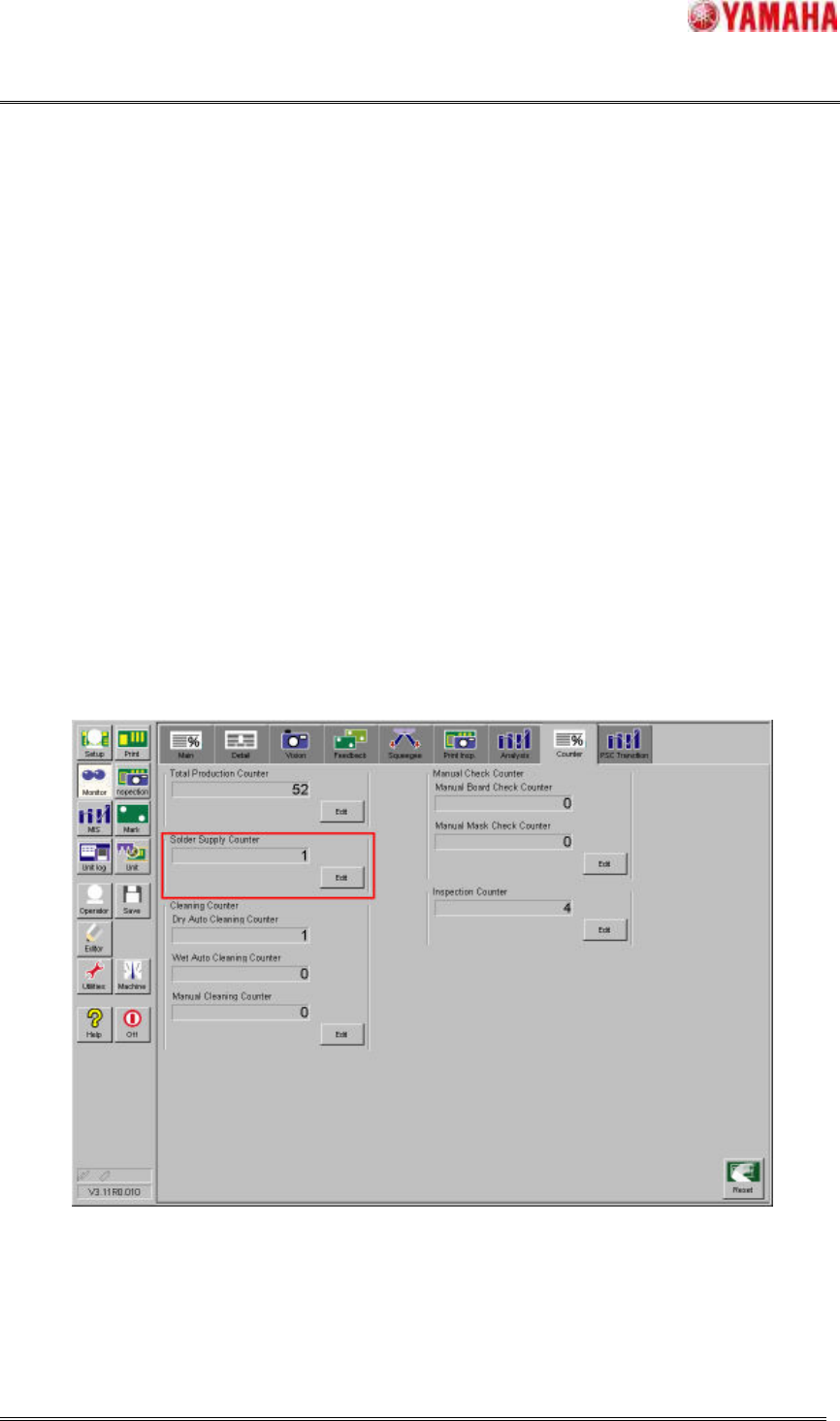
The “Solder Supply Counter” can be confirmed in window of [Monitor] – [Counter]. The value of
counter can be changed while the Auto-running. Moreover, this counter is incremented by one just after
the printing is completed.
But, the PSC action is not executed during print inspection feedback because this is the additional print
after inspection result is NG.
Fig.4.1.1.1 “Solder Supply Counter”
When the “Next Solder Supply” button in window of [Setup] - [Utility] has been pushed while the
Auto-running, the solder is supplied after printing in the forward direction regardless of the number of
“Solder Supply Counter”.