TM1467_ReleaseNote_PSC乮Print Stability Control乯-SyringeType-Function.pdf - 第20页
SMT Software Engineeri ng Group IMOperationsYAMAHAMOTORCO. ,LTD. MD OC-SOFT50033 20/30 5. Flow o f pr oduction w ith PSC fun ction W hen PSC functio n is used, the loss o f time in the so lder setu…

SMT Software Engineering Group
IMOperationsYAMAHAMOTORCO.,LTD.
MDOC-SOFT50033
19/30
Even if this warning has been occurred, it’s not a problem about operation, but please execute the
following to evade it.
Please set all of the “One Way / Round” of the window of [Print] - [Squeegee], [Inspection] -
[Feedback] and [Print] - [Squeegee] - [Detail Setting] to either the “One Way” or the “Round”.
If all of the “One Way / Round” are set “Round”, please start the Auto-running from printing of
the backward direction.
SMT Software Engineering Group
IMOperationsYAMAHAMOTORCO.,LTD.
MDOC-SOFT50033
20/30
5. Flow of production with PSC function
When PSC function is used, the loss of time in the solder setup can be decreased because the initial
solder supply and the solder supply while the Auto-running are executed automatically.
By executing the following procedure, the operations from the setup to the production are efficient.
STEP1 Select the board data
STEP2 Prepare the backup, squeegee, mask and solder
STEP3 Confirm supplying the solder and setting of supply pressure
STEP4 Execute the initial solder supply
STEP5 Execute the Rolling and Test-printing
STEP6 Start the production
STEP7 Clean after production
STEP1 Select the board data
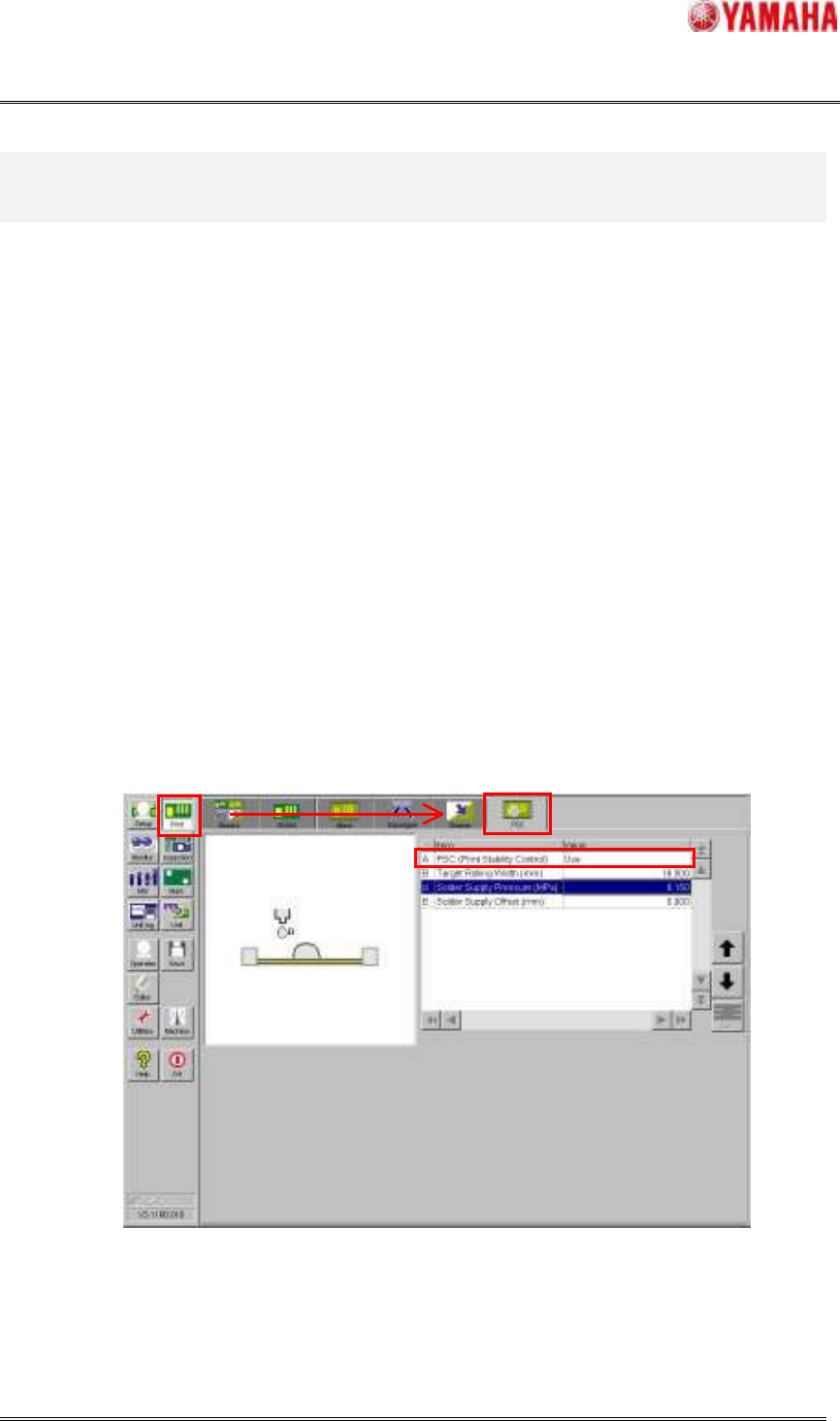
Please select the board data for production. Next, please confirm whether the “PSC (Print Stability
Control)” in window of [Print] – [PSC] is “Use”. If the “PSC (Print Stability Control)” is not use, the
following step is unnecessary. Please prepare the backup, squeegee and mask and the solder is supplied
manually and execute the Rolling action and Test-printing, and start the Auto-running.
Fig.5.1 [Print] - [PSC] window
STEP2 Prepare the backup, squeegee, mask and solder
Please prepare the necessary backup, squeegee, mask and solder. At this time, it is necessary that the
SMT Software Engineering Group
IMOperationsYAMAHAMOTORCO.,LTD.
MDOC-SOFT50033
21/30
solder is suitable temperature beforehand.
Please confirm whether to use the pin-type backup or the plane-type according to the production
board beforehand, and attach the backup correctly. If it is not attached correctly, the machine may
break.
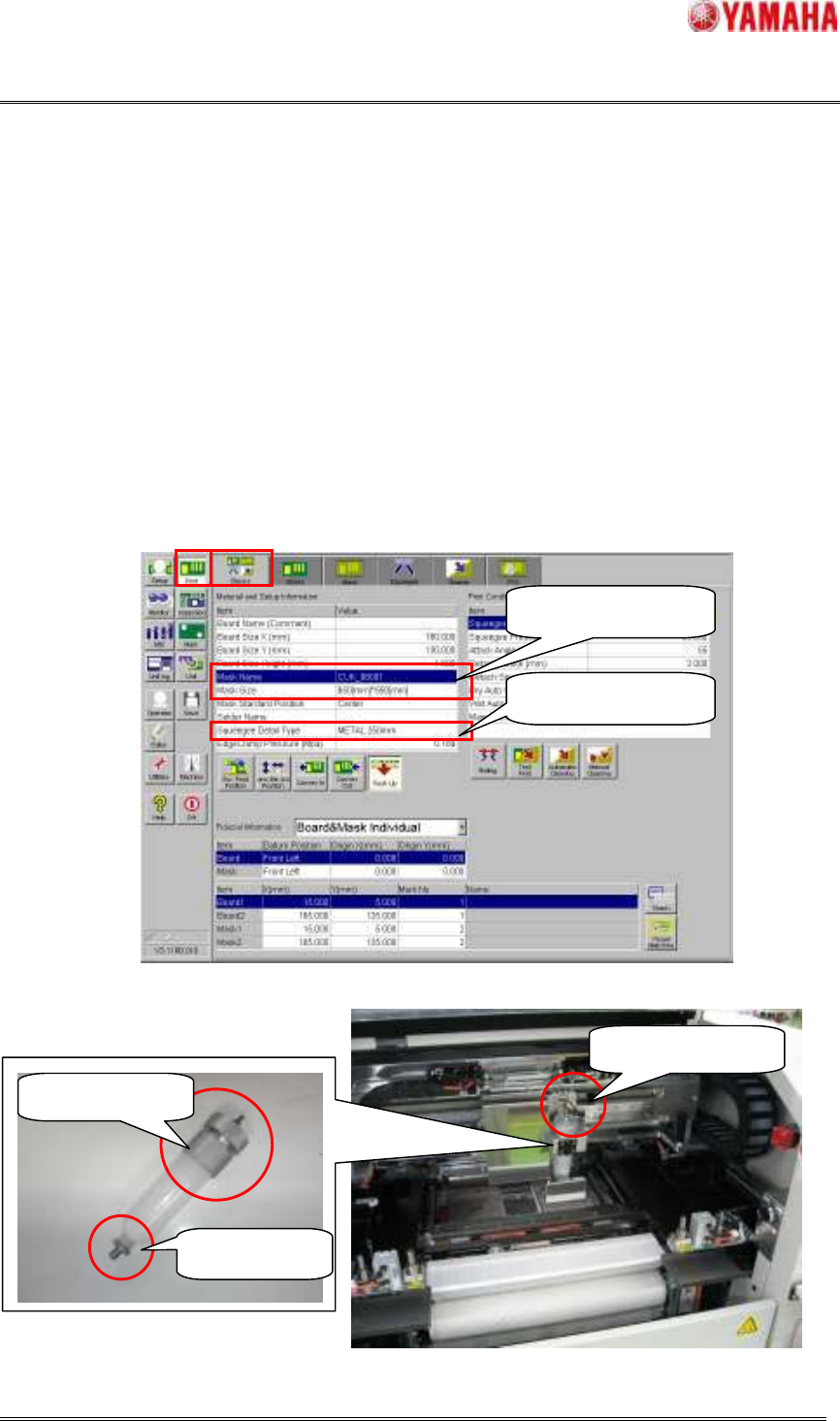
Please prepare the squeegee selected by the "Squeegee Detail Type" in the window of [Print] –
[Basics] or [Print] – [Squeegee] correctly. If not, PSC action is not executed correctly.
Please prepare the mask selected by the "Mask Name" or “Mask Size” in the window of [Print] –
[Basics] or [Print] – [Mask] correctly and insert it to the machine and clamp it. If the Mask Adapter is
used, it is attached first and please clamp the mask.
Please attach the supply nozzle and the attachment to the solder syringe, and attach it in the PSC unit.
Afterwards, please insert the air joint until it clicks.
Fig.5.2 [Print] - [Basic] window
Fig.5.3 Preparing the solder syringe
Confirm the mask
Confirm the squeegee
Supply Nozzle
Attachment
Air Joint