TM1467_ReleaseNote_PSC乮Print Stability Control乯-SyringeType-Function.pdf - 第17页
SMT Software Engineeri ng Group IMOperationsYAMAHAMOTORCO. ,LTD. MD OC-SOFT50033 17/30 Fig.4.2. 5.2 [Mo nitor] - [PSC T ransition] windo w Output the inspect ion result ana lysis graph W hen the so…
SMT Software Engineering Group
IMOperationsYAMAHAMOTORCO.,LTD.
MDOC-SOFT50033
16/30
4.2.5 The PSC action result output function
The PSC action results (the solder supply time and scanning result of the rolling width) of each printed
board are output to history and are displayed to transition graph.
Output to the board log
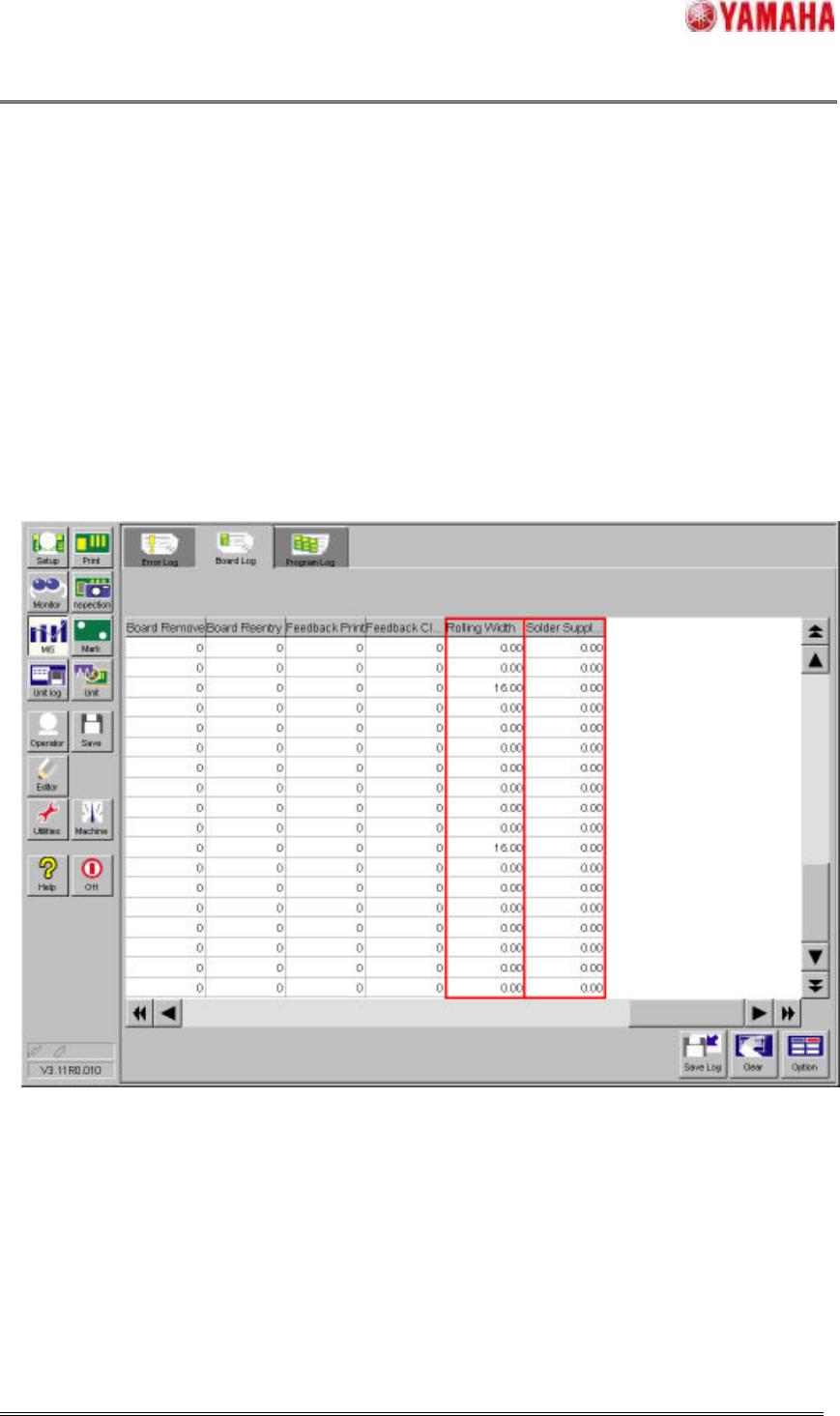
The "Rolling Width (mm)" column and the "Solder Supply Amount (msec)" column are added newly in
existed Board Log in window of [MIS] – [Board Log] and the PSC action results of every printed board
are output here.
When the PSC action results are output in this board log, the CSV file can be output and can be used
for result analysis in offline.
Fig.4.2.5.1 [MIS] - [Board Log] window
Output the PSC transition graph
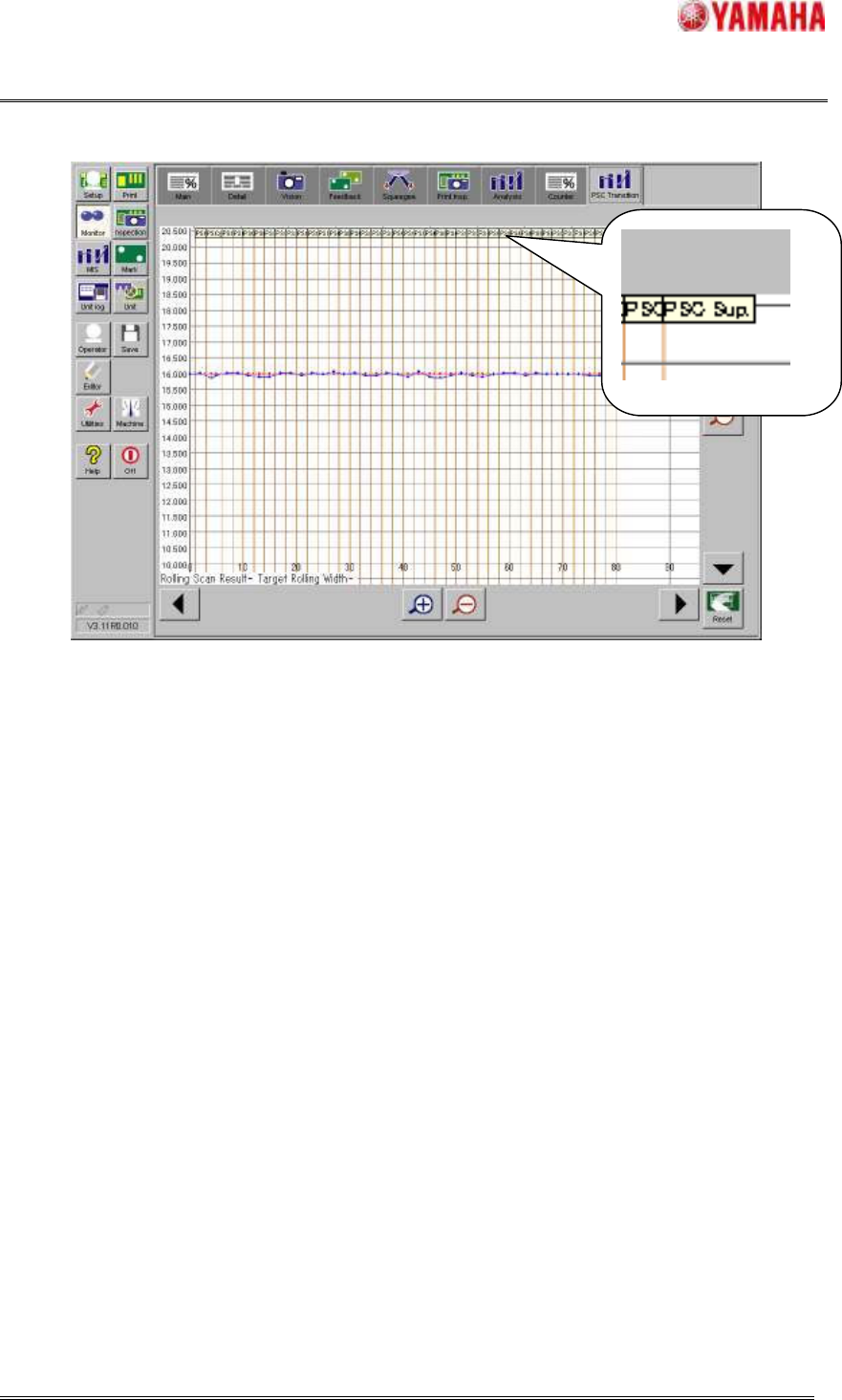
In the PSC transition graph with the rolling width on the y-axis and board number of sheets on the
x-axis, you can confirm the PSC action results visually. The red line is “Target Rolling Width (mm)” and
the blue line is the scanning results of the rolling width. And, in this graph, the flag of “PSC Sup.” is
shown when the solder is supplied. But the amount of solder supply cannot be confirmed here. If you
want to confirm it, please refer to [MIS] – [Board Log].
SMT Software Engineering Group
IMOperationsYAMAHAMOTORCO.,LTD.
MDOC-SOFT50033
17/30
Fig.4.2.5.2 [Monitor] - [PSC Transition] window
Output the inspection result analysis graph
When the solder is supplied, the filling amount is changed and may affect the inspection result. And
then, in inspection result analysis graph, the flag of “PSC Sup” is shown like the events of the "Cleaning"
and the "Solder Supply Stop". So, you can know a timing of the solder supply at one view.
4.2.6 Warning the increasing print cycle time function
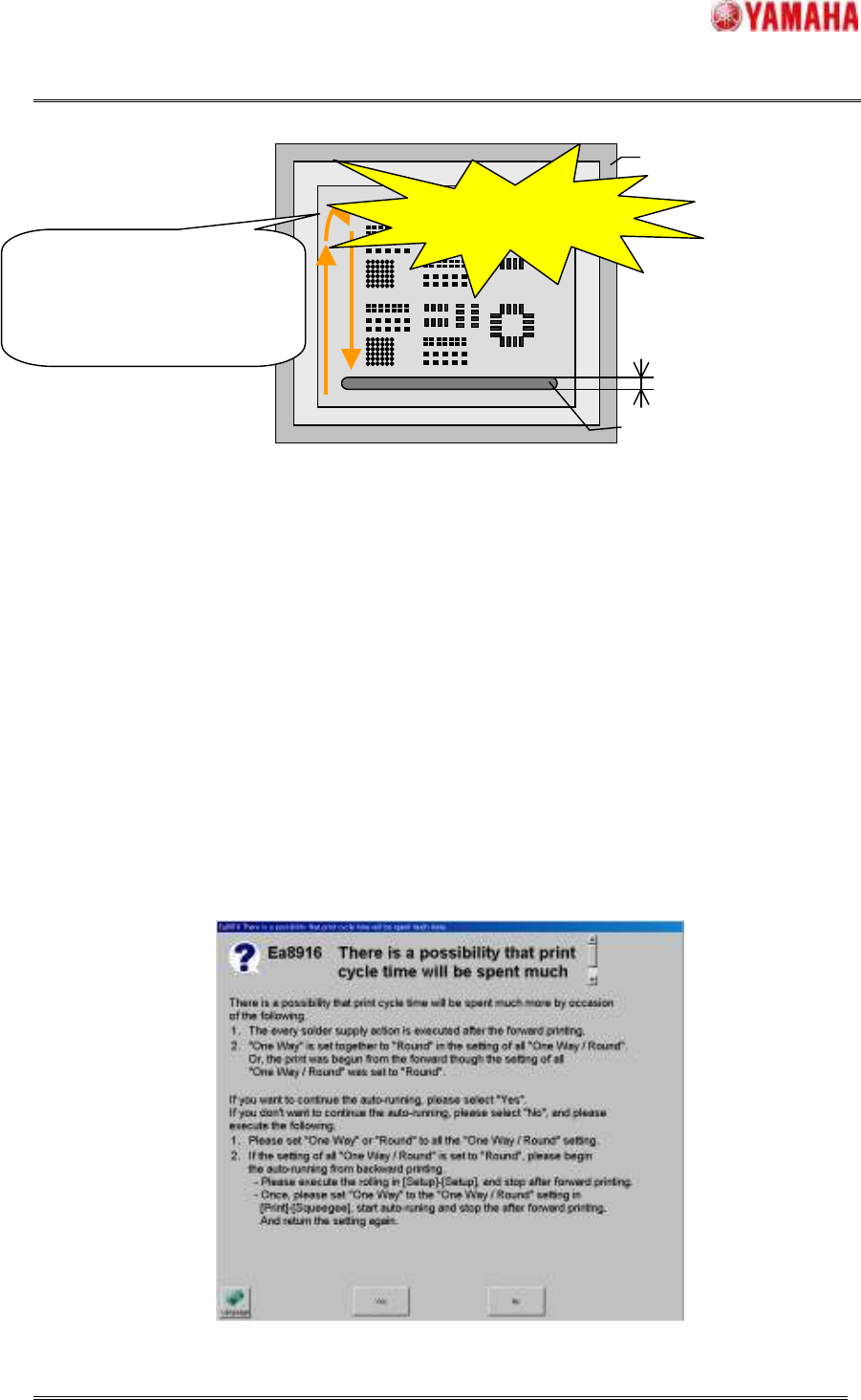
From the limitations in the PSC unit installation position layout, the solder is supplied only after
printing in the forward direction. Therefore, when the “Round” printing is set and the Auto-running is
started from the forward direction, the solder supply action is executed even if on the way of the “Round”
printing and the print cycle time is increased. Please refer to “7.1 Summary of units”. Therefore, if the
"One Way / Round" in window of [Print] - [Squeegee] has been set to "Round", please set the “One Way /
Round” of other settings (filling correct after each cleaning and inspection feedback printing) to “Round”
too and start the Auto-running from the backward direction. And the solder is not supplied on the way of
“Round” printing and print cycle time is not increased much more.
The flag of “PSC Sup. ”
SMT Software Engineering Group
IMOperationsYAMAHAMOTORCO.,LTD.
MDOC-SOFT50033
18/30
The conditions that the solder is supplied on the way of “Round” printing and the print cycle time is
increased are as follows. When either of the following conditions is satisfied, message of “Ea8916 There
is a possibility that print cycle time will be spent much more” is displayed.
Condition1 When “Round” is set to “One Way / Round” in window of [Print] - [Squeegee] and
the Auto-running is started from printing in the forward direction.
Condition2 When “Round” is set to “One Way / Round” in window of [Print] - [Squeegee] and
the Auto-running is started from the backward direction and “One Way” is set to
“One Way / Round” of other settings (filling correction after each cleaning and
inspection feedback printing).
Condition3 When “One Way” is set to “One Way / Round” in window of [Print] - [Squeegee] and
“Round” is set to “One Way / Round” of filling correction after each cleaning.
Fig.4.2.6.1 Message of “Ea8916 There is a possibility that print cycle time will be spent much more”
Mask
Solder
Rolling width
If “Round”
printing is set and the
Auto-
running is started from
printing in the forward direction,
the solder is supplied even if on
the way of “Round” printing.
The supply time is added
to the print cycle time.
Fig.4.2.6.1 Increasing the print time