TM1467_ReleaseNote_PSC乮Print Stability Control乯-SyringeType-Function.pdf - 第19页
SMT Software Engineeri ng Group IMOperationsYAMAHAMOTORCO. ,LTD. MD OC-SOFT50033 19/30 Even if t his warning has bee n occurred, it ’ s not a problem about o peration, but p lea se exe cute the fol…
SMT Software Engineering Group
IMOperationsYAMAHAMOTORCO.,LTD.
MDOC-SOFT50033
18/30
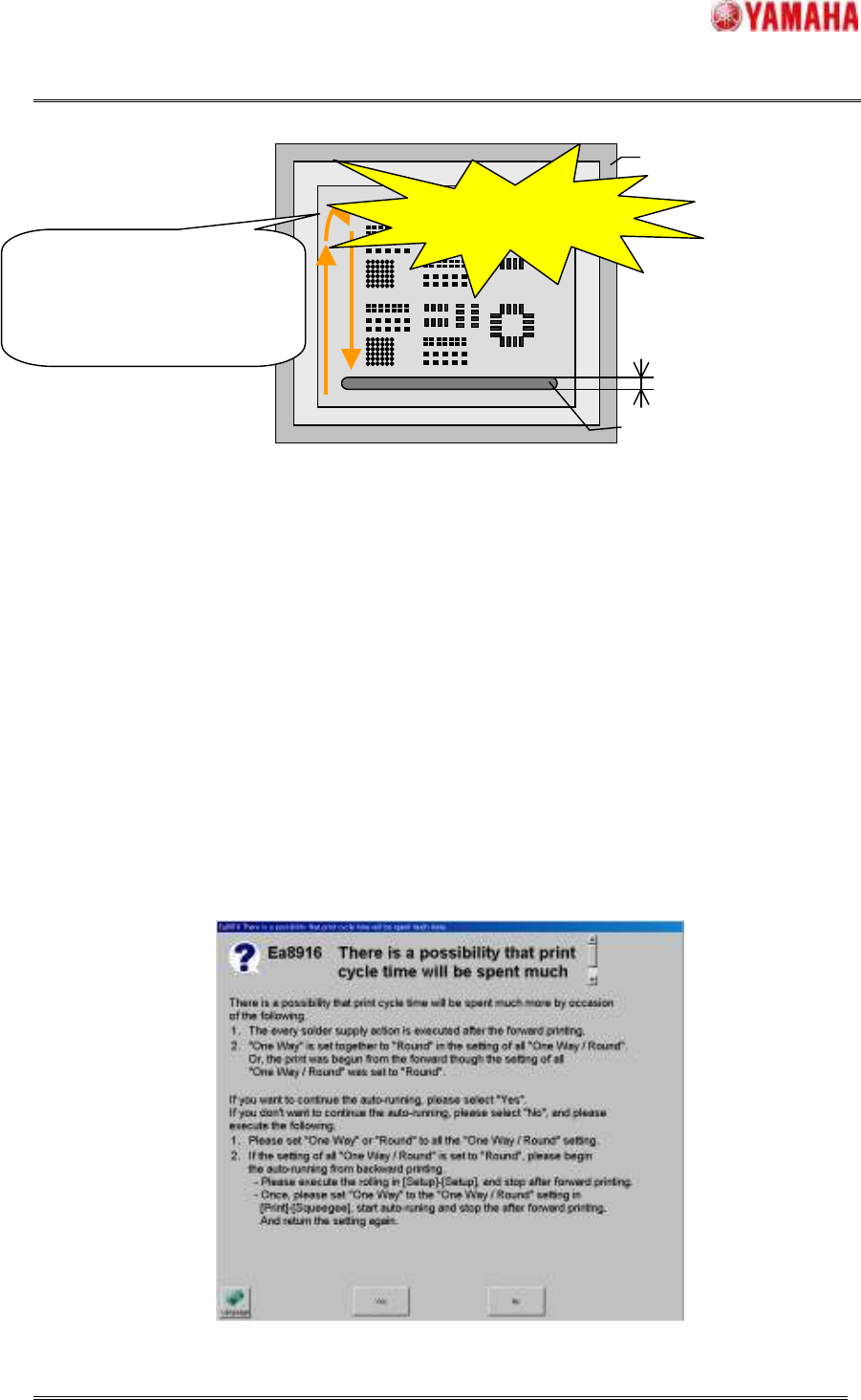
The conditions that the solder is supplied on the way of “Round” printing and the print cycle time is
increased are as follows. When either of the following conditions is satisfied, message of “Ea8916 There
is a possibility that print cycle time will be spent much more” is displayed.
Condition1 When “Round” is set to “One Way / Round” in window of [Print] - [Squeegee] and
the Auto-running is started from printing in the forward direction.
Condition2 When “Round” is set to “One Way / Round” in window of [Print] - [Squeegee] and
the Auto-running is started from the backward direction and “One Way” is set to
“One Way / Round” of other settings (filling correction after each cleaning and
inspection feedback printing).
Condition3 When “One Way” is set to “One Way / Round” in window of [Print] - [Squeegee] and
“Round” is set to “One Way / Round” of filling correction after each cleaning.
Fig.4.2.6.1 Message of “Ea8916 There is a possibility that print cycle time will be spent much more”
Mask
Solder
Rolling width
If “Round”
printing is set and the
Auto-
running is started from
printing in the forward direction,
the solder is supplied even if on
the way of “Round” printing.
The supply time is added
to the print cycle time.
Fig.4.2.6.1 Increasing the print time

SMT Software Engineering Group
IMOperationsYAMAHAMOTORCO.,LTD.
MDOC-SOFT50033
19/30
Even if this warning has been occurred, it’s not a problem about operation, but please execute the
following to evade it.
Please set all of the “One Way / Round” of the window of [Print] - [Squeegee], [Inspection] -
[Feedback] and [Print] - [Squeegee] - [Detail Setting] to either the “One Way” or the “Round”.
If all of the “One Way / Round” are set “Round”, please start the Auto-running from printing of
the backward direction.
SMT Software Engineering Group
IMOperationsYAMAHAMOTORCO.,LTD.
MDOC-SOFT50033
20/30
5. Flow of production with PSC function
When PSC function is used, the loss of time in the solder setup can be decreased because the initial
solder supply and the solder supply while the Auto-running are executed automatically.
By executing the following procedure, the operations from the setup to the production are efficient.
STEP1 Select the board data
STEP2 Prepare the backup, squeegee, mask and solder
STEP3 Confirm supplying the solder and setting of supply pressure
STEP4 Execute the initial solder supply
STEP5 Execute the Rolling and Test-printing
STEP6 Start the production
STEP7 Clean after production
STEP1 Select the board data
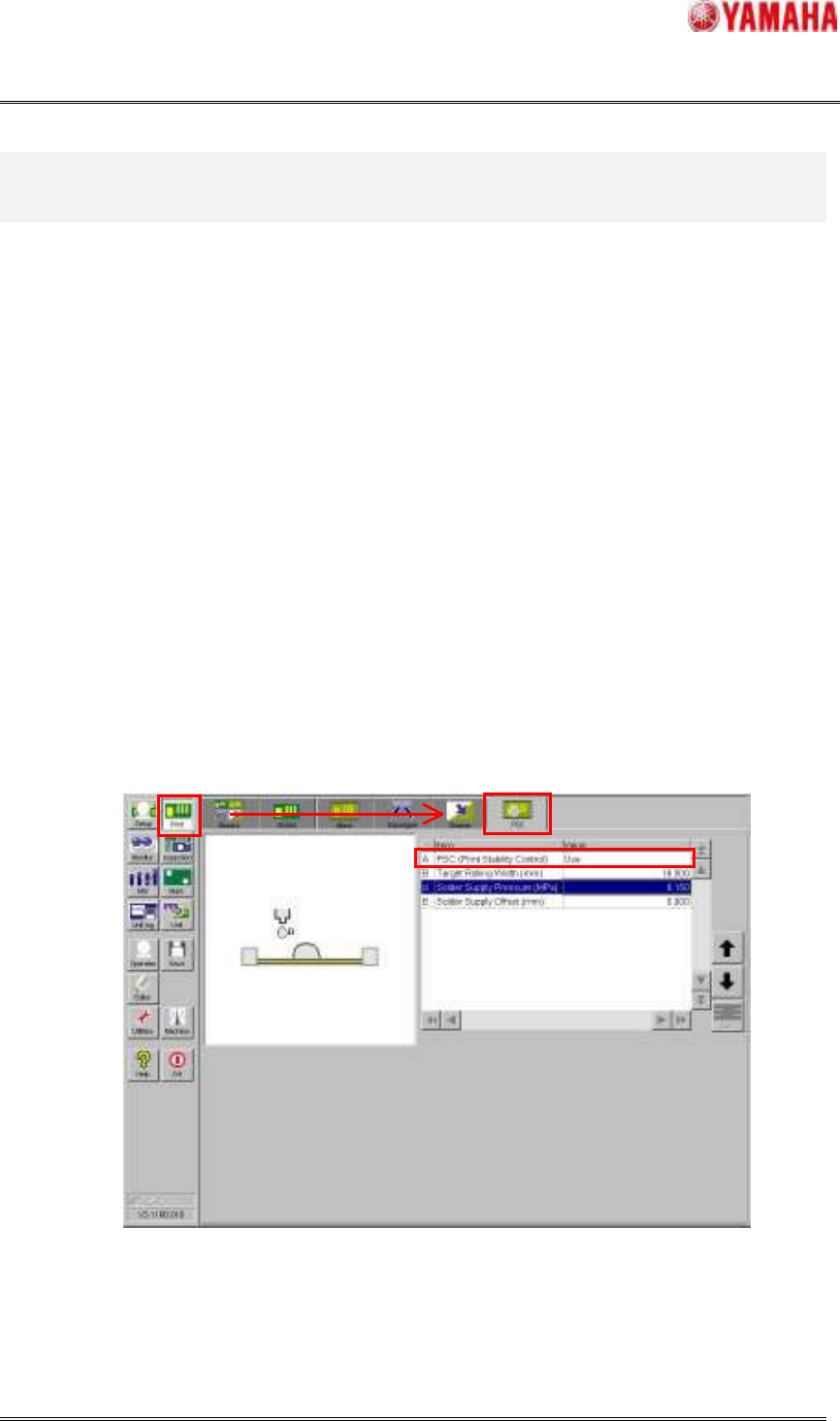
Please select the board data for production. Next, please confirm whether the “PSC (Print Stability
Control)” in window of [Print] – [PSC] is “Use”. If the “PSC (Print Stability Control)” is not use, the
following step is unnecessary. Please prepare the backup, squeegee and mask and the solder is supplied
manually and execute the Rolling action and Test-printing, and start the Auto-running.
Fig.5.1 [Print] - [PSC] window
STEP2 Prepare the backup, squeegee, mask and solder
Please prepare the necessary backup, squeegee, mask and solder. At this time, it is necessary that the