TM1467_ReleaseNote_PSC乮Print Stability Control乯-SyringeType-Function.pdf - 第25页
SMT Software Engineeri ng Group IMOperationsYAMAHAMOTORCO. ,LTD. MD OC-SOFT50033 25/30 6. Limitations This functio n is applied for only the printer “Y SP” and “3S head”. “Printer TEXT” is unsu…
SMT Software Engineering Group
IMOperationsYAMAHAMOTORCO.,LTD.
MDOC-SOFT50033
24/30
Fig.5.7 [Setup] - [Setup] - [Rolling], [Test Print]
STEP6 Start the production
Please start the Auto-running by pushing the “START” switch on the operation panel.
If the “SOLDER” is displayed in status area, please prepare the new solder of syringe. The solder
syringe can be exchanged smoothly by installing a preliminary supply nozzle in a new syringe
beforehand.
STEP7 Clean after production
When the production is all finished or other kind of the solder is exchanged, please take up the solder
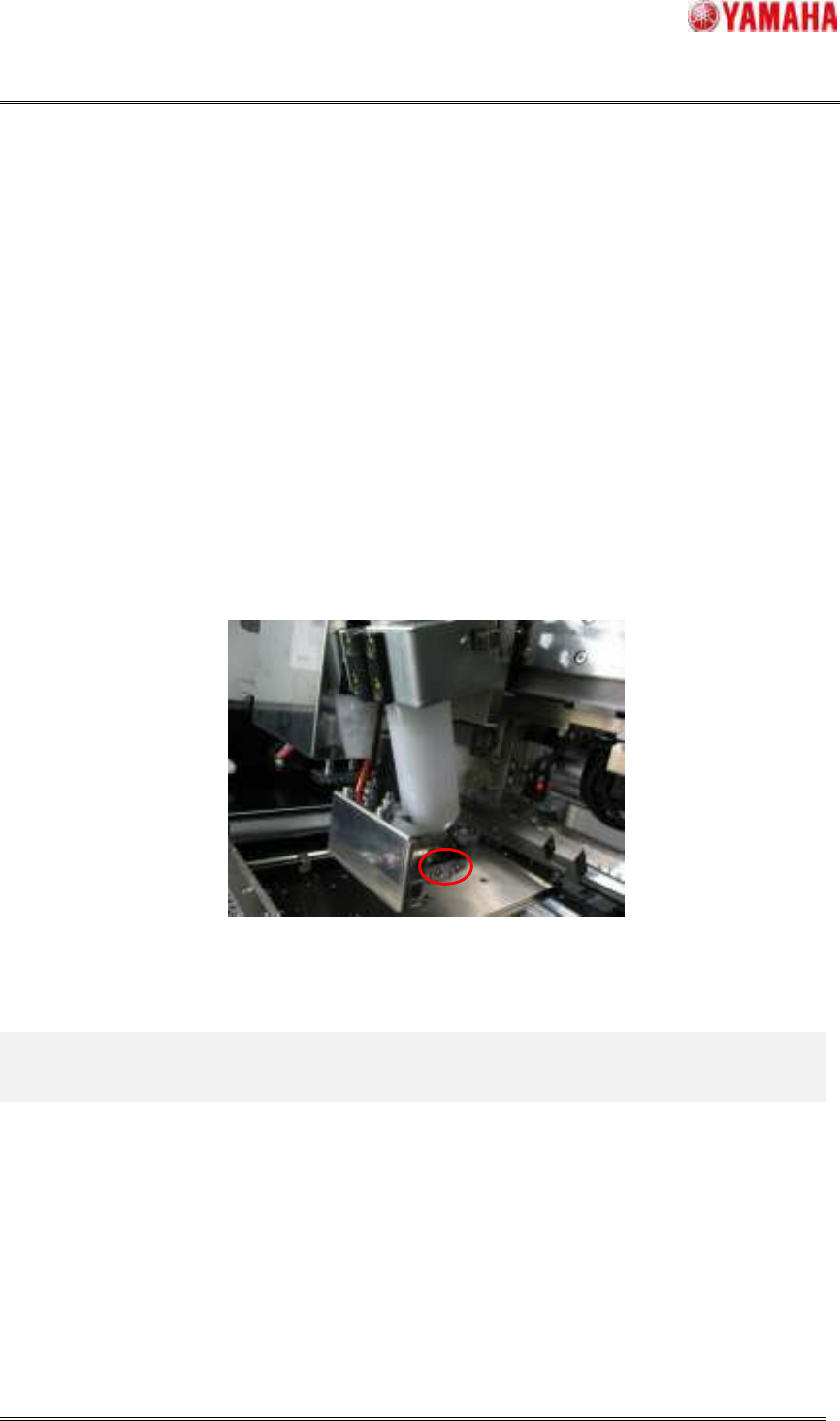
on the mask and clean up the mask, the squeegee, the supply nozzle and the solder cutter. Please detach
and clean the solder cutter fixed with two screws. After it is cleaned, please attach it again.
NOTE: Please do not lose two detached screws.
Fig.5.8 Screw position for solder cutter fixation

SMT Software Engineering Group
IMOperationsYAMAHAMOTORCO.,LTD.
MDOC-SOFT50033
25/30
6. Limitations
This function is applied for only the printer “YSP” and “3S head”.
“Printer TEXT” is unsupported. “YGZ” only.
When the board data is saved in the existing printer “YGP”, the parameters such as “Target Rolling
Width (mm)” newly added are initialized. Please update to V2.46STD R1.000 or later.
If this function is used, the existing “Solder supply stop” function cannot be used. If you want to use
the “Solder supply stop” function, please disable this function.
The PSC supply action is executed only after printing in the forward direction. Because PSC unit has
been attaching in front of squeegee. So, when the "Round" printing is set to board data, the print
cycle time is increased because the PSC unit supplies the solder in switching the printing direction.
The PSC supply action isn’t executed even if "Solder Supply Count" exceeds the supply intervals
after the printing in the BACKWARD direction because the supply action is executed only after
printing in the FORWARD direction.
The rolling width scan action is executed only after printing in the backward direction because the
sensor is mounted on the rear side of the squeegee.
Even if solder exists enough on the mask, the Auto-running is stopped after printed board transfer to
position of exit when the solder syringe is empty. And message of syringe exchange is displayed.
Afterwards, the Auto-running cannot start if not exchanged to the syringe where solder remains
enough.
Though there is no limitation in the squeegee length that can be used, please select correctly actually
used squeegee length to the “Squeegee Detail Type” of the board data.
The following problems occur if not correctly selected.
When the length of actually used squeegee is longer than the one selected by the board data.
The necessary amount of solder is not supplied.
When the length of actually used squeegee is shorter than the one selected by the board data.
The supply action is executed exceeding the length of actually used squeegee. There is
a possibility that the defective printing is occurred and PSC unit collides with the mask
frame.
If the mask with the Mask Adapter is used, movable range of solder supply unit is limited to 330mm.
Even if the squeegee of 400mm or more is attached, it is possible to move only within the range of
330mm.
SMT Software Engineering Group
IMOperationsYAMAHAMOTORCO.,LTD.
MDOC-SOFT50033
26/30
7. Appendix
7.1 Summary of unit
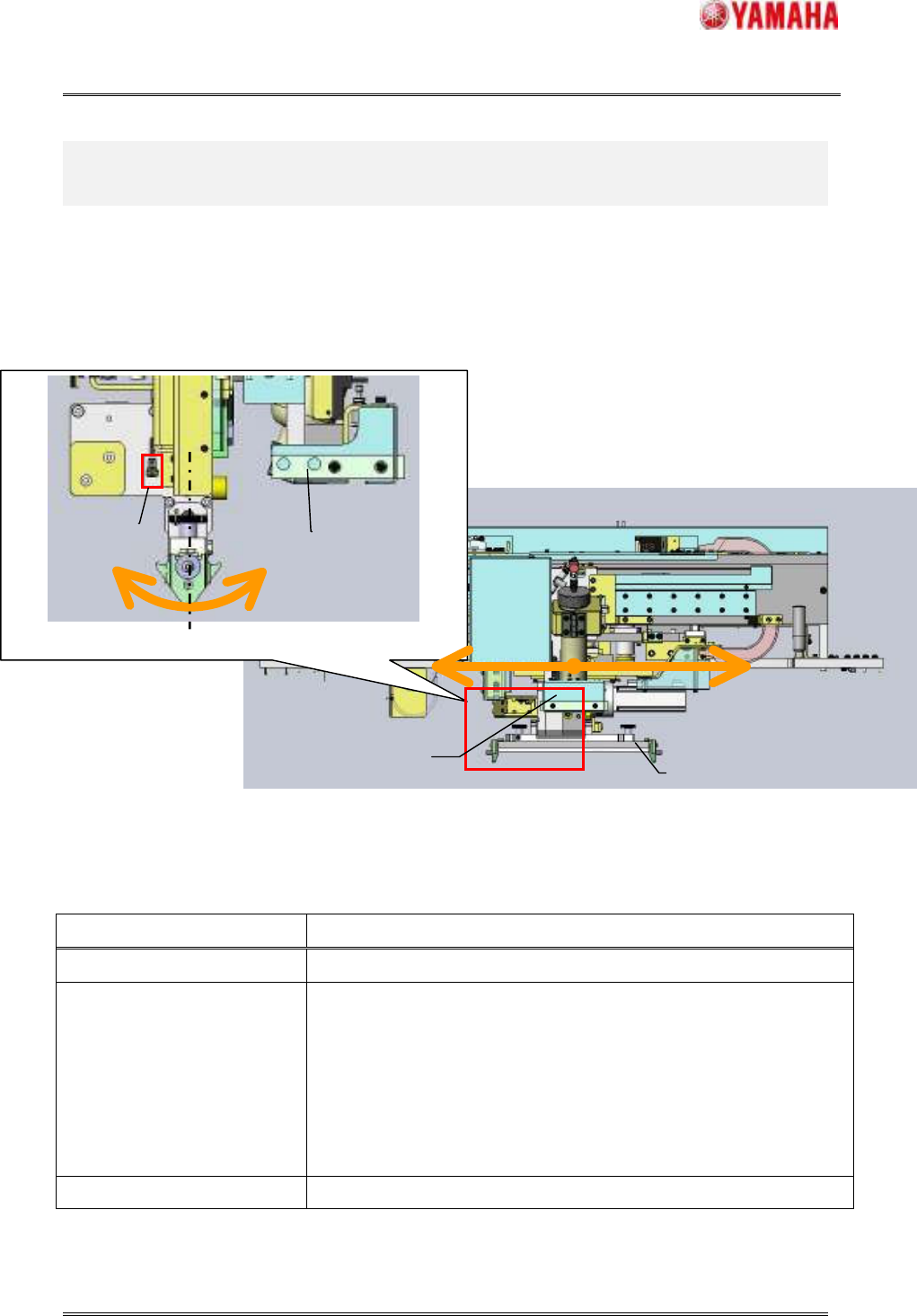
The exclusive units are necessary for PSC function. For example, “Solder supply unit”. The external
view of units and the list of necessary units are as follows.
Fig.7.1.1 External view
Table7.1.2 List of additional unit for PSC function
Item name Content
FX axis This axis is for moving the solder supply unit to X direction.
Solder supply unit This unit is for supplying the solder by blowing solder syringe. And this
is equipped with “Solder cutter” and “Solder empty sensor”.
The “Solder cutter” is for cutting the supplying solder and used to prevent
solder from falling, too.
The “Solder empty sensor” is for detecting the remained level of solder in
syringe.
Solder scan sensor This sensor is for scanning the rolling width.
Left side elevation view (Close-up)
Solder
supply unit
SR axis
FX axis
Squeegee
Solder
supply unit
Elevation view
Solder scan
sensor