SMEDBFeeder_UserGuide_EN.pdf - 第80页
4-10 SM-Series SME DB Tape Feeder User's Manual The part to be place d using the Soft T ouch function was placed in the high speed mode. The lowering speed wh en picking up a part to which a problem oc curred is…

4-9
Trouble Shooting
Clean the feeder and feeder base slot interface connectors and check whether homing
and feeding are performed properly
Check whether feeder setup unit generates a noise during homing and feeding, and
check visually the degree of vibration of the sprocket gear when it stops after feeding
Replace the feeder control board and check whether it operates properly
Check whether the feeder board control board cable is properly connected. Replace the
feeder control board cable and check whether the board operates proplerly
[Measures]
Contact our designated C/S company (STS) or local agent
Remove the cause of overload. If there is any problem, contact STS or our local agent
for proper measures.(Replace feeder motor)
Contact our designated C/S company (STS) or local agent. (Replace the interface
connector)
Contact our designated C/S company (STS) or local agent. (Replace the feeder motor)
Contact our designated C/S company (STS) or local agent. (Replace the feeder control
board)
Contact our designated C/S company (STS) or local agent. (Replace the feeder control
board cable)
E0007 Problem with accuracy
[Cause]
Y-axis distorted
[How to Check]
Y-axis precision distorted
[Measures]
Check the feeder for malfunctioning and loss rate using the MMI of the chip mounter.
E0008 Pickup Z setup error occurred.
[Cause]
Pickup height setup is incorrect.
[How to Check]
Check whether the Pickup Z value is appropriate for the corresponding part
[Measures]
Adjust the pickup Z height and pickup speed.
E0009 The down movement for pickup is fast.
[Cause]

4-10
SM-Series SME DB Tape Feeder User's Manual
The part to be placed using the Soft Touch function was placed in the high speed
mode.
The lowering speed when picking up a part to which a problem occurred is set faster
than the normal speed.
[How to Check]
Check whether the corresponding part is the one for which soft touch must be used
Set the lowering speed when picking a part up slower and check whether the same
problem occurs.
[Measures]
Set the Soft Touch function and use it.
Set the lowering speed when picking a part up to slow so that no problem occurs.
5-1
Service Part List
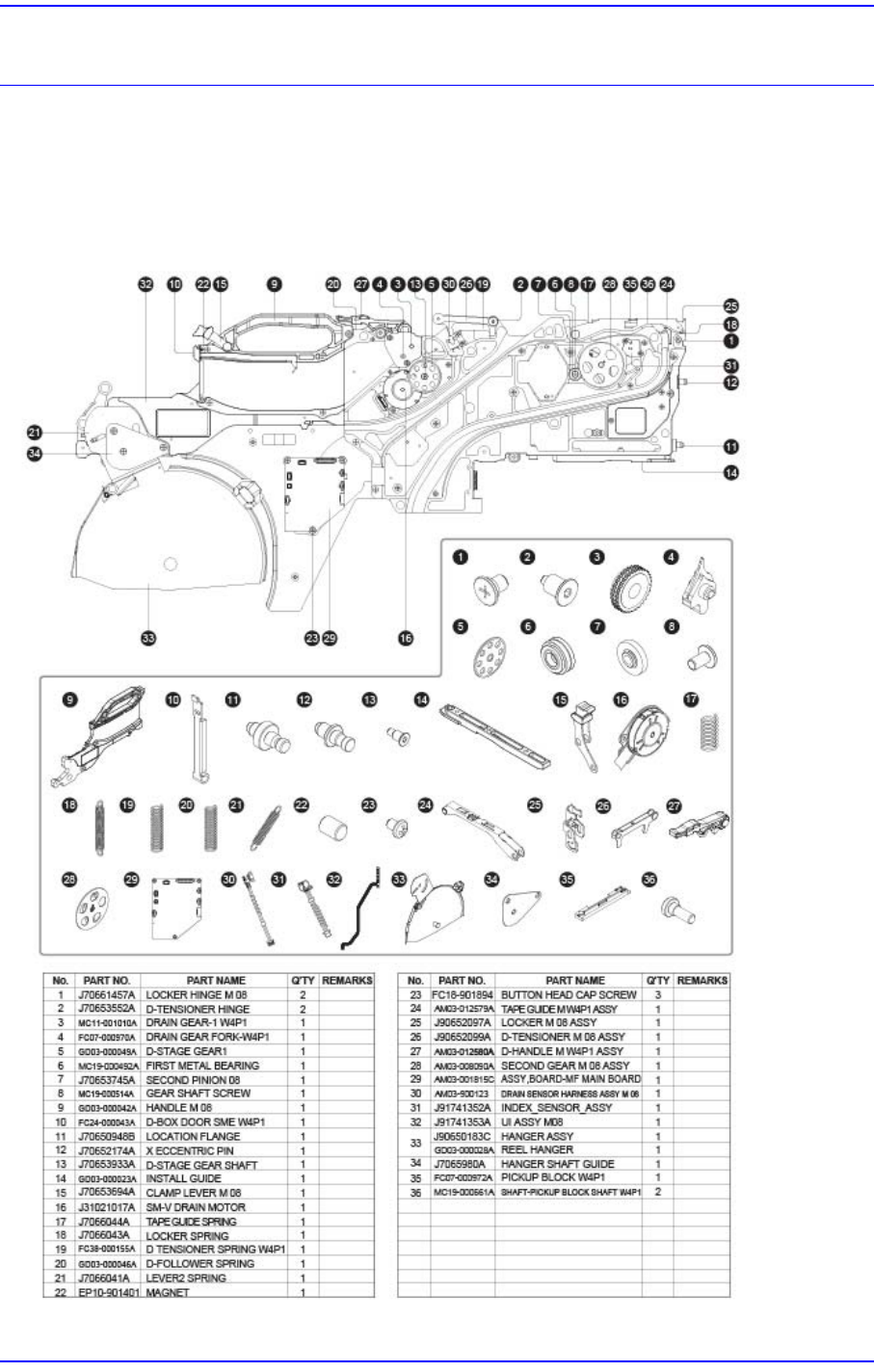
Chapter5. Service Part List
5.1. Service Part List
5.1.1. SME W4P1 Tape Feeder