00196449-04_UM_FCCS_digital_DE_EN.pdf - 第71页
4 Camera Calibration in Stations from SW705.03 4.6 Checking the camera soiling with contrast standard in the calibration tool pocket (without FCCS) Operating Manual / Bedienungsanleitung Camera Calibration FCCS digital K…
4 Camera Calibration in Stations from SW705.03
4.5 Calibration sequence in SW 7xx.xx
70 Operating Manual / Bedienungsanleitung Camera Calibration FCCS digital Kamerakalibrierung FCCS digital 04/2020
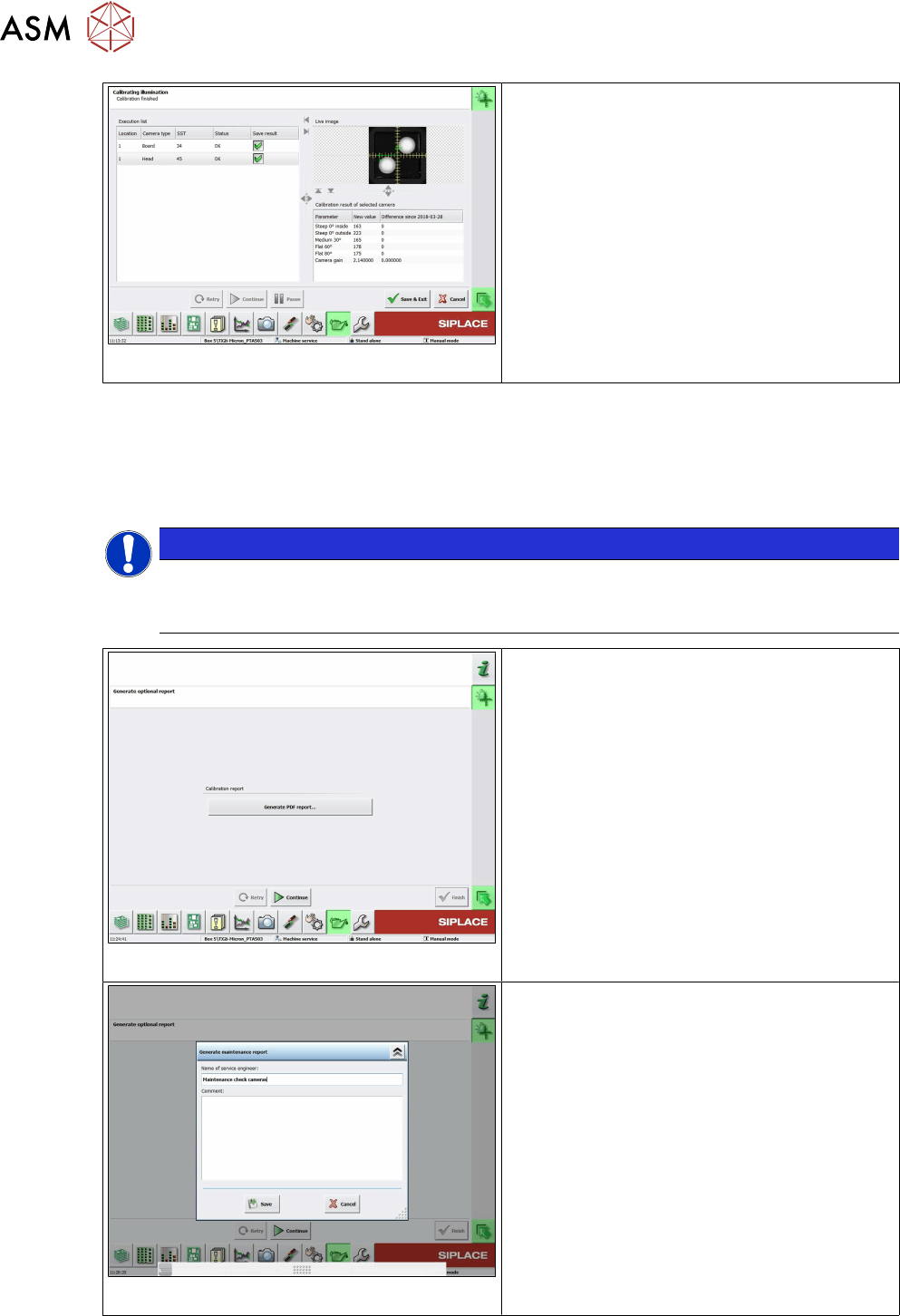
Fig.33: Save and exit
●
The camera soiling will be checked first.
●
• If the degree of camera soiling is more
than 66%, the function will be stopped with
an error message and the FCCS measure-
ments will not be started.
●
When the calibration is completed the
status will be displayed.
●
With the "Save&Exit" button the data will
be written into the cameras and you can
display the result in a file.
Error message 38423, camera soiled, "Camera is soiled and needs cleaning,camera: xx"
• If the degree of soiling is found to be tolerable, the software will automatically continue with FCCS
calibration. A (graphical) display with the degree of camera contamination will not be shown here
but can be seen later as a percentage in the FCCS report.
• The "Save&Exit" button only writes the FCCS calibration data to the cameras.
NOTICE
Cleaning the SIPLACE Vision camera system
The procedure for cleaning the SIPLACE Vision camera system is described in the tech-
nical information TI2014-10D09.pdf in German and in the TI2014-10E09.pdf file in English.
Fig.34: Creating a PDF report
●
Select the Generate PDF report... button
to show all camera calibration results in
tables.
●
For an explanation of the report file see 4.7
"Report File from SW 705.03 on-
wards" [}72].
Fig.35: Creating the report
●
As an option, you can create a report and
also add a comment.
●
• This report also shows the soiling results
for the cameras (see explanation of report
file).
4 Camera Calibration in Stations from SW705.03
4.6 Checking the camera soiling with contrast standard in the calibration tool pocket (without FCCS)
Operating Manual / Bedienungsanleitung Camera Calibration FCCS digital Kamerakalibrierung FCCS digital 04/2020 71
4.6 Checking the camera soiling with contrast standard in
the calibration tool pocket (without FCCS)
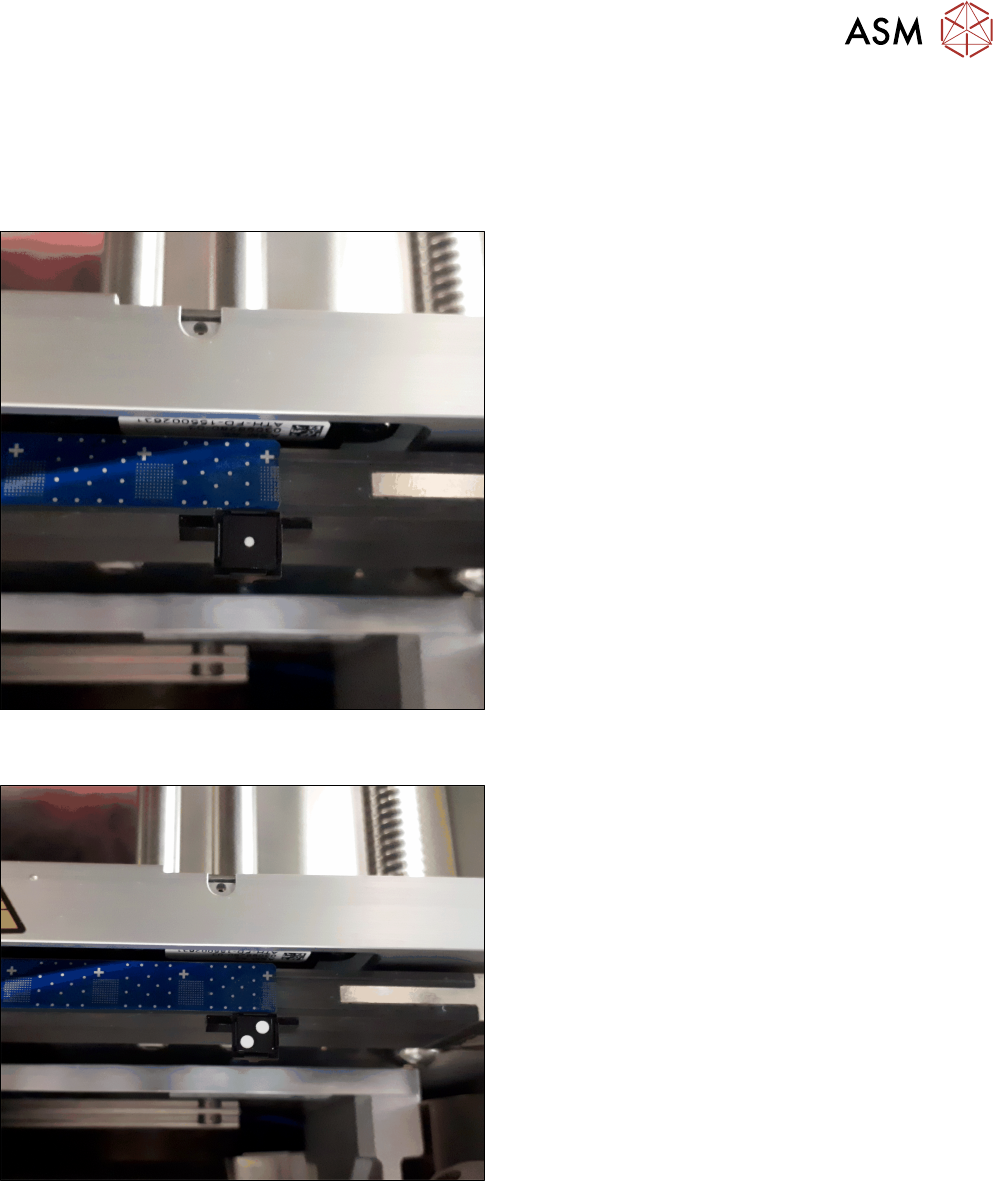
► Place the contrast standard into the calibration pocket. Observe the orientation of the contrast
standard.
Fig.36: Figure 3-1a: Measuring the component camera (head,
stationary)
► To measure a component camera (head cameras
or stationary cameras), place the standard into
the calibration pocket, with the two white dots fa-
cing downwards.
Fig.37: Figure 3-1b: Measuring PCB cameras
► To measure the PCB camera, place the contrast
standard into the calibration pocket, with the two
white dots facing upwards.
This new function is available from station software 712.1 in the →Maintenance → Verification
menu.
4 Camera Calibration in Stations from SW705.03
4.7 Report File from SW 705.03 onwards
72 Operating Manual / Bedienungsanleitung Camera Calibration FCCS digital Kamerakalibrierung FCCS digital 04/2020
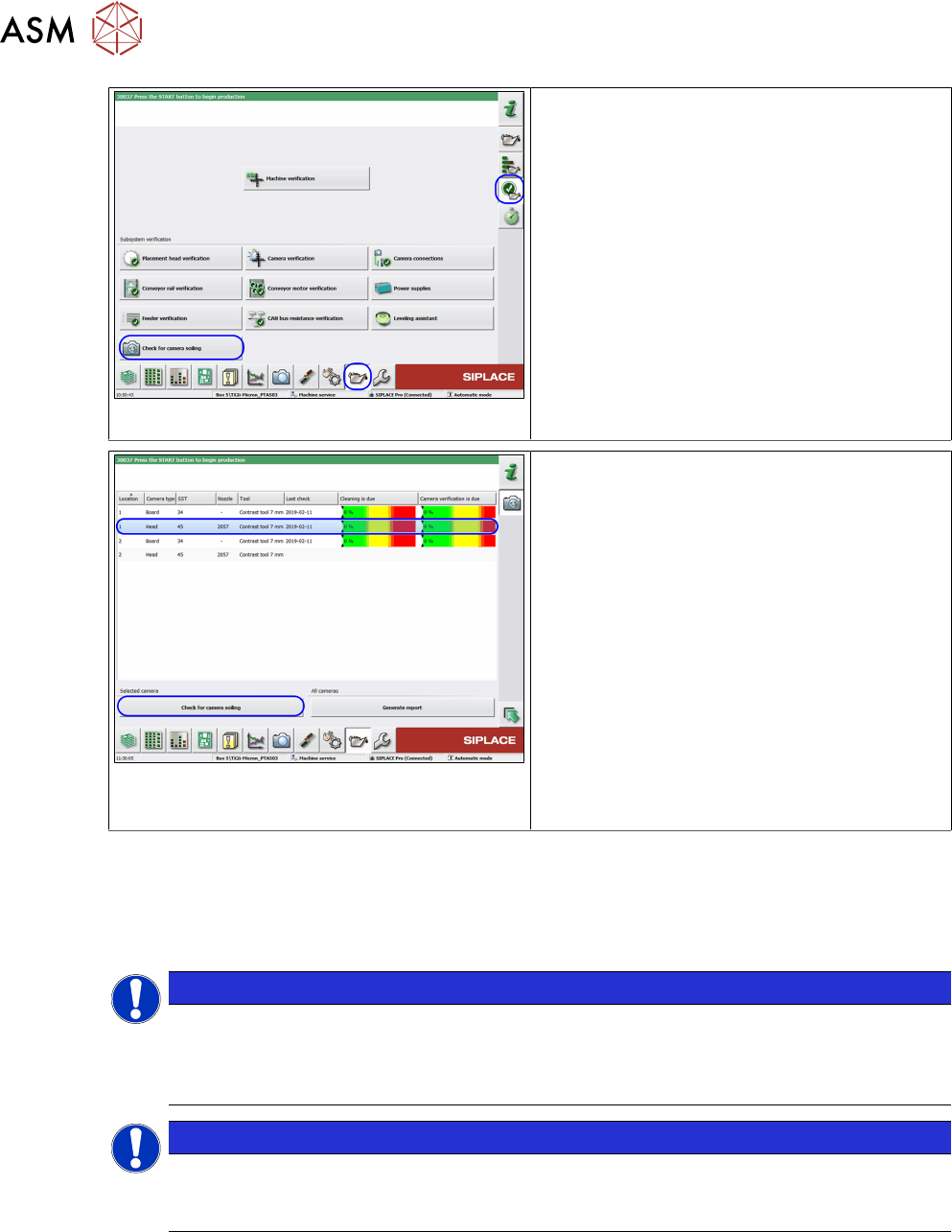
Fig.38: Checking the camera for soiling
ü The user level is Advanced production.
► Go to the Maintenance view.
► Select the Verification section.
► Click on the Check for camera soiling
button.
Fig.39: Checking the camera for soiling
ü The last result (if present) will be shown!
► Go to the Maintenance view.
► Select the camera to be measured.
► Place the contrast standard in the cali-
bration pocket and make sure that the con-
trast standard is correctly positioned.
► Click on the Check for camera soiling
button.
ð The result will be shown and can be
saved in a file on the station computer
with the Generate report function. This
same file is then saved via the LineDia-
gnostic software on the Siplace Pro
computer, in the MaintenanceReports
folder.
●
On the station computer: C:\Sirio\Work\MaintenanceReports
●
On the SIPLACE Pro computer: C:\MaintenanceReports
4.7 Report File from SW 705.03 onwards
NOTICE
From the above mentioned station software version onwards a report file will auto-
matically be generated after the calibration.
Example: Report_FCCS_SX2_00004133_2011-01-31_15-20-40 currently from
SW705-03.pdf
NOTICE
Example for a report file of a SIPLACE SX2 machine
The row numbers of the first table references the results of the relevant camera in the fol-
lowing tables.