00196449-04_UM_FCCS_digital_DE_EN.pdf - 第74页
4 Camera Calibration in Stations from SW705.03 4.7 Report File from SW 705.03 onwards 74 Operating Manual / Bedienungsanleitung Camera Calibration FCCS digital Kamerakalibrierung FCCS digital 04/2020 Fig.42: Calibration…
4 Camera Calibration in Stations from SW705.03
4.7 Report File from SW 705.03 onwards
Operating Manual / Bedienungsanleitung Camera Calibration FCCS digital Kamerakalibrierung FCCS digital 04/2020 73
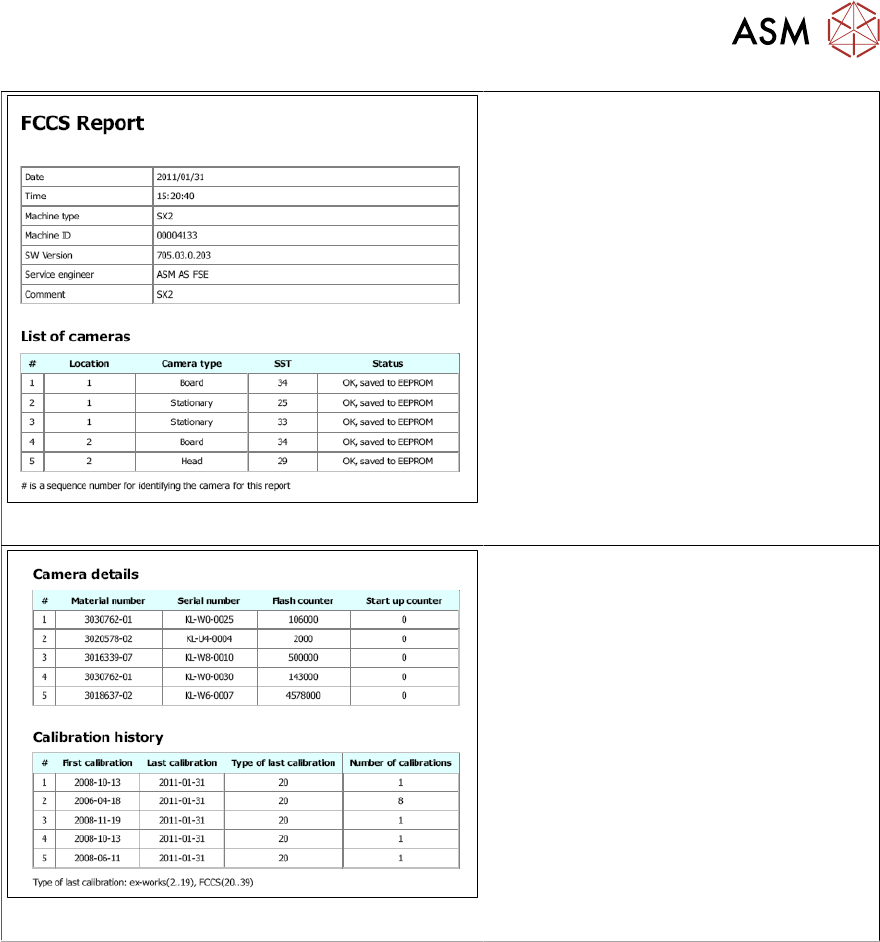
Fig.40: List of cameras
●
The list of cameras gives an overview
of the calibration states and the
proper storage of the calibration val-
ues.
Fig.41: Camera details and calibration history
●
The camera details show the mater-
ial number, the serial number and the
number of flashes, i.e. the number of
components that have been centered
optically.
●
The calibration history shows the
dates of the first and the last cali-
bration as well as the number of cali-
bration processes.
4 Camera Calibration in Stations from SW705.03
4.7 Report File from SW 705.03 onwards
74 Operating Manual / Bedienungsanleitung Camera Calibration FCCS digital Kamerakalibrierung FCCS digital 04/2020
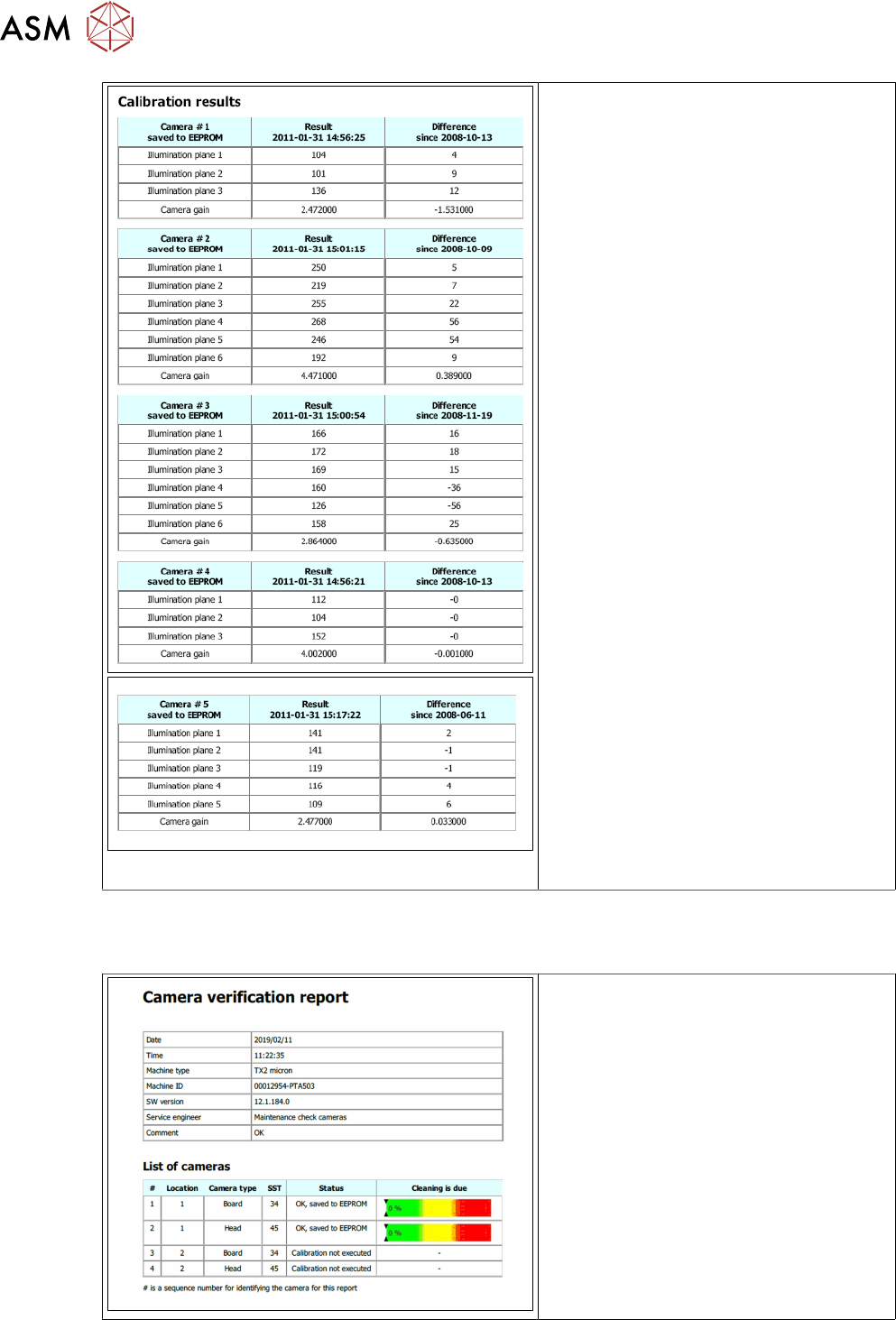
Fig.42: Calibration results
●
Calibration results for each success-
fully calibrated camera.
●
The result column shows for each illu-
mination level the set illumination dur-
ation with respect to the white stand-
ard as reference and the camera
amplification (camera gain).
The evaluation of the results with re-
spect to threshold values depends on
the camera type. See also table in
section 3.5.
●
The difference column shows the de-
viation to the last calibration.
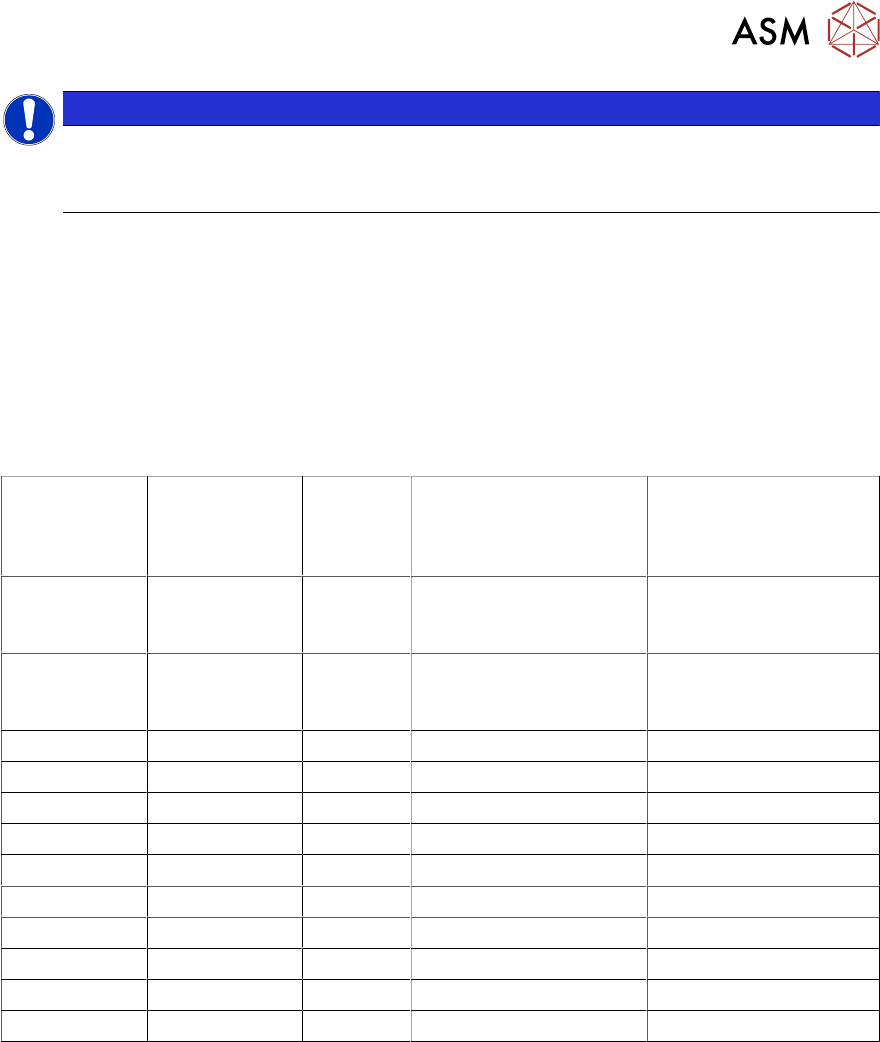
4.7.1 Report file from SW 712.xx
Excerpt from the report file:
●
The results list has been extended by
a column on the right, to show the
camera cleaning status.
●
The degree of soiling is given as a
percentage and the bars show the
soiling in 1/3 steps from green to yel-
low and red.
●
If the display is in the red area, you
urgently need to clean the camera or
replace it.
4 Camera Calibration in Stations from SW705.03
4.8 Result Assessment
Operating Manual / Bedienungsanleitung Camera Calibration FCCS digital Kamerakalibrierung FCCS digital 04/2020 75
NOTICE
Camera soiling in red area
If the marker in the display is in the red section, showing "Cleaning is due",
no camera calibration will be performed!
4.8 Result Assessment
The station software always decides if the illumination calibration of a camera has been success-
fully completed or not. Thus, the camera may be used as long as the calibration completes suc-
cessfully.
All integrated illumination levels should have similar basic brightness values. Illumination levels
with high deviations are an indication of damage to the LEDs or their control systems. The following
applies for the result assessment:
Camera type max. camera
Gain
max.
Factor
Threshold value: soft-
ware (FCCS result for
illumination levels)
Threshold value: ex-
change recommended
(FCCS result for illu-
mination levels)
SST23
(to
06.07.2011)
8 97 776 500
SST23
(from
07.07.2011)
4 97 388 200
SST24 8 98 784 500
SST 25 8 97 776 500
SST28 8 97 776 500
SST 29 7 97 679 400
SST 30 4 97 388 200
SST 33 7 97 679 400
SST 34 8 97 776 500
SST 36 8 97 776 500
SST 38 7 97 679 400
SST 41 7 97 679 400
This is valid for "Threshold value: software":
If this threshold value is exceeded, the FCCS software notifies that the camera calibration has not
been successfully completed.
This is valid for "Threshold value: exchange recommended":
If this value is exceeded, we recommend to send the camera to ASM Assembly System for main-
tenance.