00197190-03_VD_SIPLACE_Pro_10_1_SP1_DE_EN.pdf - 第20页
SIPLAC E Pro V10. 1 SP1 / Softwar e Version Desc ripti on Ausgabe 02/2013 Edit ion 20 5.7 Simpli fied Compone nt Shape E ditor The Com ponent S hape Editor has b een im proved to sim plif y the com ponent shap e handl in…

SIPLACE Pro V10.1 SP1 / Software Version Description Ausgabe 02/2013 Edition
19
5.5 Placement of Tall Components with Very High Force Pick&Place
Head and WPC5 / WPC6
Components up to a height of 30mm can be placed with a force of 70N. The WPC5 can transport
such components as of serial number 1485, the WPC6 as of serial number C1486.
For this purpose, the new Very High Force Pick&Place Head (named VHF P&P head in the
following) has been developed.The VHF P&P head is derived from the existing Twin Head but has
one segment only.
NOTICE
WPC6 – Tall Components as of Level 4 Only!
Due to the refill module, components > 25mm cannot be positioned on the levels 1 – 3
and 27 – 28 on the WPC6. The levels 4 –
28 will be automatically set up by the SIPLACE
Pro Optimizer. The levels 1 – 3 have to be manually blocked by the operator.
The VHF P&P head is supported on the SX1/SX2 V2 placement machine. In addition, a PCB
camera is needed that is installed at another, higher position.
For placement with the mentioned maximum values, the new short 508 nozzle type is available. It
is based on the 518 nozzle type but is shorter. The 508 nozzle type can also be used by the Twin
Head.
In SIPLACE Pro Desk, two new travel profiles are available for the VHF P&P head:
36: Max force 70N
37: Max force 70N Slow
5.6 SIPLACE GlueFeeder Feeder Type
The following improvements are available for the SIPLACE GlueFeeder feeder type:
– The time calculation for the glue procedure has been adjusted and optimized in SIPLACE Pro.
– SIPLACE Vision checks if the glue dot positions are placed within the component shape of the
component. When the user starts an integry check for the component or the optimization for a
recipe in which the component shape of this component is used, an error message will be
displayed if the glue dot positions are placed outside the component shape.
Detailed information about SIPLACE GlueFeeder can be found in the corresponding User Manual,
item no. [00197218-xx], and in the Online Helps for SIPLACE Vision and the station software.
SIPLACE Pro V10.1 SP1 / Software Version Description Ausgabe 02/2013 Edition
20
5.7 Simplified Component Shape Editor
The Component Shape Editor has been improved to simplify the component shape handling. For
this, the views of the Component Shape Editor have been reengineered. The main changes are
described in this section.
5.7.1 Automatic Settings when Selecting Pick-up Process
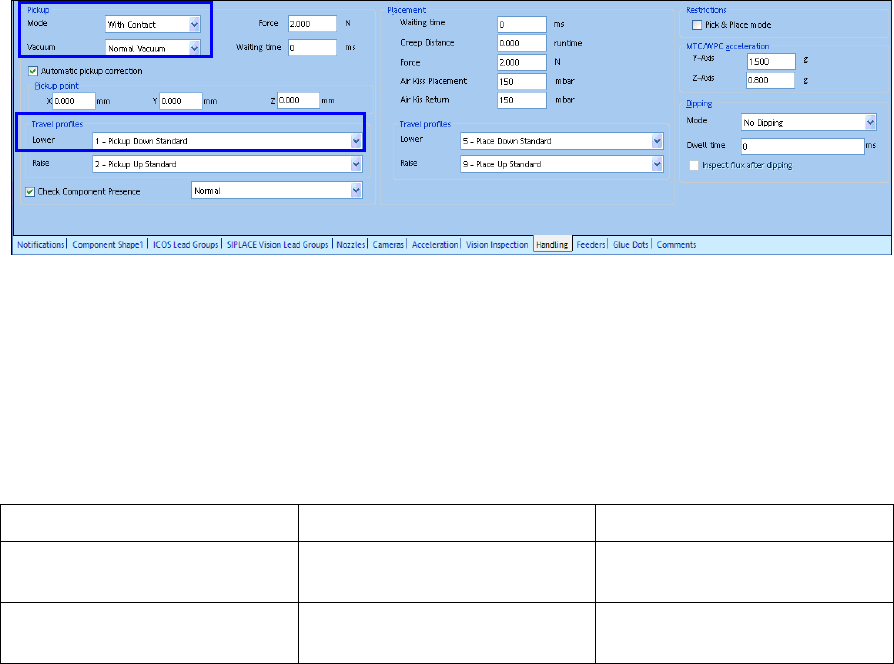
As soon as the user changes the pick-up mode to With Contact or Without Contact in SIPLACE
Pro Desk, a correct travel profile and vacuum are automatically set.
Figure 4-3: Setting pick-up mode
If the pick-up mode is changed to With Contact, SIPLACE Pro Desk automatically sets Normal
Vacuum as vacuum value and 1 – Pickup Down Standard as travel profile.
If the pick-up mode is changed to Without Contact, SIPLACE Pro Desk automatically sets Early
Vacuum as vacuum value and 17 – Down Contactless as travel profile.
The valid combinations of the pick-up modes and the corresponding settings are listed in the
following table.
Pick-up Mode Travel Profile Z-Axis Down Vacuum Mode
With Contact 17
35
Early vacuum
Without Contact 1 Early Vacuum
Normal Vacuum
Table 4-2: Pick-up modes and settings
SIPLACE Pro V10.1 SP1 / Software Version Description Ausgabe 02/2013 Edition
21
5.7.2 Revised Display of the Height Entries Meanings
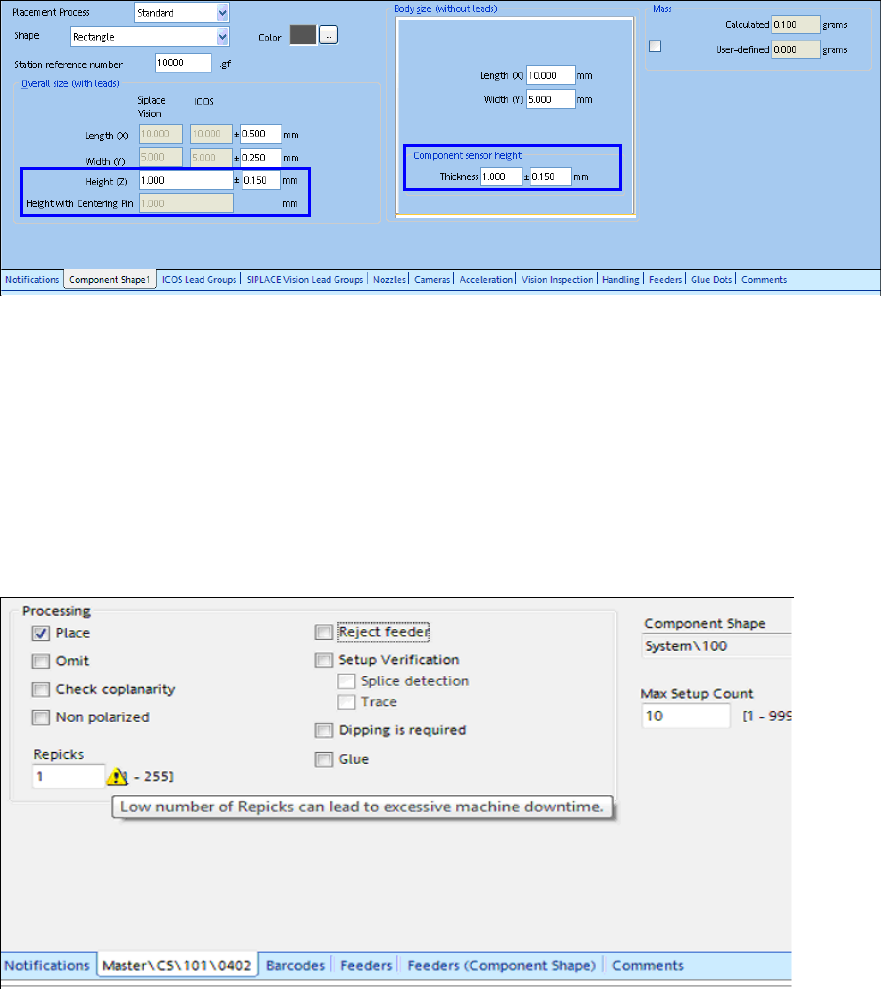
In the main view of the Component Shape Editor, the meanings of the height entries are precisely
displayed in order to make the difference between the height entries more comprehensible.
Figure 4-4: Height entries in the Component Shape Editor
5.7.3 Specified Pick-up Process for nnn5 and nnn6 Nozzles
Only contactless pick-up is performed with the nnn5 and nnn6 nozzle types.
5.7.4 Warning at Too Low Number of Re-picks
If the value for the number of re-picks is too low (value=1), this may cause frequent machine
breakdowns. In this case, a corresponding warning will be displayed in SIPLACE Pro Desk.
Figure 4-5: Number of re-picks too low