00197190-03_VD_SIPLACE_Pro_10_1_SP1_DE_EN.pdf - 第25页
SIPLAC E Pro V10. 1 SP1 / Softwar e Version Desc ripti on Ausgabe 02/2013 Edit ion 25 5.8 Feeder Parameter Management The f eeder param eter m anagem ent has been sim plifie d. The set ting alter natives t o chang e the …
SIPLACE Pro V10.1 SP1 / Software Version Description Ausgabe 02/2013 Edition
24
5.7.7 Lower Limit for Component Shape Dimensions
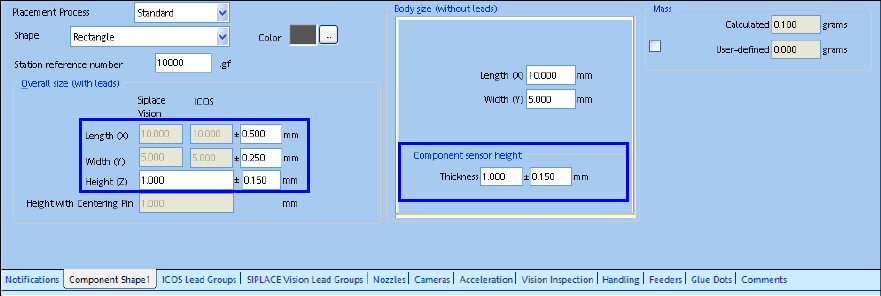
A lower tolerance limit has been introduced for the component shape dimensions. The lower limit is
valid for the length, width and height of the outer dimensions and amounts to 1% of the respective
basic sizes.
If the user tries to enter a lower value, a warning displays the smallest recommended value and the
value will not be changed.
Figure 4-9: Component shape dimensions
The Expert Mode allows entering values outside the recommended limits.
The values can be changed in the Data Maintenance Tool with the Set Feeder offset data of
assigned Feeders – Set Feeder Offset function. The prerequisite described in section 4.8.5
applies.
SIPLACE Pro V10.1 SP1 / Software Version Description Ausgabe 02/2013 Edition
25
5.8 Feeder Parameter Management
The feeder parameter management has been simplified.
The setting alternatives to change the feeder parameters and the position parameters are decided
by a combination of handling options and user authorizations at the station.
The feeder parameters get managed by three handling options which are to be set in the SIPLACE
Pro Line Control GUI.
5.8.1 Handling Options
The following handling options can be set for the feeder parameters on the SIPLACE Pro Line
Control GUI under Configuration – Download:
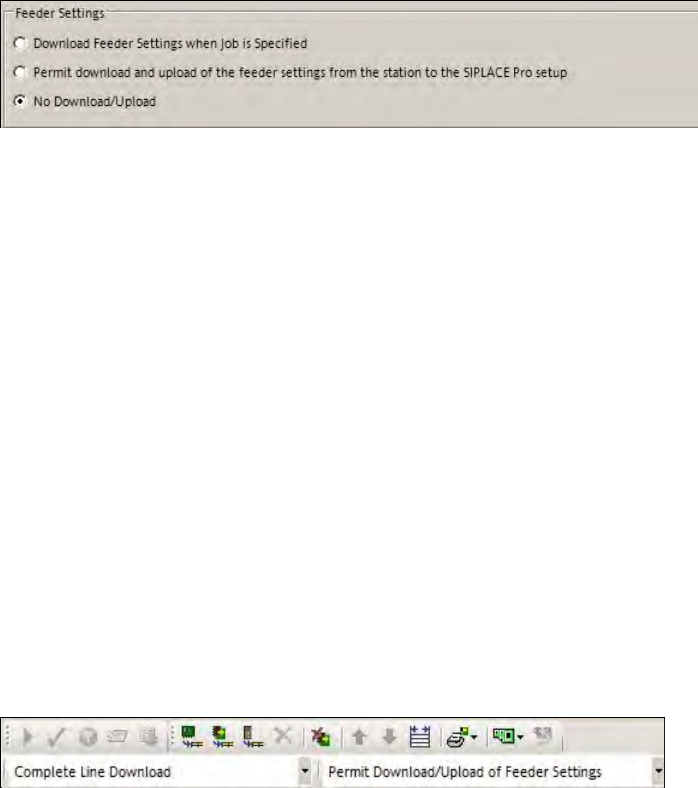
Figure 4-10: Handling options for feeder parameters
Download Feeder Settings when Job is Specified
The feeder parameters that are set in SIPLACE Pro are loaded on the feeders.
Permit download and upload of the feeder settings from the station to the SIPLACE Pro
setup
The feeder parameters set / received by SIPLACE Pro are loaded on the feeders of the active
setup.
It is permitted to change the feeder parameters at the station. Changed data is uploaded to
SIPLACE Pro into the local setup data.
No Download/Upload
It is not permitted to transmit feeder data from SIPLACE Pro to the station or from the station to
SIPLACE Pro.
It is permitted to perform local changes to the feeder data at the station.
The handling options settings can be changed in the Production Schedule, provided that the user
has the corresponding authorization.
Figure 4-11: Changing handling option in the Production Schedule
SIPLACE Pro V10.1 SP1 / Software Version Description Ausgabe 02/2013 Edition
26
Distributing the Access Authorizations via SIPLACE Pro Line Control
The access authorizations for the handling options are managed by using the different activity
levels at the station. Detailed information can be found in the Version Description for the 706.1
station software, item no. [00197043-02].
Changed access authorizations have to be manually uploaded to SIPLACE Pro. SIPLACE Pro Line
Control distributes them to all placement machines in the whole line that are switched-on at that
time. If a placement machine is switched-off or not available in the network, SIPLACE Pro Line
Control displays an error message for this station. The configuration file will not be saved by
SIPLACE Pro Line Control and the distribution will not be rerun.
5.8.2 Random Setup Settings
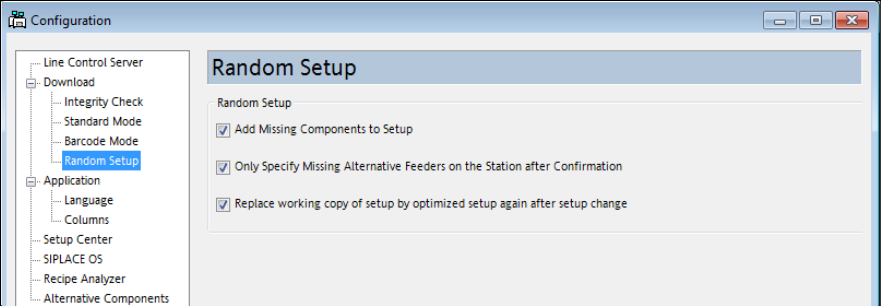
As of this SIPLACE Pro version, the settings for Random Setup are placed on a separate page in
the SIPLACE Pro Line Control GUI instead of on the page with the Download settings.
Figure 4-12: Random Setup settings