00197190-03_VD_SIPLACE_Pro_10_1_SP1_DE_EN.pdf - 第51页
SIPLAC E Pro V10. 1 SP1 / Softwar e Version Desc ripti on Ausgabe 02/2013 Edit ion 51 5.17 Whispering of Fi ducial s – Enhancements As of this SIPLAC E Pro vers ion, the Whisper down the Machine and External I nkspots an…
SIPLACE Pro V10.1 SP1 / Software Version Description Ausgabe 02/2013 Edition
50
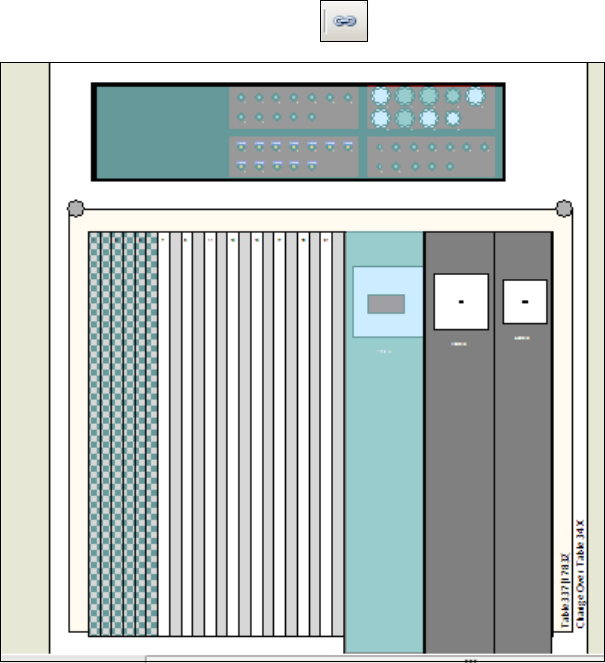
Fixed objects can be made visible in the setup graph under Settings – Drawing Options
(semitransparent, blue shading).
The display will be enabled with the icon in the tool bar.
Figure 4-38: Fixed objects in setup
The figure displays a fixed nozzle changer and a fixed feeder (third feeder from the right).
SIPLACE Pro V10.1 SP1 / Software Version Description Ausgabe 02/2013 Edition
51
5.17 Whispering of Fiducials – Enhancements
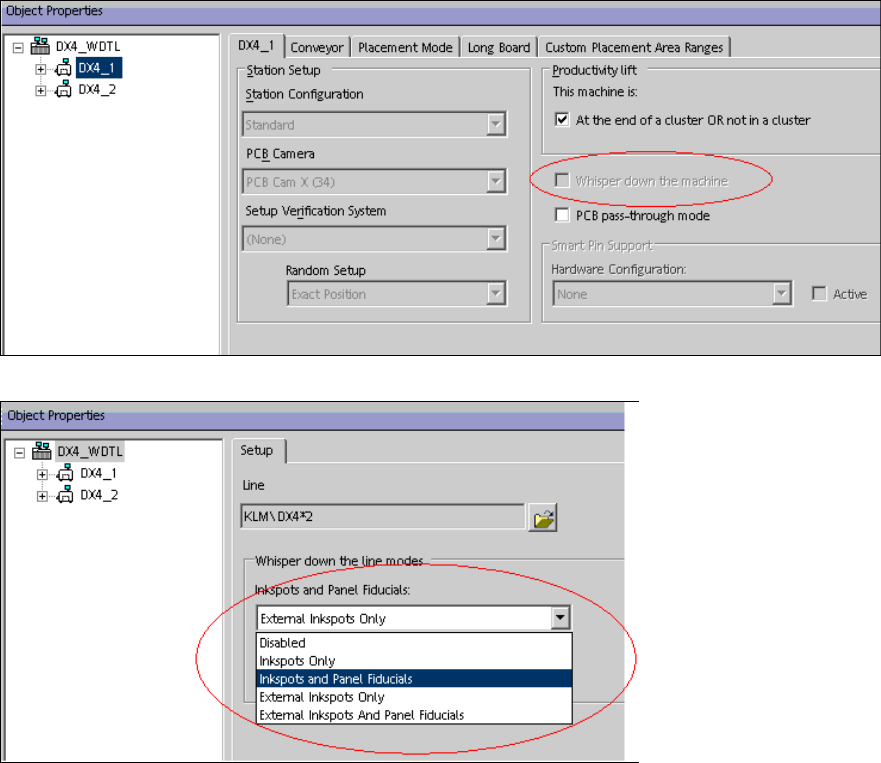
As of this SIPLACE Pro version, the Whisper down the Machine and External Inkspots and
Panel Fiducials options are additionally supported for station software versions as of 706.xx.
The options have to be enabled in the Setup Editor in order for the Optimizer to perform a correct
simulation of the fiducial and inkspot measurements.
Figure 4-39: Enabling Whispering down the machine
Figure 4-40: Enabling Whispering of external inkspots and panel fiducials
SIPLACE Pro V10.1 SP1 / Software Version Description Ausgabe 02/2013 Edition
52
5.18 3 Panel Fiducials in the Board Editor
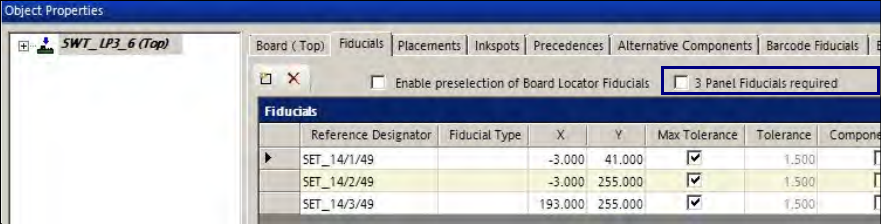
As of this SIPLACE Pro version, the 3 Panel Fiducials required object property can be set for a
board in the Fiducials tab in the Board Editor.
Figure 4-41: Board Editor – Fiducials object property
If this property is enabled, the Optimizer checks if at least three fiducials are available. If less than
three fiducials are available, the Optimizer displays an error message.
The property will be saved on the board and is valid for both board sides.
Detailed information can be found in the Online Help for SIPLACE Pro.