00197190-03_VD_SIPLACE_Pro_10_1_SP1_DE_EN.pdf - 第52页
SIPLAC E Pro V10. 1 SP1 / Softwar e Version Desc ripti on Ausgabe 02/2013 Edit ion 52 5.18 3 Panel Fiducial s in the Board Edi tor As of this SIPLAC E Pro vers ion, the 3 Panel Fid ucials requir ed object propert y c an …
SIPLACE Pro V10.1 SP1 / Software Version Description Ausgabe 02/2013 Edition
51
5.17 Whispering of Fiducials – Enhancements
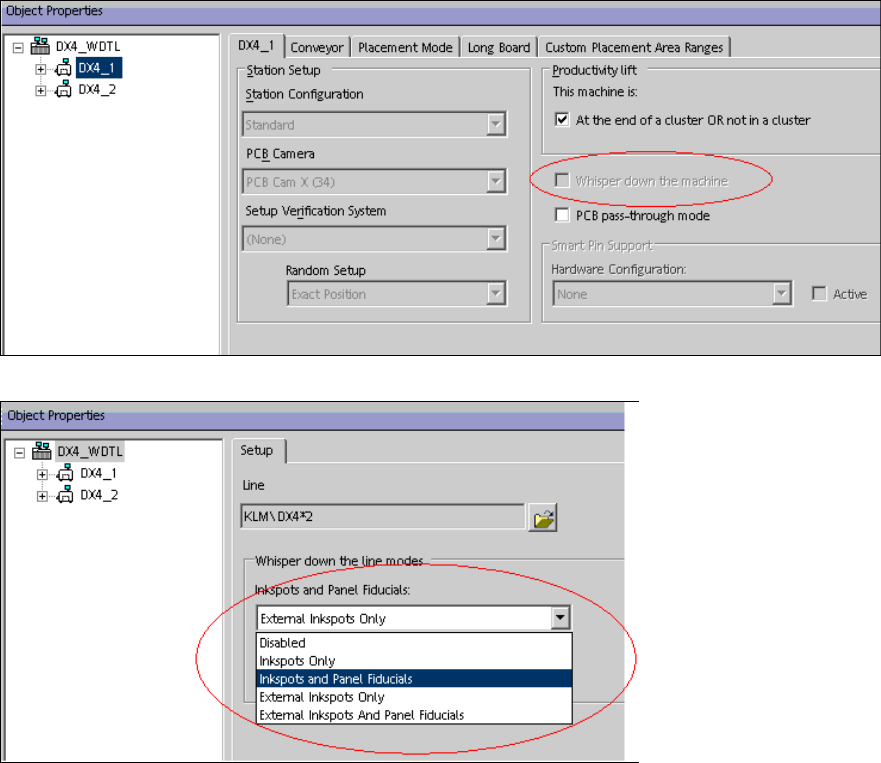
As of this SIPLACE Pro version, the Whisper down the Machine and External Inkspots and
Panel Fiducials options are additionally supported for station software versions as of 706.xx.
The options have to be enabled in the Setup Editor in order for the Optimizer to perform a correct
simulation of the fiducial and inkspot measurements.
Figure 4-39: Enabling Whispering down the machine
Figure 4-40: Enabling Whispering of external inkspots and panel fiducials
SIPLACE Pro V10.1 SP1 / Software Version Description Ausgabe 02/2013 Edition
52
5.18 3 Panel Fiducials in the Board Editor
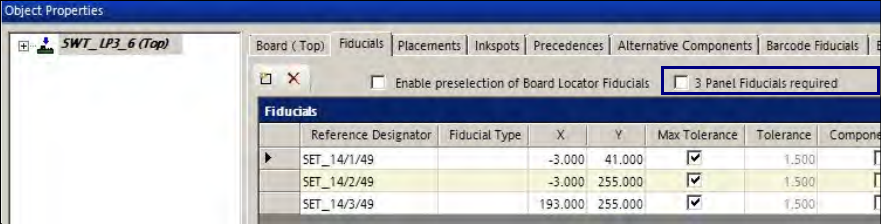
As of this SIPLACE Pro version, the 3 Panel Fiducials required object property can be set for a
board in the Fiducials tab in the Board Editor.
Figure 4-41: Board Editor – Fiducials object property
If this property is enabled, the Optimizer checks if at least three fiducials are available. If less than
three fiducials are available, the Optimizer displays an error message.
The property will be saved on the board and is valid for both board sides.
Detailed information can be found in the Online Help for SIPLACE Pro.
SIPLACE Pro V10.1 SP1 / Software Version Description Ausgabe 02/2013 Edition
53
6 Restrictions
In the following, existing restrictions in SIPLACE Pro are described.
Miscellaneous
– A complete import of customer data from the line computer can sometimes be very time-
consuming, depending on the volume of data involved and the computing system used for the
process (may take up to several hours).
– 10-fold and 15-fold stick magazines can not be combined on the same line feeder.
– When importing setup files (.rt files) from the line computer, you can not import more than one
tray per level. If you import more than one tray per level, you need to create them manually in
SIPLACE Pro.
– SIPLACE Pro object names (e.g., recipe) must not exceed 125 ASCII characters (including
folder names). If the station software is 504 or older, these names are shortened to 20 ASCII
characters.
– If various users optimize the same job at the same time, the job which was most recently
completed successfully will overwrite all corresponding recipes
– The operator must manually place manual tray carriers (carrier 30, carrier 51, carrier X and
carrier SX) in the initial setup.
– If you work with reduced acceleration for a component shape, this is seen as a "special case"
and the accuracy of 5% for the simulated Optimizer production time will not be achieved.
– The Optimizer does not check if the tray size is bigger than the carrier.
– The WPC can take up to 10 different component types per level. This restriction does not apply
for machines from station software version 70x.
Station-wise Download
– When the line control server is rebooted, station-wise downloading will be canceled. After
rebooting, you will need to perform a complete line download to restart production.
– Station-wise downloading supports setup changes in asynchronous dual operation only when
you have the same definition for both lanes.
– Station-wise downloading supports synchronous dual operation as of station software version
704.