00197190-03_VD_SIPLACE_Pro_10_1_SP1_DE_EN.pdf - 第28页
SIPLAC E Pro V10. 1 SP1 / Softwar e Version Desc ripti on Ausgabe 02/2013 Edit ion 28 Figure 4- 14 : Recalcul ated pick - up positions The f unction can also be used in th e Data M ainte nance Tool (und er Set Feeder off…
SIPLACE Pro V10.1 SP1 / Software Version Description Ausgabe 02/2013 Edition
27
5.8.3 Automatic Calculation of the Pick-up Position for Asymmetrical Components
The calculated pick-up position for asymmetrical components always has to be manually corrected
in SIPLACE Pro. Until now, the calculated pick-up position was based on the component
description of symmetrical components without leads, what resulted in incorrect pick-up positions
for asymmetrical components.
As of this SIPLACE Pro version, the calculated pick-up position for asymmetrical components will
be based on the outer dimensions of the component shape.
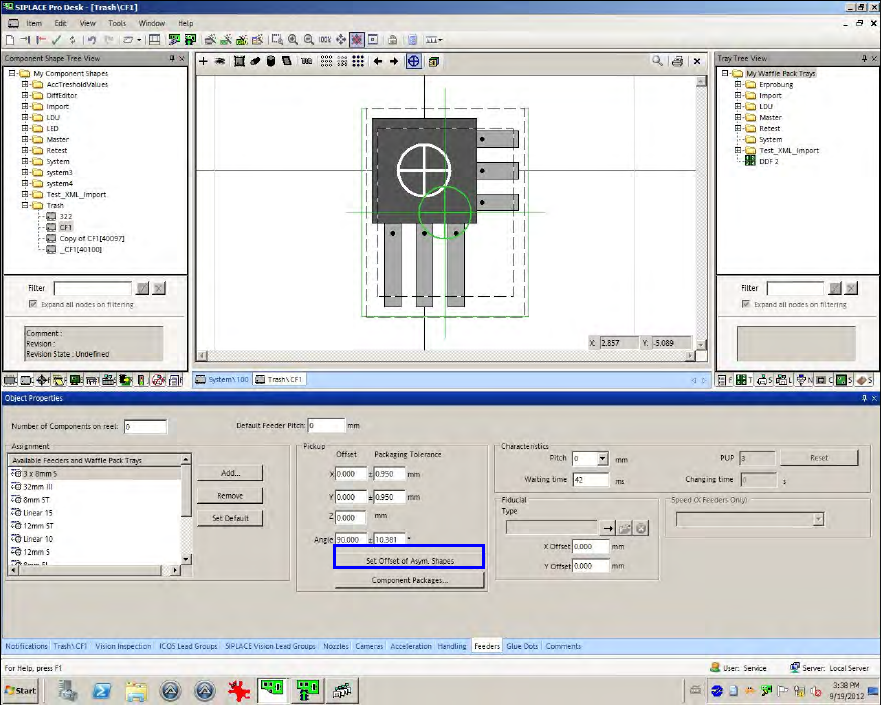
If the user selects an asymmetrical component in the Feeder tab of the Component Shape Editor,
green cross hairs will be additionally displayed at another position as the white cross hairs. The
white cross hairs display the center of the component shape without the leads/balls. The green
cross hairs display the center of the complete component shape including the leads/balls.
Figure 4-13: Automatic calculation of the pick-up positions
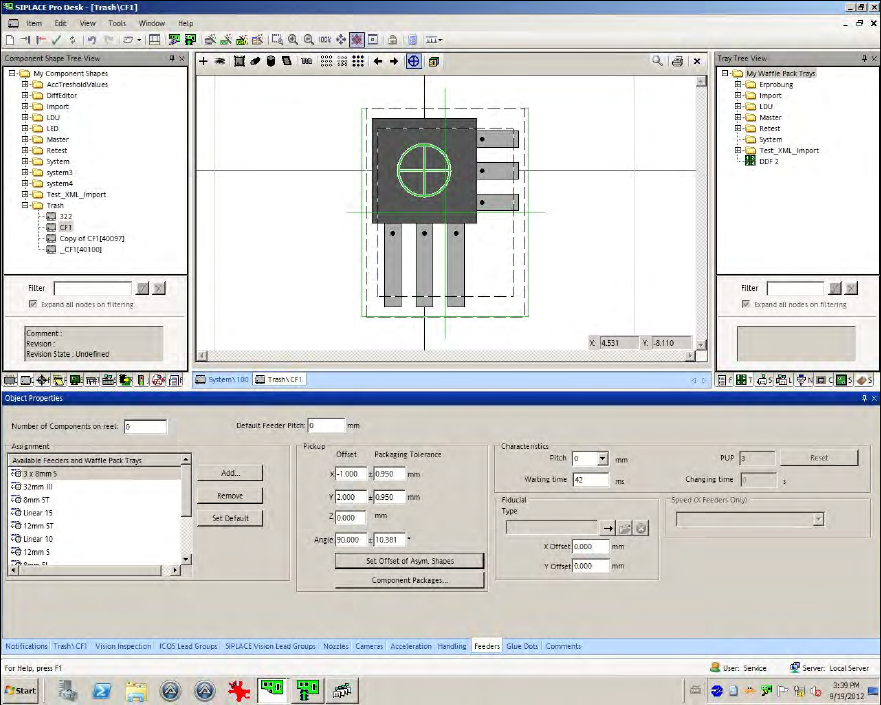
The X-/Y-positions now have to be changed so that the green cross hairs lie on the white ones.
This can be performed with the Set Offset of Asym.Shapes button.
Whenever the component shape dimensions, lead dimensions or the pick-up angle are changed,
the pick-up correction has to be performed with this button.
SIPLACE Pro V10.1 SP1 / Software Version Description Ausgabe 02/2013 Edition
28
Figure 4-14: Recalculated pick-up positions
The function can also be used in the Data Maintenance Tool (under Set Feeder offset data of
assigned Feeders).
5.8.4 Saving the X-/Y-positions
After the X-/Y-pick-up positions or the pick-up angle have been changed and the function for
uploading the feeder data is enabled at the station, the changes can be locally saved at the station
and additionally uploaded to SIPLACE Pro into the defined setup.
SIPLACE Pro V10.1 SP1 / Software Version Description Ausgabe 02/2013 Edition
29
5.8.5 Specifying User-defined Pick-up Position (PuP)
User-defined pick-up positions (Pick up Position) for components / component shapes from an
uploaded setup will be transferred to the feeder assignment in the Data Maintenance Tool
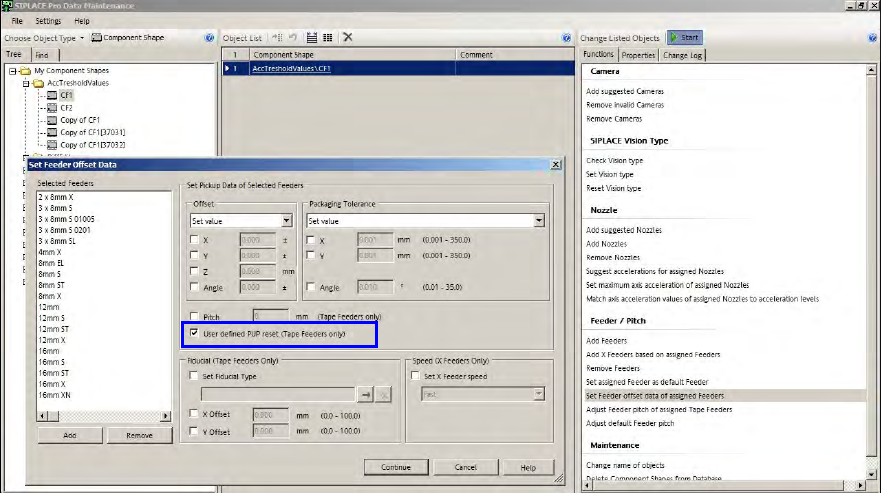
Figure 4-15: Specifying PuP
Either the calculated pick-up position or, if available, the user-defined pick-up position will be
displayed. If the user-defined pick-up position deviates from the calculated position, a warning is
displayed that the user-defined setting will be used for the pick-up position when the component is
set up.
The user-defined pick-up position can be reset to the calculated pick-up position with the User
defined PUP reset (Tape Feeders only) option.
The adjusted pick-up position will be transferred to the setup by SIPLACE Pro Desk and the
Optimizer.