00197190-03_VD_SIPLACE_Pro_10_1_SP1_DE_EN.pdf - 第31页
SIPLAC E Pro V10. 1 SP1 / Softwar e Version Desc ripti on Ausgabe 02/2013 Edit ion 31 5.10 Random Setup - Enhanceme nts The f ollowing enh ancem ents hav e been perform ed for Random Setup in this SIPL ACE Pr o version. …
SIPLACE Pro V10.1 SP1 / Software Version Description Ausgabe 02/2013 Edition
30
5.9 Locking Desk / Line Control GUI Automatically
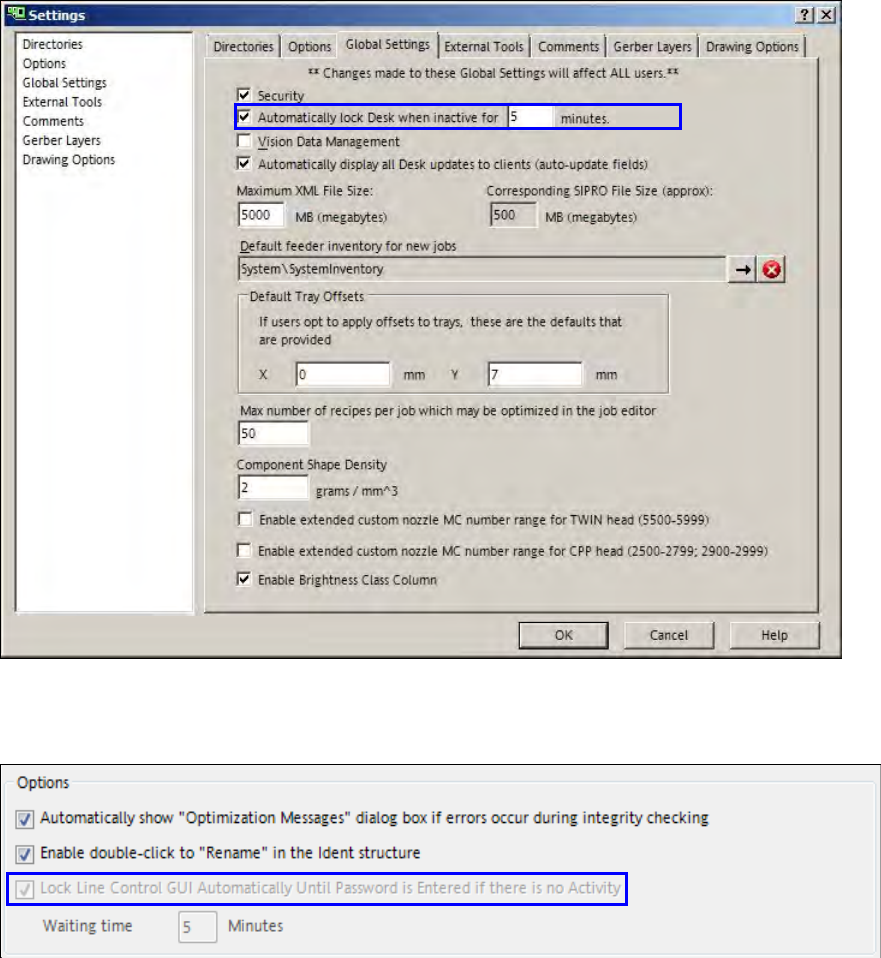
If SIPLACE Pro Desk and the SIPLACE Pro Line Control GUI are started and no entries are made
during a preset time period they will be automatically locked. Prerequisite: the security has to be
enabled in SIPLACE Pro. The preset time period = 5 minutes.
The lock can only be removed in the login dialog by the user account that was active at the locking
time or by a user account with administrator privileges.
The automatic lock and the time period for the Desk can be changed in SIPLACE Pro Desk under
Tools – Settings – Global Settings.
Figure 4-16: Settings for locking SIPLACE Pro Desk
The automatic lock and the time period for the GUI can be changed in SIPLACE Pro Line Control
GUI under Application – Options.
Figure 4-17: Settings for locking SIPLACE Line Control GUI
SIPLACE Pro V10.1 SP1 / Software Version Description Ausgabe 02/2013 Edition
31
5.10 Random Setup - Enhancements
The following enhancements have been performed for Random Setup in this SIPLACE Pro
version.
5.10.1 Dialog for Missing Components
– Components that are set-up at wrong locations in the line will be automatically positioned at the
correct locations in the working copy of the setup if the download is repeated with the Resume
Download button. So, such components are treated like missing components. Components at
wrong locations have to be changed over in the line after the download.
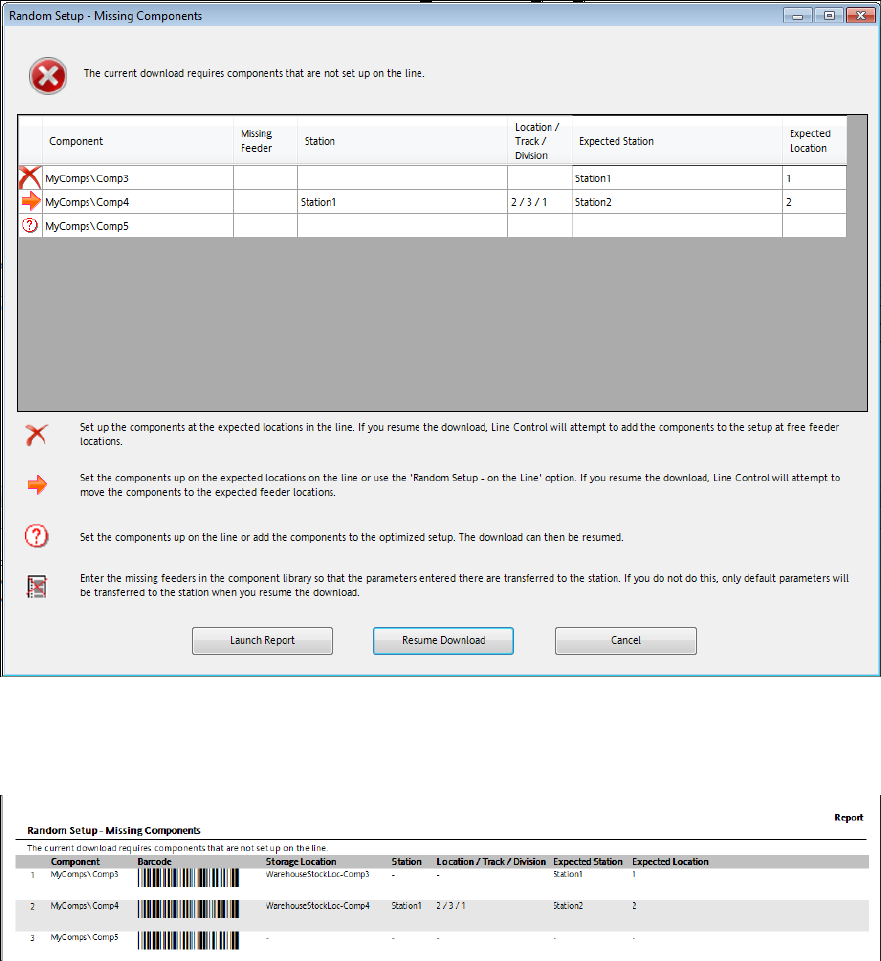
– It is now possible to create a report, i.e. to fetch still missing components from the stock.
Example
Following preconditions are assumed in this example:
– An optimized recipe is available for a line with three stations.
– A production schedule that contains the recipe is opened in the Line Control GUI.
– Random Setup – Within a Table is enabled in the production schedule.
– The Comp3 component exists in the optimized recipe but is not yet set-up in the line.
– The Comp4 component exists in the optimized recipe but is set-up at the wrong location.
– The Comp5 component does not exist in the optimized recipe and is not yet set-up in the line.
SIPLACE Pro V10.1 SP1 / Software Version Description Ausgabe 02/2013 Edition
32
Figure 4-18: Missing components – creating a report
► Click on the Launch Report button.
The following report is displayed for the missing components:
Figure 4-19: Missing components - report
Additionally, the barcode and the storage location are displayed in the report. If no values are
assigned to Storage Location, Station and Location/Track/Division, these three columns will not
be displayed.
► Click on the Resume Download button.
The dialog is displayed again and now only contains the Comp5 component that has to be manually
set-up before the download is repeated one more time.
5.10.2 Support of Station-Wise Download
As of this SIPLACE Pro version, the station-wise download is supported combined with Random
Setup. Detailed information can be found in the SIPLACE Random Setup User Manual.