00194675-04_SiplaceProInstall_eng.pdf - 第11页
Installation manual SIPLACE Pro 2 System components and configurations Edition 01/2007 US 11 2 System component s and configurations 2.1 Overview of s ystem component s A complete installa tion of SIPLACE Pro consists of…

1 Introduction Installation manual SIPLACE Pro
Edition 01/2007 US
10
– Windows 2000 Professional with SP4 and MSDE* 2000 with SP4, or
– Windows XP Professional with SP1 or SP2 and MSDE 2000 with SP4 and
– Microsoft .NET Framework 1.1 *
– Microsoft .NET Framework 1.1 SP1*
* delivered with the SIPLACE Pro installation CD-ROM 1
Note:
Windows 2003 Server SP1 is supported, but not required for the SIPLACE Pro installation 1
Installation manual SIPLACE Pro 2 System components and configurations
Edition 01/2007 US
11
2 System components and configurations
2.1 Overview of system components
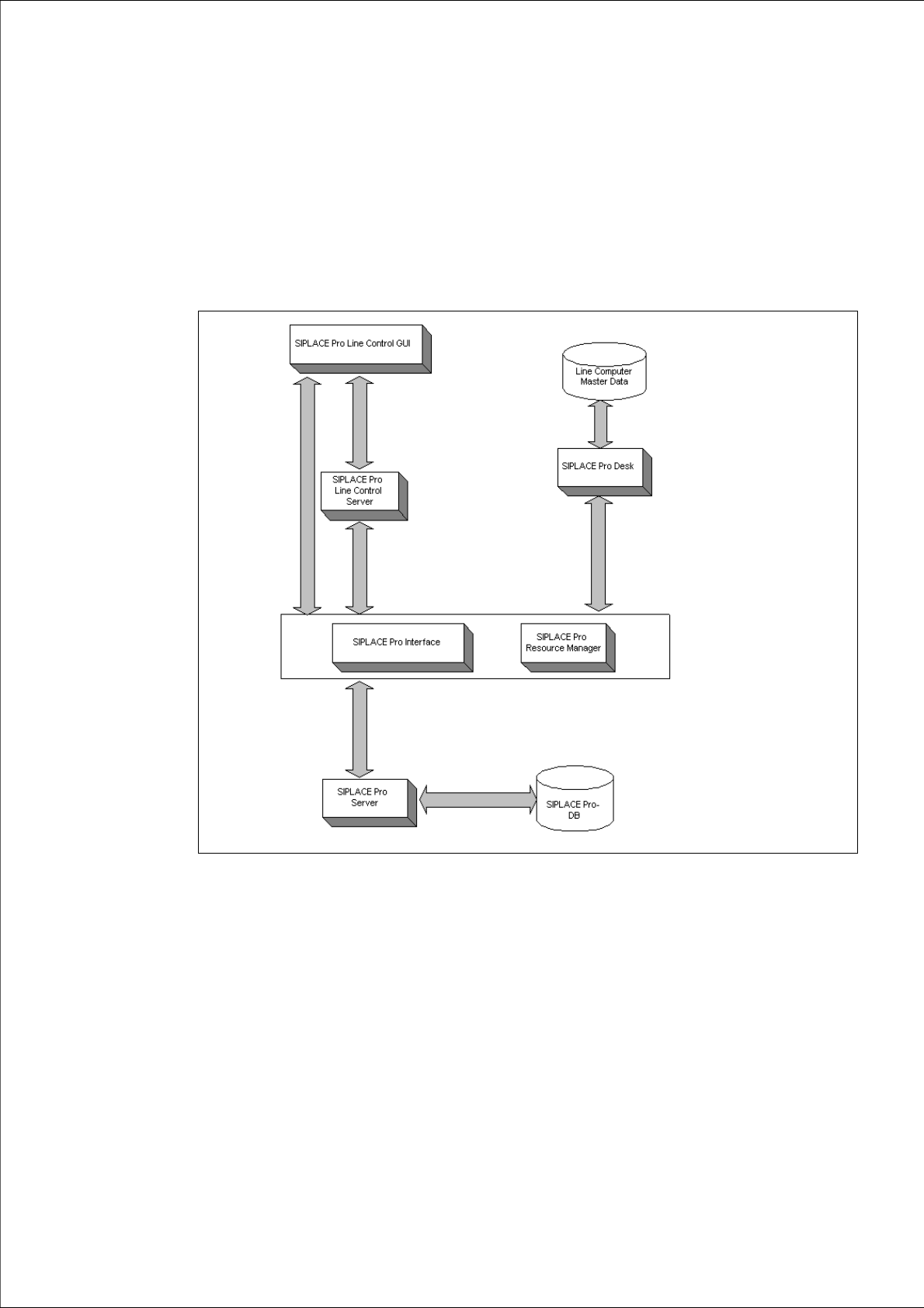
A complete installation of SIPLACE Pro consists of the following components. 2
Fig. 2 - 1 Overview of SIPLACE Pro system components
Æ Please read the documents "Configurations for SIPLACE Pro" and "Navigation Guide for
Installation". You will find the documents on the Installation CD for SIPLACE Pro (Folder
"Documentation").
2 System components and configurations Installation manual SIPLACE Pro
Edition 01/2007 US
12
2.2 System configurations
There are various configurations for the SIPLACE Pro installation depending on your production
environment. 2
2.2.1 "Stand alone" configuration
Install all software components on one computer. This computer then functions as both server and
client. If installing on one computer, we recommend using a computer with at least 512 MB disk
space; a high-performance computer is advantageous. 2
2.2.2 "Client/Server" configurations
If installing on separate computers, you work with one computer as the dedicated server and one
or more other computers as clients. 2
Example of a client/server configuration:
MS SQL Server, SIPLACE Pro Database, Line Control Server and SIPLACE Pro Server are in-
stalled on the server computer. One or more clients can work with this server computer. SIPLACE
Pro Desk, SIPLACE Pro Interface and Line Control GUI are installed on the client computers. 2
Note
This configuration is not mandatory. For example, you can also install Line Control Server on a
client computer or a separate computer.
It is also possible to change the configuration subsequently. 2
Warning:
Installation on separate computers cannot be performed via the network. Install the individual
components on separate computers by calling up the setup function for the components locally on
each destination computer. 2