00194675-04_SiplaceProInstall_eng.pdf - 第64页
9 Connecting SIPLACE Pro to the Unix Li ne Computer Installation manual SIPLACE Pro Edition 01/2007 US 64 9.2.2 Line Computer with the SCO ODT 5.0.x operating system For oper ation system UNIX SCO 5. 0x, two »Sam ba« ver…

Installation manual SIPLACE Pro 9 Connecting SIPLACE Pro to the Unix Line Computer
Edition 01/2007 US
63
9 Connecting SIPLACE Pro to the Unix Line
Computer
9.1 General information
The line computer and SIPLACE Pro must be configured in a common network to enable line com-
puter data to be exchanged with SIPLACE Pro. SIPLACE Pro runs under the Windows operating
system, whereas the line computers run on a UNIX platform. Certain preparations must be made
to enable both computers to communicate with one another. 9
Siemens recommends installing Samba on the UNIX line computer to enable SIPLACE Pro to ac-
cess the UNIX line computer. 9
Once Samba has been installed on the UNIX line computer, it is possible to establish a network
connection between the UNIX environment (NFS) and Windows (NTFS), and data can be ex-
changed. 9
9.2 Installing Samba on the UNIX Line Computer
A UNIX diskette or a CD ROM containing the archived Samba software is required for installing
Samba. 9
For the purposes of this description, it is assumed that the operating system and the line computer
software have been installed on the computer and they are functioning correctly. The following
steps can then be performed: 9
Æ With the line computer software running, use the mouse to select the Options menu command
from the main menu.
Æ Select Install Options.
A window appears in which the user is prompted to insert the diskette. 9
Æ Insert the disk and confirm by clicking on Enter.
This starts the installation of »Samba«. 9
9.2.1 Line Computer with the SCO ODT 3.0 operating system
Æ Insert the appropriate diskette for the operating system.
The installation routine is automatic; the user does not have to intervene.
Æ After installation, reboot your computer to use »Samba«.
9 Connecting SIPLACE Pro to the Unix Line Computer Installation manual SIPLACE Pro
Edition 01/2007 US
64
9.2.2 Line Computer with the SCO ODT 5.0.x operating system
For operation system UNIX SCO 5.0x, two »Samba« versions are available:
– »Samba 2.0.5a« on disk, to be used for Windows 95, 98, NT (the same as the former versions)
– »Samba 2.2.8a« on CD-ROM, to be used for Windows 95, 98, NT, 2000 or XP
The user has to make some entries during the installation process. The line computer does not
have to be restarted after the installation has finished.
Note
For installing »Samba« you’ll need root privileges. 9
Step 1
Æ Insert the appropriate diskette for the operating system.
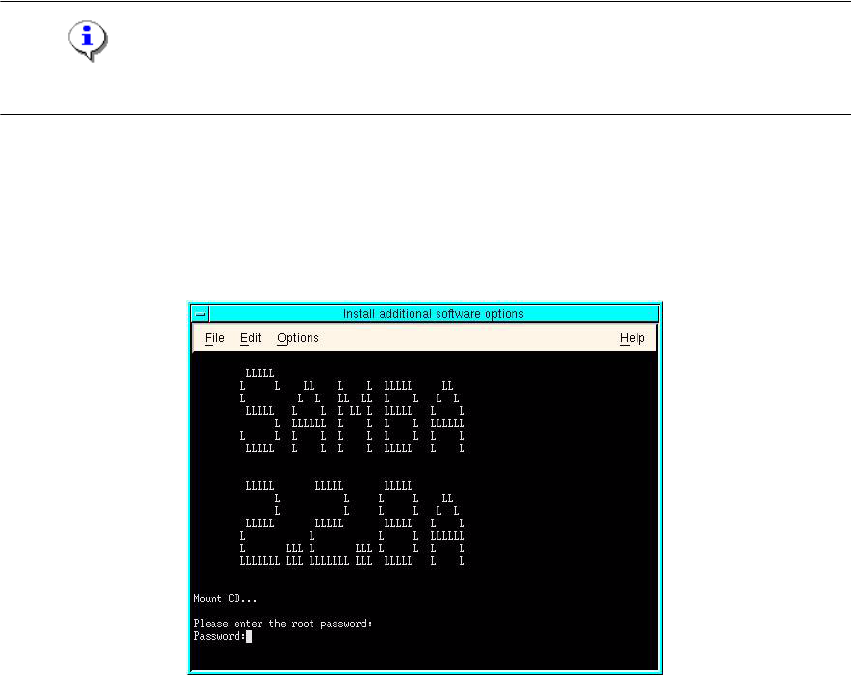
The following information appears on the screen when SAMBA installation is attempted for the first
time: 9
Fig. 9 - 1 Installing Samba - Enter root password dialog box
Æ Enter the root password.
Installation manual SIPLACE Pro 9 Connecting SIPLACE Pro to the Unix Line Computer
Edition 01/2007 US
65
Step 2
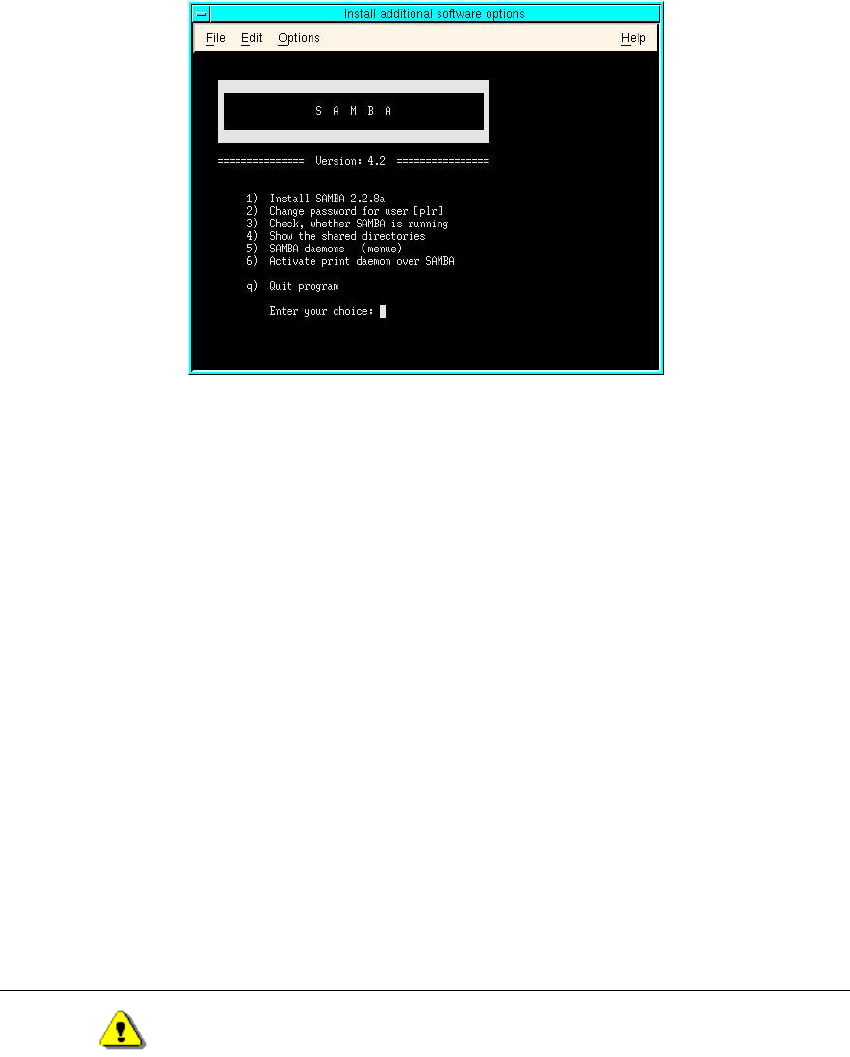
Æ install SAMBA 2.2.8A
Use menu entry (1) to install the software on your line computer.
9
Fig. 9 - 2 Installing Samba - choice dialog box
- If there is already an older version of »Samba« installed, the old version will be saved and the
actual version will be installed 9
- If the installation would overwrite the same or a newer version, you will be asked for confirma-
tion. You have to enter »y« to proceed with the installation 9
- After the update from an older »Samba« installation, you will be asked whether you prefer to
work with former »Samba« configuration file or want to install the standard TSC configuration file.9
Do you prefer to use the config file of the former 9
SAMBA installation (y/n) [y] ? 9
Enter »y« to preserve your former settings (e.g. information about shared directory, defined by
yourself). 9
Step 3
After the installation of the software, you will be asked for the »Samba« password for user »plr«.9
Please enter the new SAMBA password for user 'plr' 9
New SMB password: 9
Warning
Beware that everybody connected to the customer network can potentially access the shares on
the line computer if he/she knows the »Samba« password. The »Samba« password is for remote
access for user »plr« on the SAMBA SERVER, which runs on the line computer. It may differ from