00194675-04_SiplaceProInstall_eng.pdf - 第51页
Installation manual SIPLACE Pro 7 Troubleshooting Edition 01/2007 US 51 7 T roubleshooting 7.1 During inst allation If it is not possible to s olve a problem during insta llation of SIPLACE Pro, please send the file SIPL…
6 Update Installation manual SIPLACE Pro
Edition 01/2007 US
50

Installation manual SIPLACE Pro 7 Troubleshooting
Edition 01/2007 US
51
7 Troubleshooting
7.1 During installation
If it is not possible to solve a problem during installation of SIPLACE Pro, please send the file
SIPLACEProSetupLog.html and all similarly named files to SIEMENS Service (see 7.1.1). 7
7.1.1 Relevant files to analyze setup problems
Error description: 7
Whenever problems arise during setup, please inspect the file SIPLACEProSetupLog.html, which
is written anew by each installation. 7
Cause: 7
Setup problems. 7
Solution: 7
The log file is found either in %temp% or in the selected program folder, e.g. C:\Program Files\Si-
emens\SIPLACE\SIPLACE Pro. 7
Old versions of the log file can be found in the program folder, too. They have a timestamp added
to the filename. 7
Hint
If you need Siemens support regarding installation problems, please provide all installation log
files. If you already have a SIPLACE Pro 3.2 installation on your computer, the SIPLACE Pro Error
Reporting Tool is available and can be used from the start menu (Start/Programs/
Siplace Pro/Error Reporting Tool). 7
7.1.2 Error code 1316 and 1603
7
Fig. 7 - 1 "Error " dialog box
7 Troubleshooting Installation manual SIPLACE Pro
Edition 01/2007 US
52
Error description:
The error messages 1316 and 1603 from the Microsoft Installer Service could occur under differ-
ent conditions. 7
Cause:
See InstallShield knowledgebase articles Q107390 and Q107182. 7
Workaround:
Æ Copy the files "SIPLACE Pro.msi" and "Data1.cab" from the setup CD in the directory men-
tioned in the error message e.g. c:/Windows/Installer/SIPLACE Pro.msi.
Æ Retry the setup:
a) The error message offers to cancel the setup or
b) confirm the error message with OK. The setup is cancelled. Then restart the setup.
Æ After a successful setup, remove the copied files.
If the copied files are not removed, the installer could access these outdated files during the
next setup which might cause further problems.
Note
It has not been proven if this workaround helps in all possible situations. In case of any further
problems please contact your SIPLACE service technician. 7
7.1.3 Conflicting old SIPLACE Pro installations
Error Description: 7
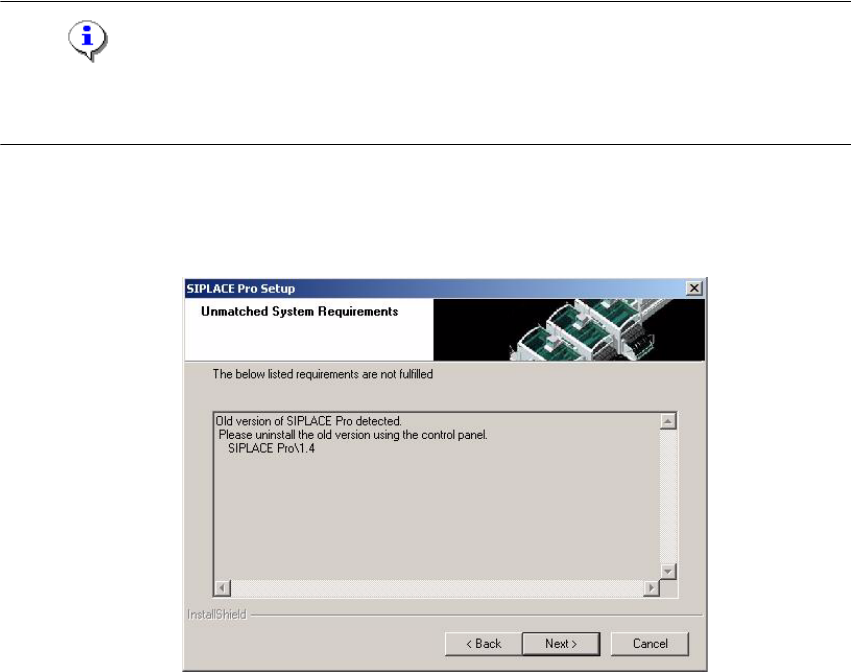
Fig. 7 - 2 Unmatched System Requirements - dialog box