JUKI KE775点胶机说明书1.pdf - 第30页
CHAPTER2DEsCRIPTION OF THE oPERAT0RC0NTR0Ls CHAPTER2DEsCRlPTION OF THE oPERATOR CONTROLs 2冖 1.FunCtions of Keys and switches 2丬 丬 。 Keyboard F:g.2ˉ 1ˉ 1κ ey board TabIe2ˉ 1冖 1 FunCtions of keys Key Function F1 ・ Nd Ⅱ 蒯 ,…
CHAPTER1GENERAL
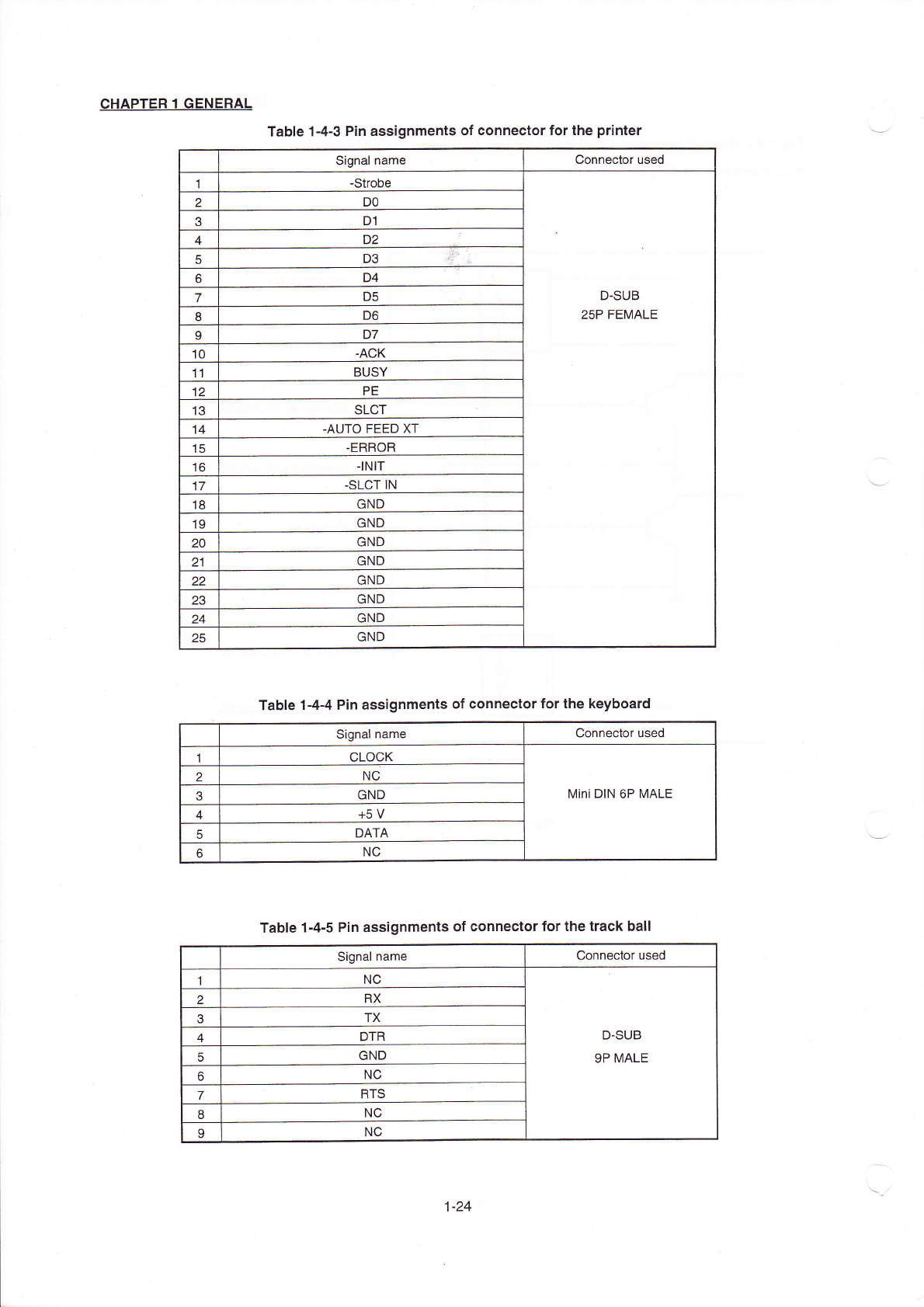
TabIe1ˉ 4ˉ3P:n assignments of connector forthe printer
signal name
Connector used
1
ˉ
strobe
D¨ SUB
25P FEMALE
2
Do
3
D1
4
D2
D3
6
D4
D5
8
D6
9
D7
ˉ
ACK
BUsY
PE
13
sLCT
ˉ
AUT0FEED XT
ˉ
ERR0R
丬NlT
17
-SLCT!N
GND
GND
GND
21
GND
GND
23
GND
GND
25
GND
TabIe1ˉ
4ˉ4Pin assignments of conneCtor forthe keyboard
s∶
gnalname
Connector used
1
CL0CK
Mini DIN6P MALE
2
NC
3
GND
4
+5V
5
DATA
NC
TabIe1ˉ
4ˉ5Pin assignments of connectorforthe track ba"
signal name
Connector used
1
NC
D-SUB
9P MALE
2
RX
3
TX
4
DTR
5
GND
NC
7
RTs
NC
NC
1ˉ 24
CHAPTER2DEsCRIPTION OF THE oPERAT0RC0NTR0Ls
CHAPTER2DEsCRlPTION OF THE oPERATOR CONTROLs
2冖 1.FunCtions of Keys and switches
2丬 丬。
Keyboard
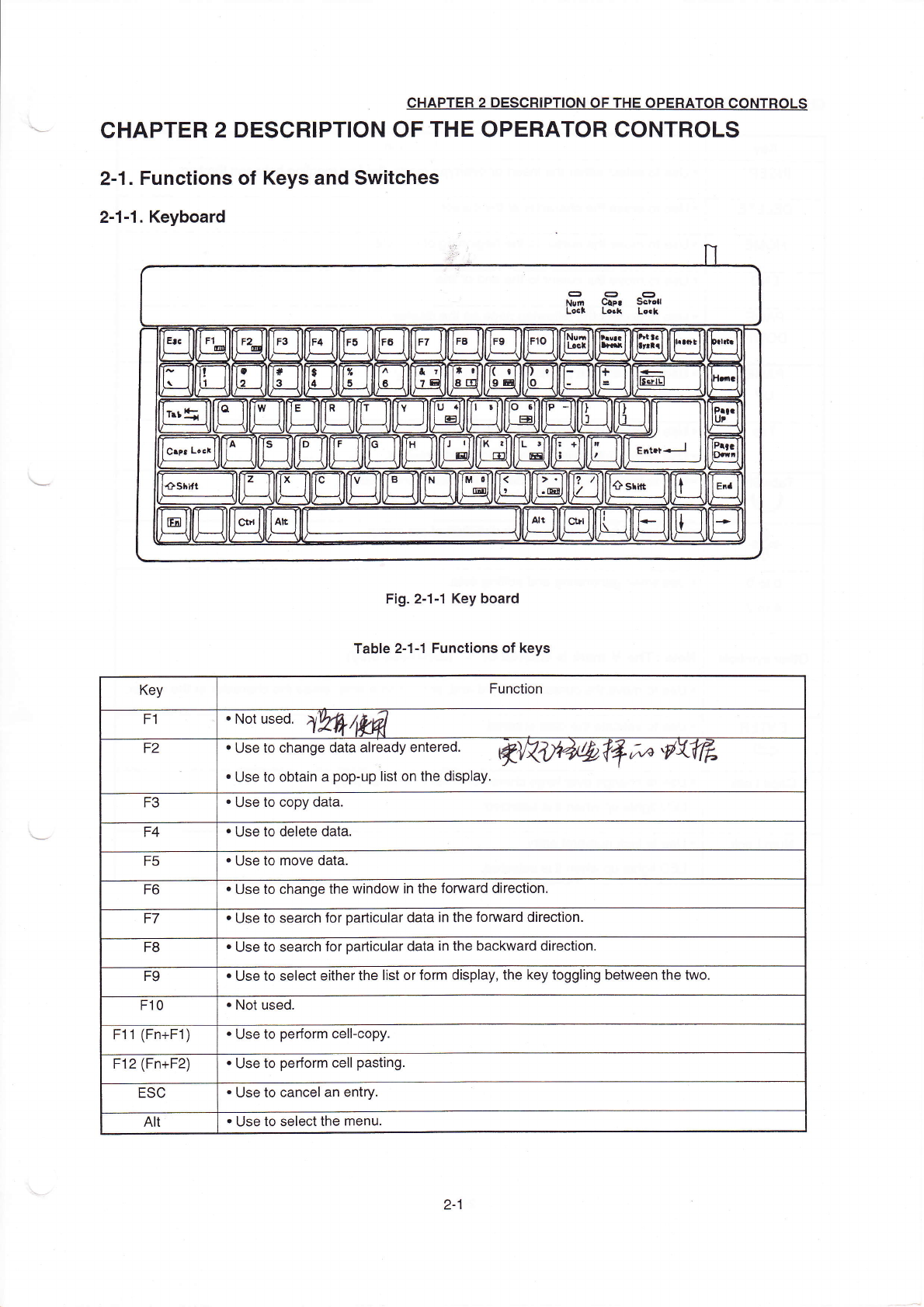
F:g.2ˉ
1ˉ 1κey board
TabIe2ˉ
1冖 1 FunCtions of keys
Key
Function
F1
・
Nd Ⅱ蒯,刁
黝姒
F2
・
∪se∞ change d引
a already em∝
e⒍
烤
突
0'刁
j0叫
饧
氵
〃丝
》
彳
彡
卩
勋
V舴
・
∪se to obtain a popˉ
up list on the display,
F3
・
∪se to copy data.
F4
・
Use to delete data.
F5
・
Use to move data.
F6
・
Use tO change the vvindow in the fomard direction,
F7
・
Use to search for padlcu丨
ar data in the fomard direction.
F8
・
∪se to search for pa"icuIar data in the backward direction,
F9
・
Use to se|ect e"her the Iist orform disp丨
ay,the key togg|ing betⅥ
`een the two.
F10
・
NOt used.
F11(Fn+F1)
・
Use to perform ceⅡ
ˉ
copy
F12(Fn+F2)
・
Use to perform ceⅡ
pasting
ESC
・
∪
se to canceI an entry,
AⅡ
・
Use to seIectthe rnenu
2ˉ
1
CHAPTER2DEsCRIPTI0N0F THE0PERAT0RC0NT且
oLs
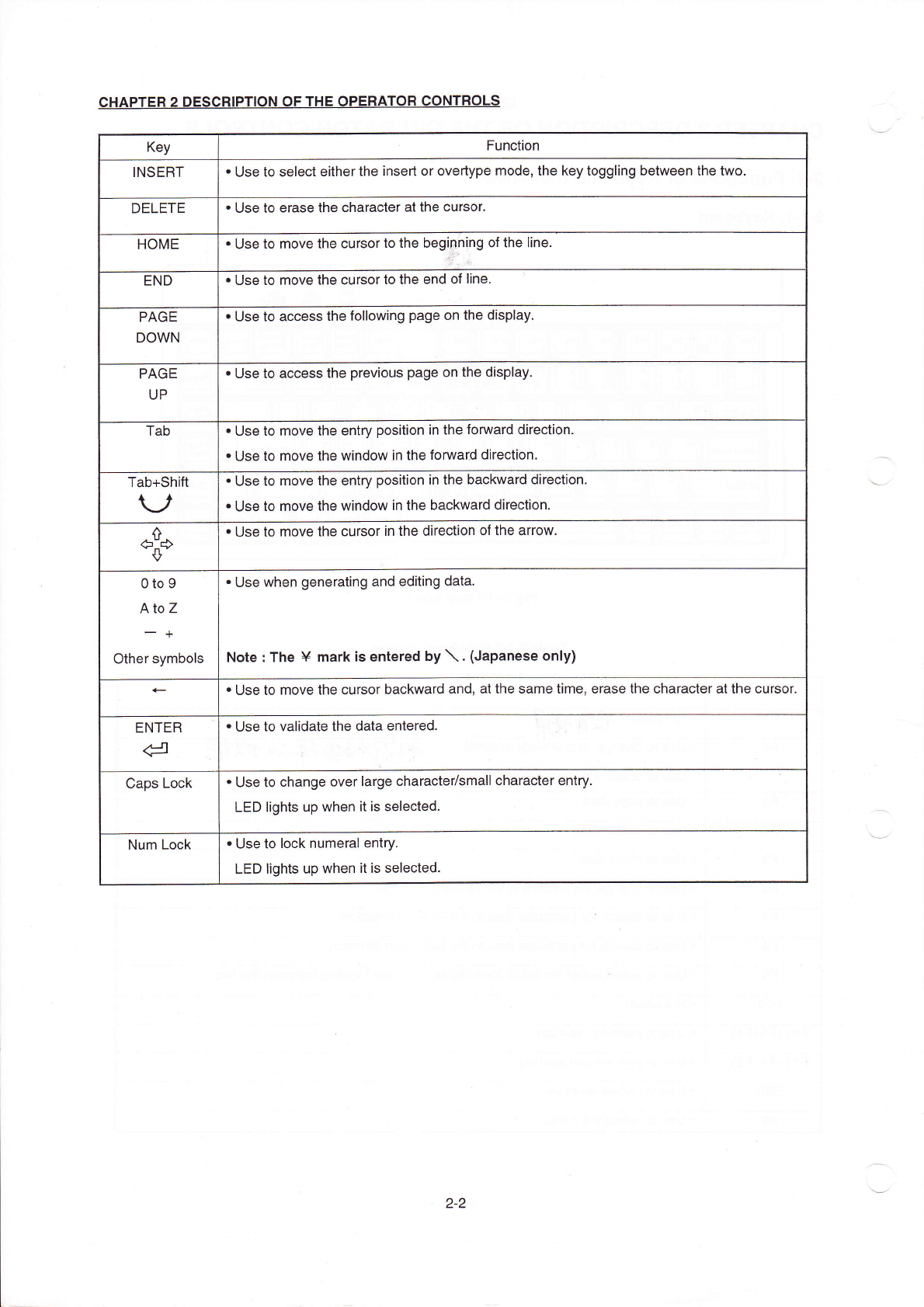
Key
Function
INsER丁
・
∪se to seIect eitherthe insed or overtype rnode,the key toggⅡ
ng betvveen the two.
DELETE
・
Use to erase the character atthe cursor,
H0ME
・
∪se to move the cursorto the begi卩
h!ng of the Iine.
END
・
Use to rnove the Cursorto the end of
Ⅱne,
PAGE
D0Ⅵ
`N
・
Use to aCCess the fo"owing page on the dispIay,
PAGE
UP
・
Use to access the previous page on the dispIay.
Tab
・
∪
se to rnove the entry position in the fomard direction.
・
Use to moVe the windoW in the fomard direc刂
on,
Tab+shi仳
V
・
∪se to moVe the entry position in the baCkward direction,
・
∪
se to rnove the windovv in the backward direction
◇
・
∪se to rnove the cursorin the direction ofthe arrow,
o to9
A to z
- +
other symboIs
・
∪se when generating and ed∶
ting data,
Note:The¥
mark∶ s entered by′ \.(Japanese only)
・
∪se to rnove the cursor backward and,atthe same tirne,erase the character atthe cursor
ENTER
d
・
∪se to vaⅡ
date the data entered
Caps Lock
・
Use to change oVerIarge characte〃
smaⅡ
character entry
LED lights up VVhen"is selected,
Num LOck
・
Use tO IOck numeraI entγ
.
LED Ⅱ
ghts up when itis seIected。
2ˉ 2