JUKI KE775点胶机说明书1.pdf - 第54页
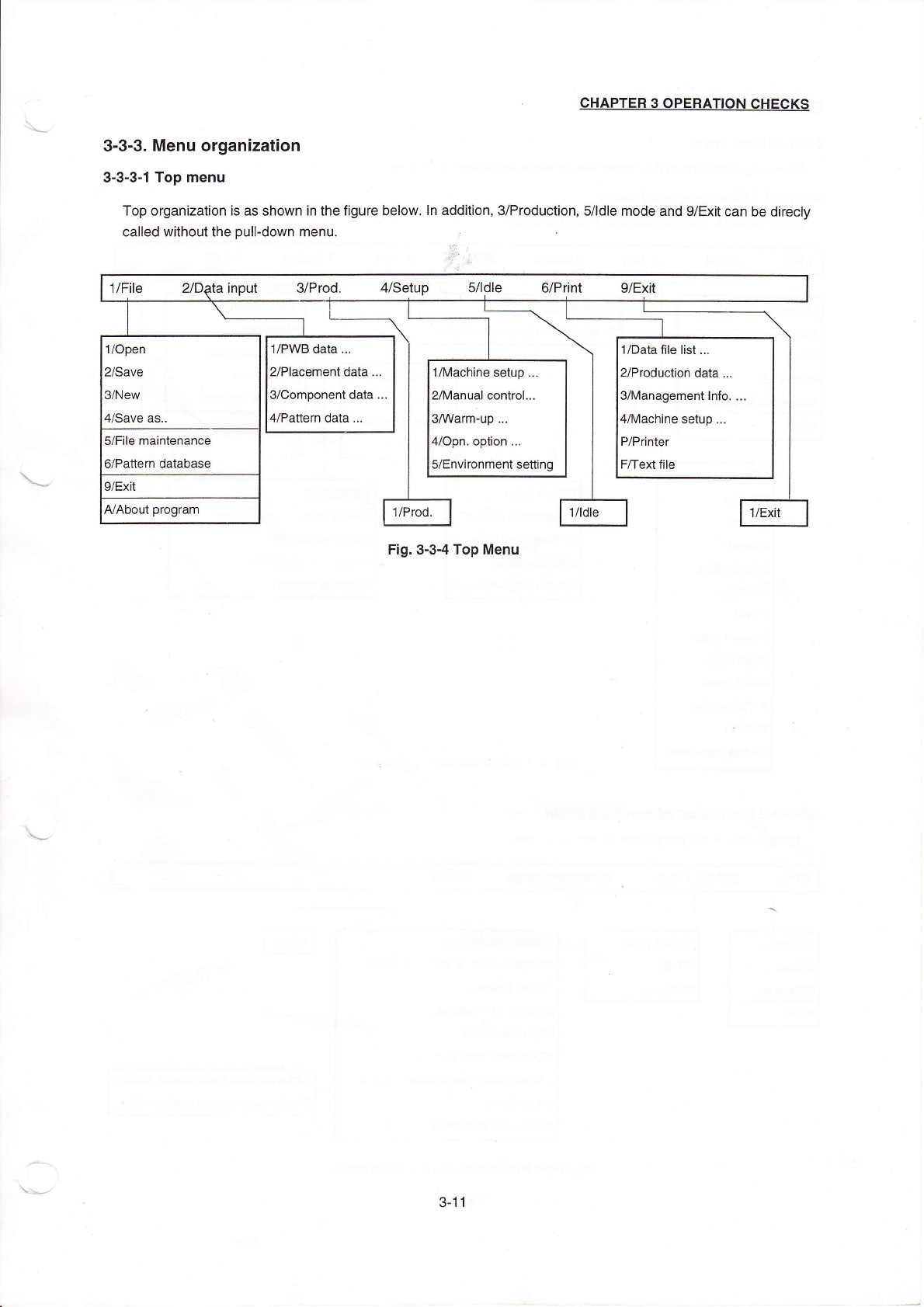
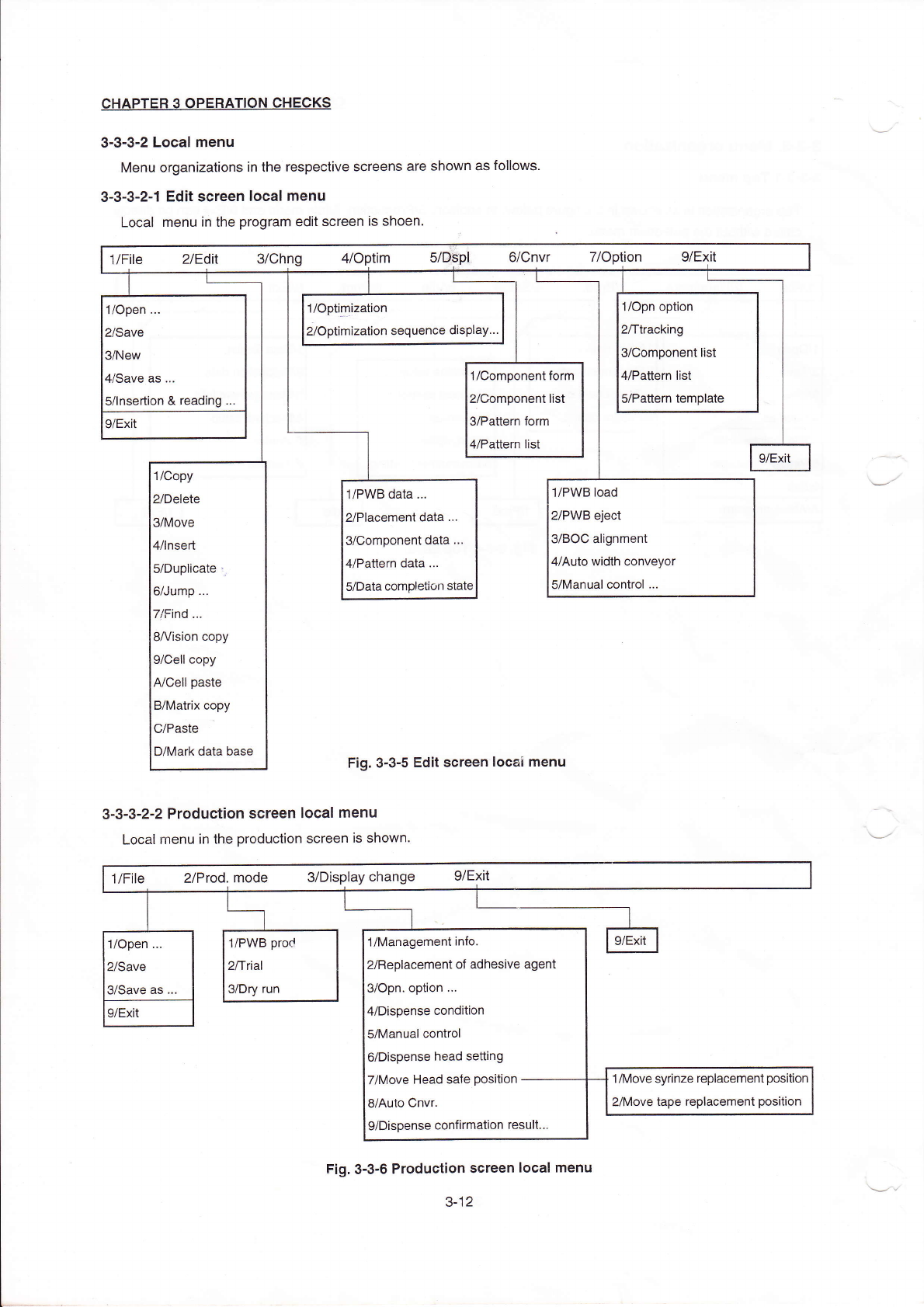
CHAPTER30PERATION CHECKs 3ˉ 3ˉ 3ˉ 2LOCaI menu Menu organizations in the respective screens are shoⅥ `n as foⅡ ows 3ˉ 3ˉ 3ˉ 2ˉ 1Edit sCreen IOcaI rnenu LOcaI menu ih the program ed"screen is shoen, 1/open ¨ 2/save 3/…
CHAPTER30PER△
△I0N CHECκs
3臼 3ˉ 3。
Menu organization
3ˉ3ˉ 3ˉ
1Top1nenu
TOp organizaⅡ
on is as shoWn in the figure beIOw,In add"ion,3/Production,s/ldle rnode and9/Ex∶
t can be direcIy
ca"ed Ⅵ
`"houtthe pu"ˉ
dovvn menu,
∷
Fig・
0ˉ
3ˉ4Top Menu
`
′
、
、
、
~~'
〃
File ″D尉a in0ut s/Prod, 〃
setup 5刀 dle G/P"nt g/EⅪ
t
1/0pen
2/save
3/New
4/save as,,
1/PllVB data ¨
2/Placement data.¨
3/Component data
4`Pattern data,¨
1/Data】
丨e Ⅱst¨
2/Production data.¨
3/Managementlnfo‘
:
4/Machine setup.¨
P/Printer
F/Text币
le
1/Machine setup ¨
2/Manua丨 contro1.¨
3/werm~up¨ 。
H/opn option ¨
5/Environment se⒒
ing
5/F"e rnaintenance
6/Pa廿
ern database
9/EX"
AlAbout program
1/Prod,
俐de
丨 丨
J/E斑
3ˉ 丬1
CHAPTER30PERATION CHECKs
3ˉ3ˉ3ˉ
2LOCaI menu
Menu organizations in the respective screens are shoⅥ
`n as foⅡ
ows
3ˉ 3ˉ3ˉ
2ˉ 1Edit sCreen IOcaI rnenu
LOcaI menu ih the program ed"screen is shoen,
1/open
¨
2/save
3/New
闫冫Save as
¨
5/lnsertion&reading
1/°
p”
”
ization
2/0ptimization sequehce dispIay¨
1/opn option
2/ttraCklng
3/Component"st
〃
Pa廿
ern list
s/Pauem temp丨
ate
|/COmponentform
yComponent"st
VPaⅡern form
l/Pa‖
ern list
9/EXⅡ
|
9/EXit
1/Copy
2/Delete
3/MOve
4/Insed
5/Duplicate:i
6/Jump
7/Find.¨
8A/ision Copy
9/Cell copy
A/Ce"paste
B/MatHX Copy
C/Paste
D/Mark data base
1/P、
VB data,¨
2/Placement data
¨
3/Comp°
nent data
¨
4/Pattern data
¨
5/Data comp丨
etion statc
1/Pˇ
VB load
2/PWB丬 eCt
3/B0C alignment
4/Auto Ⅵ
`idth ConVeyor
5/Manual oontro丨
¨
Fig.3Ⅱ 3ˉ5Ed"sCreen loCaI rnenu
3ˉ3ˉ
3ˉ
2冖2ProduCtion screen IocaI menu
LocaIrnenu in the production screen is shown,
1/F"e
2/Prod.mode
s/DisPlay change g/E冫
Jt
毡
1/0ρen
¨
2/Save
3/save as,,
1/P、VB prod
2/t"al
a/Dry run
1/Managementinfo
2/ReplaCement of adhesive agent
3/0pn op刂
on
¨
4/Dispense condition
5/Manual control
6/Dispense head se⒒
ing
7/Move Head sa忄
e position-ˉ
ˉˉˉ
8/Auto CnVr
9/Dispense confirmation resu"¨
9/EX"
1/MoVe syrinze replacement position
2/MoVe tape repIaGement pos"i°
n
Fig.3ˉ
3ˉ 6ProduCtion screen local menu
3ˉ
12
3ˉ3ˉ3ˉ
2ˉ
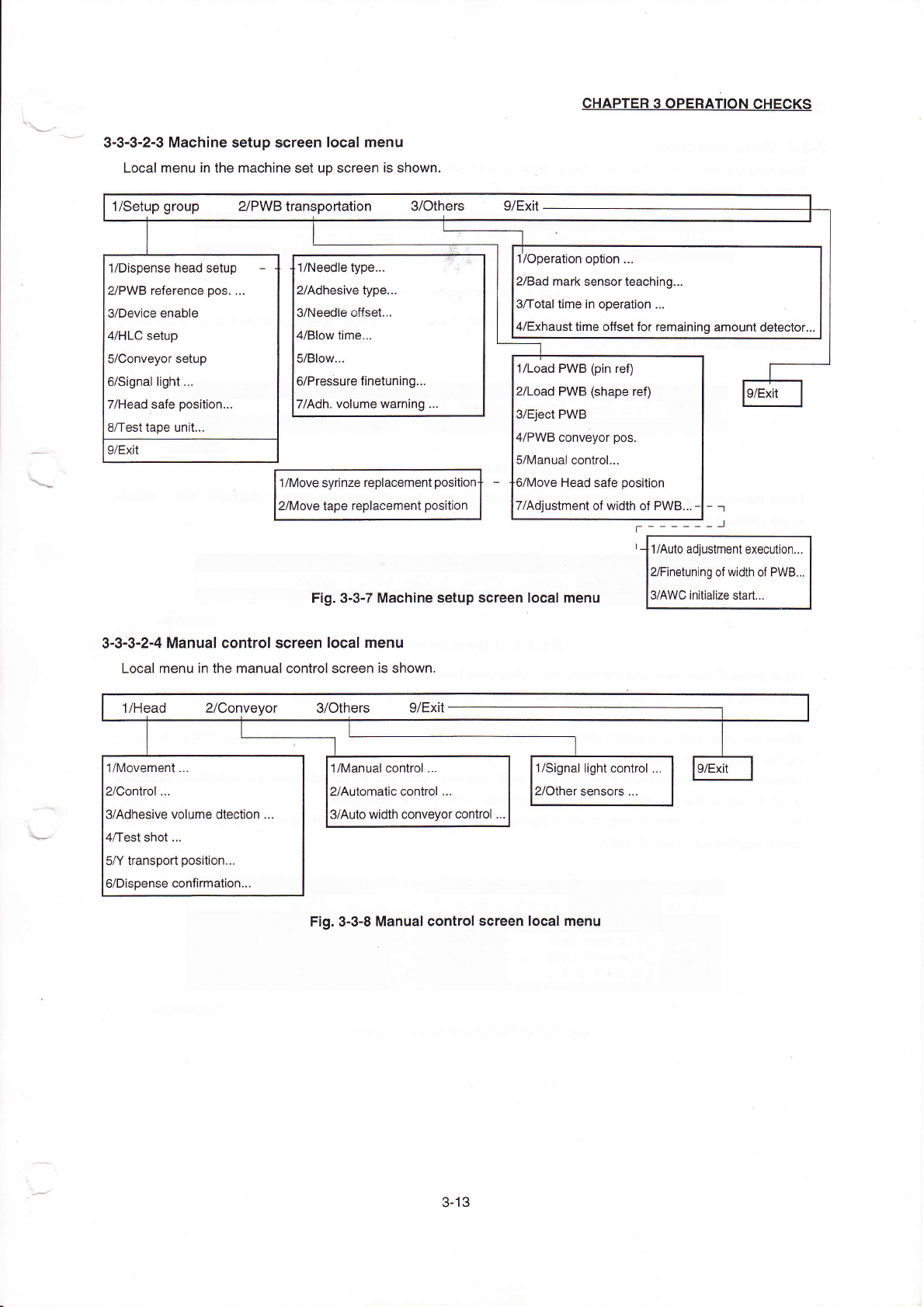
3MaChine setup screen IOcaIrnenu
LOcalrnenu in the rnachine set up screen is shoⅥ
`n,
1/~1oVe sy"nze rep丨
acement
tape rep丨 aCement position
Fig.3ˉ
3ˉ
7MaChine setup screen IocaIrnenu
3Ⅱ3ˉ3ˉ
2ˉ4ManuaI control screen IocaIrnenu
LocaI rnenu in the rnanuaI controI screen is shown.
CHApTER30PERATION CHECκ
s
ˉ ˉ
ˉ ˉ ˉ ˉ 凵
1//Aulo a叫
ustment execut on¨
γFinetun|ng of width of P、
VB¨
γAˇVC in"ialize sta"
1/setup group ⒉
PVVB transportation 3/0thers
9/Ex"
丬
/0peration optlon.¨
2/Bad rnark sensorteaching¨
3/Total t∶me in operation,¨
4/EXhausttime o仟
setfor remaining amount detector¨
1/Dispense head setup -
2/PVVB re亻 erence pos
¨
3/Device enable
〃HLC setup
5/Conveyor setup
6/Signa丨
Ⅱ
ght
¨
7/Head safe position¨
8/testtape unIt.¨
9/EX"
9/EXit
1/Load PVVB(pin refl
2/LOad PWB(shape refl
s/Elect PWB
4/PWB qonVeyor pos
5/Manua丨
control¨
Head safe
ρ
osition
7/A叫
ustment of w dth of PWB∶
1/Head 2/ConVeyor 3/0thers
9/Ex"
1/h/oVement.¨
2/Control ¨
3/Adhesive volume dtection .
0/Test shot
¨
5丿Υ transpod position¨
6/Dispense conflrmatlon¨
1/Manual Control
¨
2/Automalc contro1,¨
3/Auto vvidth Conveyor contro丨
1/Signal Ⅱ
ght control
2/other sensors
¨
9/EXit
Fig,3ˉ 3ˉ 8Manual Control screen locaI menu
3ˉ
13