JUKI KE775点胶机说明书1.pdf - 第6页
Matters of CauJon for safe use of κ Dˉ 775 DANGER 1. To prevent aGcid∷ ents due to electric shock,do not open the e|ectrica丨 equipment box、 ″ h"e powersupp丨 yis on. 2. To preVent e|eotHc shock|do not operate the Fna…
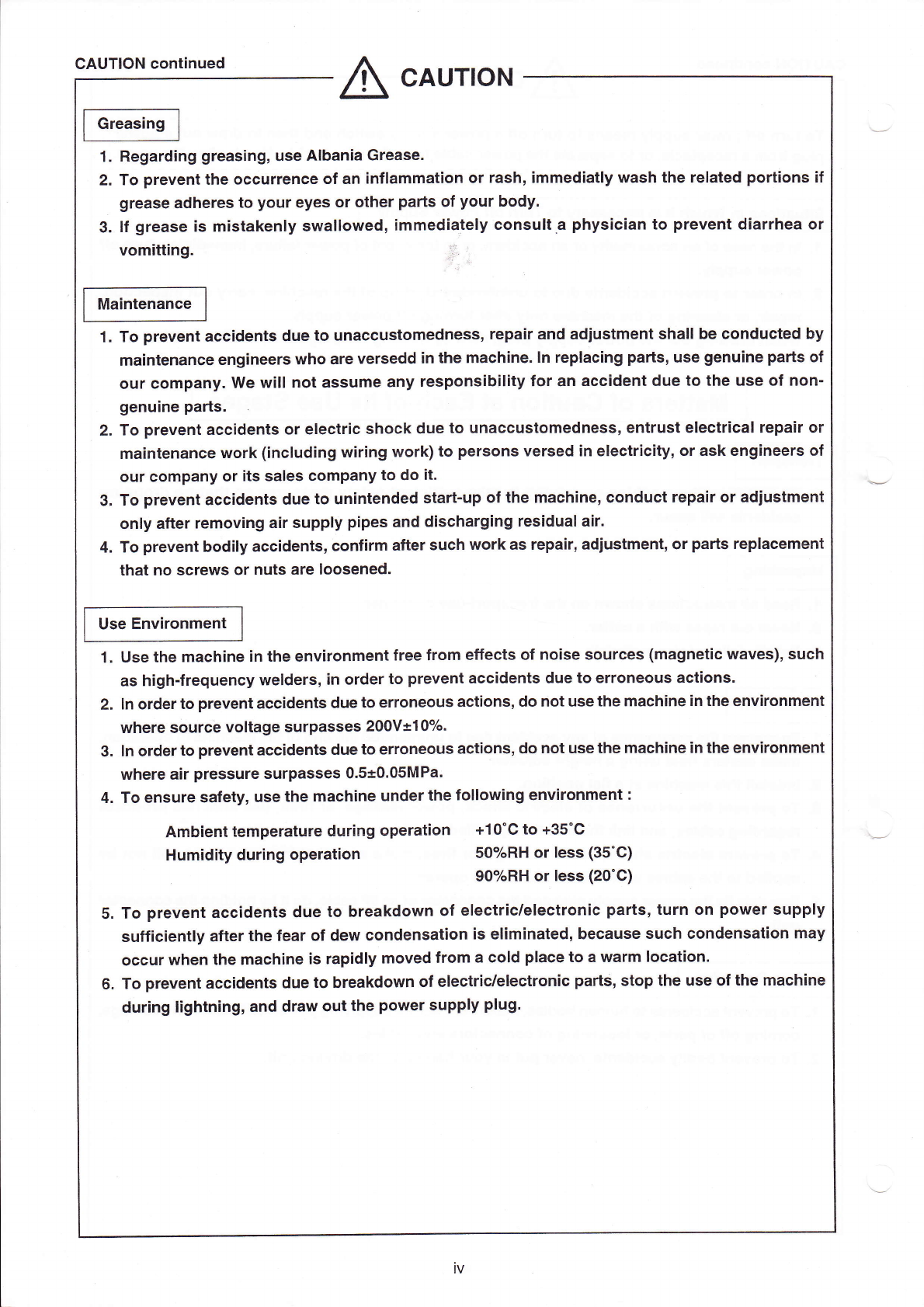
CAuTION c。
nt∶
nued
△
cAUTION
1. Regarding greas:ng,use AIbania Grease。
2.To preventthe occurrence of an∶
nf∶ammat∶
on or rash,∶
mmediauy l″ash the reIated port∶
ons if
grease adheres to your eyes or other pa"s of your b0dy。
3. lf grease∶
s mistakenIy swa"oWed,iΠ
"η
edie!ely c°
nsu"a physic∶ an to prevent d∶
arrhea or
Vom⒒】
ng。
Ⅱ
Ma∶ntenance
1.To preVent accidents due to unaCCustomedness,repa∶
rand ad;ustIη
ent sha"be oonducted by
maintenanCe eng∶
neers who are versedd in the1η
aChine.In repIac∶
ng pads,use genu∶
ne parts of
our company.We wⅡ
I not assume any responsib"∶
ty for an accident due to the use of nonˉ
genu:ne pa"s.
2.T。
preVent accidents or eIe0tr∶
c shock due to unaccustomedness,entrust electr∶
caI repa∶ r or
ma:ntenance、
″ork(incIuding l″
∶r∶ ngl″
ork)t。
persons versed∶
n eIectric∶
ty,or ask eng∶neers of
our company orits saIes Company to do∶
t.
3.To preVent acoidenIs due to unintended startˉ
up ofthe1nach∶
ne,cOnduct repair or adjus"η
ent
onIy after removing a:r supplˇ
pipes and discharging residuaI air.
4.To preˇ
ent bodiIy acCidents,Conf∶
r:η a仳er suCh、
″ork as repair,adjust:η
ent,or pa"s repIacement
that no sCreWs or nuts are Ioosened。
Use Env∶
ronment
1. use the mach∶
ne∶
n the enV∶
ronment free fronl e矸
eCts of no∶ se sources(magnet∶
c waves),such
as highˉ
frequency、
″eIders,∶
n orderto preˇ
ent accidents due to erroneous actions.
2. In orderto prevent acc∶
dents due to erroneous act∶
ons,do hot use the rnachine:n the environment
where sourc0VoItage surpasses200V±
10%。
3. ln orderto prevent aCc∶
dents due to erroneous ac刂
ons,do not usethe Fnach∶
ne∶ n the enV∶ ronment
where air pressure surpasses O。
5±0.05MPa∶
4.To ensure safety,use the1η
ach:ne underthe fo"owing enVironment:
A口nb∶ent temperature during operat∶
on +10°
C to+35°
C
Hum:dky dur:ng operation 50%RH0r Iess(35°
C)
90%RH orIess(20°
C)
5.To preVent accidents due to breakdown of eIeCtriC`eIectronic parts,turn on power suppIy
suff∶ CientIy after the fear of dew cond0nsation is eⅡ
nl∶ nated,beCause such Condensat∶
on may
occur when the1η
ach∶
ne∶
s rapidIy lη
oVed fronl a coId pIaCe to a waⅡ
η IoCat∶
on.
6.To preˇ
ent accidents due to breakdown of electric/eIeotronic parts,stop the use ofthe mach∶
ne
during I∶
ghtning,and draW outthe power supp:y plug.
lV
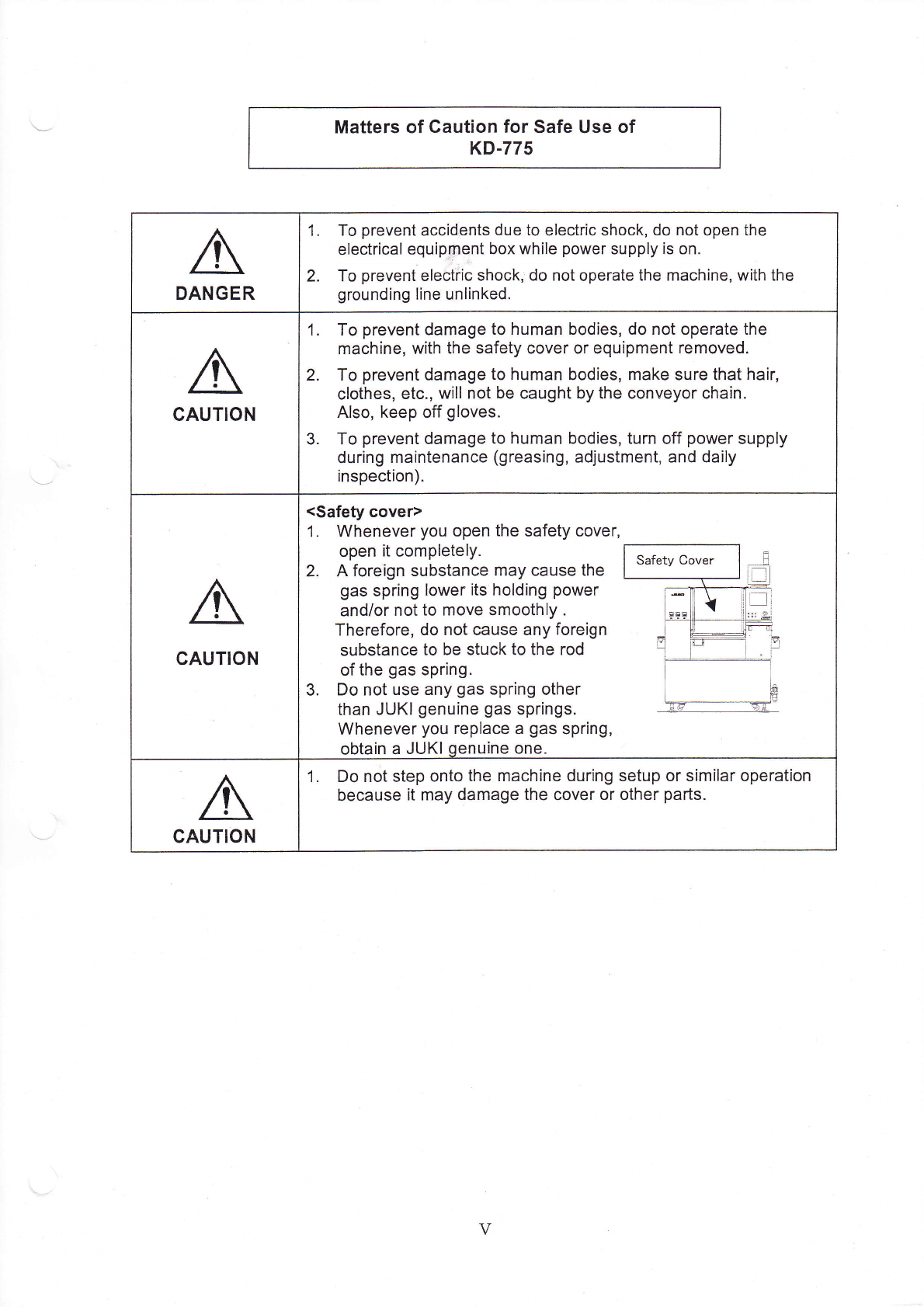
Matters of CauJon for safe use of
κDˉ775
DANGER
1. To prevent aGcid∷
ents due to electric shock,do not open the
e|ectrica丨
equipment box、
″h"e powersupp丨
yis on.
2. To preVent e|eotHc shock|do not operate the Fnachine,vvith the
grounding丨
ine unⅡ
nked‘
cAuTION
1. To preVent damage to human bodies,do not operate the
machine,vvith the safety cover or equipment removed,
2. To prevent damage to human bodies,Fη
ake sure that hair,
c丨 othes,etC.,vvi"n0t be caught by the Conveyor chain‘
Also,keep off g|oVes.
3. To prevent damage to human bodies,turn off power supp丨
y
during rnaintenance(greasing,adjust1η
ent,and daⅡ
y
inspection).
GAuTION
<safeV cover)
1, VVhenever you open the safety cover,
open it comp|ete丨
y.
2. A foreign substance Fη
ay cause the
gas spring|ower1s ho|ding poweΓ
and/or notto rnove smooth丨
y.
Therefore,do not cause any foreign
substance to be stuCk to the rod
ofthe gas spring.
3. Do not use any gas spHng other
than JUKl genuine gas springs,
Whenever you rep|ace a gas spring,
obtain a JUK丨
qenuine One.
CAUTION
1, Do not step onto the machine dur|ng setup or siFη
Ⅱ
ar operation
because it rnay damage the cover or Other parts.
V
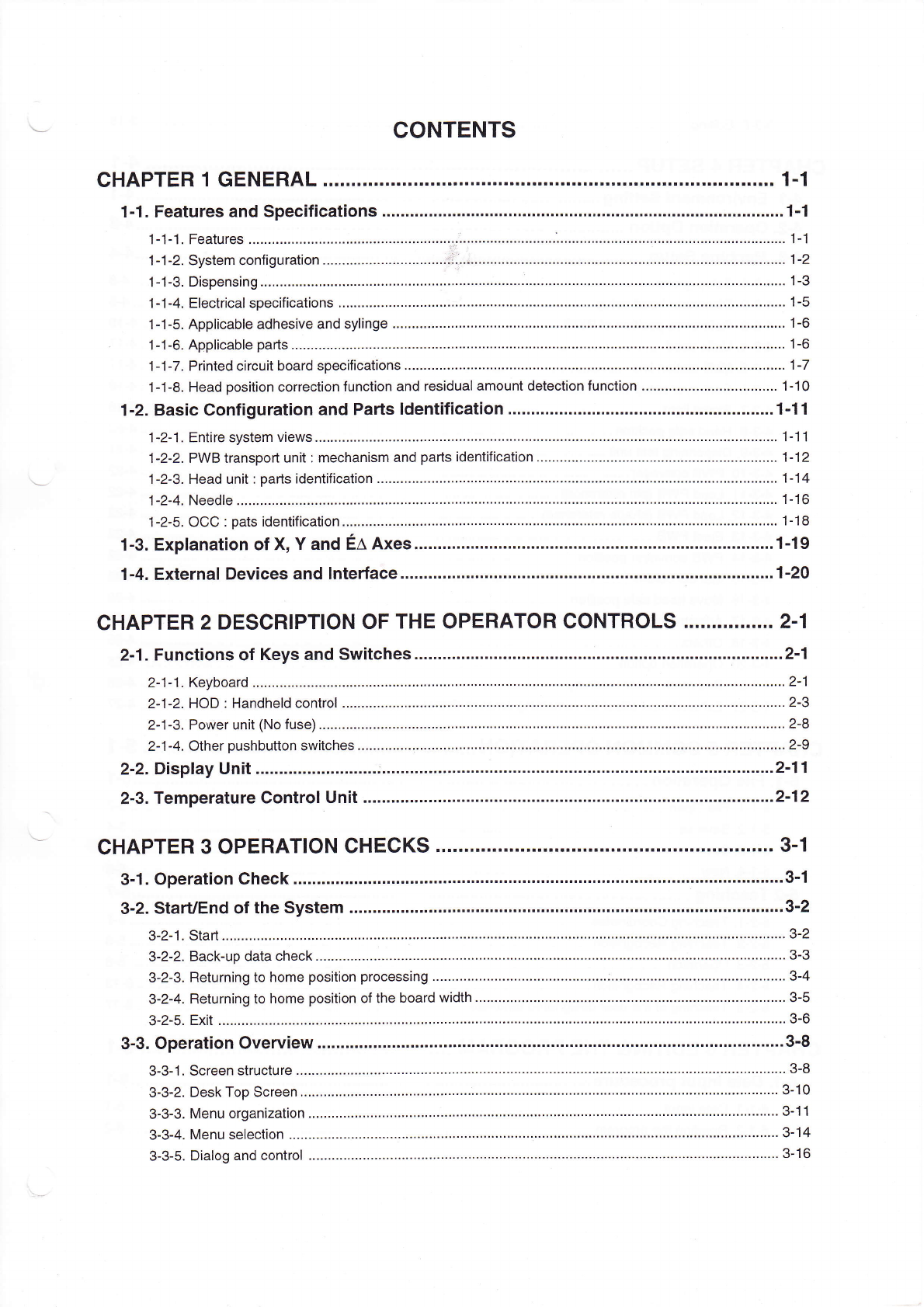
CONTENTs
CHAPTER1GENERAL.¨
""¨
¨
¨
¨
"¨ """"¨
""""…
……
"・
Lj・ ……
"""""…
…
""¨
"1丬
1ˉ 1.Features and speCifiCat∶
ons。
¨¨¨¨¨……
"…
……………
………
……
……
"…
………
"…
………………………
"…
………・1ˉ
1
1ˉ 1ˉ 1,Features.¨
¨¨¨¨¨¨¨¨¨…
¨
∶
・¨¨¨¨
¨
¨……
¨¨¨……∴
・¨¨¨¨¨¨¨
¨¨¨¨
∴
¨¨¨¨
¨
¨¨¨¨………………………………………¨¨¨¨¨
1ˉ 1
1ˉ 1ˉ2,systenη configuration.¨
¨¨¨¨¨
¨¨¨¨¨¨¨……∴
∴
∷.¨ ¨¨¨……¨¨…¨¨¨¨¨¨¨…¨¨¨¨…………¨¨¨¨¨¨¨¨¨¨¨¨¨
…¨1ˉ2
1ˉ
1ˉ
3 Dispensing.¨
¨¨
¨¨¨¨¨¨¨¨
……¨¨¨¨¨¨……
¨
∵
¨¨
¨¨¨¨¨¨¨¨¨
¨
¨
¨
¨¨¨¨
…
¨¨…………………¨¨
¨¨¨¨¨
¨¨¨¨
……………1ˉ 3
1ˉ 1ˉ
4 EIeCtricaI specifications,¨
¨
¨¨¨¨¨
¨
¨
¨¨¨¨¨
¨¨¨¨¨¨¨¨¨¨¨¨¨¨¨¨¨¨¨¨¨………………………¨¨¨¨¨¨¨¨¨¨¨¨¨1ˉ
5
1ˉ 1-5.AppⅡcabIe adhesive and sy"nge.¨
¨¨¨Ⅱ
¨¨¨¨¨¨
¨
………………………………………¨¨¨¨¨¨¨¨¨¨……………¨¨¨¨¨¨¨¨1ˉ 6
1ˉ
⒈
6.AppⅡ
cabIe parts
¨¨¨¨¨¨¨¨¨
¨¨…¨¨¨
¨
…
¨¨¨¨
¨¨¨¨¨¨¨
¨¨¨
………
¨¨……
¨¨
…¨¨
…………
¨¨¨¨…………………………¨¨1^6
1ˉ 1ˉ 7 Printed Circuit board specifications.¨
¨
¨¨¨¨¨
¨¨¨¨…………………………
¨¨¨
……¨¨¨¨¨………
¨¨…………………………¨¨・1ˉ7
1¨ 1-8,Head position correction funCtion and residuaI amount detection function.¨
¨¨¨¨¨¨¨¨……………¨¨¨1ˉ 10
1ˉ2。 BasiC Configurat∶
on and Parts Identification."¨
¨
"¨
………………………………………
¨¨
……………
…1ˉ 11
1ˉ 2-1 Entire system views¨
¨¨¨¨
¨¨¨¨¨¨¨¨…
¨¨¨¨¨¨
¨¨¨¨
………………………¨¨¨¨¨¨¨¨¨¨……………¨¨¨¨¨………………
1丬 1
1ˉ 2ˉ 2 PVVB transport unit∶
rnechanism and parts identification。
¨¨¨¨¨¨¨¨¨…¨¨¨¨¨¨¨¨¨¨¨¨¨¨¨¨¨¨
…¨
・
1ˉ 12
1ˉ 2ˉ
3.Head un"∶
pa^s identification.¨ ¨¨¨¨¨
¨¨¨¨
¨¨……
¨¨¨¨¨¨¨¨……¨¨¨¨¨¨¨¨¨¨¨¨¨¨¨¨¨¨……………¨¨¨¨1ˉ
14
1ˉ
2ˉ4。 NeedIe。 ¨¨¨
¨¨¨¨¨¨¨¨¨
…
¨¨
¨¨¨¨¨¨¨……
¨¨¨
¨¨¨¨¨……¨¨¨¨¨¨
¨¨……………¨∶・¨¨¨¨¨¨¨…………………………¨¨¨1ˉ 16
1ˉ⒉5.0CC∶
pats ident亻
iCa】 on,¨
¨…
¨………
…¨………
……
……………………………………………………………・1-18
1ˉ3。 EXpIanation of X,Y and EΔ
AXes。
¨¨¨¨
∴。。¨¨¨…………
…
¨¨¨
…………
¨¨¨¨¨¨¨¨
…¨¨¨…………
"1丬
9
1ˉ4.EXternaI Devices and Interface.¨
¨
¨¨¨
¨¨¨……………………………
"…
………………
"…
…“…………………¨・1ˉ
20
CHAPTER2DEsCRIPTlON OF THE oPERATOR CONTROLs.""."。
""・ "2ˉ
1
2ˉ
1.FunCtions of Keys and sWitches.¨
¨¨
¨
"¨
¨¨¨………………………∴.¨ ¨¨¨………………………………………・2ˉ1
2ˉ
1ˉ 1.Keyboard。 ¨¨
¨
¨¨
¨¨¨¨¨¨¨¨¨
¨¨¨¨¨¨¨¨¨
……¨¨¨¨
¨
¨¨
…
¨¨……………¨¨¨¨¨……………¨¨¨¨¨¨¨¨¨¨……………¨¨¨2ˉ 1
2ˉ 1ˉ 2 H0D∶ HandheId contrOI.¨
¨¨¨¨¨¨¨¨
…¨¨¨¨
¨¨¨¨¨¨¨…………¨¨¨¨¨……………¨¨¨¨¨……………¨¨¨¨¨………………
2ˉ 3
2ˉ 1ˉ 3 PoWer unⅡ
(No fuse)¨
¨¨
¨¨¨¨¨¨…
¨
…
¨¨¨¨¨¨
¨¨¨¨¨¨……………¨¨¨¨¨………………………………………¨¨¨¨¨………………
2ˉ 8
2ˉ 1ˉ 4,0ther pushbutton switches。
¨¨
¨¨¨¨
∵
¨
¨¨¨¨¨¨
¨¨¨¨¨
……………
¨¨
…………
¨
……………
¨¨¨
……………
¨
………………………・2^9
2ˉ 2.D∶
spIay Un∶ t.¨
¨¨¨¨¨¨¨¨…
……∴・¨¨¨¨
¨¨¨
¨¨¨¨¨¨¨¨……“………………………………………………“…………・2ˉ
11
2ˉ
3.Temperature ControI Unit。
¨
¨¨¨¨¨
¨
"¨
¨
¨¨¨¨……
……
……………………………………
"…
………………
"…
…・2ˉ12
CHAPTER30PERATION CHECKs.¨
""¨
¨
"・ ""・
""・
""…
…
"… """"・ "…
・
"・
""・
…
3。
1
3ˉ 1。 0peration Check.“
.¨ ¨
¨¨……¨
"¨
………¨
¨…¨
¨¨¨……………………
""…
………………………………
…
…
…………
…
……
3ˉ 丬
3ˉ 2。
starUEnd ofthe system。
¨¨
¨¨¨¨…¨
¨¨¨
¨¨¨¨¨……………………………
""…
……………………
"…
………
"…
…3ˉ2
3¨2-1,Start.¨ ¨
¨¨¨¨¨¨…………
¨…¨¨¨¨…
¨¨¨¨¨¨¨
¨¨¨
¨¨¨¨¨¨¨¨¨¨¨¨¨¨………¨¨……………¨¨¨¨¨¨¨¨¨¨………………………3ˉ 2
3ˉ
2ˉ 2 BaCkˉup data check,¨
¨¨
¨¨¨¨¨……
¨¨¨…¨¨¨
¨¨¨¨¨¨…………………………¨¨¨¨¨¨¨¨¨¨¨¨¨¨¨¨¨¨¨¨…
¨¨
……
…
¨3ˉ 3
3ˉ 2ˉ 3。
Returning to home position processing
¨¨¨
¨¨¨¨¨¨
…
¨¨¨
………
…
¨¨¨
……∶………¨¨¨¨¨……………¨¨¨¨¨…………
3ˉ
4
3ˉ
2¨ 4。 Returning to home position ofthe board width.¨
¨
¨¨¨¨¨¨
……
……………
¨¨¨¨¨¨¨¨¨
……
¨¨¨¨………………………・
3ˉ 5
3ˉ
2ˉ
5,EXit.¨
¨¨¨¨
……¨¨¨¨¨¨¨…
¨¨¨¨¨
¨
¨
¨¨¨¨¨¨
¨¨¨¨¨¨………
¨
…………………………………
¨¨¨¨
¨¨
……¨¨¨¨
¨
………¨¨……¨
3ˉ 6
3ˉ 3.operation0verview。
¨
¨¨¨¨
¨¨¨
¨¨・¨
¨……
……
…¨…………………………………
…
・…
・
3ˉ8
3ˉ 3¨ 1,screen structure
¨¨¨¨¨
¨¨¨¨¨¨
¨¨¨¨¨¨¨
¨¨¨¨¨
¨¨
…
¨¨¨¨¨¨¨¨¨¨¨¨¨¨¨¨¨¨¨¨¨¨¨…………………
¨¨¨¨¨¨
3ˉ 8
3ˉ 3ˉ
2 Desk Top screen,¨
¨¨¨¨¨…
¨¨¨¨¨¨
¨¨¨¨¨
¨¨¨¨¨¨¨¨
…
¨¨¨¨…………
¨¨¨¨¨¨……………¨¨¨¨¨¨¨¨¨¨¨
…………
3ˉ 10
3ˉ
3ˉ
3,Menu organization.¨
¨
¨¨¨¨¨…
¨¨¨¨¨¨¨¨
¨¨
¨¨¨¨¨¨¨¨¨………………………
¨¨
…
¨¨¨……¨¨¨¨¨¨¨¨¨¨¨¨¨
………
3ˉ 11
3ˉ 3-4,Menu se丨
ection.¨
¨¨¨¨¨
………¨¨
¨¨¨¨¨¨
¨¨¨¨
¨¨¨¨¨“¨¨¨¨¨¨¨¨¨¨¨
…
¨
¨
…………
¨¨¨¨¨………………………
¨¨¨
3ˉ 14
3ˉ 3ˉ 5 DiaIog and ContrOI
¨¨¨
¨¨¨¨¨¨…
¨¨¨¨¨¨
¨¨¨¨¨
¨¨
¨…
¨¨¨¨¨¨¨¨¨………¨¨…………¨¨¨¨
…
¨
¨
………
¨¨¨¨¨¨¨3ˉ 16