JUKI KE775点胶机说明书1.pdf - 第55页
3ˉ 3ˉ 3ˉ 2ˉ 3MaChine setup screen IOcaIrnenu LOcalrnenu in the rnachine set up screen is shoⅥ `n, 1/~1oVe sy"nze rep丨 acement tape rep丨 aCement position Fig.3ˉ 3ˉ 7MaChine setup screen IocaIrnenu 3Ⅱ 3ˉ 3ˉ 2ˉ 4ManuaI…
CHAPTER30PERATION CHECKs
3ˉ3ˉ3ˉ
2LOCaI menu
Menu organizations in the respective screens are shoⅥ
`n as foⅡ
ows
3ˉ 3ˉ3ˉ
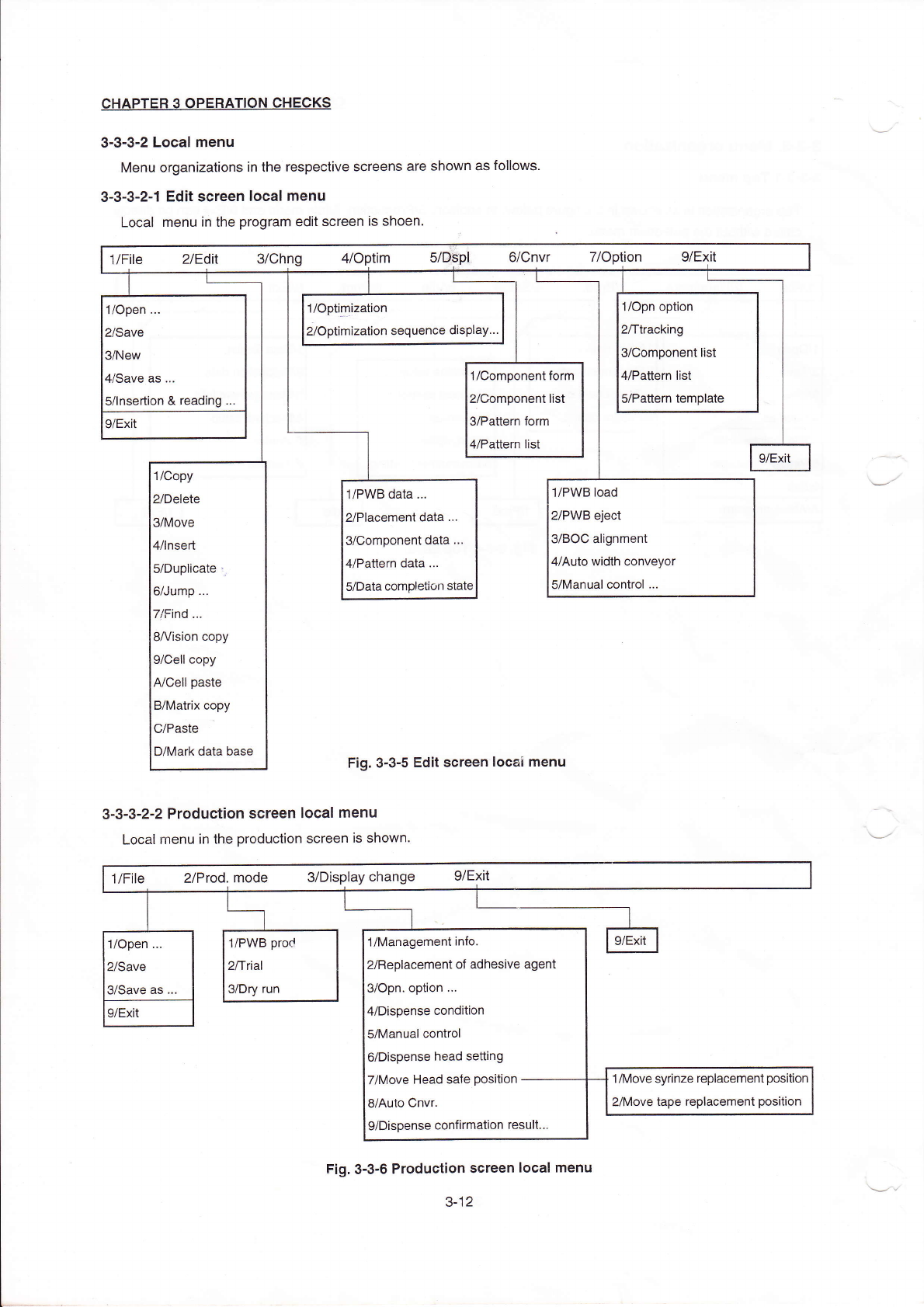
2ˉ 1Edit sCreen IOcaI rnenu
LOcaI menu ih the program ed"screen is shoen,
1/open
¨
2/save
3/New
闫冫Save as
¨
5/lnsertion&reading
1/°
p”
”
ization
2/0ptimization sequehce dispIay¨
1/opn option
2/ttraCklng
3/Component"st
〃
Pa廿
ern list
s/Pauem temp丨
ate
|/COmponentform
yComponent"st
VPaⅡern form
l/Pa‖
ern list
9/EXⅡ
|
9/EXit
1/Copy
2/Delete
3/MOve
4/Insed
5/Duplicate:i
6/Jump
7/Find.¨
8A/ision Copy
9/Cell copy
A/Ce"paste
B/MatHX Copy
C/Paste
D/Mark data base
1/P、
VB data,¨
2/Placement data
¨
3/Comp°
nent data
¨
4/Pattern data
¨
5/Data comp丨
etion statc
1/Pˇ
VB load
2/PWB丬 eCt
3/B0C alignment
4/Auto Ⅵ
`idth ConVeyor
5/Manual oontro丨
¨
Fig.3Ⅱ 3ˉ5Ed"sCreen loCaI rnenu
3ˉ3ˉ
3ˉ
2冖2ProduCtion screen IocaI menu
LocaIrnenu in the production screen is shown,
1/F"e
2/Prod.mode
s/DisPlay change g/E冫
Jt
毡
1/0ρen
¨
2/Save
3/save as,,
1/P、VB prod
2/t"al
a/Dry run
1/Managementinfo
2/ReplaCement of adhesive agent
3/0pn op刂
on
¨
4/Dispense condition
5/Manual control
6/Dispense head se⒒
ing
7/Move Head sa忄
e position-ˉ
ˉˉˉ
8/Auto CnVr
9/Dispense confirmation resu"¨
9/EX"
1/MoVe syrinze replacement position
2/MoVe tape repIaGement pos"i°
n
Fig.3ˉ
3ˉ 6ProduCtion screen local menu
3ˉ
12
3ˉ3ˉ3ˉ
2ˉ
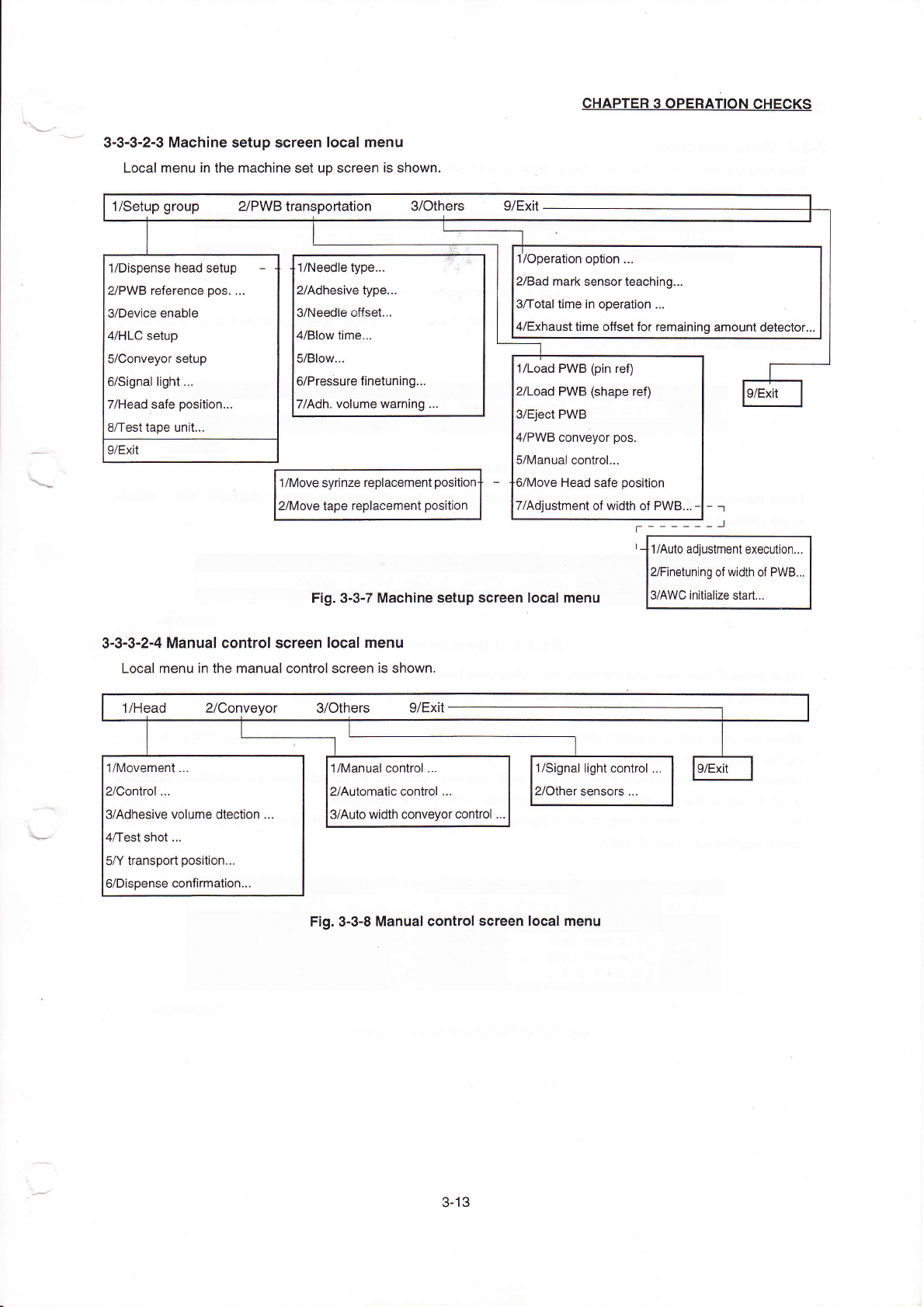
3MaChine setup screen IOcaIrnenu
LOcalrnenu in the rnachine set up screen is shoⅥ
`n,
1/~1oVe sy"nze rep丨
acement
tape rep丨 aCement position
Fig.3ˉ
3ˉ
7MaChine setup screen IocaIrnenu
3Ⅱ3ˉ3ˉ
2ˉ4ManuaI control screen IocaIrnenu
LocaI rnenu in the rnanuaI controI screen is shown.
CHApTER30PERATION CHECκ
s
ˉ ˉ
ˉ ˉ ˉ ˉ 凵
1//Aulo a叫
ustment execut on¨
γFinetun|ng of width of P、
VB¨
γAˇVC in"ialize sta"
1/setup group ⒉
PVVB transportation 3/0thers
9/Ex"
丬
/0peration optlon.¨
2/Bad rnark sensorteaching¨
3/Total t∶me in operation,¨
4/EXhausttime o仟
setfor remaining amount detector¨
1/Dispense head setup -
2/PVVB re亻 erence pos
¨
3/Device enable
〃HLC setup
5/Conveyor setup
6/Signa丨
Ⅱ
ght
¨
7/Head safe position¨
8/testtape unIt.¨
9/EX"
9/EXit
1/Load PVVB(pin refl
2/LOad PWB(shape refl
s/Elect PWB
4/PWB qonVeyor pos
5/Manua丨
control¨
Head safe
ρ
osition
7/A叫
ustment of w dth of PWB∶
1/Head 2/ConVeyor 3/0thers
9/Ex"
1/h/oVement.¨
2/Control ¨
3/Adhesive volume dtection .
0/Test shot
¨
5丿Υ transpod position¨
6/Dispense conflrmatlon¨
1/Manual Control
¨
2/Automalc contro1,¨
3/Auto vvidth Conveyor contro丨
1/Signal Ⅱ
ght control
2/other sensors
¨
9/EXit
Fig,3ˉ 3ˉ 8Manual Control screen locaI menu
3ˉ
13
CHAPTER30PERATI0N CHECκ
s
3ˉ3ˉ
4。 Menu se∶ection
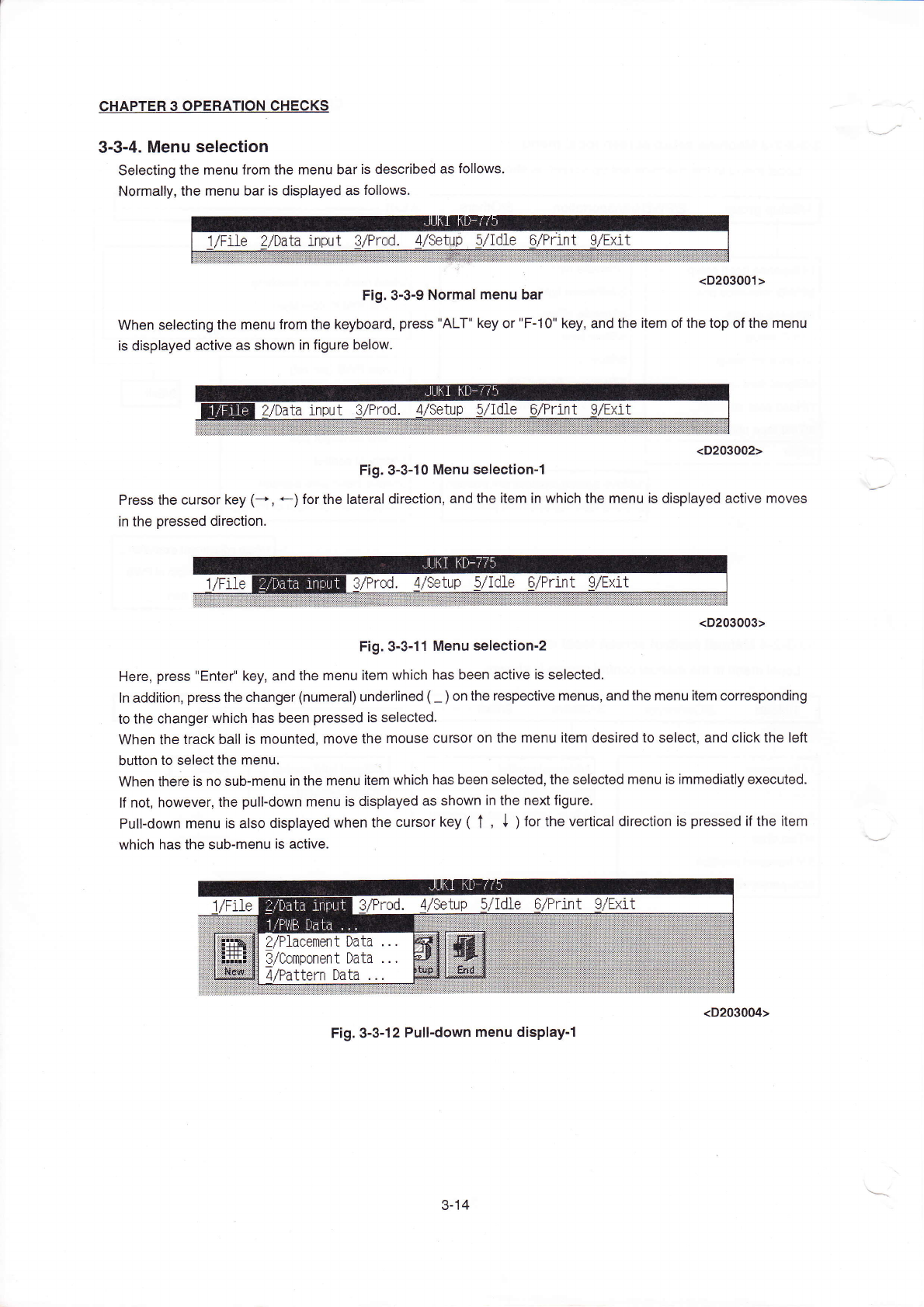
Selecting the rnenu from the rnenu baris described as fo"ows。
Norrna"y,the rnenu baris displayed as fo"ovvs,
(D203001>
Fig.3ˉ 3ˉ9N0rmaI menu bar
VVhen seIecting the rη
enu from the keyboard,press"ALT"key or"Fˉ
10"key,and the Ⅱem ofthe top ofthe rnenu
is dispIayed aCtive as shown in figure beloW.
Press the cursor key(-◆
∶n the pressed direction。
(D203002>
Fig.3ˉ 3ˉ
10Menu seIec"onˉ
1
←
)forthe丨
atera|direc刂
on,and the
Ⅱem in which the menu is dispIayed acⅠ
ve
勰 槲
迳蛋奏冬这≡圭
<D203003>
Fig,3ˉ 3ˉ 11Menu selectionˉ
2
Here,press"EnterI key,and the rnenu item
Ⅵ
`hiCh has been actiVe is selected
ln addition,press the changer(numeral)underIined(~)on the respective rnenus,and the rnenu item corresponding
to the changer vvhich has been pressed is seleCted.
VVhen the track ba"is rnounted丿
rnove the rnouse Cursor on the rnenu item desired to seIec1and cⅡ
ck the le伍
button to seIectthe rnenu
VVhen there is no sub-menuin the rnenuitem which has been se丨
ected,the seIected rnenu is∶
mmediatly executed.
lf not,however,the pullˉ
down rnenu is displayed as shoⅥ
`n in the nextfigure,
PulIˉ
down menuis a丨
so displayed when the cursor key(↑
,
↓
)for the Vertical direCtion is pressed亻
the
Ⅱ
em
WhiCh has the subˉ
menu is active.
Fig,3冖
3ˉ 12pu"ˉ
down menu displayˉ
1
3ˉ
14