JUKI KE775点胶机说明书1.pdf - 第45页
CHAPTER30PERATI0N CHECκ s 3ˉ 2ˉ 2。 BaCkˉ up data check When the poweris turned(DFF Without pedorming retention of the produc】 ion controlinformation caused by electriCity faⅡ ure or the like du"ng production,this sy…
CHAPTER30PERATION CHECKs
3ˉ
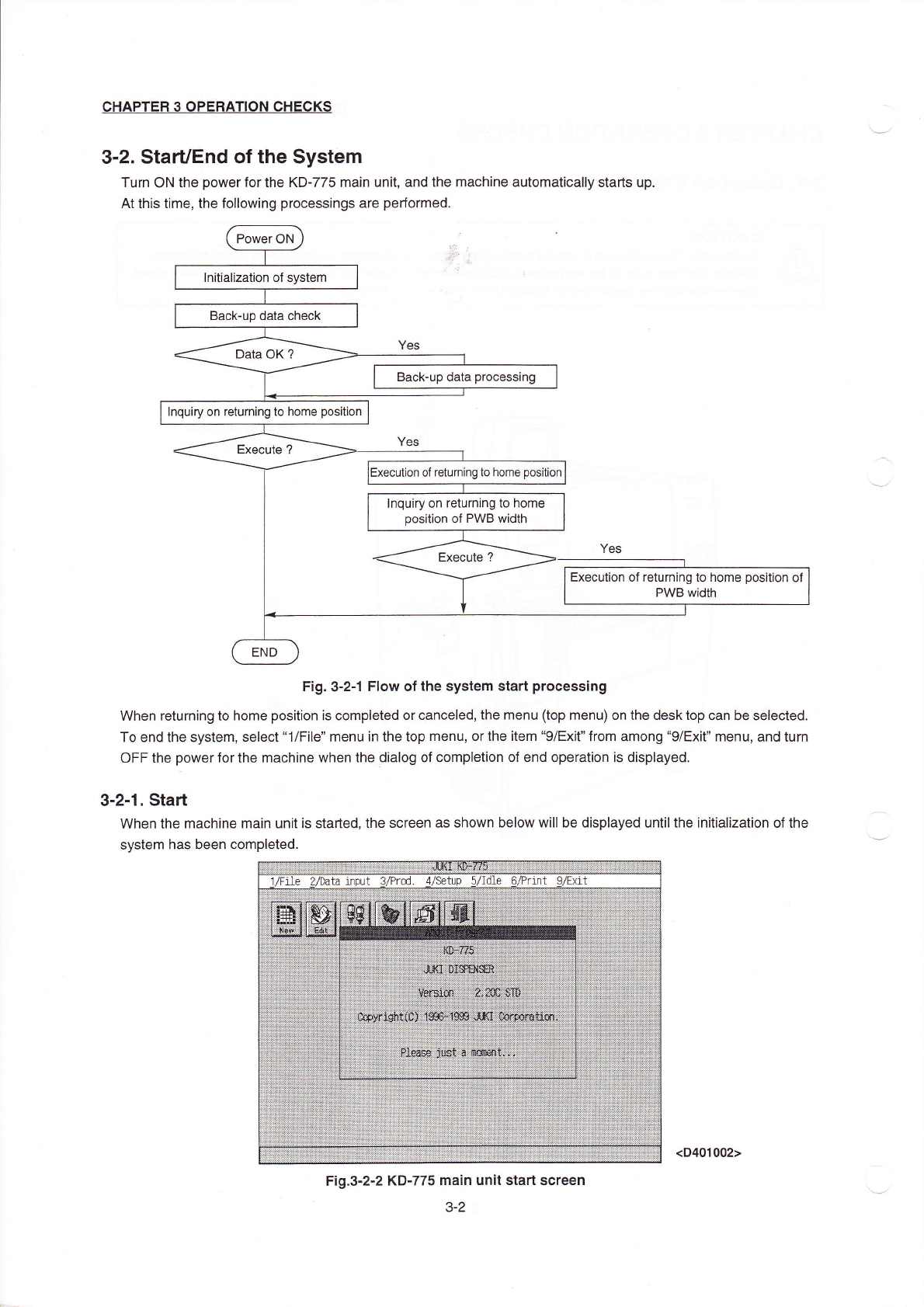
2.starVEnd ofthe syst0m
Turn ON the poWerforthe KDˉ 775main un",and the maChine automatica"y starts up.
At this tirne,the fo"owing processings are perforrned,
Fig.3ˉ 2丬 FloW ofthe system start processing
When returning to home position is compIeted or0anceIed,the menu(top rnenu)on the desktop can be seIected。
To end the system,select“
1/FⅡe” rnenu in the top menu,orthe item“
9/Exit” from among“ 9/EX"” rnenu,and turn
oFF the poⅥ
`erforthe machine when the oiaIOg of CompIetion of end operation is displayed,
3ˉ
2ˉ1。 sta"
VVhen the rnachine rnain unitis staded,the screen as shown beIOw w∶
"be dispIayed untiIthe in"iaⅡ
zation of the
systenη
has been completed.
芽艹
“咚
年书扌i艹++社+羊卉:|l(≡扌
=∶
|△甘
-△
≡△谬掸
趸莎多淖佛 |
1/Fne
〃
1ydta input VPrOd d,/setup5'
dle 6/Pr】
nt 9/Ex△ t
拄扌扌玎扌
扌艹关礻1i
扌艹亻纟艹
∷菇∶艹冉
王姗
岱锚 七
扌辂璇
篝篝罢
≡缓:箝
咖
。
隹箝鞲
∶
=珏
≡
=垂=率
纟扛年羊
Fig.3ˉ
2ˉ2【<Dˉ
775Ina∶
n un∶ t sta^screen
3ˉ 2
Backˉ up data processing
lnquiry on returning to home
ρ
os"ion
of returning to home pos"ion
Inquiry on returnIng to home
pos"ion of P、
ⅣB width
Execu】on ofreturning to home pos"ion of
PWB width
(D401002)
CHAPTER30PERATI0N CHECκ
s
3ˉ2ˉ2。
BaCkˉ up data check
When the poweris turned(DFF Without pedorming retention of the produc】
ion controlinformation caused by
electriCity faⅡure or the like du"ng production,this system checks the Contents of the battery backˉ
up sRAM
Ⅵ
`hen the p°
vveris turned0N,and can write the production controIinformation in the production data file,
To use this funCtion,the data should b0the data read from the disk or data stored in the disk,This function cannot
be used when the data⒗
made on trle machine and the produc刂
on⒗
pe矸
ormed.
After the stad∶
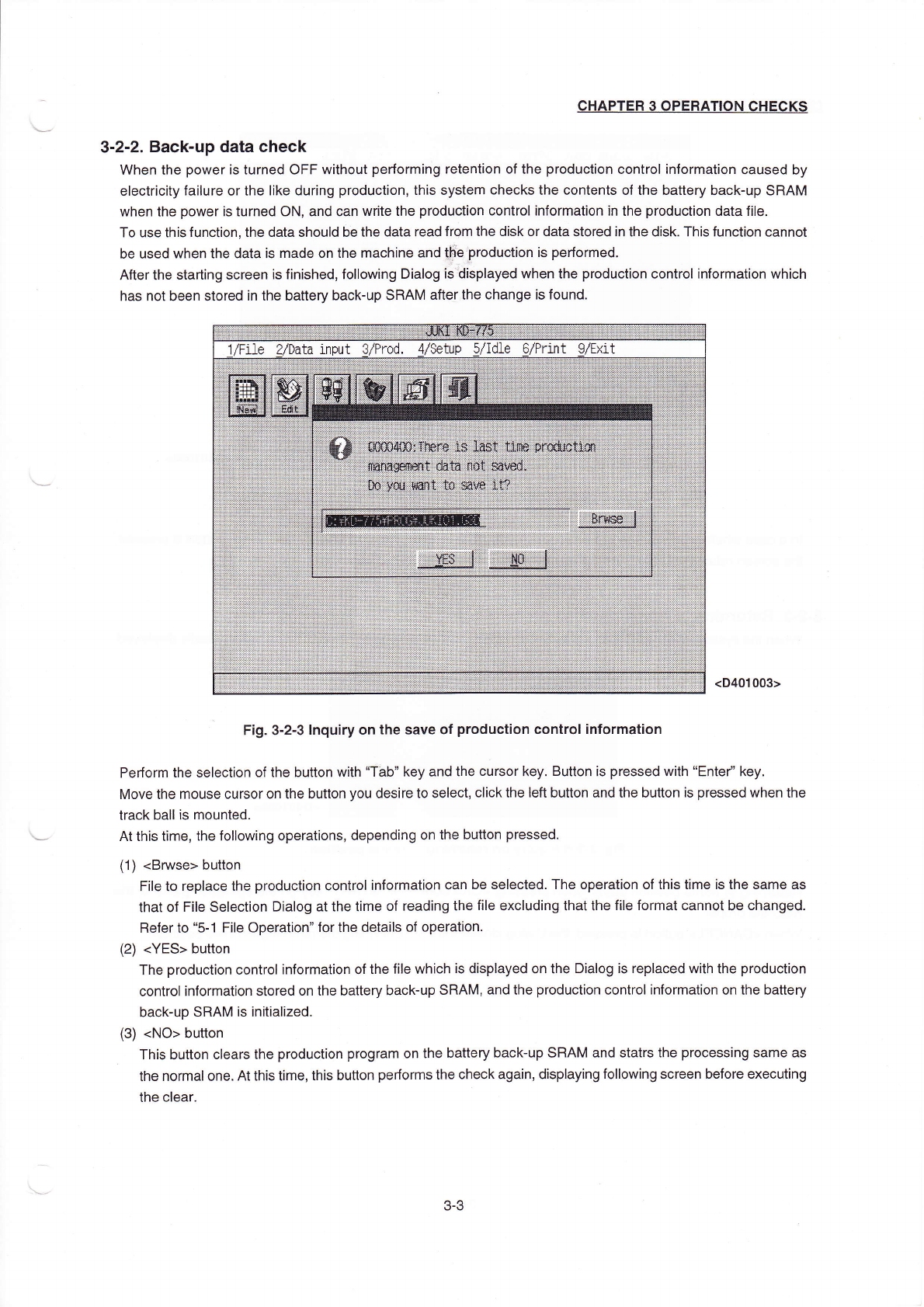
ng screen is finished,fo"owing Dialog is dispIayed when the production controIinformation which
has not been stored in the battery backˉ
up sR'`Ma仪
erthe change is found.
(D401003>
Fig.3ˉ
2ˉ
3Inquiry on the save of production controlinformation
Pe汀orrn the se丨
ection ofthe button
Ⅵ
`ith“
Tab” key and the cursor key,Button is pressed with“
Enter’ key,
Move the rnouse cursor on the button you desire to seIec1cⅡ
ck the Ie仅 button and the button is pressed when the
track ballis rnounted
At this tirne,the fo"oⅥ
`ing operations,depending on the buuon pressed
(1)(Bmse>button
F"e to rep丨
ace the production controlinforrnation can be seIected.The operation ofthis tirne is the same as
that of F"e Se|eCtion Dia|og atthe tirne of reading the f"e excIuding thatthe fⅡ
e forrnat cannot be changed.
Refer to“ 5ˉ
1 FⅡ e operation”
forthe deta"s of operation
(2)(YEs>button
The production ControIinformation ofthe f"e vvhich is displayed on the Dialog is replaced with the production
controlinformation stored on the batten`backˉ
up sR'\M,and the production cOntroIinforrna刂 on on the battery
back¨up SRAM is inⅡ
ialized,
(3)(No)button
This button clears the produGtion program on the ba仗
ery backˉ
up SR'`M and statrs the processing same as
the norrnal one,At this tirne,this bu‖
on pe矸or丫
ns the Check again,displaying fo"owing screen before executing
the cIear.
3ˉ
3
CHApTER30PERATI0N CHECKs
J茁艹扌1饣衤多避扌蛋≡手|手∶1茔扌≡扌夕舛 |1亠||∶ 艹卿
△廿珏≡
壬吾饣:】 ∶吾
=i|i∶
|∶Ξ扌i=Ξ 艹苷∶
1/File2/Data input3/PrOd.4/Setup5/Id1e6/Print9/EXit
繇靳醑
∶籀:
锪
∶鞲瑶
取 茁 棘 轩
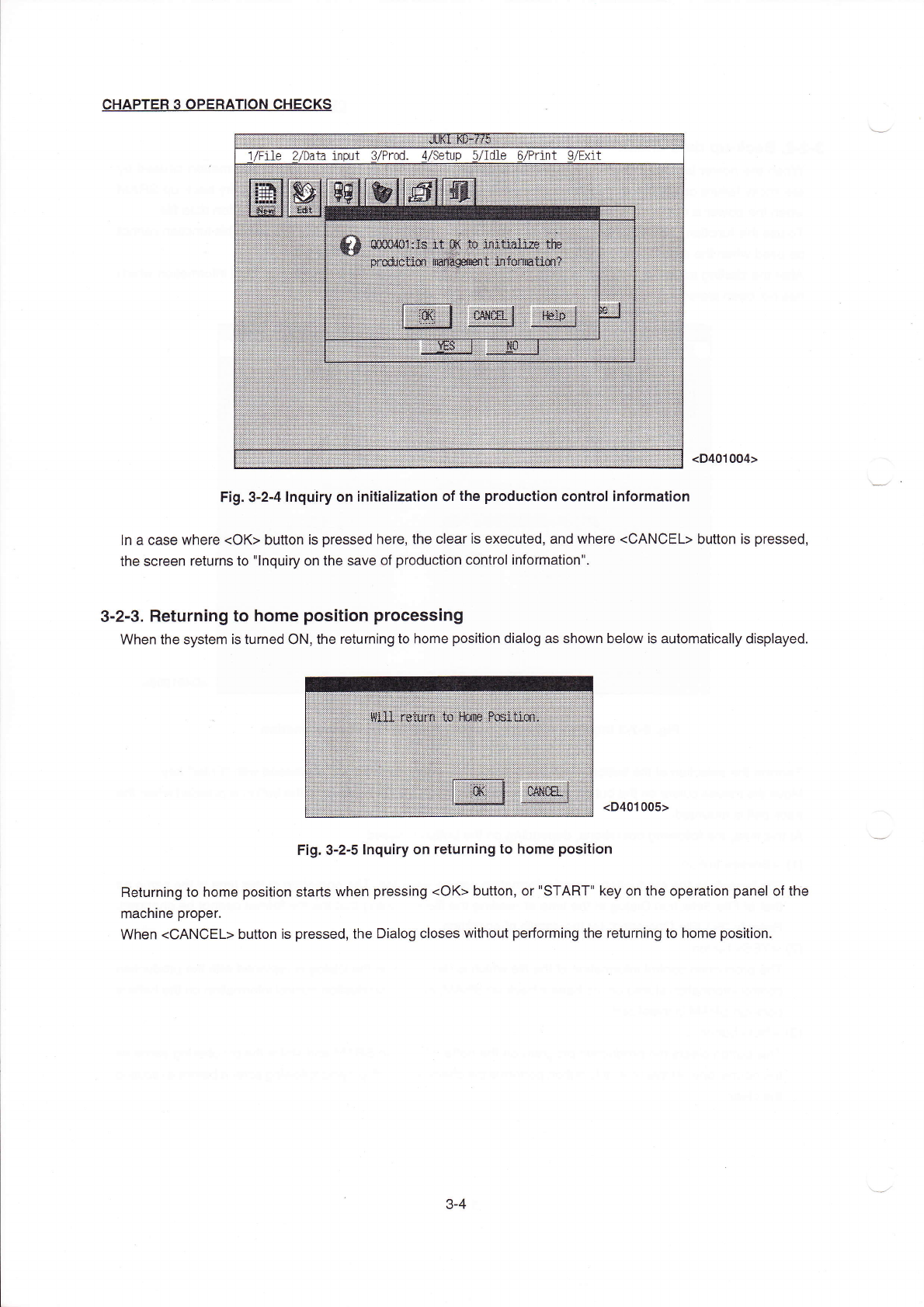
(D401004)
Fig.3冖
2ˉ4Inquiry on init:aⅡ
zation of the production contrOIinformation
ln a case
Ⅵ
`here(0K>buuon is pressed here,the clearis executed,and where<CANCEL>button is pressed,
the screen returns to"InquiFγ
on the save of production contrOIinforrnation".
3…2ˉ3。
Returning to home pos∶
tion proCessing
VVhen the system is turned0N,the returning to home position dialog as shown beloW is automatically displayed
(D401005>
Fig.3ˉ
2ˉ5Inqu∶
ry on returning to home pos"ion
Returning to home pos"ion starts
Ⅵ
`hen pressing(()K>button,or"sTART‖
key on the operation panel ofthe
machine proper。
When(C丿
`NCEL)button is pressed,the Dialog cIOses
Ⅵ
`"hout pe1fornη
ing the returning to home position。
3ˉ
4