JUKI KE775点胶机说明书1.pdf - 第53页
CHAPTER30PER△ △ I0N CHECκ s 3臼 3ˉ 3。 Menu organization 3ˉ 3ˉ 3ˉ 1Top1nenu TOp organizaⅡ on is as shoWn in the figure beIOw,In add"ion,3/Production,s/ldle rnode and9/Ex∶ t can be direcIy ca"ed Ⅵ `"houtthe p…
CHAPTER30PERATION CHECκ
s
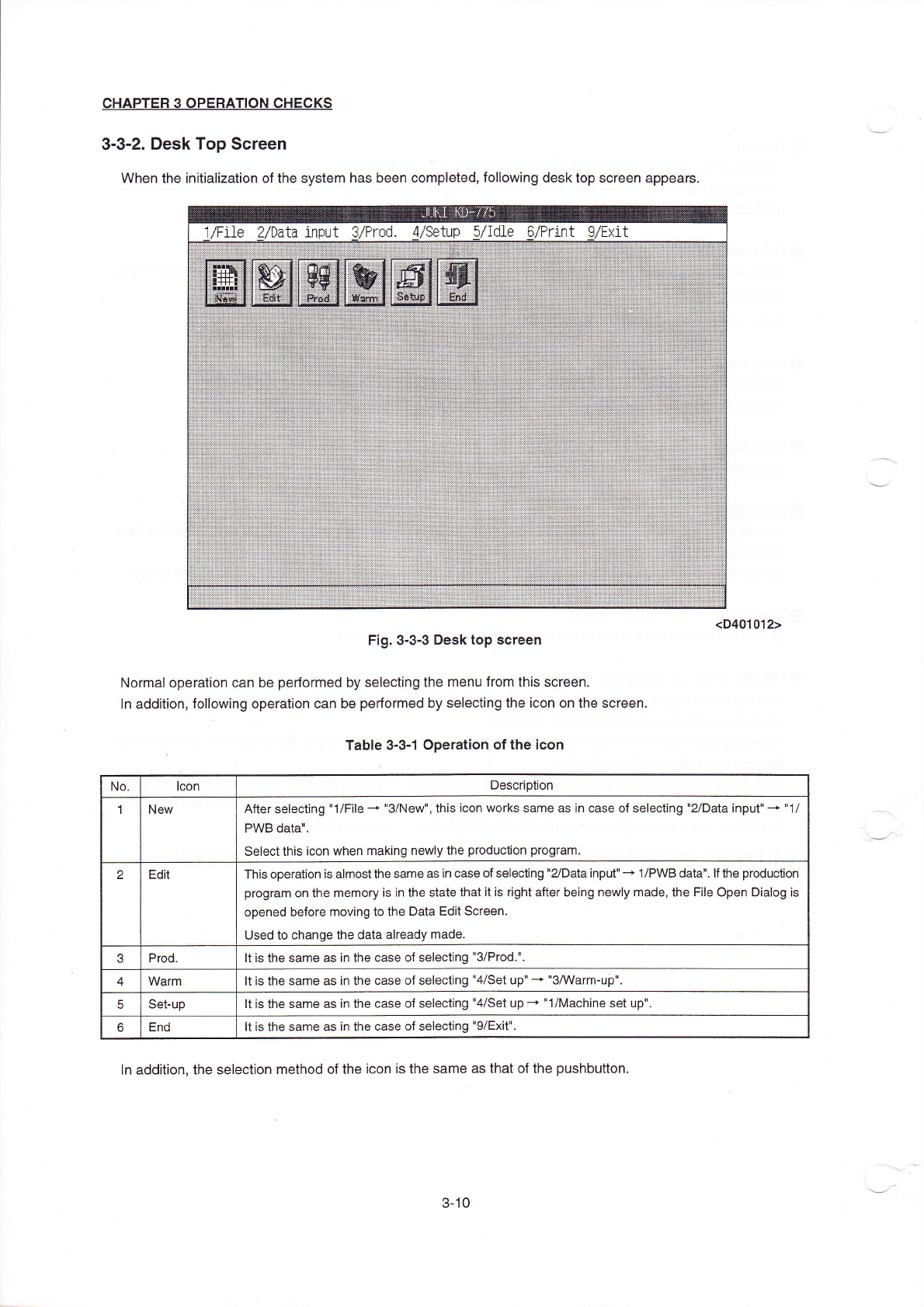
3ˉ 3ˉ2。 Desk Top screen
VVhen the initiaⅡzation ofthe system has been compIeted,fo"oWing desk top screen appears。
Fig.3ˉ 3ˉ3Desk top sCreen
NOrrnal operation can be perforrned by soIecting the rη
enu from this screen.
ln addition,fo"oⅥ
`ing operation can be perforrned by selecting the icon on the sCreen.
Table3ˉ
3ˉ 10peration ofthe icon
ln addition,the seIection rnethod ofthe iCon is the same as that ofthe pushbutton.
<D401012)
No lCon
Desc"puon
1 New
After selecting"1/F"eˉ
◆
"3/NeW",this iCon Works same as in case of selecting"2/Data input"-+"1/
PWB dataⅡ 、
se丨ectthis iCon When rneking newly the production progran⒈
2
Ed" This operation is alrnostthe same as in case of selecting"2`Data input"-。
1/P、VB data" 丨fthe production
program on the rnemory is in the state that"is rIght aner being newly made,the F"e0pen Dia丨 og Is
opened before rnoving to the Data Ed"screen
Used to change the data already made
3
Prod Itis the same as in the case of selecting"3/Prod"
4
Warm 丨tis the same as in the Case of seleC刂
ng"4/set up"—
+"s/Warm-up"
5
Se⒈up
ltis the same as in the Case of selecting"4/Set upˉ
◆
Ⅱ
1/Machine set up"
6
End
Itis the same as in the case of selecting"9/Exit"
3ˉ
10
CHAPTER30PER△
△I0N CHECκs
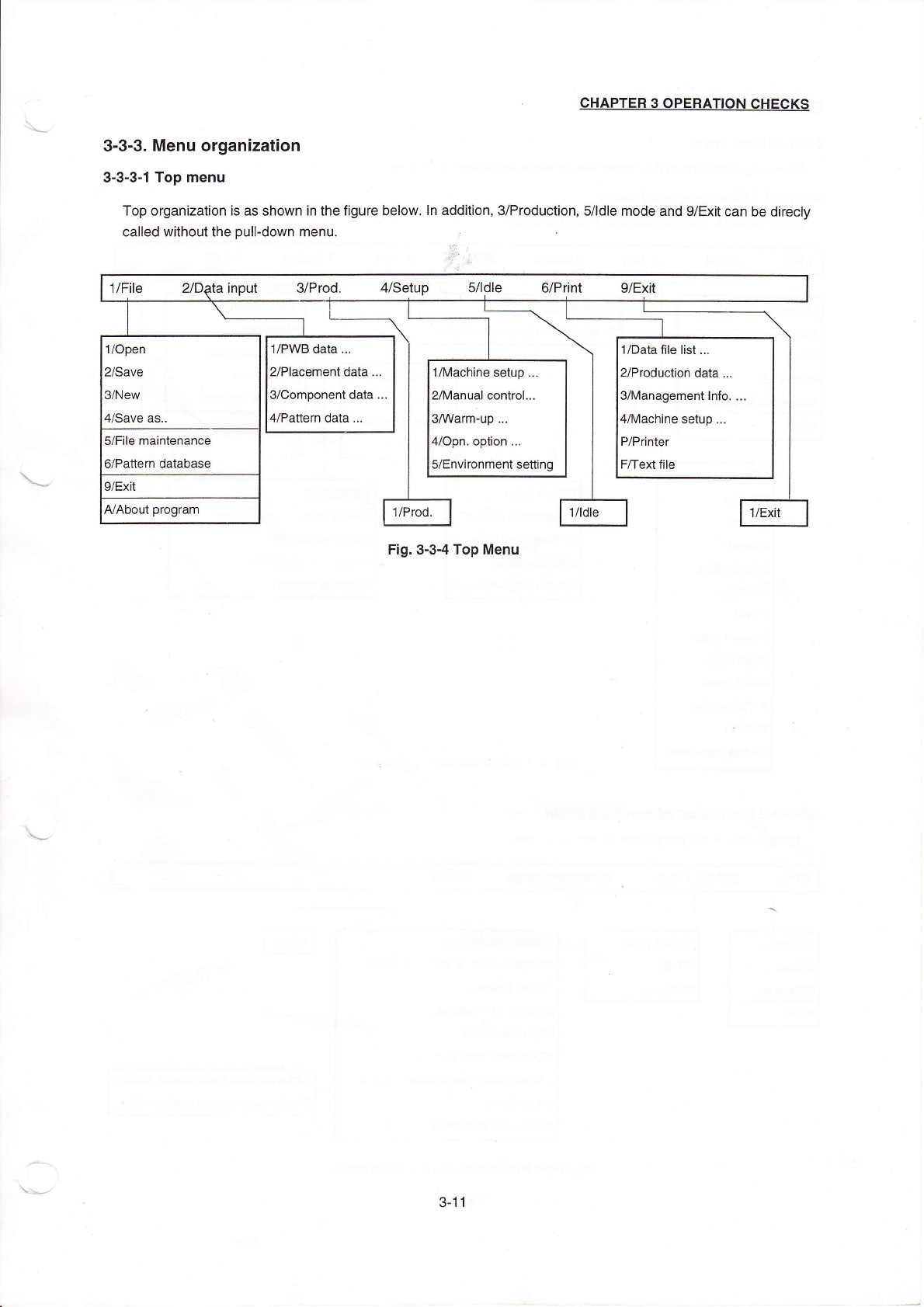
3臼 3ˉ 3。
Menu organization
3ˉ3ˉ 3ˉ
1Top1nenu
TOp organizaⅡ
on is as shoWn in the figure beIOw,In add"ion,3/Production,s/ldle rnode and9/Ex∶
t can be direcIy
ca"ed Ⅵ
`"houtthe pu"ˉ
dovvn menu,
∷
Fig・
0ˉ
3ˉ4Top Menu
`
′
、
、
、
~~'
〃
File ″D尉a in0ut s/Prod, 〃
setup 5刀 dle G/P"nt g/EⅪ
t
1/0pen
2/save
3/New
4/save as,,
1/PllVB data ¨
2/Placement data.¨
3/Component data
4`Pattern data,¨
1/Data】
丨e Ⅱst¨
2/Production data.¨
3/Managementlnfo‘
:
4/Machine setup.¨
P/Printer
F/Text币
le
1/Machine setup ¨
2/Manua丨 contro1.¨
3/werm~up¨ 。
H/opn option ¨
5/Environment se⒒
ing
5/F"e rnaintenance
6/Pa廿
ern database
9/EX"
AlAbout program
1/Prod,
俐de
丨 丨
J/E斑
3ˉ 丬1
CHAPTER30PERATION CHECKs
3ˉ3ˉ3ˉ
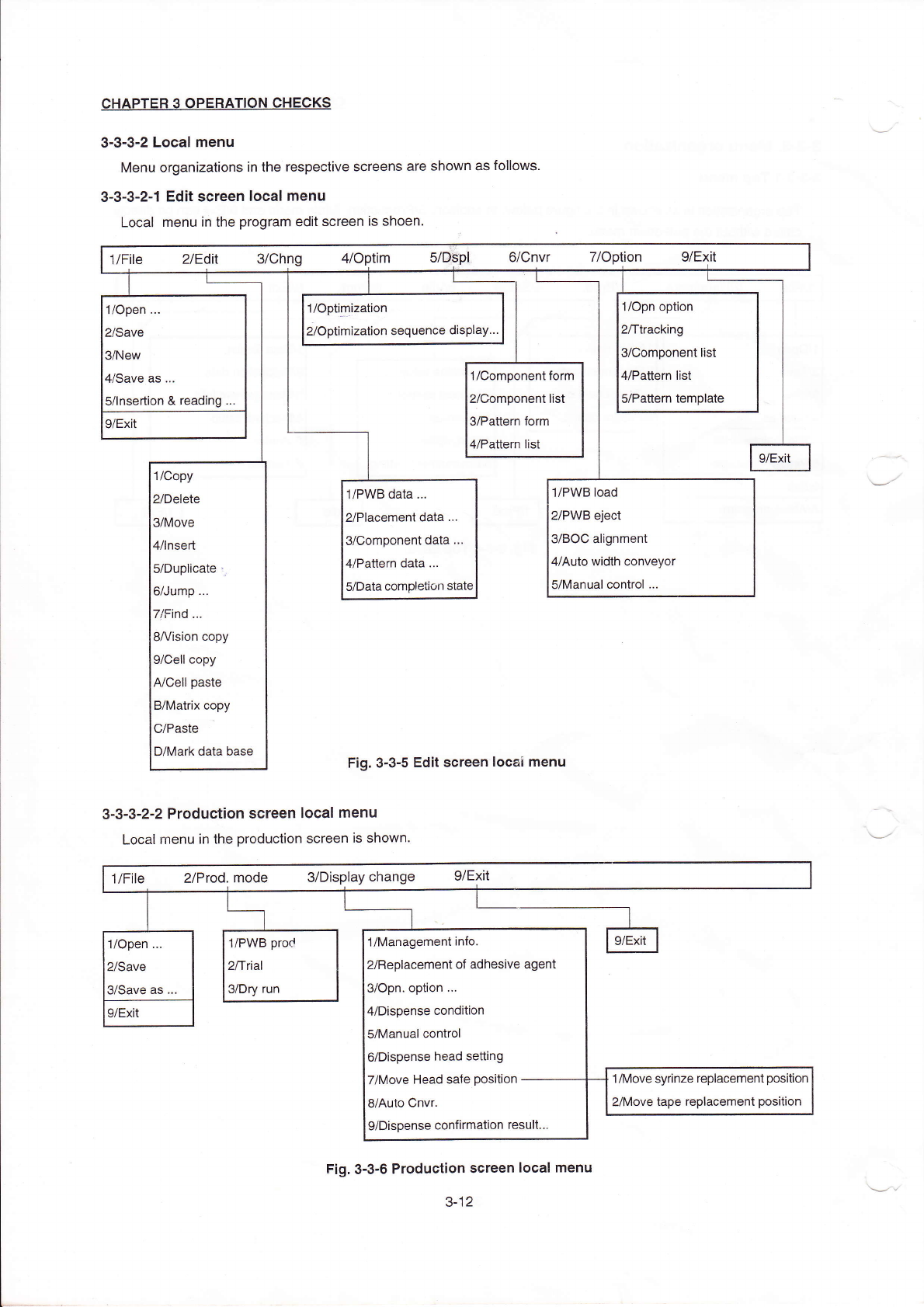
2LOCaI menu
Menu organizations in the respective screens are shoⅥ
`n as foⅡ
ows
3ˉ 3ˉ3ˉ
2ˉ 1Edit sCreen IOcaI rnenu
LOcaI menu ih the program ed"screen is shoen,
1/open
¨
2/save
3/New
闫冫Save as
¨
5/lnsertion&reading
1/°
p”
”
ization
2/0ptimization sequehce dispIay¨
1/opn option
2/ttraCklng
3/Component"st
〃
Pa廿
ern list
s/Pauem temp丨
ate
|/COmponentform
yComponent"st
VPaⅡern form
l/Pa‖
ern list
9/EXⅡ
|
9/EXit
1/Copy
2/Delete
3/MOve
4/Insed
5/Duplicate:i
6/Jump
7/Find.¨
8A/ision Copy
9/Cell copy
A/Ce"paste
B/MatHX Copy
C/Paste
D/Mark data base
1/P、
VB data,¨
2/Placement data
¨
3/Comp°
nent data
¨
4/Pattern data
¨
5/Data comp丨
etion statc
1/Pˇ
VB load
2/PWB丬 eCt
3/B0C alignment
4/Auto Ⅵ
`idth ConVeyor
5/Manual oontro丨
¨
Fig.3Ⅱ 3ˉ5Ed"sCreen loCaI rnenu
3ˉ3ˉ
3ˉ
2冖2ProduCtion screen IocaI menu
LocaIrnenu in the production screen is shown,
1/F"e
2/Prod.mode
s/DisPlay change g/E冫
Jt
毡
1/0ρen
¨
2/Save
3/save as,,
1/P、VB prod
2/t"al
a/Dry run
1/Managementinfo
2/ReplaCement of adhesive agent
3/0pn op刂
on
¨
4/Dispense condition
5/Manual control
6/Dispense head se⒒
ing
7/Move Head sa忄
e position-ˉ
ˉˉˉ
8/Auto CnVr
9/Dispense confirmation resu"¨
9/EX"
1/MoVe syrinze replacement position
2/MoVe tape repIaGement pos"i°
n
Fig.3ˉ
3ˉ 6ProduCtion screen local menu
3ˉ
12