JUKI KE775点胶机说明书1.pdf - 第57页
CHAPTER30PERATlON CHECκ s ln case ofthe float∶ ng rnenu,the item which has been inve吐 edIy dispIayed rnoves by the cursor key( ↑ , ↓ )in the venical direction 婴 溺 茁 ∶ 婴 <D203005> Fig.3ˉ 3ˉ 13Pu"ˉ down menu dis…
CHAPTER30PERATI0N CHECκ
s
3ˉ3ˉ
4。 Menu se∶ection
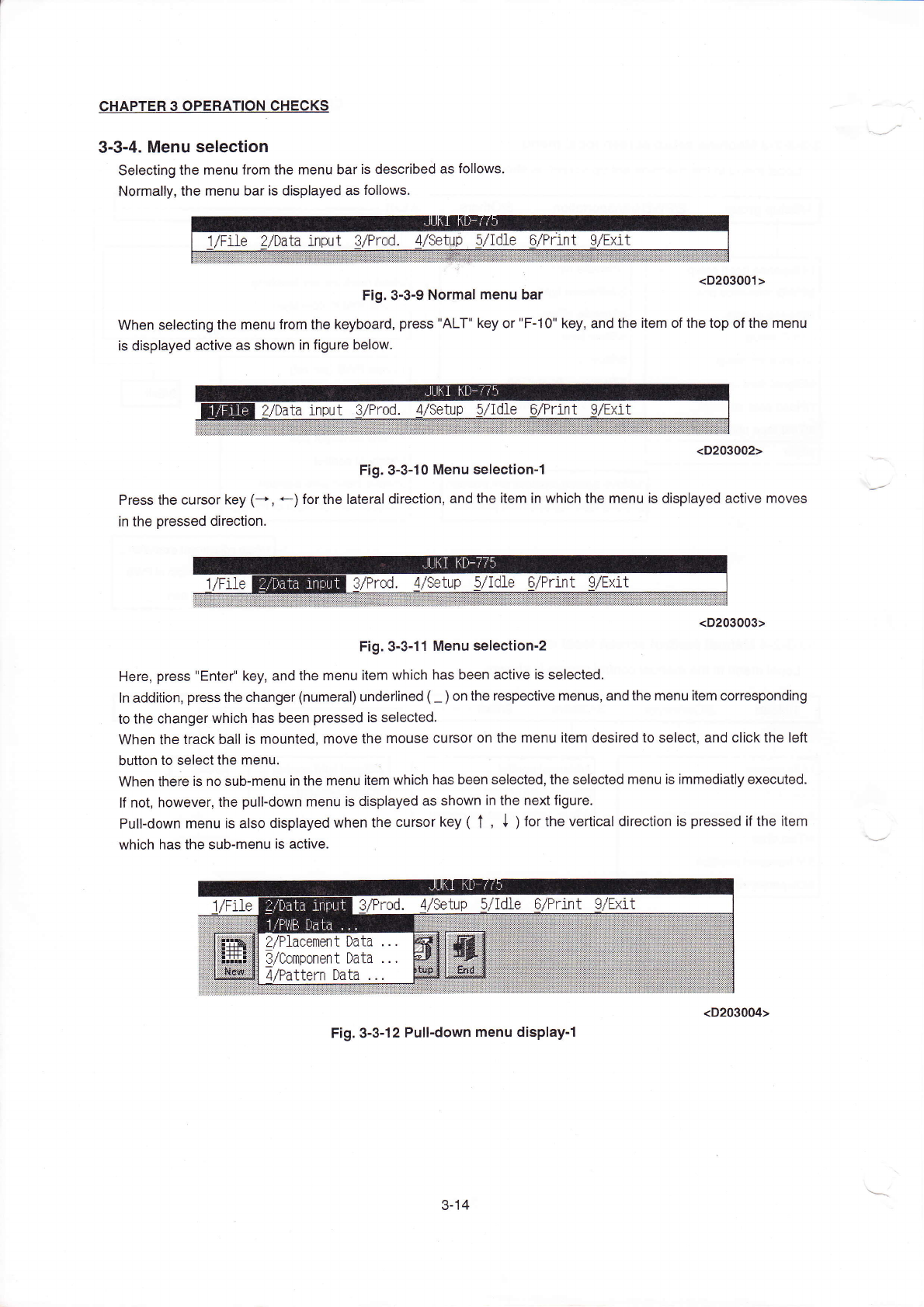
Selecting the rnenu from the rnenu baris described as fo"ows。
Norrna"y,the rnenu baris displayed as fo"ovvs,
(D203001>
Fig.3ˉ 3ˉ9N0rmaI menu bar
VVhen seIecting the rη
enu from the keyboard,press"ALT"key or"Fˉ
10"key,and the Ⅱem ofthe top ofthe rnenu
is dispIayed aCtive as shown in figure beloW.
Press the cursor key(-◆
∶n the pressed direction。
(D203002>
Fig.3ˉ 3ˉ
10Menu seIec"onˉ
1
←
)forthe丨
atera|direc刂
on,and the
Ⅱem in which the menu is dispIayed acⅠ
ve
勰 槲
迳蛋奏冬这≡圭
<D203003>
Fig,3ˉ 3ˉ 11Menu selectionˉ
2
Here,press"EnterI key,and the rnenu item
Ⅵ
`hiCh has been actiVe is selected
ln addition,press the changer(numeral)underIined(~)on the respective rnenus,and the rnenu item corresponding
to the changer vvhich has been pressed is seleCted.
VVhen the track ba"is rnounted丿
rnove the rnouse Cursor on the rnenu item desired to seIec1and cⅡ
ck the le伍
button to seIectthe rnenu
VVhen there is no sub-menuin the rnenuitem which has been se丨
ected,the seIected rnenu is∶
mmediatly executed.
lf not,however,the pullˉ
down rnenu is displayed as shoⅥ
`n in the nextfigure,
PulIˉ
down menuis a丨
so displayed when the cursor key(↑
,
↓
)for the Vertical direCtion is pressed亻
the
Ⅱ
em
WhiCh has the subˉ
menu is active.
Fig,3冖
3ˉ 12pu"ˉ
down menu displayˉ
1
3ˉ
14
CHAPTER30PERATlON CHECκ s
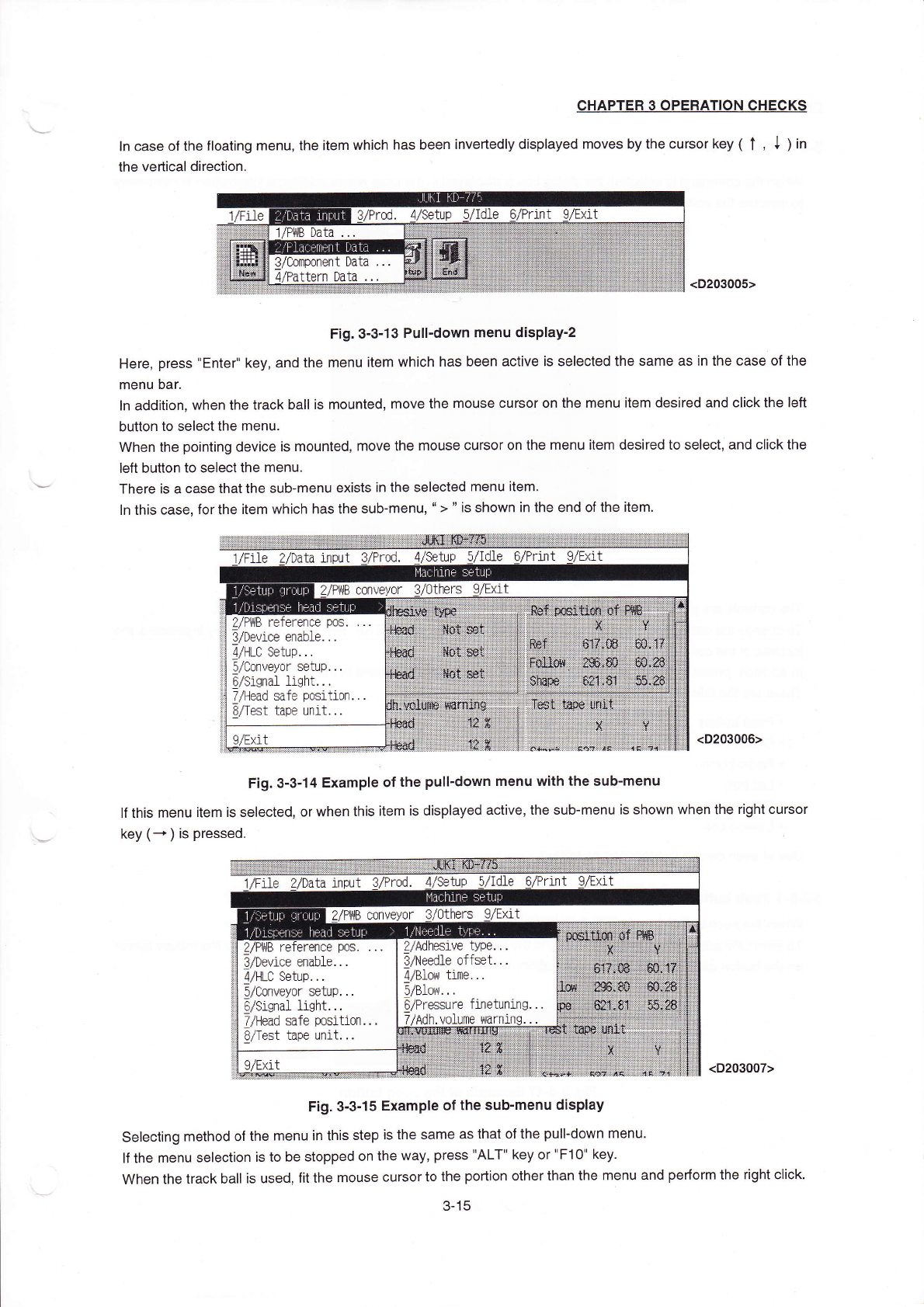
ln case ofthe float∶
ng rnenu,the item which has been inve吐
edIy dispIayed rnoves by the cursor key(
↑
,
↓
)in
the venical direction
婴
溺茁∶ 婴
<D203005>
Fig.3ˉ
3ˉ
13Pu"ˉ
down menu displayˉ
2
Here,press"Enter"key,and the rnenu item vvhich has been active is selected the same as in the case ofthe
menu bar。
In add"ion,when the track ba"is rnounted,rnove the rnouse cursor on the rnenu item desired and cⅡ
ck the Ieft
button to selectthe rnenu.
When the pointing device is rnounted,rnoVe the rnouse cursor on the rnenu item desired to seIect,and cⅡ
ck the
left button to selectthe rnenu
There is a case thatthe sub冖
menu eXists in the seIected menu item.
丨n this Case,forthe iteΠ
η
Ⅵ
`hiCh has the sub-menu,“
>” is shoWn in the end ofthe"em。
器袋笠I罴瀑蛋萎薮:
鞲漪i菸艹
:;富
∶
吝
∶
∶:瀚
1/F11e
input3/PrOd,4/setup
1nt
(D203006)
Fig.3ˉ
3ˉ丬4EXampIe ofthe puⅡ
ˉ
down menu With the subˉ
menu
"this menu item is selected,or when this item is dispIayed active,the sub-menu is shoWn When the right cursor
key(→
)。
pressed。
ta input
β
/PrOd.
tup 5/Idle
黼
嬲
∶£大t扌∶:i-i
∷ ;:t+耸
<D203007>
Fig.3ˉ
3ˉ
15EXampIe ofthe subˉ
menu dispIay
seIecting rnethod ofthe rnenu in this step is the same as that ofthe puⅡ
ˉ
down rnenu,
丨fthe rnenu selection is to be stoppρ
d on the VVay,press"ALT"key or"F10"key.
When the track ba"is used,f"the rnouse cursorto the portion otherthan the rnenu and perforrn the right c"ck,
3-15
CHAPTER30PERATION CHECκ
s
3ˉ3冖
5。 DiaIog and controI
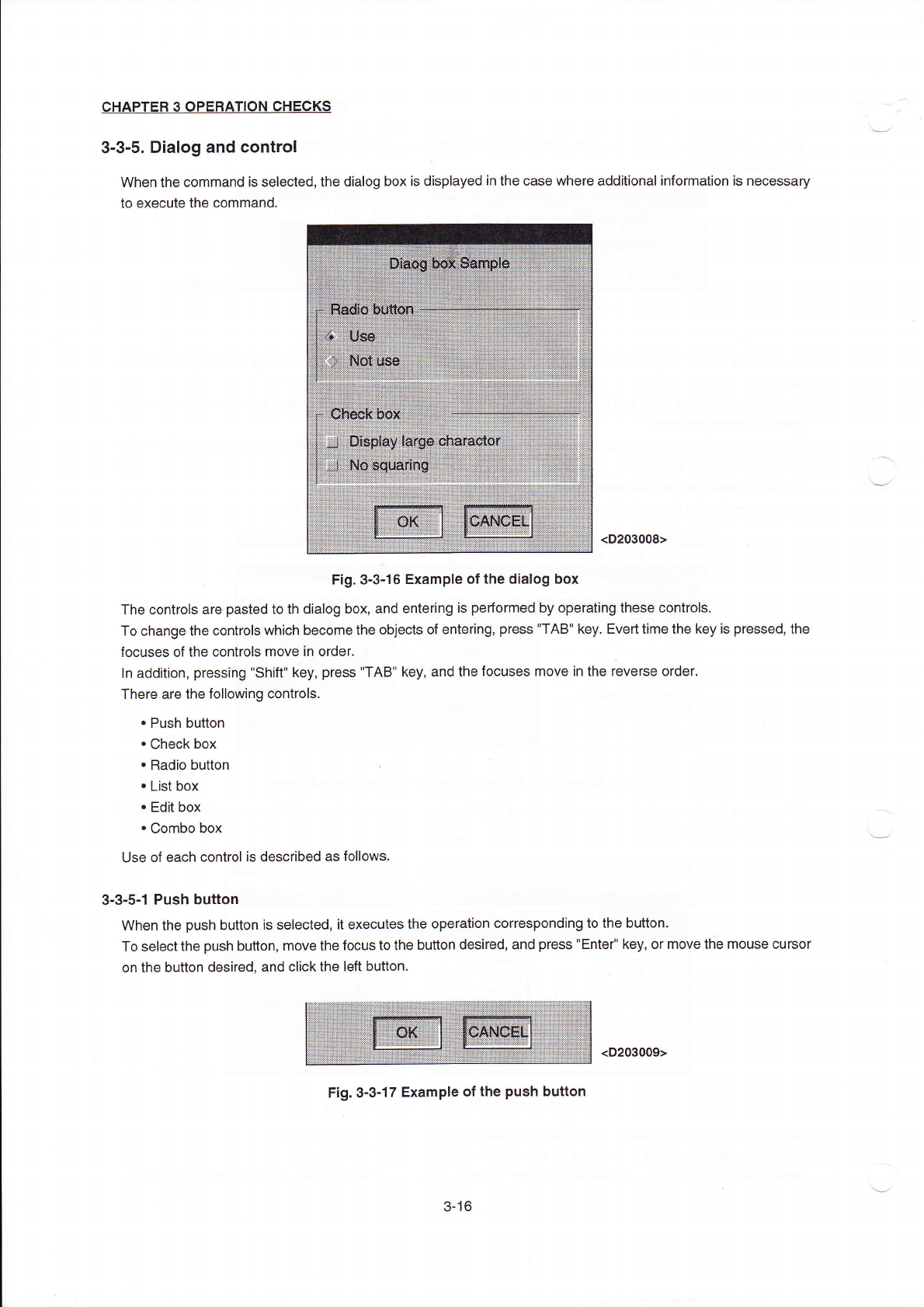
VVhen the Commandis se丨
ected,the diaIog box is disp|ayed in the casρ
where additionalinforrnation is necessaγ
to eXecute the comrnand,
<D203008)
Fig.3ˉ
3ˉ
16EXampIe ofthe d∶
alog box
The cOntrOIs are pasted to th dialog box,and entering is perforrned by operating these controls,
TO change the controls whiCh become the objects of ente"ng,press"TAB"key.EVed tirne the key is pressed,the
focuses of the contrOIs rnove in order
丨n addⅡ
ion,pressihg"Sh"t"key,press"TAB"key,and the focuses rnove in the reVerse order,
There are the fo"oWing contrOIs.
・
Push button
・
Check box
・
Radio button
∷
・
List boX
・
Edit box
・
Combo boX
∪se of each contro丨
is described as follows
3ˉ
3o5ˉ1Push button
When the push button is seIected,"executes the operation corresponding to the button。
TO selectthe push bu廿
on,rnove the fOcus to the buuon desired,and press"Enter"key,orrnove the Fnouse cursor
on the button desired,and c"ck the Ie仪
button。
F:g.3ˉ
3ˉ
17EXampIe ofthe push button
3ˉ
16
(D203009)