JUKI KE775点胶机说明书1.pdf - 第43页
CHAPTER30PERA丁 ION CHECKs CHAPTER30PERATION CHECKs 3△ .operation Check cAuTION ∷ ConⅡ rm thatthe equ巾 mentis plaCed hor眨 ontally|nd in the c。 ndⅢ onin wh℃ h there‘ no boseness. Confirm thatIock nuts atthe leg p° rtions o…
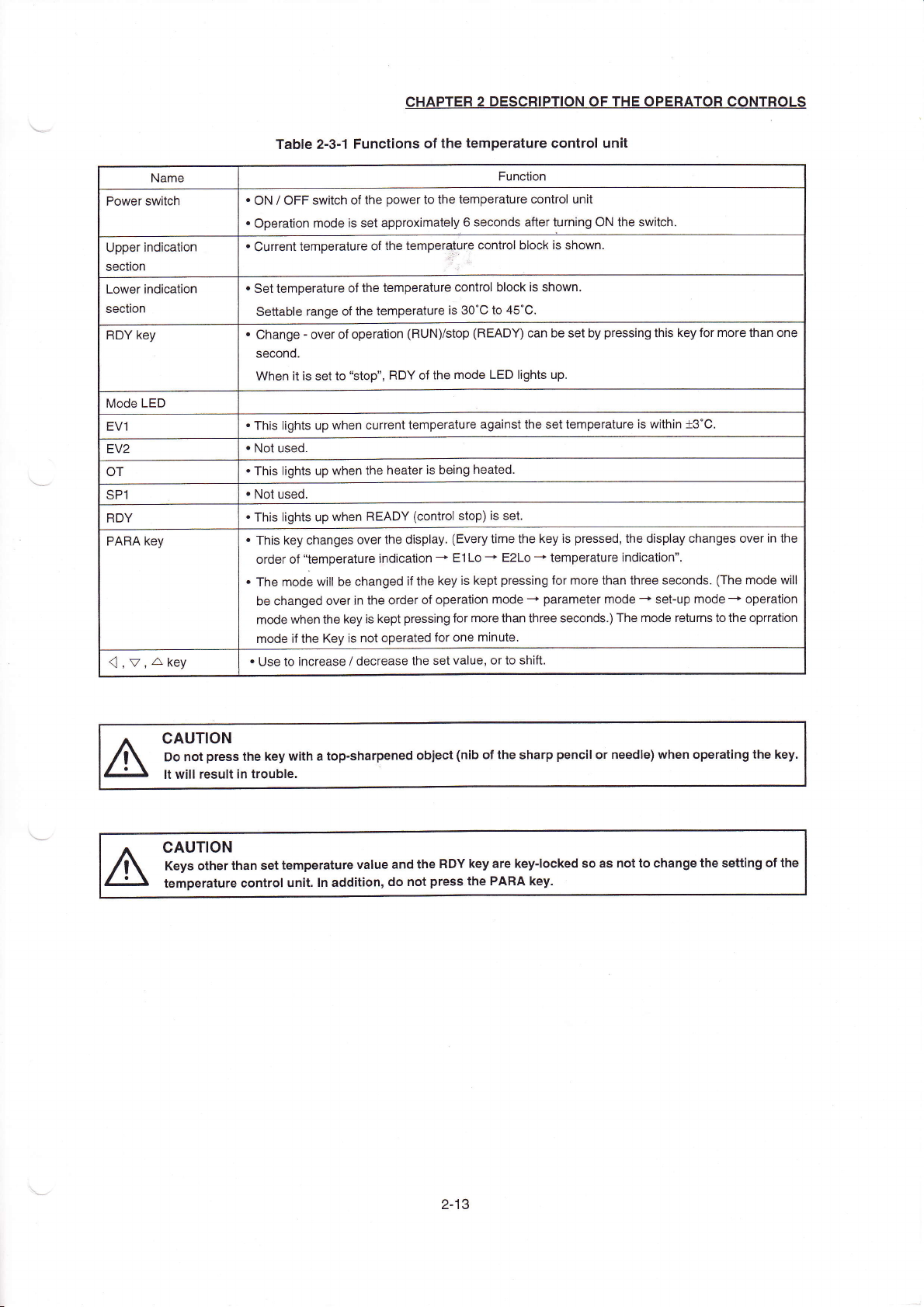
Name
Function
Power switch
・
0N/0FF switch ofthe p°
werto the temperature control un"
・
0peration rnode is set approxirnately6seconds anerturning0N the sⅥ
`itch,
Upper indica刂
on
section
・
Currenttemperature ofthe temperaturρ
contrOI bIoCk is shoWn
Lower indication
section
・
settemperature ofthe temperature contrOI block is shoⅥ
`n.
se廿able range ofthe temperature is30°
C to45°C,
RDY key
・
Changeˉ
over of opera】
on(R∪
Nyst°
p(READY)can be set by pressing this key for more than one
second
、Ⅳhen"is set to“
st0p’
’
,RDY ofthe mode LED
Ⅱ
ghts up
Mode LED
EV1
・
This lights up when currenttemperature against the settemperature is w"hin±
3°
C,
EV2
・
NOt used
0T
・
This lights up when the heateris being heated
sP1
・
NOt used
RDY
・
This lights up when READY(contr°
I stop)is set
PARA key
・
This key changes overthe display,(Every time the key is pressed,the display changes overin the
order of“temperature indiCation-→
E1Loˉ
十
E2Lo→
temperature indiCation”
,
・
The rnode wi"be changed ifthe key is kept pressing forrnore than three seconds (The rn°
de w"l
be changed oVerin the order of operation rnodeˉ
→
parameter rnode→
setˉ up rnodeˉ
+operation
mode when the keyis kept pressing for more than three seconds,)The rn°
de returns to又
he oprration
mode ifthe Key is not operated for one minute
司
,v,△
key
・
∪se to increase/decrease the set Value,orto shi钆
CHAPtER2DEsCRIPTION OF THE oPERAT0RC0NTROLs
TabIe2ˉ 3ˉ
1FunCtions ofthe temperature controI unit
cAuTlON
Do not press the key with a topˉ
sharpened objeCt(nib ofthe sharp penc"or needIe)when°
perating the key.
It Wi"result in troubIe.
CAUTION
Keys otherthan settemperature vaIue and the RDY key are key丬
ocked so as notto change the seⅡ
ing ofthe
temperature control un∶
t.ln add"ion,do not press the PAflA key.
2丬 3
CHAPTER30PERA丁
ION CHECKs
CHAPTER30PERATION CHECKs
3△
.operation Check
cAuTION
∷
ConⅡ rm thatthe equ巾
mentis plaCed hor眨 ontally|nd in the c。 ndⅢonin wh℃h there‘
no boseness.
Confirm thatIock nuts atthe leg p°
rtions of the0ouipment proper are sufficiently tightened(f°
ur points)
ConⅡ
rm that correct power and air suppIy to the machine are e彳
ected,
●
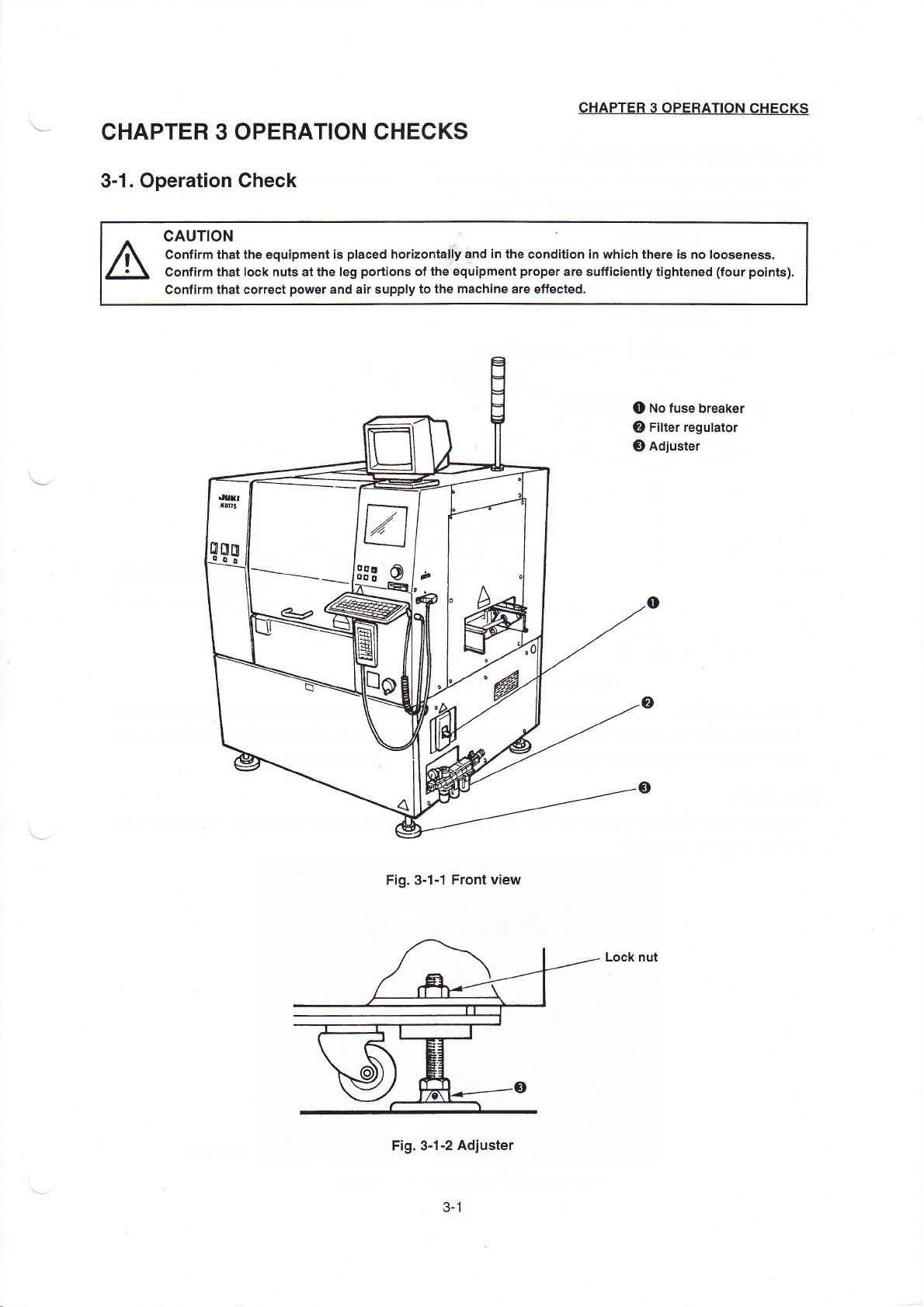
No fuse breaker
②
FⅡter reguIator
0Adjuster
Fig.3ˉ
1ˉ 1Front View
Fig。 3ˉ
1ˉ2Adjuster
3ˉ
1
CHAPTER30PERATION CHECKs
3ˉ
2.starVEnd ofthe syst0m
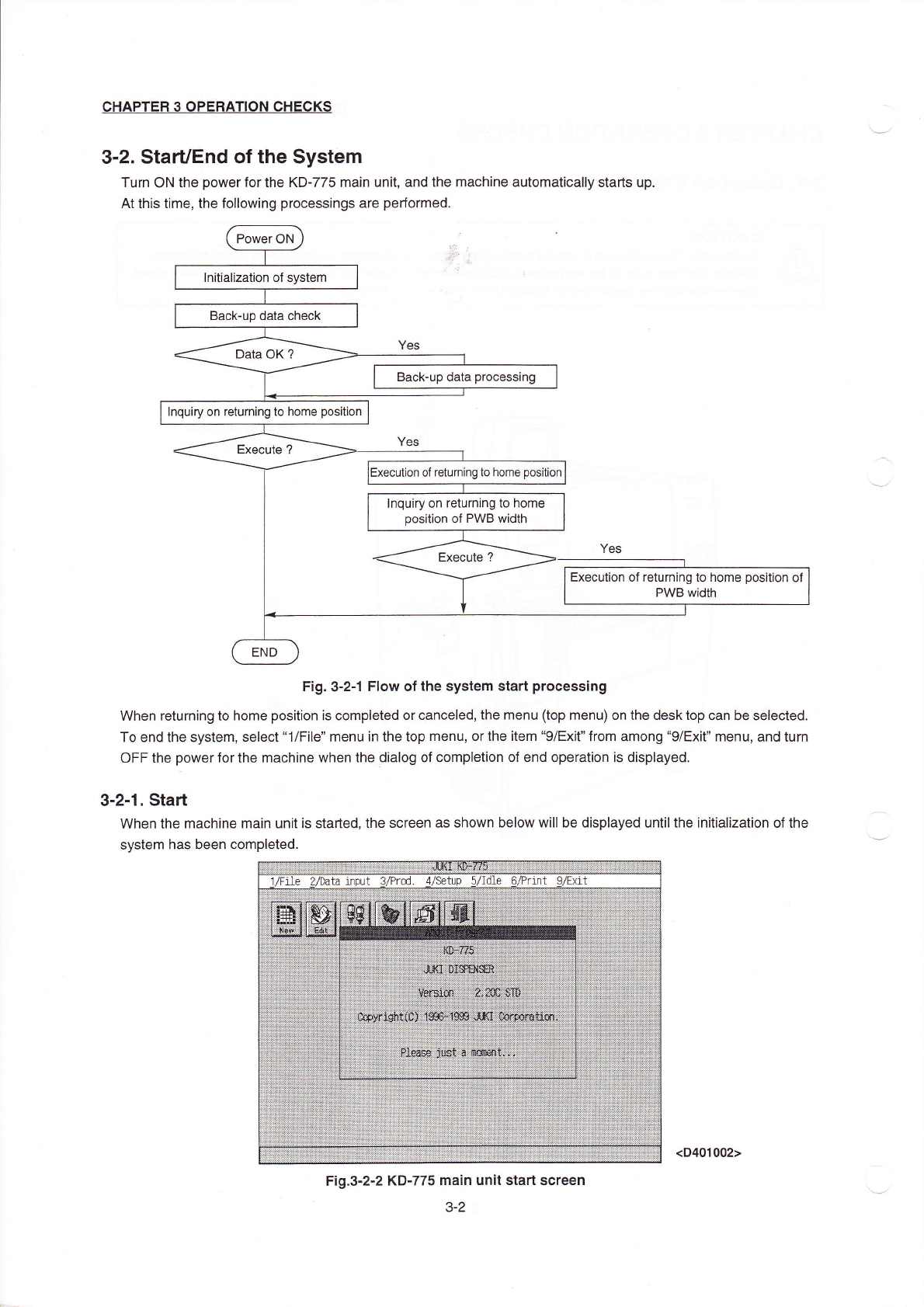
Turn ON the poWerforthe KDˉ 775main un",and the maChine automatica"y starts up.
At this tirne,the fo"owing processings are perforrned,
Fig.3ˉ 2丬 FloW ofthe system start processing
When returning to home position is compIeted or0anceIed,the menu(top rnenu)on the desktop can be seIected。
To end the system,select“
1/FⅡe” rnenu in the top menu,orthe item“
9/Exit” from among“ 9/EX"” rnenu,and turn
oFF the poⅥ
`erforthe machine when the oiaIOg of CompIetion of end operation is displayed,
3ˉ
2ˉ1。 sta"
VVhen the rnachine rnain unitis staded,the screen as shown beIOw w∶
"be dispIayed untiIthe in"iaⅡ
zation of the
systenη
has been completed.
芽艹
“咚
年书扌i艹++社+羊卉:|l(≡扌
=∶
|△甘
-△
≡△谬掸
趸莎多淖佛 |
1/Fne
〃
1ydta input VPrOd d,/setup5'
dle 6/Pr】
nt 9/Ex△ t
拄扌扌玎扌
扌艹关礻1i
扌艹亻纟艹
∷菇∶艹冉
王姗
岱锚 七
扌辂璇
篝篝罢
≡缓:箝
咖
。
隹箝鞲
∶
=珏
≡
=垂=率
纟扛年羊
Fig.3ˉ
2ˉ2【<Dˉ
775Ina∶
n un∶ t sta^screen
3ˉ 2
Backˉ up data processing
lnquiry on returning to home
ρ
os"ion
of returning to home pos"ion
Inquiry on returnIng to home
pos"ion of P、
ⅣB width
Execu】on ofreturning to home pos"ion of
PWB width
(D401002)