JUKI KE775点胶机说明书1.pdf - 第31页
CHAPTER2DEsCRIPTI0N0F THE0PERAT0RC0NT且 oLs Key Function INsER丁 ・ ∪ se to seIect eitherthe insed or overtype rnode,the key toggⅡ ng betvveen the two. DELETE ・ Use to erase the character atthe cursor, H0ME ・ ∪ se to move t…
CHAPTER2DEsCRIPTION OF THE oPERAT0RC0NTR0Ls
CHAPTER2DEsCRlPTION OF THE oPERATOR CONTROLs
2冖 1.FunCtions of Keys and switches
2丬 丬。
Keyboard
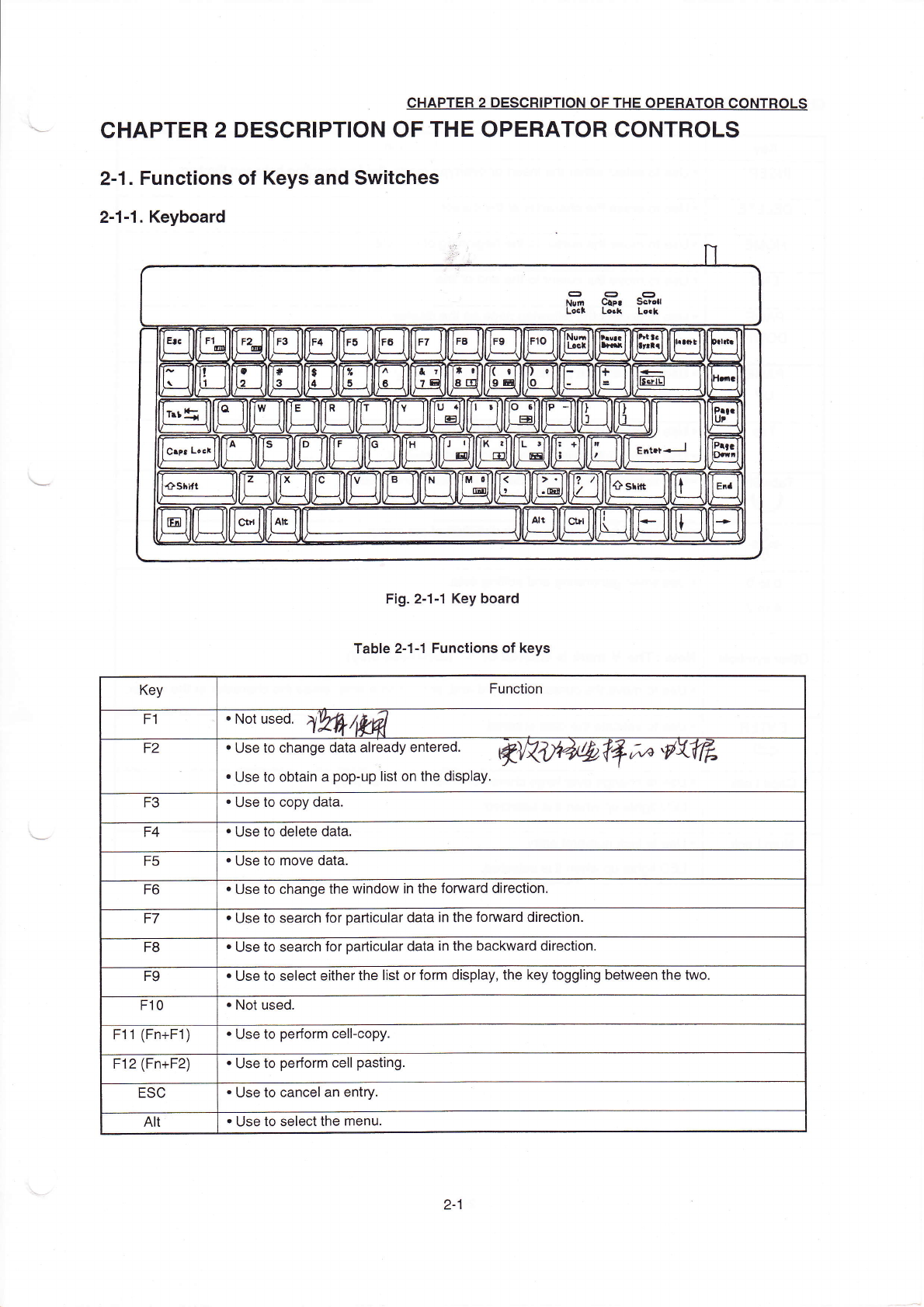
F:g.2ˉ
1ˉ 1κey board
TabIe2ˉ
1冖 1 FunCtions of keys
Key
Function
F1
・
Nd Ⅱ蒯,刁
黝姒
F2
・
∪se∞ change d引
a already em∝
e⒍
烤
突
0'刁
j0叫
饧
氵
〃丝
》
彳
彡
卩
勋
V舴
・
∪se to obtain a popˉ
up list on the display,
F3
・
∪se to copy data.
F4
・
Use to delete data.
F5
・
Use to move data.
F6
・
Use tO change the vvindow in the fomard direction,
F7
・
Use to search for padlcu丨
ar data in the fomard direction.
F8
・
∪se to search for pa"icuIar data in the backward direction,
F9
・
Use to se|ect e"her the Iist orform disp丨
ay,the key togg|ing betⅥ
`een the two.
F10
・
NOt used.
F11(Fn+F1)
・
Use to perform ceⅡ
ˉ
copy
F12(Fn+F2)
・
Use to perform ceⅡ
pasting
ESC
・
∪
se to canceI an entry,
AⅡ
・
Use to seIectthe rnenu
2ˉ
1
CHAPTER2DEsCRIPTI0N0F THE0PERAT0RC0NT且
oLs
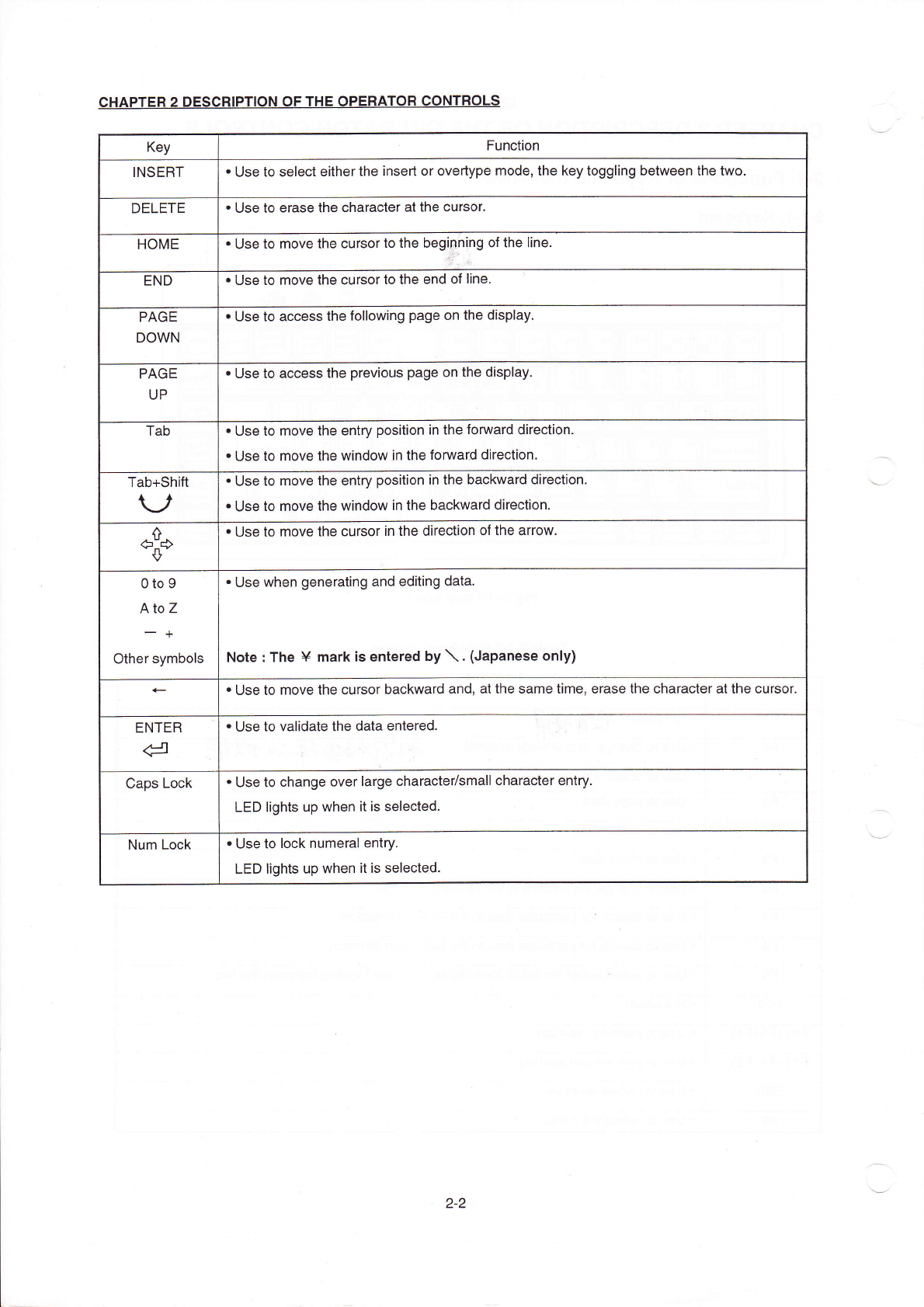
Key
Function
INsER丁
・
∪se to seIect eitherthe insed or overtype rnode,the key toggⅡ
ng betvveen the two.
DELETE
・
Use to erase the character atthe cursor,
H0ME
・
∪se to move the cursorto the begi卩
h!ng of the Iine.
END
・
Use to rnove the Cursorto the end of
Ⅱne,
PAGE
D0Ⅵ
`N
・
Use to aCCess the fo"owing page on the dispIay,
PAGE
UP
・
Use to access the previous page on the dispIay.
Tab
・
∪
se to rnove the entry position in the fomard direction.
・
Use to moVe the windoW in the fomard direc刂
on,
Tab+shi仳
V
・
∪se to moVe the entry position in the baCkward direction,
・
∪
se to rnove the windovv in the backward direction
◇
・
∪se to rnove the cursorin the direction ofthe arrow,
o to9
A to z
- +
other symboIs
・
∪se when generating and ed∶
ting data,
Note:The¥
mark∶ s entered by′ \.(Japanese only)
・
∪se to rnove the cursor backward and,atthe same tirne,erase the character atthe cursor
ENTER
d
・
∪se to vaⅡ
date the data entered
Caps Lock
・
Use to change oVerIarge characte〃
smaⅡ
character entry
LED lights up VVhen"is selected,
Num LOck
・
Use tO IOck numeraI entγ
.
LED Ⅱ
ghts up when itis seIected。
2ˉ 2
CHAPTER2DEsCRIPTION OF THE oPERATOR C0NTR0Ls
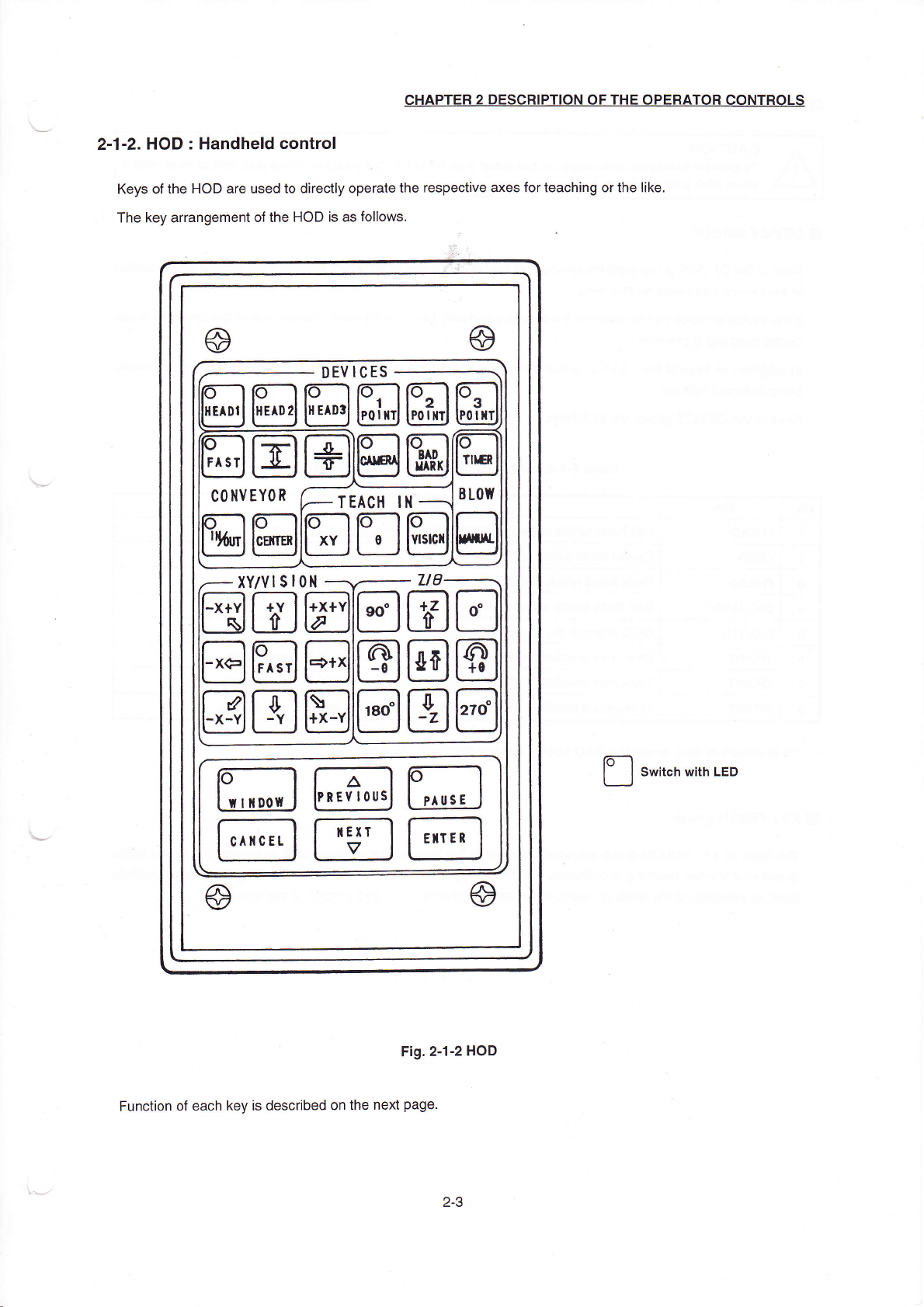
2ˉ1ˉ2.H0D:HandheId controI
Keys ofthe HC冫
D are used to directIy operate the respective axes forteaching orthe Iike.
The key arrangement ofthe HOD is as follows.
sW"Ch W"h LED
Fig,2斗
2HOD
Function of each key is desGribed on the next page.
⑨
⑨
⑥
⑨
DEVICEs
国圄
COⅡ
VEΥ
OR
TEACH lⅡ
目
□固
XΥ
`VlsIO"
2ˉ 3