JUKI KE775点胶机说明书1.pdf - 第7页
CONTENTs CHAPTER1GENERAL.¨ ""¨ ¨ ¨ ¨ "¨ """"¨ """"… … … "・ Lj・ … … """""… … ""¨ "1丬 1ˉ 1.Features and speCifiCat∶ ons。 ¨…
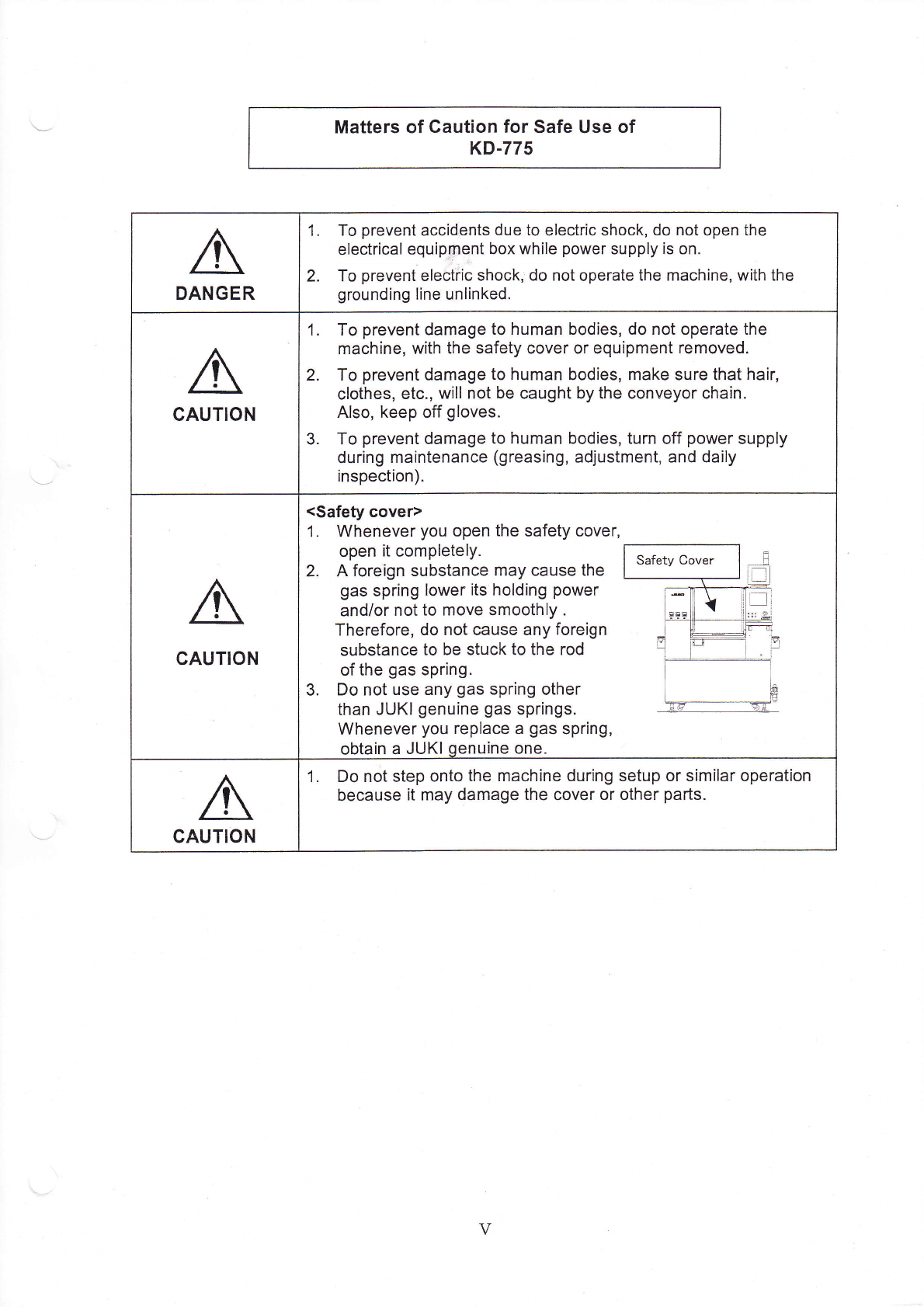
Matters of CauJon for safe use of
κDˉ775
DANGER
1. To prevent aGcid∷
ents due to electric shock,do not open the
e|ectrica丨
equipment box、
″h"e powersupp丨
yis on.
2. To preVent e|eotHc shock|do not operate the Fnachine,vvith the
grounding丨
ine unⅡ
nked‘
cAuTION
1. To preVent damage to human bodies,do not operate the
machine,vvith the safety cover or equipment removed,
2. To prevent damage to human bodies,Fη
ake sure that hair,
c丨 othes,etC.,vvi"n0t be caught by the Conveyor chain‘
Also,keep off g|oVes.
3. To prevent damage to human bodies,turn off power supp丨
y
during rnaintenance(greasing,adjust1η
ent,and daⅡ
y
inspection).
GAuTION
<safeV cover)
1, VVhenever you open the safety cover,
open it comp|ete丨
y.
2. A foreign substance Fη
ay cause the
gas spring|ower1s ho|ding poweΓ
and/or notto rnove smooth丨
y.
Therefore,do not cause any foreign
substance to be stuCk to the rod
ofthe gas spring.
3. Do not use any gas spHng other
than JUKl genuine gas springs,
Whenever you rep|ace a gas spring,
obtain a JUK丨
qenuine One.
CAUTION
1, Do not step onto the machine dur|ng setup or siFη
Ⅱ
ar operation
because it rnay damage the cover or Other parts.
V
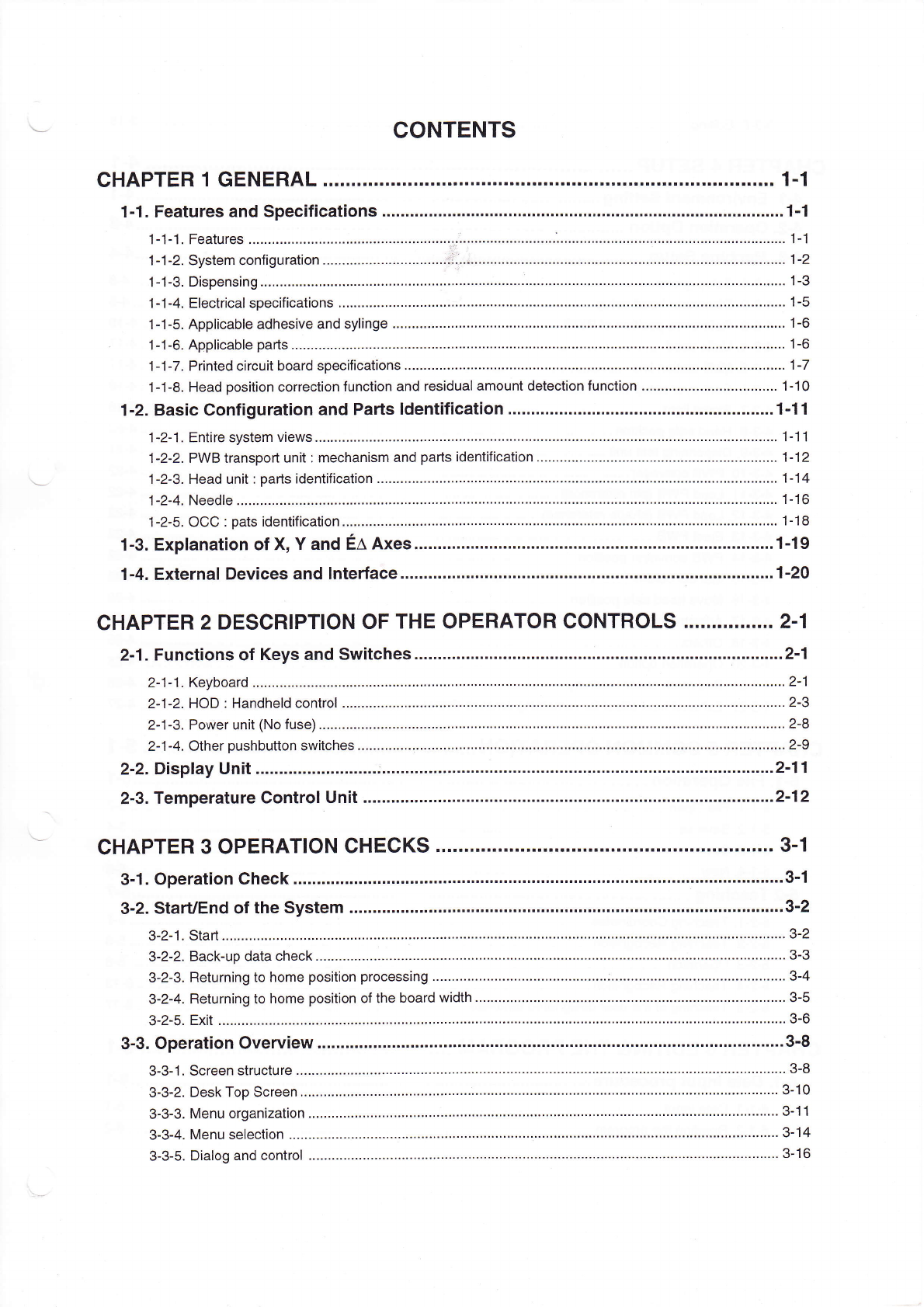
CONTENTs
CHAPTER1GENERAL.¨
""¨
¨
¨
¨
"¨ """"¨
""""…
……
"・
Lj・ ……
"""""…
…
""¨
"1丬
1ˉ 1.Features and speCifiCat∶
ons。
¨¨¨¨¨……
"…
……………
………
……
……
"…
………
"…
………………………
"…
………・1ˉ
1
1ˉ 1ˉ 1,Features.¨
¨¨¨¨¨¨¨¨¨…
¨
∶
・¨¨¨¨
¨
¨……
¨¨¨……∴
・¨¨¨¨¨¨¨
¨¨¨¨
∴
¨¨¨¨
¨
¨¨¨¨………………………………………¨¨¨¨¨
1ˉ 1
1ˉ 1ˉ2,systenη configuration.¨
¨¨¨¨¨
¨¨¨¨¨¨¨……∴
∴
∷.¨ ¨¨¨……¨¨…¨¨¨¨¨¨¨…¨¨¨¨…………¨¨¨¨¨¨¨¨¨¨¨¨¨
…¨1ˉ2
1ˉ
1ˉ
3 Dispensing.¨
¨¨
¨¨¨¨¨¨¨¨
……¨¨¨¨¨¨……
¨
∵
¨¨
¨¨¨¨¨¨¨¨¨
¨
¨
¨
¨¨¨¨
…
¨¨…………………¨¨
¨¨¨¨¨
¨¨¨¨
……………1ˉ 3
1ˉ 1ˉ
4 EIeCtricaI specifications,¨
¨
¨¨¨¨¨
¨
¨
¨¨¨¨¨
¨¨¨¨¨¨¨¨¨¨¨¨¨¨¨¨¨¨¨¨¨………………………¨¨¨¨¨¨¨¨¨¨¨¨¨1ˉ
5
1ˉ 1-5.AppⅡcabIe adhesive and sy"nge.¨
¨¨¨Ⅱ
¨¨¨¨¨¨
¨
………………………………………¨¨¨¨¨¨¨¨¨¨……………¨¨¨¨¨¨¨¨1ˉ 6
1ˉ
⒈
6.AppⅡ
cabIe parts
¨¨¨¨¨¨¨¨¨
¨¨…¨¨¨
¨
…
¨¨¨¨
¨¨¨¨¨¨¨
¨¨¨
………
¨¨……
¨¨
…¨¨
…………
¨¨¨¨…………………………¨¨1^6
1ˉ 1ˉ 7 Printed Circuit board specifications.¨
¨
¨¨¨¨¨
¨¨¨¨…………………………
¨¨¨
……¨¨¨¨¨………
¨¨…………………………¨¨・1ˉ7
1¨ 1-8,Head position correction funCtion and residuaI amount detection function.¨
¨¨¨¨¨¨¨¨……………¨¨¨1ˉ 10
1ˉ2。 BasiC Configurat∶
on and Parts Identification."¨
¨
"¨
………………………………………
¨¨
……………
…1ˉ 11
1ˉ 2-1 Entire system views¨
¨¨¨¨
¨¨¨¨¨¨¨¨…
¨¨¨¨¨¨
¨¨¨¨
………………………¨¨¨¨¨¨¨¨¨¨……………¨¨¨¨¨………………
1丬 1
1ˉ 2ˉ 2 PVVB transport unit∶
rnechanism and parts identification。
¨¨¨¨¨¨¨¨¨…¨¨¨¨¨¨¨¨¨¨¨¨¨¨¨¨¨¨
…¨
・
1ˉ 12
1ˉ 2ˉ
3.Head un"∶
pa^s identification.¨ ¨¨¨¨¨
¨¨¨¨
¨¨……
¨¨¨¨¨¨¨¨……¨¨¨¨¨¨¨¨¨¨¨¨¨¨¨¨¨¨……………¨¨¨¨1ˉ
14
1ˉ
2ˉ4。 NeedIe。 ¨¨¨
¨¨¨¨¨¨¨¨¨
…
¨¨
¨¨¨¨¨¨¨……
¨¨¨
¨¨¨¨¨……¨¨¨¨¨¨
¨¨……………¨∶・¨¨¨¨¨¨¨…………………………¨¨¨1ˉ 16
1ˉ⒉5.0CC∶
pats ident亻
iCa】 on,¨
¨…
¨………
…¨………
……
……………………………………………………………・1-18
1ˉ3。 EXpIanation of X,Y and EΔ
AXes。
¨¨¨¨
∴。。¨¨¨…………
…
¨¨¨
…………
¨¨¨¨¨¨¨¨
…¨¨¨…………
"1丬
9
1ˉ4.EXternaI Devices and Interface.¨
¨
¨¨¨
¨¨¨……………………………
"…
………………
"…
…“…………………¨・1ˉ
20
CHAPTER2DEsCRIPTlON OF THE oPERATOR CONTROLs.""."。
""・ "2ˉ
1
2ˉ
1.FunCtions of Keys and sWitches.¨
¨¨
¨
"¨
¨¨¨………………………∴.¨ ¨¨¨………………………………………・2ˉ1
2ˉ
1ˉ 1.Keyboard。 ¨¨
¨
¨¨
¨¨¨¨¨¨¨¨¨
¨¨¨¨¨¨¨¨¨
……¨¨¨¨
¨
¨¨
…
¨¨……………¨¨¨¨¨……………¨¨¨¨¨¨¨¨¨¨……………¨¨¨2ˉ 1
2ˉ 1ˉ 2 H0D∶ HandheId contrOI.¨
¨¨¨¨¨¨¨¨
…¨¨¨¨
¨¨¨¨¨¨¨…………¨¨¨¨¨……………¨¨¨¨¨……………¨¨¨¨¨………………
2ˉ 3
2ˉ 1ˉ 3 PoWer unⅡ
(No fuse)¨
¨¨
¨¨¨¨¨¨…
¨
…
¨¨¨¨¨¨
¨¨¨¨¨¨……………¨¨¨¨¨………………………………………¨¨¨¨¨………………
2ˉ 8
2ˉ 1ˉ 4,0ther pushbutton switches。
¨¨
¨¨¨¨
∵
¨
¨¨¨¨¨¨
¨¨¨¨¨
……………
¨¨
…………
¨
……………
¨¨¨
……………
¨
………………………・2^9
2ˉ 2.D∶
spIay Un∶ t.¨
¨¨¨¨¨¨¨¨…
……∴・¨¨¨¨
¨¨¨
¨¨¨¨¨¨¨¨……“………………………………………………“…………・2ˉ
11
2ˉ
3.Temperature ControI Unit。
¨
¨¨¨¨¨
¨
"¨
¨
¨¨¨¨……
……
……………………………………
"…
………………
"…
…・2ˉ12
CHAPTER30PERATION CHECKs.¨
""¨
¨
"・ ""・
""・
""…
…
"… """"・ "…
・
"・
""・
…
3。
1
3ˉ 1。 0peration Check.“
.¨ ¨
¨¨……¨
"¨
………¨
¨…¨
¨¨¨……………………
""…
………………………………
…
…
…………
…
……
3ˉ 丬
3ˉ 2。
starUEnd ofthe system。
¨¨
¨¨¨¨…¨
¨¨¨
¨¨¨¨¨……………………………
""…
……………………
"…
………
"…
…3ˉ2
3¨2-1,Start.¨ ¨
¨¨¨¨¨¨…………
¨…¨¨¨¨…
¨¨¨¨¨¨¨
¨¨¨
¨¨¨¨¨¨¨¨¨¨¨¨¨¨………¨¨……………¨¨¨¨¨¨¨¨¨¨………………………3ˉ 2
3ˉ
2ˉ 2 BaCkˉup data check,¨
¨¨
¨¨¨¨¨……
¨¨¨…¨¨¨
¨¨¨¨¨¨…………………………¨¨¨¨¨¨¨¨¨¨¨¨¨¨¨¨¨¨¨¨…
¨¨
……
…
¨3ˉ 3
3ˉ 2ˉ 3。
Returning to home position processing
¨¨¨
¨¨¨¨¨¨
…
¨¨¨
………
…
¨¨¨
……∶………¨¨¨¨¨……………¨¨¨¨¨…………
3ˉ
4
3ˉ
2¨ 4。 Returning to home position ofthe board width.¨
¨
¨¨¨¨¨¨
……
……………
¨¨¨¨¨¨¨¨¨
……
¨¨¨¨………………………・
3ˉ 5
3ˉ
2ˉ
5,EXit.¨
¨¨¨¨
……¨¨¨¨¨¨¨…
¨¨¨¨¨
¨
¨
¨¨¨¨¨¨
¨¨¨¨¨¨………
¨
…………………………………
¨¨¨¨
¨¨
……¨¨¨¨
¨
………¨¨……¨
3ˉ 6
3ˉ 3.operation0verview。
¨
¨¨¨¨
¨¨¨
¨¨・¨
¨……
……
…¨…………………………………
…
・…
・
3ˉ8
3ˉ 3¨ 1,screen structure
¨¨¨¨¨
¨¨¨¨¨¨
¨¨¨¨¨¨¨
¨¨¨¨¨
¨¨
…
¨¨¨¨¨¨¨¨¨¨¨¨¨¨¨¨¨¨¨¨¨¨¨…………………
¨¨¨¨¨¨
3ˉ 8
3ˉ 3ˉ
2 Desk Top screen,¨
¨¨¨¨¨…
¨¨¨¨¨¨
¨¨¨¨¨
¨¨¨¨¨¨¨¨
…
¨¨¨¨…………
¨¨¨¨¨¨……………¨¨¨¨¨¨¨¨¨¨¨
…………
3ˉ 10
3ˉ
3ˉ
3,Menu organization.¨
¨
¨¨¨¨¨…
¨¨¨¨¨¨¨¨
¨¨
¨¨¨¨¨¨¨¨¨………………………
¨¨
…
¨¨¨……¨¨¨¨¨¨¨¨¨¨¨¨¨
………
3ˉ 11
3ˉ 3-4,Menu se丨
ection.¨
¨¨¨¨¨
………¨¨
¨¨¨¨¨¨
¨¨¨¨
¨¨¨¨¨“¨¨¨¨¨¨¨¨¨¨¨
…
¨
¨
…………
¨¨¨¨¨………………………
¨¨¨
3ˉ 14
3ˉ 3ˉ 5 DiaIog and ContrOI
¨¨¨
¨¨¨¨¨¨…
¨¨¨¨¨¨
¨¨¨¨¨
¨¨
¨…
¨¨¨¨¨¨¨¨¨………¨¨…………¨¨¨¨
…
¨
¨
………
¨¨¨¨¨¨¨3ˉ 16
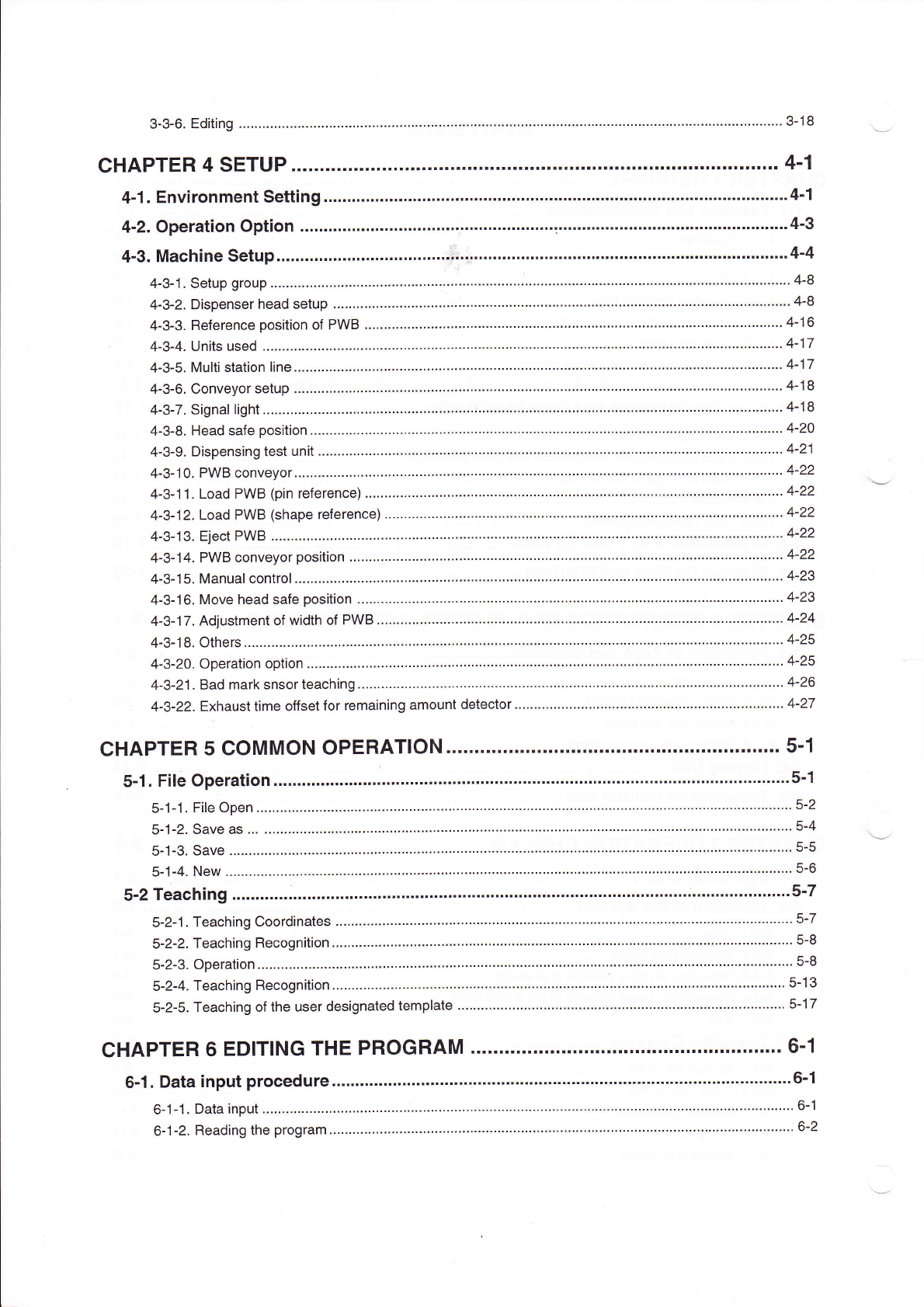
3ˉ 3ˉ 6,Editing.¨
¨¨¨¨
¨…¨¨¨¨¨¨
…¨¨¨
¨¨¨¨¨
¨¨¨¨¨
¨¨¨¨¨¨¨¨¨¨¨¨¨¨¨¨¨¨
……………………¨¨¨¨¨¨¨∴。¨¨¨¨
…
¨
…
3ˉ
18
CHAPTER4sETuP.""¨
¨.""…
…・
""■
"¨ """¨
""・ "…
・
"""""・
"""“"""・"""・
……■
"4冖
1
4ˉ
1.EnV∶
ronment setting¨
¨¨¨
¨¨¨¨¨¨
¨¨¨
¨¨¨¨¨……………
……
……
¨¨¨¨¨¨………………
¨¨¨¨¨
"¨
¨¨…。4ˉ1
4ˉ 2。 0pera刂
on opt∶
on.¨
¨¨¨
"¨
¨¨¨
¨¨¨¨
¨¨¨
∵
¨¨¨¨¨¨¨¨¨……………
………¨¨……………………………………
¨Ⅱ4ˉ
3
4ˉ3.MaChine setup¨
¨∶。。
¨¨..¨
¨¨¨
¨¨・¨¨¨
…・
∷
0∶
・∶・¨¨¨¨¨¨¨…
・…
…
・…………・……・………・・
…
"…
……・……・…・……4ˉ4
4ˉ
3ˉ
1,setup group.¨
¨¨¨¨¨
¨¨¨¨¨
¨¨¨¨
¨¨¨¨¨
¨
∵
¨
¨¨¨¨¨¨¨¨¨¨¨¨¨¨¨¨
………¨…¨¨¨¨¨¨¨¨¨¨
………………¨¨¨¨¨¨4ˉ 8
4ˉ 3ˉ
2,Dispenser head setup,¨
¨¨
¨¨¨¨
¨¨¨¨¨
¨¨¨¨
¨¨¨¨…¨¨¨¨…………
¨……¨¨¨¨¨¨¨¨¨¨¨¨
…¨¨¨¨¨¨¨¨¨¨¨¨¨
4ˉ
8
4ˉ3ˉ 3.Reference pos"ion of PVVB.¨
¨¨¨¨¨¨
¨∶・¨¨
¨¨¨¨¨¨¨
¨
¨
¨¨…¨¨¨¨¨¨……
¨
…
¨¨¨¨¨¨¨¨¨
…¨…¨¨…¨¨¨¨¨4ˉ 16
4ˉ3ˉ 4.Units used.¨
¨¨¨¨
……¨¨¨
¨¨¨¨
¨¨¨¨¨¨
…¨¨¨¨
¨¨¨¨¨¨¨¨¨¨¨¨¨
……¨¨¨¨¨¨¨¨¨………
¨¨¨¨¨¨¨¨¨¨¨¨¨¨4Ⅱ
17
4ˉ
3ˉ
5,Mu"i station Iine¨
¨¨¨
¨¨¨¨
¨¨¨¨¨
¨¨¨¨¨¨
…¨¨
¨¨……………¨¨¨∶¨¨¨¨¨¨¨
…
¨
…………………¨¨¨¨¨¨¨¨¨¨……
¨4ˉ 17
4ˉ
3ˉ 6,COnveyor setup,¨
¨¨¨¨
…¨¨¨
¨¨¨¨
¨¨…¨¨¨
¨¨¨¨
¨¨…¨………¨¨¨¨¨¨¨¨¨
………
¨
¨¨¨¨¨¨¨¨¨¨¨¨¨¨¨¨
…¨¨4^18
4ˉ 3ˉ
7 Signallight.¨
¨¨¨¨¨
¨¨¨¨¨
¨¨¨¨¨
¨¨¨¨¨
¨¨¨¨
¨・
j・
¨¨¨¨¨¨¨¨¨¨¨¨¨
……¨¨¨¨……………………¨
¨…………¨…………・4ˉ 18
4ˉ 3ˉ 8,Head safe pos"ion.¨
¨¨¨¨¨¨
¨¨¨¨¨
¨¨¨¨¨
¨¨¨¨¨¨¨¨¨¨¨…
¨¨¨
…
¨¨¨¨¨……………………………
¨¨¨………………¨¨4ˉ 20
4ˉ 3-9,Dispensing test unit.¨
¨¨¨¨
¨¨¨¨¨
………¨¨¨
…¨¨¨¨¨¨¨
¨…
¨
………………………¨¨¨¨………
¨¨¨¨¨¨¨…………………¨¨4ˉ 21
4ˉ
3ˉ
10,PVVB conVeyor.¨
¨¨¨
¨¨¨¨
¨¨¨¨¨
¨¨¨¨¨¨
¨¨¨¨
¨¨
¨¨
………………¨………………¨¨¨¨¨
……………¨¨¨¨¨¨¨¨¨¨……4ˉ 22
4ˉ
3ˉ
11,LOad PVVB(pin reference)¨
¨
¨¨¨¨…
¨¨¨¨
¨¨¨¨¨¨¨¨……
…………………………………
¨¨
¨
¨¨¨…¨¨¨¨¨¨¨¨¨¨¨¨・
4ˉ 22
4ˉ 3ˉ
12.LOad PVVB(shape reference)
¨¨¨
¨¨¨¨¨
¨¨¨¨¨¨¨¨¨
…………………¨¨¨¨¨¨¨
………¨¨¨¨¨¨¨¨¨¨¨¨¨¨¨
¨・4ˉ 22
4ˉ 3丬 3.日
eCt PWB‘
¨¨…¨
¨……
¨¨¨
…¨¨
…¨¨
¨¨¨¨¨…………
…………………………
……………………・422
4ˉ 3ˉ
14 Pˇ
VB conVeyor pos"ion,¨
¨¨¨¨
¨¨¨¨¨¨
¨¨¨¨
¨¨¨¨…¨¨…¨…………………
¨
…
¨¨¨¨¨¨¨¨¨¨¨¨¨¨¨
……………¨¨4ˉ 22
4ˉ 3ˉ 15 ManuaI contrOI,¨
¨¨
¨¨¨¨¨
¨¨¨¨
¨¨¨¨¨
¨¨¨¨
¨¨¨¨……………¨¨¨¨¨¨¨¨
¨¨¨¨¨¨¨¨¨¨¨¨¨¨¨¨¨¨¨
…¨¨¨¨4^23
4ˉ3ˉ
16,MOVe head safe position.¨
¨
¨¨¨“¨¨¨
¨¨¨¨
¨¨¨¨¨¨¨¨¨¨¨¨¨¨¨¨
…
¨
¨¨¨¨¨¨……………¨¨∶・
…
¨
¨¨¨¨¨¨¨4ˉ 23
4ˉ 3ˉ
17Adlustment of width of PWB.¨
¨…¨¨
¨……
……
…
………………………………
……………………¨¨…
4ˉ
24
4ˉ 3ˉ 18,C)thers¨
¨¨¨¨¨¨¨¨
…¨¨¨
¨¨¨¨¨
¨¨¨¨¨
¨¨¨¨
¨¨¨¨¨¨¨¨¨……………¨¨¨
…………¨¨¨……………
¨¨¨¨¨
¨
………¨¨¨・4¨25
4ˉ
3ˉ
20 0peration option。
¨¨¨
¨¨¨¨
¨¨¨¨¨
¨¨¨¨
¨¨¨¨¨¨
¨¨¨¨¨¨¨¨¨¨¨¨¨
………¨……¨¨¨¨¨¨¨……………
……………¨¨・4ˉ25
4ˉ 3ˉ 21 Bad mark sn§
orteaching.¨
¨¨
¨¨¨¨¨
……¨¨
¨………………¨¨¨¨……………
¨¨¨¨¨¨¨¨¨¨¨¨¨¨¨
……………¨¨¨¨¨¨4ˉ 26
4ˉ
3ˉ
22,EXhausttime o矸
set for remaining amount detector.¨
¨
¨¨¨¨¨¨¨¨¨¨¨¨¨
¨¨¨¨¨¨¨¨¨¨¨¨¨¨¨¨¨
……4ˉ 27
CHAPTER5COMMON OPERATION..¨
¨…¨¨…
…¨¨¨・¨…¨
¨…¨¨¨
"5丬
5ˉ
1.FⅡ e operation.¨
¨¨¨¨
¨¨¨
¨¨¨
¨¨¨¨¨
¨¨¨
¨¨¨¨
"¨
¨¨¨……
¨¨¨¨¨¨¨¨
¨¨¨¨¨…………………
"¨
…
¨・
5冖
1
5ˉ
1ˉ 1,FⅡ e open.¨
¨¨¨¨¨…
¨¨¨¨¨
¨¨¨¨¨
¨¨¨¨¨
¨¨¨¨¨
¨¨¨¨…………¨…¨………¨¨¨
………¨¨¨¨¨¨¨¨¨
……………¨¨¨¨¨¨¨5ˉ 2
5ˉ 1ˉ
2.SaVe as.¨
.¨ ¨¨
¨¨…¨¨¨
¨¨¨¨
¨¨¨¨¨
¨¨¨¨
¨¨¨¨¨
¨¨
¨¨
……………¨¨¨¨¨¨¨
…………¨¨¨……………¨¨
………………¨¨¨¨5ˉ 4
5ˉ 1ˉ 3.SaVe.¨
¨¨¨……
¨¨¨¨¨¨
¨¨……
………¨
¨¨¨¨¨
¨¨¨¨
¨¨¨¨¨¨¨¨¨¨
……………¨¨¨¨¨¨¨¨
………………¨¨¨¨¨¨
…………………
5ˉ
5
5¨ ⒈
4.NeW。 …¨
…¨…¨…
…¨…
…¨¨
¨¨¨…
¨¨
¨¨¨…¨…¨
………………………
…………………
…………¨¨5ˉ 6
5ˉ
2Teaching.¨
¨¨¨
¨
¨
¨
"…
…
¨¨¨…
¨¨¨
¨¨¨¨
¨¨…
¨¨¨¨………
"…
…………
………………
"…
………
∶・………¨¨¨¨¨…
…
5ˉ7
5ˉ
2ˉ 1.TeaChing Coordinates.¨
¨¨
¨¨¨¨
¨¨¨¨¨
¨¨¨¨
¨¨¨¨¨¨¨¨……………
………¨∴.¨ ¨¨¨……
¨¨
…
…¨¨¨¨¨¨¨
…
¨¨
………・
5ˉ
7
5ˉ 2ˉ
2,TeaGhing Recogn"ion.¨
¨¨¨
¨¨¨
¨¨¨¨¨
¨¨¨¨
¨¨¨¨¨¨¨¨¨………
¨¨…¨¨¨¨¨¨¨¨¨¨¨
……¨¨¨¨¨¨¨¨¨¨¨¨
¨¨・
5ˉ 8
5ˉ 2ˉ 3‘
operation,¨
¨¨¨
¨¨¨¨¨¨
¨¨¨¨
¨¨¨
¨¨¨¨¨
¨¨¨¨¨
¨¨¨¨¨¨¨¨¨¨¨¨¨
…¨¨¨¨¨¨¨¨………
¨¨¨¨¨¨¨¨¨¨¨¨¨¨
…¨
5ˉ 8
5ˉ 2冖
4 TeaChing Recognition.¨
¨¨¨
¨¨¨¨¨¨
…¨¨¨
¨¨¨¨¨¨
……¨¨…¨¨¨¨¨¨
¨
¨
…
…
¨¨¨¨¨……………
…¨¨
…
¨……………¨¨・5ˉ 13
5ˉ
2-5.TeaChing ofthe user designated tempIate.¨
¨¨¨¨¨¨¨……………
…¨¨¨¨¨¨¨¨¨¨
……………¨¨¨¨¨¨¨
…………… 5ˉ 17
CHAPTER6EDITING THE PROGRAM.¨
¨¨¨…
¨¨¨¨¨¨
¨¨¨¨¨
¨¨
6丬
6ˉ
1.Data input procedure。
¨¨¨
¨¨¨¨
¨¨¨¨
¨¨¨¨
¨¨¨¨¨¨¨…
……¨¨¨¨¨¨¨
…
……
……¨¨¨¨¨…
…¨¨¨¨・6ˉ1
6ˉ
1ˉ 1.Data input
¨¨¨¨¨
……¨¨¨
¨¨¨¨
¨¨¨¨
¨¨¨¨¨
¨¨¨¨
¨¨¨¨¨¨¨¨…………
¨………¨¨……………¨¨¨
¨¨¨¨¨¨¨…
¨¨¨¨¨¨・6ˉ 1
6ˉ
1ˉ2。
Reading the program.¨
¨
¨¨¨
¨¨¨¨¨
¨¨¨¨
¨¨¨¨
¨¨¨……¨…¨¨¨
…
¨¨
¨¨¨¨¨¨¨¨¨¨¨
……¨¨¨¨¨¨¨…
¨¨¨¨¨¨¨6ˉ 2