JUKI KE775点胶机说明书1.pdf - 第51页
CHAPTER30PERATION CHECKs o TⅢ e bar∶ Tiue bar° fthe desk冖 top shows the Jue(model name)ofthe system, Tiue bars ofthe WindoW otherthan the aforementioned t"le bar shoⅥ `the Contents of work,file name ofthe production…
CHAP丁
ER30PERA丁
I0N CHECκ
s
3冖3.operation Overview
3ˉ 3ˉ
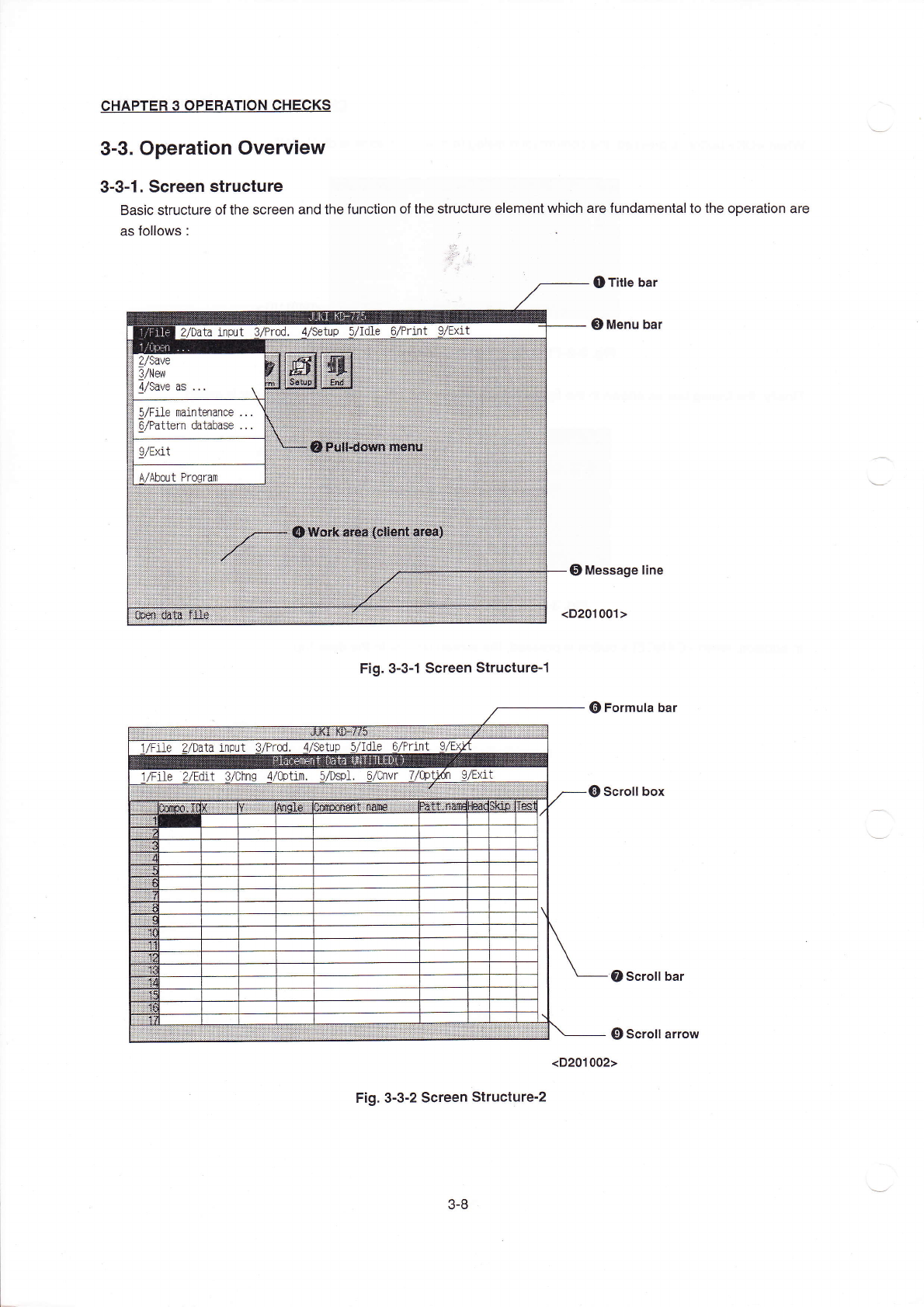
1。 sCreen structure
BasiC struCture ofthe screen and the function ofthe structure eIement
Ⅵ
'hich are fundamentalto the operatIon are
as foⅡoWs∶
●
TitIe bar
③
Menu bar
F:g.3ˉ 3ˉ
1sCreen structureˉ
1
⑥
FormuIa bar
∈
)scroⅡ
box
⑦
scro"bar
⑨
scroII arrow
Fig.3ˉ 3ˉ
2sCreen structureˉ
2
3-8
(D201002>

CHAPTER30PERATION CHECKs
o TⅢ
e bar∶
Tiue bar°
fthe desk冖top shows the Jue(model name)ofthe system,
Tiue bars ofthe WindoW otherthan the aforementioned t"le bar shoⅥ
`the Contents of work,file name ofthe
production program under working and circuit board ID.
②
Pu丨lˉ down menu∶
△
llVhen the rnenu is seIected from the menu bar,and the seIected menu has the hierarchicaI structure,Ⅱ is
dispIayed.
Refer to3-3ˉ
4.Menu seIeCtion forthe deta“
s.
③
Menu bar∶
Comrnands that Can be used in the window are Iisted beWeen the cⅡ
ent area and the titIe bar.
The command is eXecuted by selecting the rnenu from the rnenu bar,
0Work area∶
Area to vvhiCh data is entered for generating a production program orthe like.
⑤
Message Iine
Area to show the sumrnary ofthe function ofthe comrnand to be executed and the range、
Ⅳithin VVh∶ ch the data
to be entered can be entered,
0n the desktop screen,the fⅡ
e name ofthe program curren"y reading and the circu"board lD are shown。
⑥
Fomuh bar∶
shOVvs the contents ofthe Ce"atthe cursor,itis where you edit for了
nuIas.
0,(D,⑨
,Scro"bar,SCrOII boX,ScroII arrow∶
The barthatis dispIayed on one or both sides ofthe IOvver end or right end ofthe vvindoⅥ
`orthe Iist boX in
whiCh the Contents are not compIeteIy dispIayed.
There are one knob(scro"box)and two arroⅥ
`ˉ
marked buttons in the scroⅡ bar By using thenη
,you can scro"
the contents ofthe vvindow or
Ⅱ
st boX, ∷
CⅡ Ck the sCroⅡ
arrow in the direction ofthe arrow to scroll one Iine using the track ba".C"Gkthe po忖
:on other
than the scro"box ofthe scro"barto scro"one page in the direction of cⅡ
cking as viewed from the scro"b0X.
ln addition,you can scro"the screen to the desired position by dragging the scro"boX.
涞
There is a case、
vhere forthe scro"barin the丨
atera丨 direction,on丨
y the page scro"is suppo仗
ed。
3ˉ
9
CHAPTER30PERATION CHECκ
s
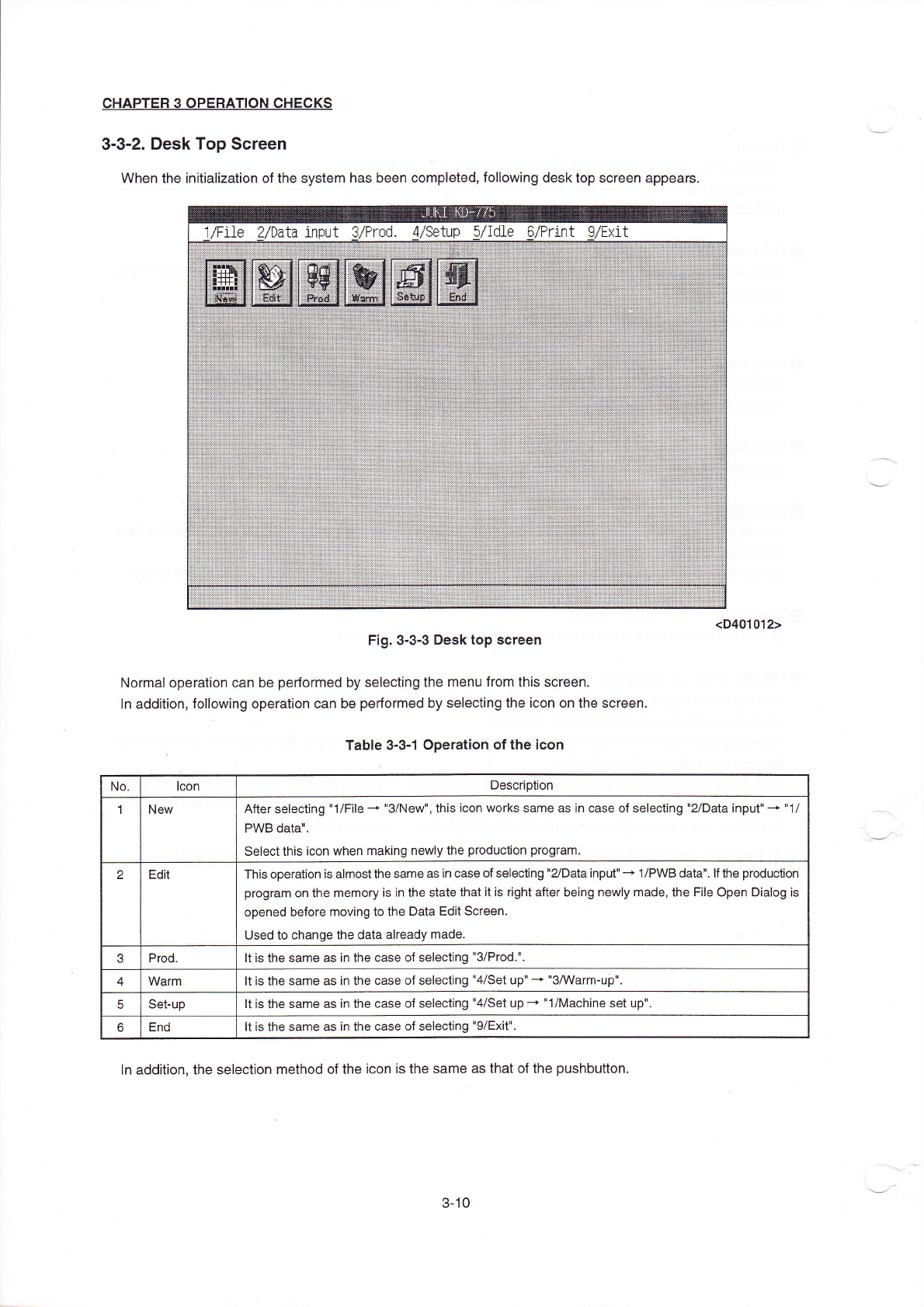
3ˉ 3ˉ2。 Desk Top screen
VVhen the initiaⅡzation ofthe system has been compIeted,fo"oWing desk top screen appears。
Fig.3ˉ 3ˉ3Desk top sCreen
NOrrnal operation can be perforrned by soIecting the rη
enu from this screen.
ln addition,fo"oⅥ
`ing operation can be perforrned by selecting the icon on the sCreen.
Table3ˉ
3ˉ 10peration ofthe icon
ln addition,the seIection rnethod ofthe iCon is the same as that ofthe pushbutton.
<D401012)
No lCon
Desc"puon
1 New
After selecting"1/F"eˉ
◆
"3/NeW",this iCon Works same as in case of selecting"2/Data input"-+"1/
PWB dataⅡ 、
se丨ectthis iCon When rneking newly the production progran⒈
2
Ed" This operation is alrnostthe same as in case of selecting"2`Data input"-。
1/P、VB data" 丨fthe production
program on the rnemory is in the state that"is rIght aner being newly made,the F"e0pen Dia丨 og Is
opened before rnoving to the Data Ed"screen
Used to change the data already made
3
Prod Itis the same as in the case of selecting"3/Prod"
4
Warm 丨tis the same as in the Case of seleC刂
ng"4/set up"—
+"s/Warm-up"
5
Se⒈up
ltis the same as in the Case of selecting"4/Set upˉ
◆
Ⅱ
1/Machine set up"
6
End
Itis the same as in the case of selecting"9/Exit"
3ˉ
10