00197549-01_IM_TX150SS8_Win2008R2_en.pdf - 第44页
Installing Prim ergy TX 150 S8 with W indows S erver 20 08 R2 04/2014 Edit ion 44
Installing Primergy TX150 S8 with Windows Server 2008 R2 04/2014 Edition
43
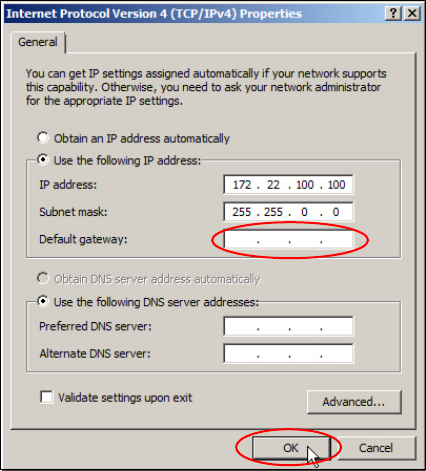
Figure 4-22: TCP/IP Properties with gateway removed
► Remove the wrong dummy gateway 127.0.0.1 and click the OK button.
4.5 Further Preparation Steps
Before applying the Support Media, you must check a couple of settings.
These further preparation steps are described in the document "Required Steps before using
Support Media".
Installing Primergy TX150 S8 with Windows Server 2008 R2 04/2014 Edition
44
Installing Primergy TX150 S8 with Windows Server 2008 R2 04/2014 Edition
45