00197549-01_IM_TX150SS8_Win2008R2_en.pdf - 第5页
Installing Prim ergy TX 150 S8 with W indows S erver 20 08 R2 04/2014 Edit ion 5 1 Purpos e This doc ument des cribes th e instal lation of the Prim ergy TX 150 S8 with W indows Server 2008 R2 using the install ation med…
Installing Primergy TX150 S8 with Windows Server 2008 R2 04/2014 Edition
5
1 Purpose
This document describes the installation of the Primergy TX150 S8 with Windows Server 2008 R2
using the installation media delivered from Fujitsu.
Installing Primergy TX150 S8 with Windows Server 2008 R2 04/2014 Edition
6
2 Preparation
Before installing the server, some preparation tasks have to be performed.
2.1 Interfaces Overview
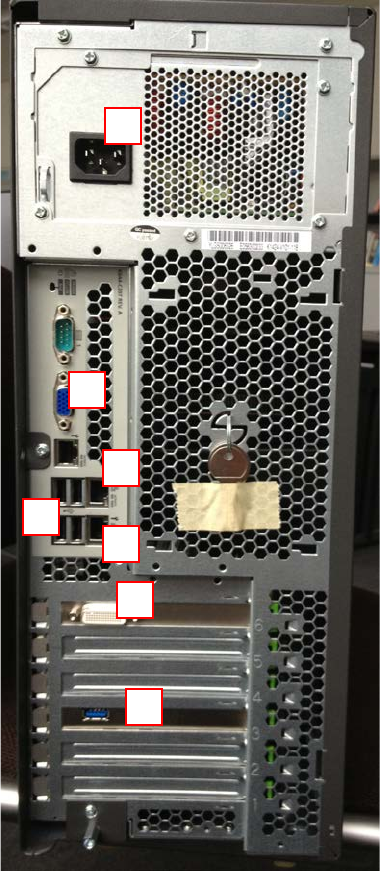
The following picture shows an overview of the interfaces of your computer hardware (backside).
Figure 2-1: Back of TX150 S8 computer
Legend:
1) Connector to graphics card (use the delivered 2* DVI splitter cable)
2) Onboard VGA connector
3) SIPLACE LAN Network connection
1
2
3
4
5
6
7