CP-842E-842ME Operator's Guide-Preliminary-CP842-10E.pdf - 第10页
Section title Each section contains text and figures for a specific procedure or set of information. Step Each procedure is broken down into several easy to follow steps. Notes: Notes provide useful or convenient informa…
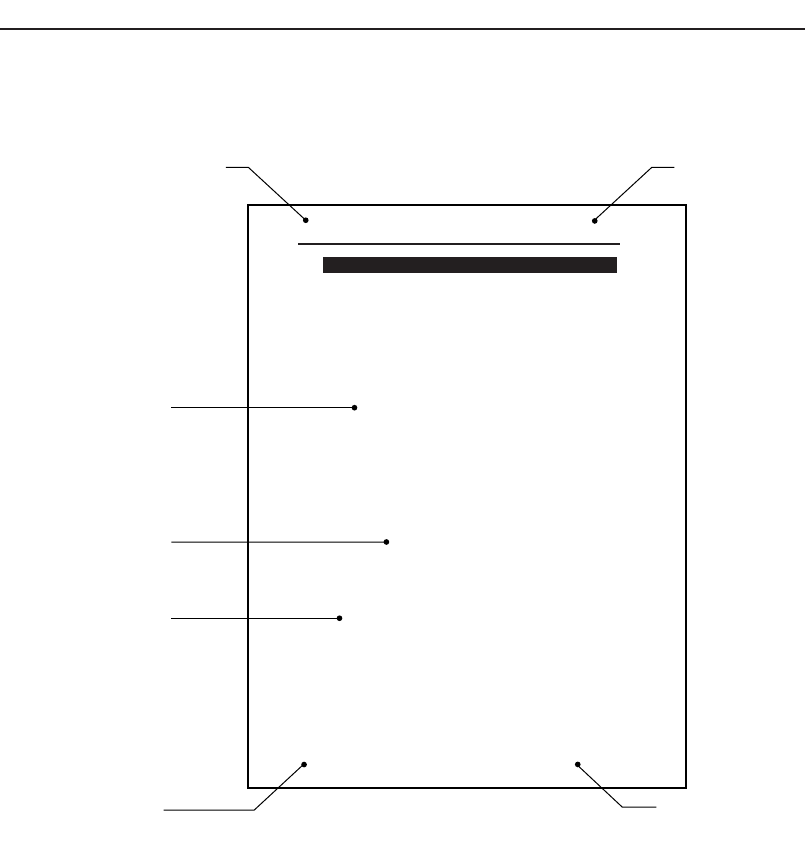
How to Read This Manual
The information in this manual is generally arranged as shown below.
Chapter title
This is the title of the chapter.
Edition number
This manual is updated on a chapter-by-chapter basis. The edition numbers are revised when the
manual content is revised or updated. The edition number for the manual as a whole is found on
the front cover of the manual.
Important: This manual can be stored in a loose-leaf binder to allow easy replacement
or addition of pages. To keep your manual up-to-date at all times, check the
edition numbers against the numbers indicated in the table of contents. Any
additional or updated sections of this manual can be
downloaded as required from Fuji's website (http://www.fuji.co.jp.).
Body
Step
Edition numberChapter title
Manual title
Page number
Notes:
CP84T001E
Setting the Device Table Mode
Select the method in which the device tables are to be used (Table mode) in
accordance with production.
<Explanation of table modes>
Joint mode:
The device tables D1 and D2 are operated together as a single device table.
This mode is used for production programs that have a large number of parts.
Joint resupply mode:
Joint resupply mode is basically the same as the standard joint mode in that
both tables are used in production. However, in joint resupply mode, the table
which is inactive in moved to the retract position until required, and feeders
can be set or removed at this position without interrupting production.
Device Change mode:
One of the device tables D1 or D2 is used in production while the other table
is kept in the standby position for use as a reserve. When a part runs out on
the device table in use, a switch is made to the other device table and
production continues. The relevant device slots on each table must be loaded
with the same parts.
Changeover mode:
One of the device tables D1 or D2 is used for production while parts are
switched on the other to ready it for the next production run.
Note: When either the “Device Change Mode” or the “Changeover Mode” is
selected, the [Original Table] setting described below must also be
specified.
Procedure
1. Select [Operation] from the [Main] screen.
2. Select the table mode that is to be used in production. Select
either "Joint", "Device Change", or "Changeover".
3. Press [Close] to return to the [Main] screen.
3.3 Device Tables
Chapter 3: Preparing for Production
Preliminary
3-10 CP-842E/842ME Operator’
s Guide
About This Manual
Preliminary
3CP-842E/842ME Operator’s Guide

Section title
Each section contains text and figures for a specific procedure or set of information.
Step
Each procedure is broken down into several easy to follow steps.
Notes:
Notes provide useful or convenient information about the machine.
Page number
The number on each page is composed of two parts. The first digit is the chapter number, and the
page number within the chapter is shown after the hyphen.
Manual title
This is the title of the manual.
Note: The reference numbers at the bottom right of the illustrations are for
administrative purposes only, and are in no way connected to the content of
the manual.
About This Manual
Preliminary
4 CP-842E/842ME Operator’s Guide

Chapter 1
Machine Configuration
1.1 Component Names and Functions
Preliminary
1-1CP-842E/842ME Operator’s Guide