00900057-02_IM_Performance_Monitor_2.1_EN.pdf - 第16页
ASM Performance Monitor 2.1 / Installation Manual 01/2021 Edition 16 4.3 Selecting Packages and Features Figure 4-6: Selecting Packages and Features dialog The Complete Deployment is enable d by default. ► In default cas…
ASM Performance Monitor 2.1 / Installation Manual 01/2021 Edition
15
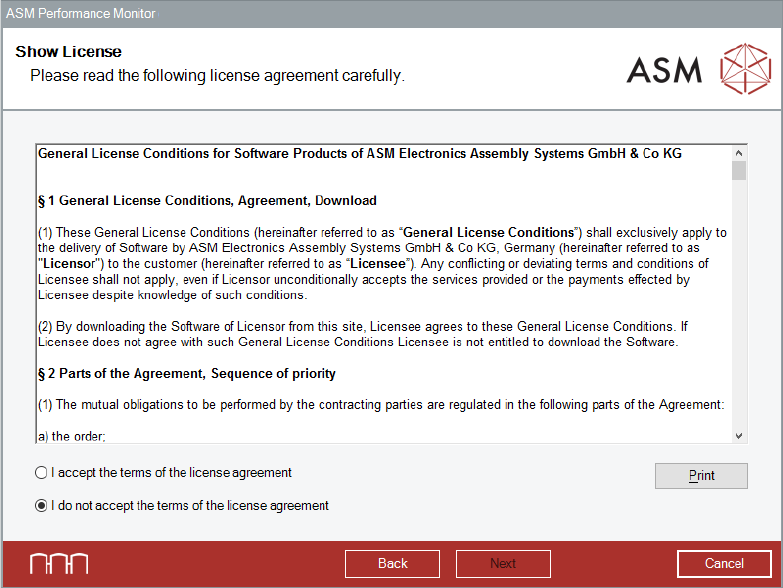
Accepting the License Conditions
Figure 4-5: Show License dialog
► Read the license agreement of ASM Assembly Systems GmbH & Co. KG relating to use of this
software.
► Select I accept the terms of the license agreement to accept the license conditions.
► Click the Next button.
The Packages and Features dialog is displayed.
ASM Performance Monitor 2.1 / Installation Manual 01/2021 Edition
16
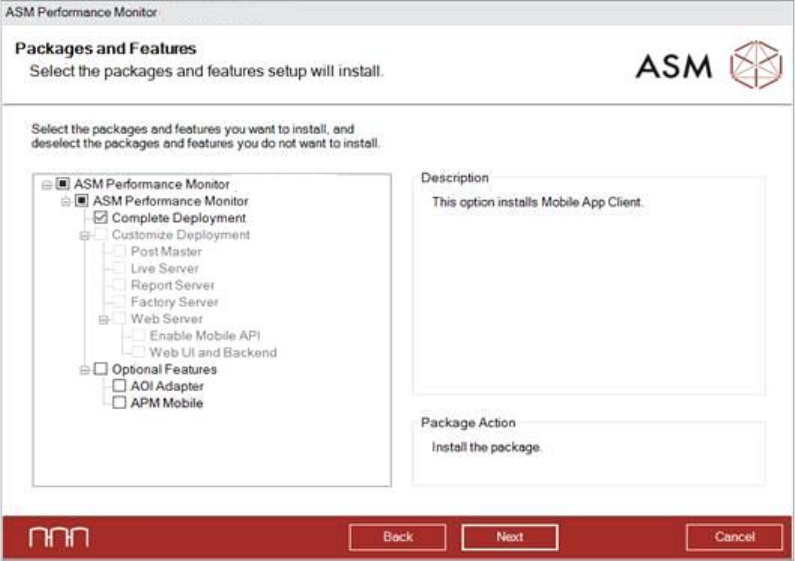
4.3 Selecting Packages and Features
Figure 4-6: Selecting Packages and Features dialog
The Complete Deployment is enabled by default.
► In default case, click the Next button.
By selecting Customize Deployment you can select single features to be installed.
As Optional Features, you can select to install the AOI Adapter for the AOI machine and install
the APM Mobile Web Server to connect mobile devices.
► Select the features you want to install and deselect the features you want to remove.
► Click the Next button.
The Destination Folder dialog is displayed.

ASM Performance Monitor 2.1 / Installation Manual 01/2021 Edition
17
The following table summarizes the information requested by the wizard for each of the above
packages or features selected.
Package or Feature Selected
Information Requested by the Wizard
Complete Deployment – Installs Post Master,
Live Server, Report Server, Factory Server and
Web Server.
1. OIB Core Computer Name, TCP Port
Number, HTTP Port Number.
2. Name or IP Address of the Post Master
Server.
3. Server Port Number.
4. Client Port Number.
5. UserManagement Port Number,
HealthCheck Port Number.
6. Passwords for APMDBA and APM_SSIS
users.
7. SQL Server Instance and Authentication
Method.
Customize Deployment – Post Master
1. Computer Name, TCP Port Number, HTTP
Port Number.
2. UserManagement Port Number,
HealthCheck Port Number.
3. SQL Server Instance and Authentication
Method.
Customize Deployment – Live Server
1. Name or IP Address of the server.
2. Server Port Number.
3. SQL Server Instance and Authentication
Method.
Customize Deployment – Report Server
1. Name or IP Address of the server.
2. Server Port Number.
3. SQL Server Instance and Authentication
Method.
Customize Deployment – Factory Server
1. Name or IP Address of the server.
2. Server Port Number.
3. SQL Server Instance and Authentication
Method.
Customize Deployment – Web Server
1. Name or IP Address of the server.
2. Client Port Number.
3. SQL Server Instance and Authentication
Method.
AOI Adapter
1. OIB Core Server Computer Name, TCP Port
Number, HTTP Port Number
2. Monitoring Folder
APM Mobile
1. Mobile Service Host
Table 4-1: Information requested for each package or feature installation