00900057-02_IM_Performance_Monitor_2.1_EN.pdf - 第8页
ASM Performance Monitor 2.1 / Installation Manual 01/2021 Edition 8 Database user accounts – The APM_SSIS Windows u ser must be created before installing ASM Performance Monito r , either as a “shadow accou nt” on both t…
ASM Performance Monitor 2.1 / Installation Manual 01/2021 Edition
7
2 Requirements
The following requirements must be met in order to be able to install ASM Performance Monitor:
– ASM Performance Monitor 2.1 is compatible to the ASM software products of R18-1.
NOTICE
System requirements
ASM Support Media checks the necessary system requirements of your system and
installs these. Amongst others, e.g. Microsoft .NET Framework, the ASM License
Manager, the ASM Error Reporter Service and the ASM Operation Manager.
The use of the ASM Support Media 2.7 (R18-1) is mandatory.
The system requirements (supported operating systems and database variants) and an
overview of the interoperable products can be found in the ASM Support Media 2.7
(R18-1) Software Version Description, item no. [00900052-xx].
– Windows administrative rights are required for all computers on which you are installing
ASM Performance Monitor.
– ASM OIS must have been installed on all line computers on which lines shall be monitored.
– ASM OIB must have been installed.
Preparing SQL server
– By default, ASM Support Media installs SQL Express editions only. The SQL Server Express
edition is not supported by ASM Performance Monitor.
► Therefore, install the SQL server edition (at least SQL Server Standard) manually instead
by following the steps described in the SQL installation documentation on ASM Support
Media, before using Prerequisite Analyzer for further preparation. We strongly recommend
that you follow the installation documentation on ASM Support Media, since it describes the
settings needed for ASM Line Software.
– The SQL server must be prepared with the SQL Server Integration Services (SSIS) feature.
WARNING
If you do not prepare the SQL server with the SSIS feature, the installation of
ASM Performance Monitor will fail.
► When preparing the SQL server, make sure the Integration Services option is activated in
the feature selection. The “scale out” sub-features of the integration services are not
required.
For further information, please refer to the Microsoft Support website on SQL Server Integration
Services, see https://docs.microsoft.com/en-us/sql/integration-services/install-windows/install-
integration-services. If problems should arise, please contact your system administrator.
– If you install the database on a remote computer, ASM Support Media must be executed on
this computer with the ASM Net – SQL Server Prerequisites – Apply ASM SQL settings
profile after the SQL server has been installed.
ASM Performance Monitor 2.1 / Installation Manual 01/2021 Edition
8
Database user accounts
– The APM_SSIS Windows user must be created before installing ASM Performance Monitor,
either as a “shadow account” on both the computer where ASM Performance Monitor is
installed and the SQL server (using the same password), or as a domain user.
– On the SQL server, the APM_SSIS database user must be associated with a database login
with sysadmin role assigned. Using BUILTIN\Administrators is not possible.
– During installation, the APM_SSIS user must be assigned the administrator role on the
computer where ASM Performance Monitor is installed. This can be changed after the
installation has been finished successfully.
– The APM_SSIS user needs the Log on as a service right on the computer where ASM
Performance Monitor is installed. For further information, please refer to the Microsoft Support
information for Windows security in Windows 10.
– On the Core Windows / SQL server, the APM_SSIS Windows user does not need any specific
rights and can be prepared as a “standard user”.
For further information on database users, please refer to section 4.14.2.
ASM Performance Monitor 2.1 / Installation Manual 01/2021 Edition
9
3 System Components and Configuration
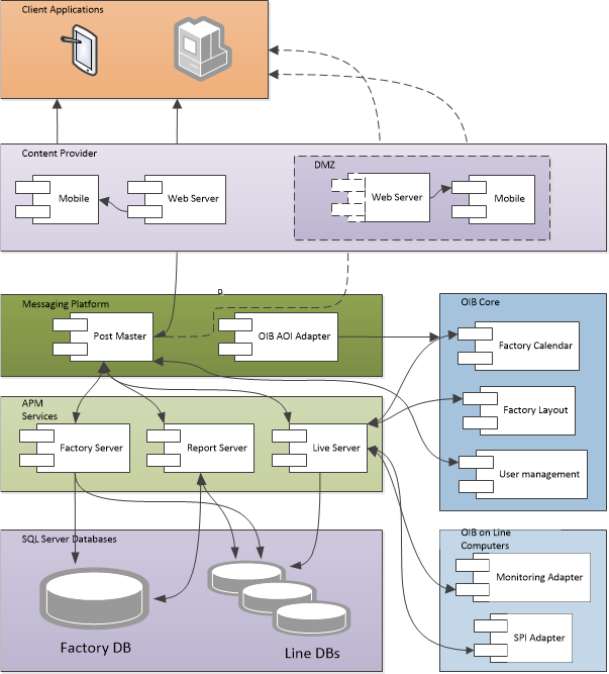
This chapter describes the system components of ASM Performance Monitor and a basic system
configuration.
3.1 System Components Overview
Figure 3-1: System Components - ASM Performance Monitor