00900057-02_IM_Performance_Monitor_2.1_EN.pdf - 第48页
ASM Performance Monitor 2.1 / Installation Manual 01/2021 Edition 48 The <unitData> main tag contain s a <processingParameters> subt ag. The <processingParameters > tag itself contains additional <pa…

ASM Performance Monitor 2.1 / Installation Manual 01/2021 Edition
47
6.4.2 AOI XML File Structure
For the ASM Performance Monitor to be able to interpret data coming from AOI machines, the AOI
data must be delivered in a form that can be interpreted by the AOI Adapter.
The following example shows the minimum attributes that must be provided:
<?xml version="1.0" encoding="utf-8"?>
<unitData xmlns:xsi="http://www.w3.org/2001/XMLSchema-instance"
xmlns:xsd="http://www.w3.org/2001/XMLSchema"
xmlns:notused="http://Asm.As.Apm.AOIAdapter/ImportFile"
equipmentClass="AOI"
starttime="2018-11-08T11:29:07" endtime="2018-11-08T11:29:47"
unit="S_2018_045726"
state="nok">
<processingParameters>
<parameter name="program" value="03126543-01_S" />
<parameter name="stationName" value="SQSNS3138" />
<parameter name="equipmentId" value="AOI13" />
<parameter name="orderNumber" value="276706" />
<parameter name="NOKComponentCount" value="100" />
<parameter name="TotalComponentCount" value="1140" />
</processingParameters>
<!-- Note: The subUnitData is required when panel counting is active -->
<subUnitData position="1" positionType="sequence" starttime="2015-09-
09T12:09:08+00:00" endtime="2015-09-09T12:09:10+00:00" state="nok"/>
<subUnitData position="2" positionType="sequence" starttime="2015-09-
09T12:09:09+00:00" endtime="2015-09-09T12:09:12+00:00" state="ok"/>
<subUnitData position="3" positionType="sequence" starttime="2015-09-
09T12:09:08+00:00" endtime="2015-09-09T12:09:10+00:00" state="inkout"/>
</unitData>
Explanation
ASPM Performance Monitor is using the Microsoft .NET Framework method
DateTimeOffset.TryParse() to obtain time values. Every time format accepted by this method is
supported. However, it is recommended to use the format “YYYY-MM-DDThh:mm:ss+00:00”.
Example: 2020-20-01T06:29:07-01:00 (the time zone here being UTC-1, CET time)
For the <unitData> tag, the value of the equipmentClass attribute must be identical to the value in
the file name.
– AOI: For optical inspection systems
– AXI: For X-Ray inspection systems
– AOXI: For combined optical and X-Ray inspection systems
– Classification: For classification stations
ASM Performance Monitor 2.1 / Installation Manual 01/2021 Edition
48
The <unitData> main tag contains a <processingParameters> subtag. The
<processingParameters> tag itself contains additional <paremeter> tags with name value pairs
with specific SPM information. The following <parameter> tags are included additionally:
– <parameter name="sequenceNumber" value="..."/>
The value contains an integer number with a unique sequence number. The number will be
increased by 1 for each new result file. The range is from 0 to 4294967296. If a counter overrun
occurs the counting will start again from 0.
– <parameter name="stationName" value="..."/>
The value contains a fixed character string read from the Windows registry of the system. This
is used to identify the system.
– <parameter name="equipmentId" value="..."/>
The value contains a fixed character string read from the Windows registry of the system. The
value must be unique among all the equipment.
– <parameter name="orderNumber" value="..."/>
The value contains a character string identifying the order number of the current production
order. The value is set during the inspection process.
– <parameter name="NOKComponentCount" value="..."/>
The value contains an integer number with the count of the failed components on the current
board.
– <parameter name="TotalComponentCount" value="..."/>
The value contains an integer number with the total count of components on the current board.
6.5 User Administration
When ASM Performance Monitor is installed, the required user roles are automatically created in
the User Manager.
The following user roles apply for ASM Performance Monitor:
– Performance Monitor Administrator
person who can modify system and parameter settings for ASM Performance Monitor.
This user has all the permissions to change anything in APM.
– Performance Monitor Supervisor
person who can modify parameter settings e.g. KPI targets, component costs and line
configuration, but no system settings.
– APM User
role for email subscriptions for ASM Performance Monitor.
ASM Performance Monitor 2.1 / Installation Manual 01/2021 Edition
49
7 Troubleshooting
This chapter describes general problems that may occur and provides troubleshooting to help you
solving them.
7.1 WebGUI Shortcut Cannot Be Opened Using Built-in Administrator
Account
Issue:
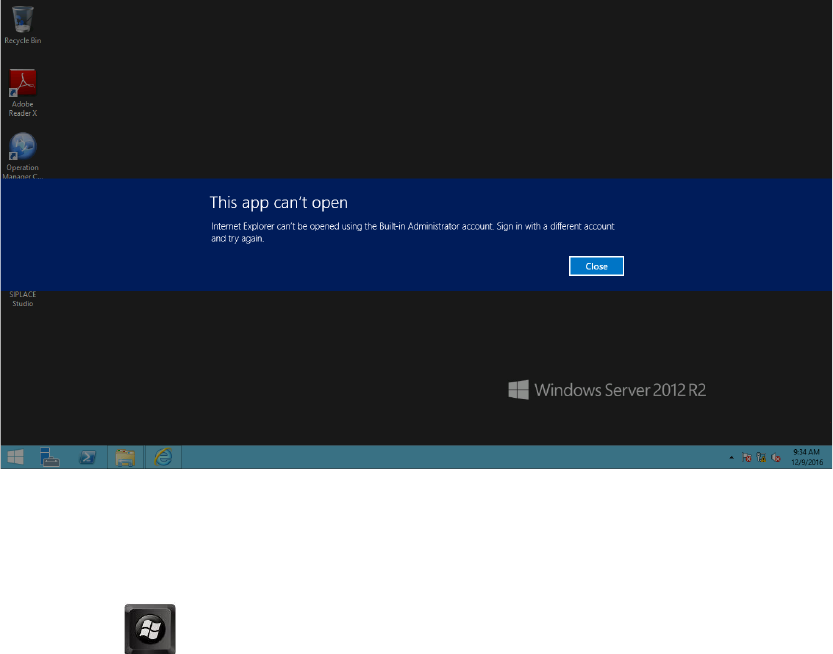
When you start the WebGUI from the start menu shortcut in Windows Server 2012, the following
prompt pops up:
Figure 7-1: WebGUI cannot be opened
Solution:
► Modify Windows security policy:
1. Press the key+ R to open the Run window, and then type "secpol.msc".
► Click the OK button.
2. In the Local Security Policy window, navigate to Security Settings – Local Policies –
Security Options.