IFS-NX_SPE_EN.pdf - 第18页
IFS - NX P rodu ct S pecificat ions 14 Opera tion enviro nment Server PC specification The server P C specificatio n recommended for the IFS - NX i s sh own bel ow : - The num ber o f PCs for the IF S servers changes ac …
IFS-NX Product Specifications
13
5-2-14 Kitting Control (Option)
Kitting Control loads BOM information such as a production program, and then enters the number of
PWBs planned to be produced to create a batch. It assists the operation (kitting) that collects
components required for production as a kit by assigning components whose number is sufficient for
completing of PWBs production.
5-2-15 Linkage with the ISM tower (Option)
This software updates and controls information on components required for production of PWBs
between the IFS server and the ISM tower by synchronizing the following information with the ISM
tower: information on components registered in the IFS server varying when a component is added or
deleted or when the number of remaining components changes. In addition, when the ISM server
requests the ISM tower to deliver a component, a component can be extracted at the required timing.
5-2-16 Storage function (Option)
This software can control loading/unloading of components to/from a component shelf located outside
the IFS server.
IFS-NX Product Specifications
14
Operation environment
Server PC specification
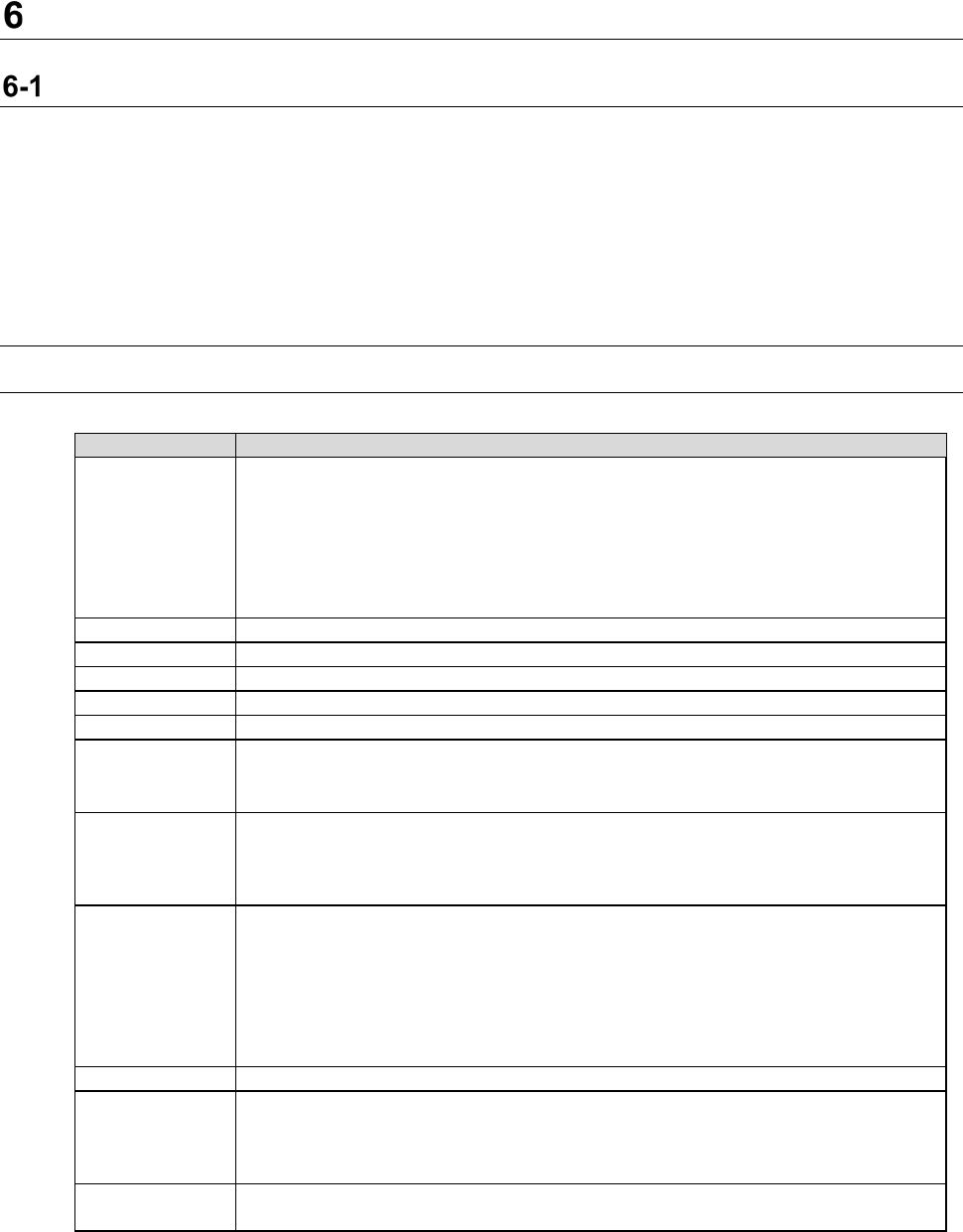
The server PC specification recommended for the IFS-NX is shown below:
- The number of PCs for the IFS servers changes according to the number of machines to be
connected to the system.
- The server operates as a database server and a Web server.
- It is also possible to install COI on a server.
It is recommended that the server PC can access the Internet.
* FX-3/3R/3RA and RX-7/7R have two stations, so one machine is converted into two machines.
6-1-1 New Installation Configuration for IFS-NX Version 8.10 or later (DB2 Ver11.5.5)
6-1-1-1 Server PC specification (the number of machines to be connected to the system: 1 to 10)
Table 6-1-1-1 Server PC specifications (Number of machine units: 1 to 10 units)
Recommended specification
Function
CGS/CGSDW/CGSCX database
Cogiscan Web Server (for Configurator, POI and installation)
Cogiscan Web Server (for Reports)
Cogiscan Web Server (for CAMX Message Broker)
Cogiscan Web Server (for Co-NECT Server)
TTC Server (for TTC-GO)
Cogiscan Data Warehousing Service
CPU
Quad Core CPU 2.00 GHz or higher (Hyper-Threading exists)
RAM
8GB or more
HDD
300GB RAID1 HDD x 2 sets *1
DVD-ROM
1 unit or more
Screen size
15-inch monitor or bigger
Interface
Standard mouse and keyboard
100BASE-TX/10BASE-T - capable, LAN connector (RJ-45) ×1
USB2.0
×
1
OS *2
Windows 10 Pro (64bit)
Windows Server 2012 R2 Standard (64bit)
Windows Server 2016 (64bit)
Windows Server 2019 Standard Edition (64bit)
Firewall
- The following ports need to be opened:
80 (Cogiscan Web Server), 7654 (Cogiscan PTU Shell Server), 50000 (IBM
DB2), 56277 (Cogiscan CIMS Server), 56278 (Cogiscan TTC Server)
- The following programs need to be opened:
\Program Files\Cogiscan\Server\Web Server\bin\cgsserver.exe
\Program Files\Cogiscan\Server\ttc\ttc.exe
\Program Files\Cogiscan\Server\ttc\orb\orb.exe
DB2
DB2 Community Edition V11.5.5 (Free)
The maximum
number of
connectable
client PCs
10 units *2
Uninterruptible
power system
Approximately 60 minutes at 100 VA, 70 W (APC Smart-UPS 700 or equivalent)
*1 Physical HDDs are 4 units in total because RAID 1 configuration requires 2 sets.
Recommended configuration is the configuration with C-Drive and D-Drive in each RAID1.
*2 JaNets/IS client using IFX-NX function is also included in the number of connecting units.
IFS-NX Product Specifications
15
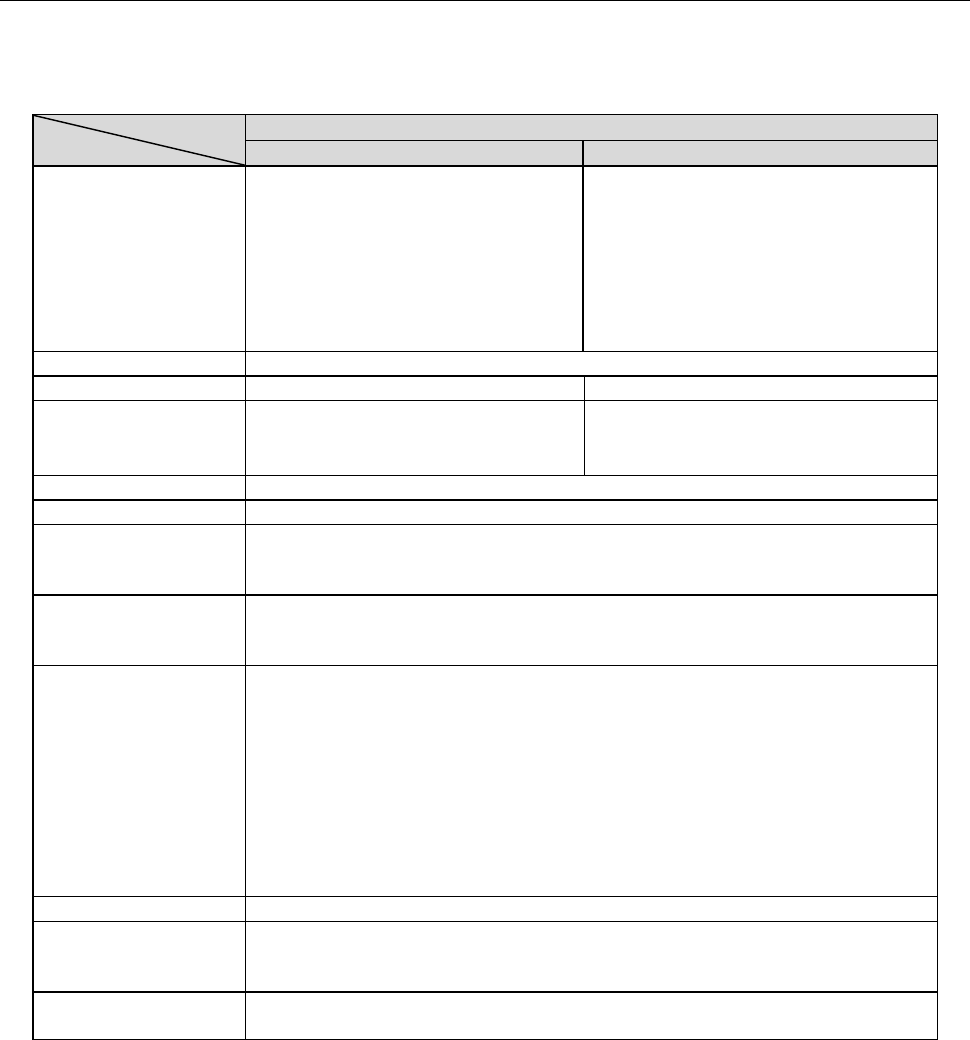
6-1-1-2 Server PC specification (the number of machines to be connected to the system: 11 to 25)
When the number of machines connected to the systme is from 11 to 25 units, the IFS server is
configured with two PCs.
Table 6-1-1-2 Server PC specifications (Number of machine units: 11 to 25 units)
Recommended specification
First PC
Second PC
Function
CGS/CGSCX database
Cogiscan Web Server (for
Configurator, POI and installation)
Cogiscan Web Server (for CAMX
Message Broker)
Cogiscan Web Server (for Co-NECT
Server)
TTC Server (for TTC-GO)
CGSDW database
Cogiscan Web Server (for Reports)
Cogiscan Data Warehousing Service
CPU
Quad Core CPU 2.00GHz or higher (Hyper-Threading exists)
RAM
12GB or more
8GB or more
HDD
300GB RAID1 HDD x 2 sets
Fast SATA/SAS HDD (10K or 15K
RPM) *1
1TB RAID1HDD x 2 sets *1
DVD-ROM
1 unit or more
Screen size
XGA 1024×768 Pixel or more *2
Interface
Standard mouse and keyboard
100BASE-TX/10BASE-T - capable, LAN connector (RJ-45) ×1
USB 2.0×1
OS *1
Windows Server 2012 R2 Standard (64bit)
Windows Server 2016 (64bit)
Windows Server 2019 Standard Edition (64bit)
Firewall
- The following ports need to be opened:
80 (Cogiscan Web Server)
7654 (Cogiscan PTU Shell Server)
50000 (IBM DB2)
56277 (Cogiscan CIMS Server)
56278 (Cogiscan TTC Server)
- The following programs need to be opened:
\Program Files\Cogiscan\Server\Web Server\bin\cgsserver.exe
\Program Files\Cogiscan\Server\ttc\ttc.exe
\Program Files\Cogiscan\Server\ttc\orb\orb.exe
DB2
DB2 Community Edition V11.5.5 (Free)
The maximum number
of connectable client
PCs
15 units *3
Uninterruptible power
system
2 units; Degree of 60 Minutes at 100V, 70W (APC Smart-UPS 700 or
equivalent)
*1 Physical HDDs are 4 units in total because RAID 1 configuration requires 2 sets. Recommended
configuration is the configuration with C-Drive and D-Drive in each RAID1. External HDD with USB
connection is usable to use.
*2 Only “the normal size (96 DPI)” is supported as the DPI setting of the screen.
*3 JaNets/IS client using IFX-NX function is also included in the number of connecting units.