IFS-NX_SPE_EN.pdf - 第54页
MANUFACTURER INQUIRY 2- 11 - 1, T s urum aki, T ama - shi, T okyo 206 - 85 51, JAP AN PHO NE: 81 - 42 - 357 - 229 3 http s ://ww w .juki.co .jp/ Copyright © 2012 - 20 21 J UKI CO RPO RA TI O N The specificati on and appe…
IFS-NX Product Specifications
48
data or other data).
These coordinates are saved with other type of mounters as part of a production program.
10-4-5 Multi Code Reader
A multi code reader is a device that reads both a barcode and a 2-D code. It is attached to the head unit
of a machine and reads the PWB code that is stuck on the top side of a PWB.
A large-size code can be read up to □26 mm.
10-4-5-1 Usable code types
The code that can be used is as follows:
No.
Item
Remarks
1
Usable code
QR code (Version 1 to Version 7)
2-D code
MicroQR code (Version M1 to M4)
2-D code
DataMatrix (ECC50,80,100,140,200)
2-D code
CODE39, CODE128, NW-7
1-D barcode
2
Usable character
Alphanumeric character (Chinese character and binary
character cannot be used.)
3
Maximum number of
characters
250 characters
The digit number which can be
processed through the IFS-NX
4
Code size
□
26.0 mm or less
* However, when a 2-D code is used on the bottom side
of a PWB, a recommended size of the 2-D code is □5.5
mm or less.
A quiet zone is included.
5
Minimum resolution
Head: 6 mil, Bottom: 6 mil
1 mil = 0.0254 mm
10-4-6 Bottom View Multi Code Reader
A bottom v
iew multi code reader is a device that reads both a barcode and a 2-D code a device that
is attached near the IN sensor on a transport path and reads a PWB code that is stuck on the
bottom side of the PWB during transport
The Code Setting screen of "Multi Code Reader" can be opened by setting up Traceability of the
Program Editor.
A PWB is set at the recognizable position using the Bottom View Multi Code Reader. After selection
of the "Code Type," pressing the "Auto Get Light Parameters" button optimizes a light parameter
automatically to perform recognition operation.
10-4-6-1 Usable code types
The code that can be used is the same as the code described in the Subsection "10-4-5-1 Usable code
types."
(Note)
- If a 2-D code larger than recommended size is recognized when the 2-D code is recognized using
the View Multi Code Reader, a recognition rate may fall. In that case, reducing transport speed at
the time of setup improves the recognition rate. So, adjust the transport speed if needed.
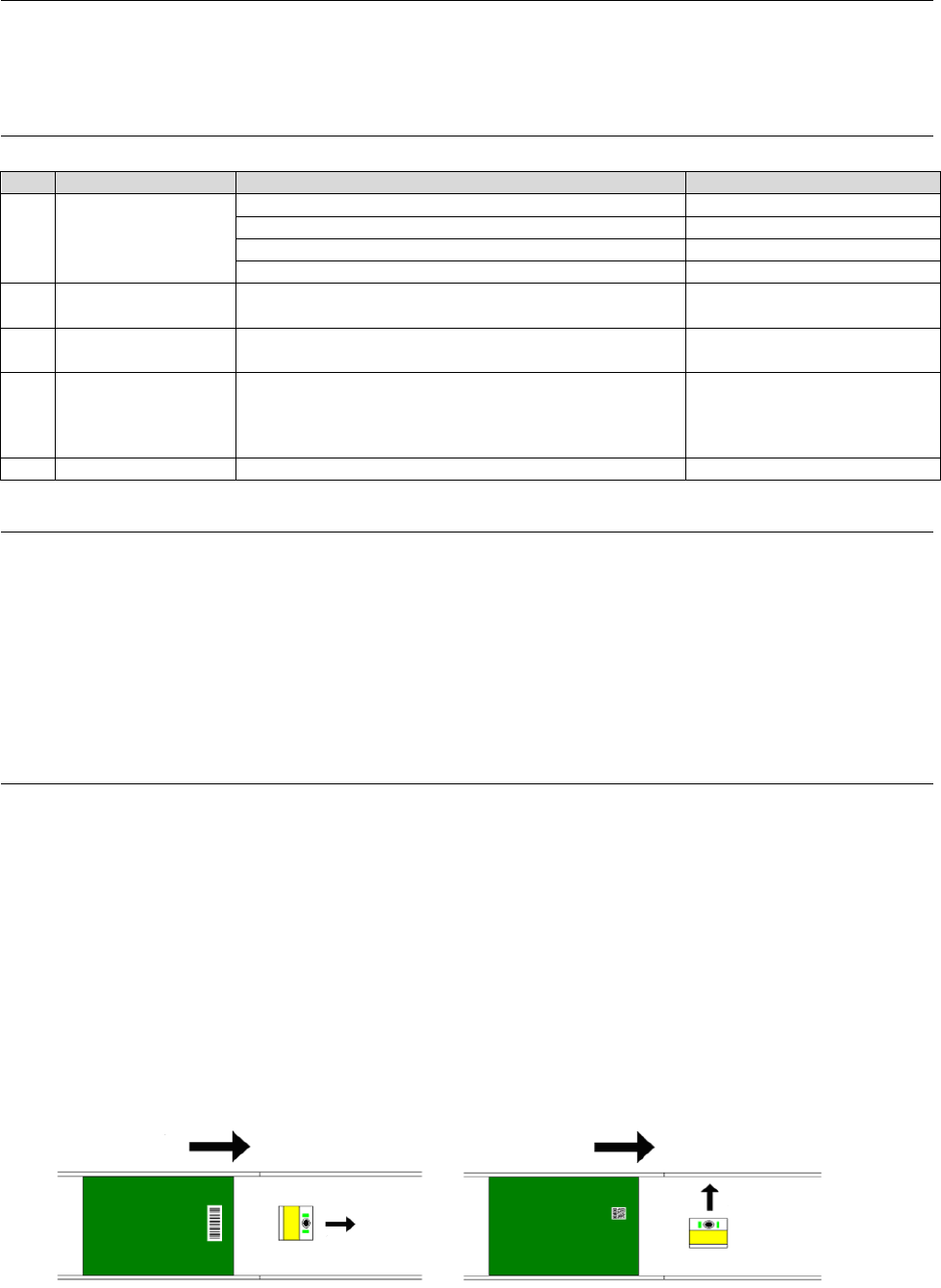
- When the View Multi Code Reader is used, if the direction of the View Multi Code Reader is
changed as follows according to the recognizing code type, it will ease recognition.
(The direction is changed to the same direction as transport direction when a 1-D barcode is used.
The direction is changed to a direction perpendicular to the transport direction when a 2-D code is
used.)
◆Camera direction when a 1-D barc
ode ◆Camera direction when a 2-D code
Is used (Recommendation) is used (Recommendation)
Transport direction
Transport direction
Camera direction
Camera direction
◆ Revision record
Rev. Date Revised locations Revision contents Remarks
00 Jul.2012
First edition
01 Aug.2012
P3,5,6,7,9,10,11,17,26,30
Supported main software Ver2.00
Revised
02 Sep.2012
P2,3,5,7,8,20,23,30
Supported for ETF 72/88mm
and corrected
Revised
03 Jul. 2013 P4,18,19,20,22,26,27
Supported main software Ver3.00
Revised
04 Sep. 2014
P4,6,17,18,19,20,22,23,26,
29,30,31,32
Supported main software Ver4.00 Revised
05 Nov. 2014
P20 Supported main software Ver4.10
Revised
06 Apr. 2015
P4, 9, 10, 11, 15
Supported main software
Ver4.20A, Ver4.30A
Revised
07 Dec. 2015
P1 to 5, 7, 8, 10, 12, 20 to 24,
27, 28, 32
Supported main software
Ver5.00A
Revised
08 Apr.2016
P5,7,9,14,19,22,24,26
Supported main software
Ver6.00A
Revised
09 Jul. 2016
P22, 24 Supported main software Ver6.10 Revised
10 Feb.2017 Chapter 4 System configuration. Revised
11
Apr. 2017
Completely revised (RS-1)
Supported main software Ver7.00 Revised
12
Jul. 2017
Completely revised
Supported main software Ver7.10 Revised
13
Feb. 2018
Completely revised
Supported main software Ver7.30
Revised
14
Nov. 2018
Completely revised
Supported main software Ver7.40 Revised
15
Nov. 2018
Completely revised
Supported main software Ver7.50 Revised
16
Jan. 2019
Completely revised
Supported main software Ver7.60
Revised
17
May. 2019
Completely revised
Supported main software Ver7.70 Revised
18
Nov. 2019
Completely revised
Supported main software Ver7.80 Revised
19
Dec. 2019
Completely revised
Supported main software Ver7.81
Revised
20
May. 2020
Chapter 9
Supported main software Ver7.82 Revised
21
Sep. 2020
P 5, 6, 8, 24
Supported main software Ver7.90 Revised
22
Dec. 2020
Chapters 6, 7
Supported main software Ver8.00
Revised
23
Apr. 2021
Chapters 3-7
Supported main software Ver8.10 Revised

MANUFACTURER
INQUIRY
2-11-1, Tsurumaki, Tama-shi, Tokyo 206-8551, JAPAN
PHONE: 81-42-357-2293
https://www.juki.co.jp/
Copyright © 2012-2021 JUKI CORPORATION The specification and appearance may be changed without notice.
All rights reserved throughout the world.
Original Instructions
2021.05 Printed in Japan