IFS-NX_SPE_EN.pdf - 第4页
IFS - NX P rodu ct S pecificat ions Handy termi nal specificati on ·········································································· 29 Access point spe ci fication ··············································…

IFS-NX Product Specifications
Table of Contents
General ..................................................................................................................................... 1
Features ................................................................................................................................... 3
IFS-NX system configuration ................................................................................................. 4
Product configuration ............................................................................................................ 6
IFS-NX application configuration ······································································ 6
Available languages ······················································································ 6
Basic system and options ··············································································· 7
4-3-1 IFS-NX basic system ........................................................................................ 7
4-3-2 Options ............................................................................................................. 8
System configuration ····················································································· 9
4-4-1 Example of a small-scale system configuration (number of the
connected machines: 1 to 10) ....................................................................... 9
4-4-2
Example of a medium-scale configuration (number of the connected machines:
11 to 25)
............................................................................................................. 9
4-4-3 Second medium-scale configuration (number of connected machines:
26 to 35) ......................................................................................................... 10
4-4-4
Large-scale configuration (number of the connected machines: 36 to 70)
............. 10
Overview of the software ..................................................................................................... 11
List of functions ·························································································· 11
Description of software function ····································································· 11
5-2-1 Parts Verification ............................................................................................ 11
5-2-2 Changing the setting of the Parts Verification software ................................. 11
5-2-3 Component inventory control/Feeder location search ................................... 11
5-2-4 Random feeder setup ..................................................................................... 12
5-2-5 Job setup ........................................................................................................ 12
5-2-6
Function for displaying an incorrect feeder attachment position on the screen
......... 12
5-2-7 Splicing function ............................................................................................. 12
5-2-8 Traceability (Option) ....................................................................................... 12
5-2-9 Reading a circuit barcode (Option) ................................................................ 12
5-2-10 MSD (Moisture Sensitive Device) control (Option) ........................................ 12
5-2-11 Management of feeder maintenance history (Option) ................................... 12
5-2-12 Connection to a general-purpose printer (Option) ......................................... 12
5-2-13 Connection to a system conforming to IPC-CFX (Option) ............................. 12
5-2-14 Kitting Control (Option) ................................................................................... 13
5-2-15 Linkage with the ISM tower (Option) .............................................................. 13
5-2-16 Storage function (Option) ............................................................................... 13
Operation environment ........................................................................................................ 14
Server PC specification ················································································ 14
6-1-1 New Installation Configuration for IFS-NX Version 8.10 or later (DB2
Ver11.5.5) ....................................................................................................... 14
6-1-2 New Installation Configuration for IFS-NX Version 7.30 to 8.00 (DB2
Ver11.1) .......................................................................................................... 18
6-1-3
New Installation Configuration of IFS-NX Ver. 4.0 ~ Ver. 7.20 (DB2 Ver. 10.5)
......... 21
6-1-4
New installation configuration for IFS-NX Ver. 3.1 or earlier (DB2 Ver. 9.7.5)
........... 24
Client PC specification ················································································· 26
Other network requirements ·········································································· 26
Antivirus software ························································································ 26
Hardware specification......................................................................................................... 27
Barcode reader (wired code reader) specification ·············································· 27

IFS-NX Product Specifications
Handy terminal specification ·········································································· 29
Access point specification ············································································· 33
Label printer specification ············································································· 34
Models to be supported with IFS-NX .................................................................................. 35
List of machine type ····················································································· 35
Line configuration ························································································ 35
Readable files ···························································································· 36
Supported Devices ............................................................................................................... 37
Supply unit on which an RFID and CAN can be used ········································· 37
9-1-1 Intelli feeder (RFID) ........................................................................................ 38
9-1-2 Intelli feeder (CAN) ......................................................................................... 38
Devices supporting RFID/CAN ······································································· 39
9-2-1 Intelli trolley (RFID) ......................................................................................... 41
9-2-2 Intelli trolley (CAN) ......................................................................................... 41
9-2-3 Intelli trolley pool (RFID) ................................................................................. 41
9-2-4 PW02 .............................................................................................................. 41
9-2-5 Intelli stocker ................................................................................................... 42
9-2-6 Intelli feeder calibration jig with a monitor ...................................................... 42
Component code/PWB code specifications ...................................................................... 43
Code type and device to read a code ······························································ 43
Unusable characters ···················································································· 43
Component code ························································································ 43
10-3-1 Features ......................................................................................................... 43
10-3-2 Component labeling method .......................................................................... 43
10-3-3 Usable component code type ......................................................................... 44
10-3-4 Component code field definition ..................................................................... 44
PWB code ································································································· 45
10-4-1 Common subject matter ................................................................................. 45
10-4-2 Applicable Machine Types .............................................................................. 45
10-4-3 PWB Barcode [Conveyor extension barcode reader method] ....................... 46
10-4-4 PWB 2D code [OCC method] ......................................................................... 47
10-4-5 Multi Code Reader ......................................................................................... 48
10-4-6 Bottom View Multi Code Reader .................................................................... 48
IFS-NX Product Specifications
1
General
The Intelligent Feeder System (IFS-NX) succeeds to JUKI software, Intelli SCS.
This system uses barcodes and/or 2D codes to carry out quality control over mounters with the
functions “Parts Verification” and “Traceability,” “improves the workability of tooling change” and
performs the “Component inventory control” function. You can select an authentication method of a
feeder or a tray supply unit: a barcode, an RFID, or CAN. When you use a component supply device
that supports an RFID and CAN, operations such as verification and management can be automated.
This drastically improves quality control and working efficiency.
IFS - NX can be used alone without the need for a floor productivity improvement support system
(JaNets, IS, IS Lite, MI Line Optimizer).
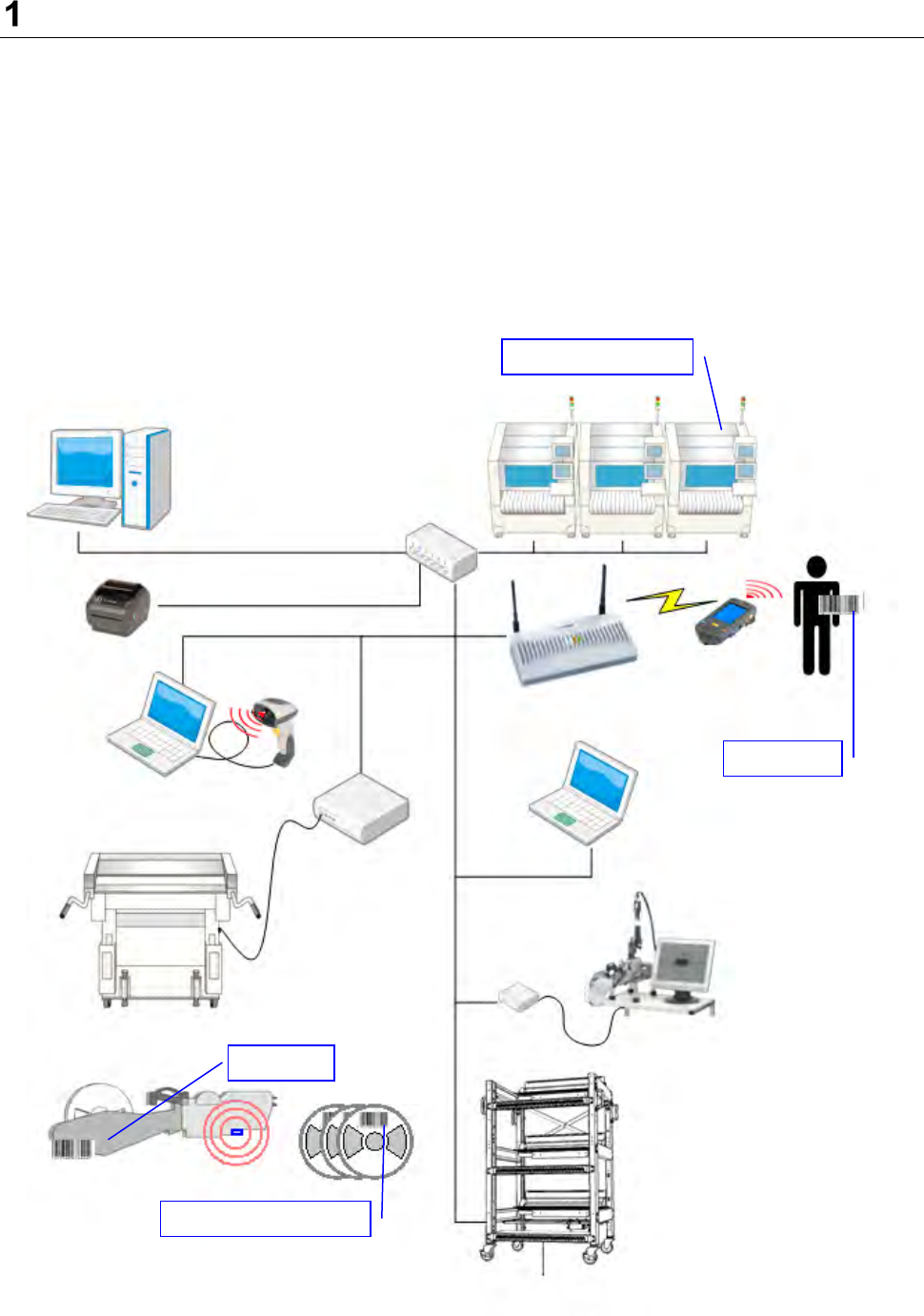
* The below figure is an example of the system configuration utilizing an RFID.
IFS server
IFS client
IFS client
Access point
Handy terminal
Barcode reader
Intelli trolley (RFID)
Feeder ID
Component barcode
User ID
Intelli trolley pool
Controller box
Intelli feeder (RFID)
Intelli feeder
calibration jig
Intelli stocker
Label printer
SMT line
Ethernet HUB