IFS-NX_SPE_EN.pdf - 第30页
IFS - NX P rodu ct S pecificat ions 26 Cl ien t P C sp eci f ica tio n The client P C specificatio n recommended for the IFS - NX is show n be low : One client P C is requ ired at every lo cation where th e C OI operat e…
IFS-NX Product Specifications
25
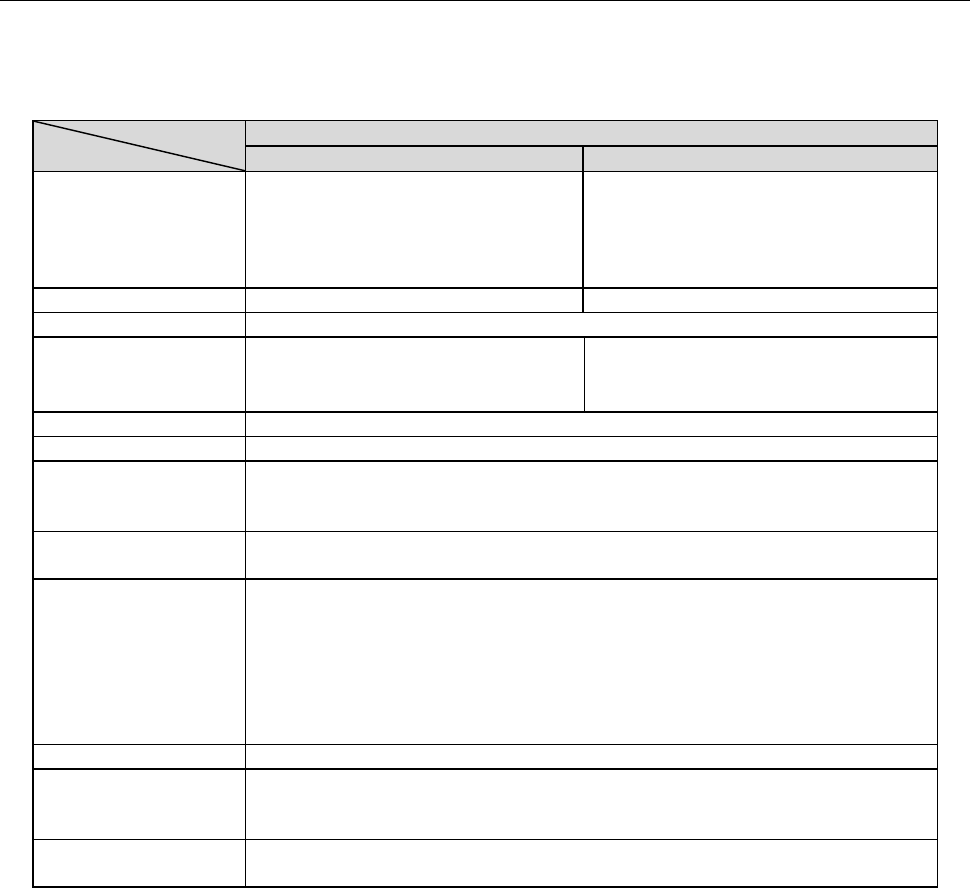
6-1-4-2 Server PC specification (the number of machines to be connected to the system: 11 to 25)
When the number of machines connected to the system is from 11 to 25, a dual-server is included
in the system configuration.
Table 6-1-4-2 Server PC specifications (Number of machine units: 11 to 25 units)
Recommended specification
First PC
Second PC
Function
CGS/CGSCX database
Cogiscan Web Server (for
Configurator, POI and installation)
And Cogiscan Web Server (for
CAMX Message Broker)
CGSDW database
Cogiscan Web Server (for Reports)
Cogiscan Data Warehousing Service
CPU
Quad Core CPU 2.00 GHz or higher
Dual Core CPU 2.00G Hz or higher
RAM
6GB or more
HDD
300GB RAID1 HDD x 2 sets
Fast SATA/SAS HDD (10K or 15K
RPM) *1
1TB RAID1HDD x 2 sets *1
DVD-ROM
1 unit or more
Screen size
15-inch monitor or bigger
Interface
Standard mouse and keyboard
100BASE-TX/10BASE-T - capable, LAN connector (RJ-45) ×1
USB 2.0×1
OS *1
Windows 2003 Server Standard SP2 or later (64 bits)
Windows 2008 Server R2 Standard SP1 or later (64 bits)
Firewall
- The following ports need to be opened:
80 (Cogiscan Web Server), 7654 (Cogiscan PTU Shell Server)、50000 (IBM
DB2), 56277(Cogiscan CIMS Server), 56278 (Cogiscan TTC Server)
- The following programs need to be opened:
\Program Files\Cogiscan\Server\Web Server\bin\cgsserver.exe
\Program Files\Cogiscan\Server\ttc\ttc.exe
\Program Files\Cogiscan\Server\ttc\orb\orb.exe
DB2
DB2 Express-C Edition V9.7.5 (Free)
The maximum number
of connectable client
PCs
15 units
Uninterruptible power
system
Approximately 60 minutes at 100 VA, 70 W (APC Smart-UPS 700 or
equivalent)
*1 Four sets of 300 GB (for the first PC) and four sets of 1 TB (for the second PC) as physical HDDs
are needed in total because two sets are needed to configure the RAID1. Configuration to create the
drives C and D in each RAID1 is recommended. No external HDD can be used via a USB port.
IFS-NX Product Specifications
26
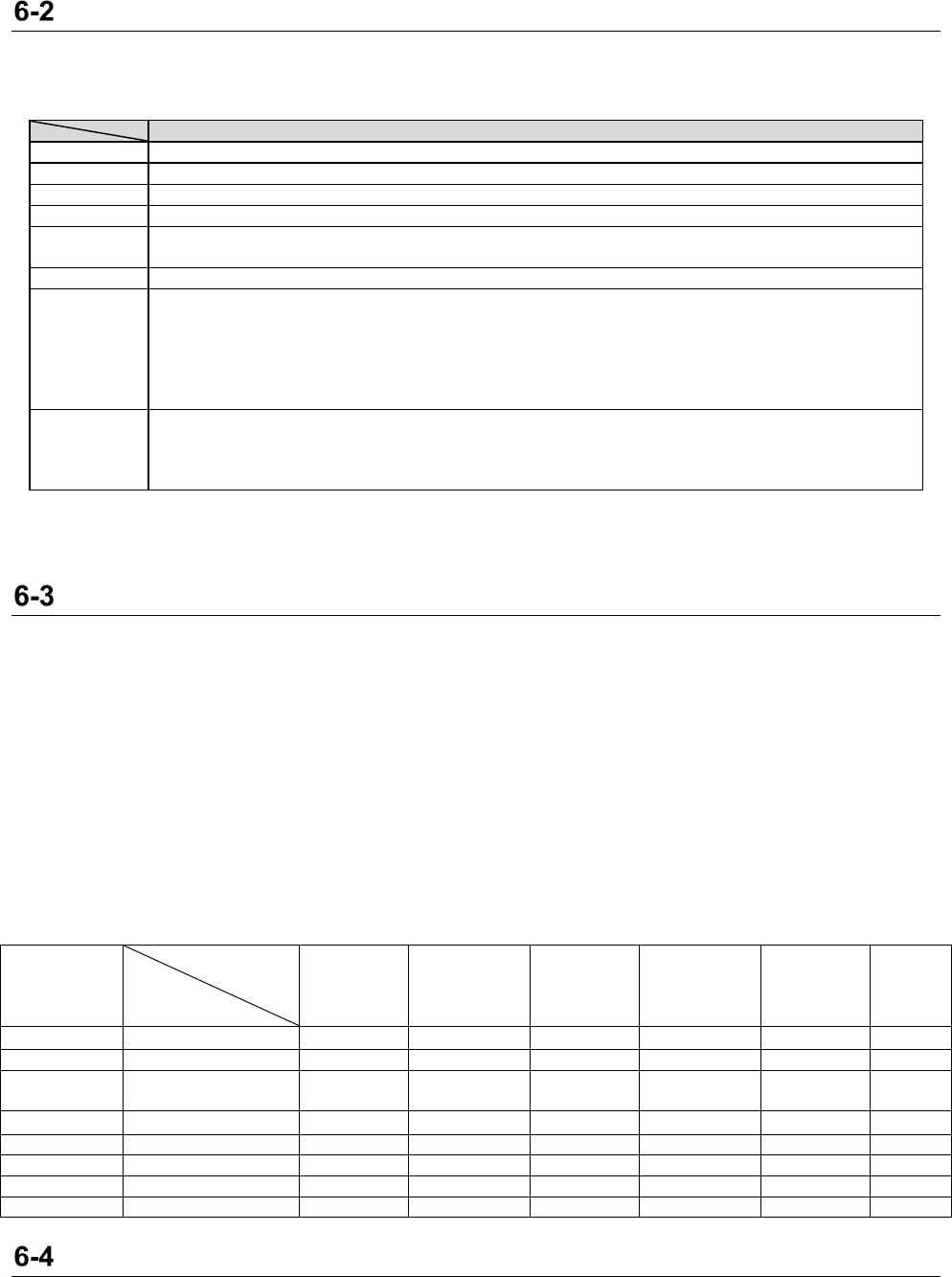
Client PC specification
The client PC specification recommended for the IFS-NX is shown below:
One client PC is required at every location where the COI operates.
Each client PC has to be installed in the same network (TCP/IP) as the server PC.
Recommended specification
CPU
Dual Core CPU 2.00 GHz or higher
RAM
4 GB or more
HDD
40 GB HDD
Screen size
15-inch monitor or bigger
Interface
Standard mouse and keyboard
LAN connector (RJ-45) x 1 for 100BASE-TX/10BASE-T
Internet
Windows shall be able to be updated (This is applied to only some environment of Windows 10). *1
OS
Windows 7 Professional SP1 or later (32 bits/64 bits)
Windows 10 Professional or later (32 bits/64 bits)
Windows 2008 Server Standard SP2 or later (32 bits)
Windows 2008 Server R2 Standard SP1 or later (64 bits)
Windows 2012 Server R2 Standard or later (64 bits)
Windows Server 2016 (64bits)
Firewall
- The following ports need to be opened:
Output: 80 (Cogiscan Web Server), 50000 (IBM DB2), 56277 (Cogiscan CIMS Server)
Input: 56270 (Cogiscan Support)
C:\Program Files\cogiscan\platform\jre\bin\Javaw.exe
*1 The environment that allows Windows to be updated may be required depending on combination of the
language of the OS and that of the COI in order to install the corresponding language pack and
supplementary fonts.
Other network requirements
A fixed ID addresses and network connection are required for each server, a Client PC, an Intelli:
Trolley Pool, a label printer, and a wireless LAN access point. However, a dynamic IP address is
also applied to for client PC.
A fixed IP address and network connection is required for each mounter that is equipped with an
Intelli: Trolley Pool.
When you use Windows 10, the environment allowing Windows to be updated may be required
depending on the language of the OS and that of the COI. See the table below to install the
language pack and supplementary fonts corresponding to the language used with the COI. After
setup, the language used with the COI may be added to the system in some cases. Therefore, it
is recommended to maintain the Internet environment even after setup.
Table 6-3-1 Combination of the OS and the COI requiring installation of the corresponding language pack
OS name
Language
pack name
Windows 10
Japanese
editio
n
Windows 10
English edition
Windows 10
Chinese
edition
Windows 10
Korean edition
Windows 10
other
language
edition
Other
Windows
Language
used with the
COI
Japanese
Japanese pack
✔
✔
✔
✔
English
English
Chinese
Simplified Chinese
Traditional Chinese
✔
✔
✔
Korean
Korean
✔
✔
✔
✔
Spanish
Spanish
German
German
French
French
Portuguese
Portuguese
Antivirus software
Virus Buster (Trend Micro) is recommended as antivirus software.
IFS-NX Product Specifications
27
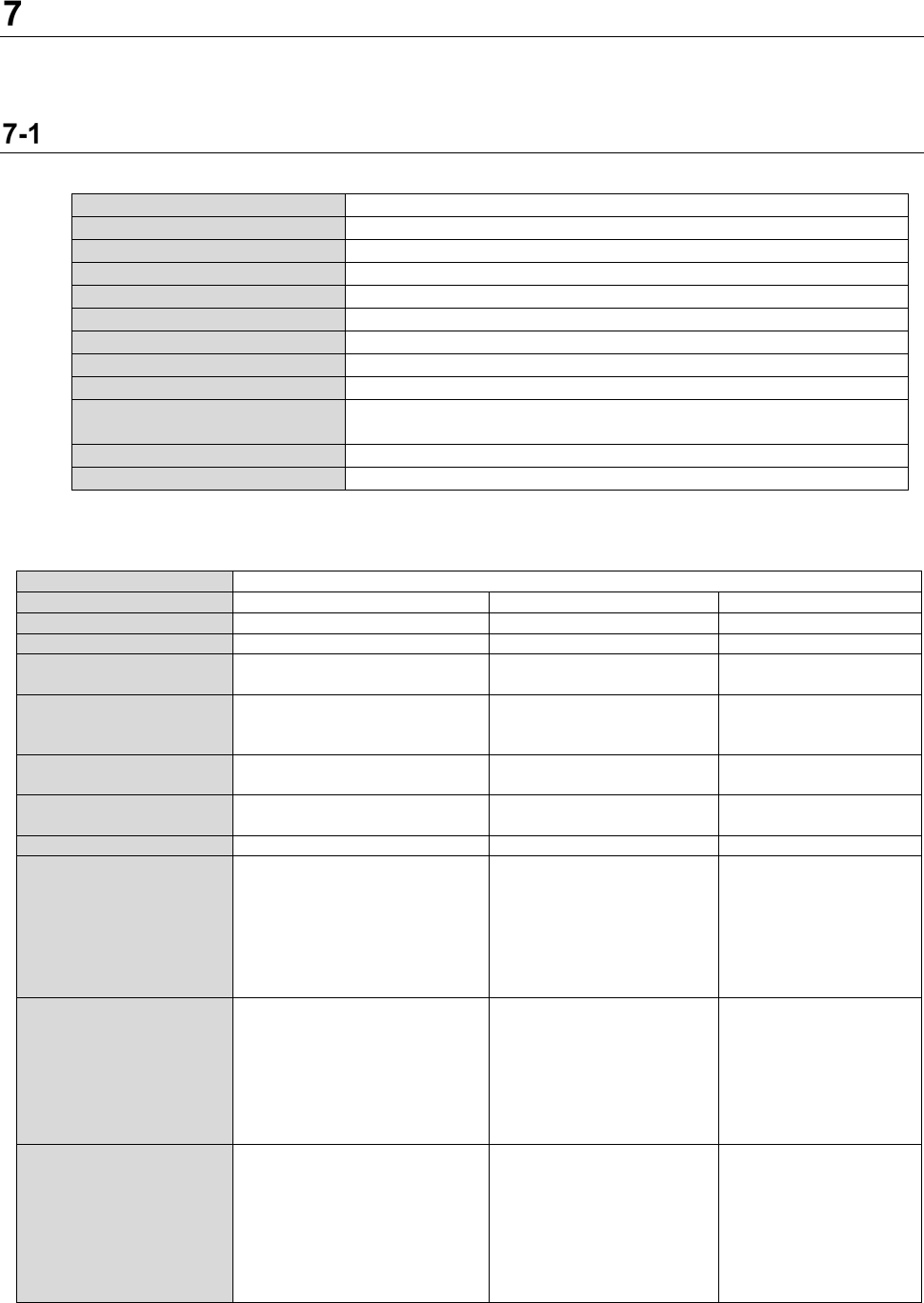
Hardware specification
The RFID-related hardware of IFS-NX is described here. The configuration is the same as that of the
Intelli SCS.
Barcode reader (wired code reader) specification
(1) Dedicated for a barcode
Manufacturer
Zebra
Model name
LS2208
External dimensions
152mm x 63 mm x 84mm
Readable code
1D
Power supply
5V DC ±10%
Interface
USB
Operating temperature limit
– 0 to 50 (°C)
Storage temperature range
- 40 to 70 (°C)
Weight
146g
Safety standards
UL 60950-1 certified, C22.2 No. 60950-1 certified, EN 60950-1
certified, IEC 60950-1 certified
Laser safety standards
FCC 15 Class B certified, ICES 003 Class B certified
EMI/RFI
FCC 15 Class B certified, ICES 003 Class B certified
* If an RS-232C cable is used with your conventional barcode reader, replace it with a USB cable.
(2) For a barcode/2D code/postal code
Manufacturer
Zebra
Model name
DS4608
DS6707
DS4308
External dimensions
165 x 98 x 67mm
166 x 120 x 72 mm
165 x 98 x 67mm
Readable code
1D/ 2D postal code
1D/2D postal code
1D/ 2D postal code
Power supply
5VDC±10% @ 340mA
(standard)
DC 5 V
±
10%
DC5V+10%@360mA(R
MS Normal Value)
Interface
USB, RS232, Keyboard
Wedge, RS485 (IBM 46XX)
and SSI
USB
USB, RS232, Keyboard
Wedge, RS485 (IBM
46XX) and SSI
Operating temperature
limit
32°F to 122°F (0 °C to 50°C)
- 0 to 50 (°C)
32°F to 122°F (0 °C to
50°C)
Storage temperature
range
-40°F to 158°F (-40°C to 70°C)
- 40 to 70 (°C)
-40°F to 158°F (-40°C
to 70°C)
Weight
162 g (cable excluded)
182 g
162g(cable excluded)
Safety standards
UL60950-1 2nd ed
、
CAN/
CSA-C22.2
No. 60950-1-07 EN
60950-1:2006/A2:2013
IEC 60950-1:2005/A2: 2013
IEC 62368-1 (ed.2),
EN 62368-1:2014
UL6950-1, CSA C22.2 No.
60950-1,
EN60950-1/IEC60950-1
UL60950-1 2nd ed,
CSA C22.2 No.
60950-1 2nd ed,
EN60950-1/
IEC60950-1 2nd ed
Safety standards
IEC 62471:2006 (Ed.1.0),
EN 62471:2008
(Laser)
EN60825-1:1994+A1:
2002+A2:2001,
IEC60825-1,
21CFR1040.10 and
21CFR1040.11, CDRH
Class
Ⅱ
, IEC Class2
(LED)
IEC/EN60825-1:2001,
IEC/EN62471:2006
EMI/RFI
FCC: 47 CFR Part 15, Subpart
B, Class B
ICES-003 Issue 6, Class B
EN 55032, Class B
EN 55024
EN 55035
EN 60601-1-2:2015,
IEC 60601-1-2:2014
FCC Part15 Class B,
ICES-003 Class B, CISPR
22,CISPR 24 Medical
electrical equipment:
EN60601-1-2:2002
FCC Part 15 Class B,
ICES-003 Class B,
EN55022 Class B,
EN55024, Medical
Electronic Device:
EN60601-1-2
* If an RS-232C cable is used with your conventional barcode reader, replace it with a USB cable.