IFS-NX_SPE_EN.pdf - 第21页
IFS - NX P rodu ct S pecificat ions 17 6-1-1-4 Server PC specification (the number of machines to be connected to the system: 26 to 70 ) When the nu mber of machines connected to the sy stme is fro m 26 to 70 unit s, the…
IFS-NX Product Specifications
16
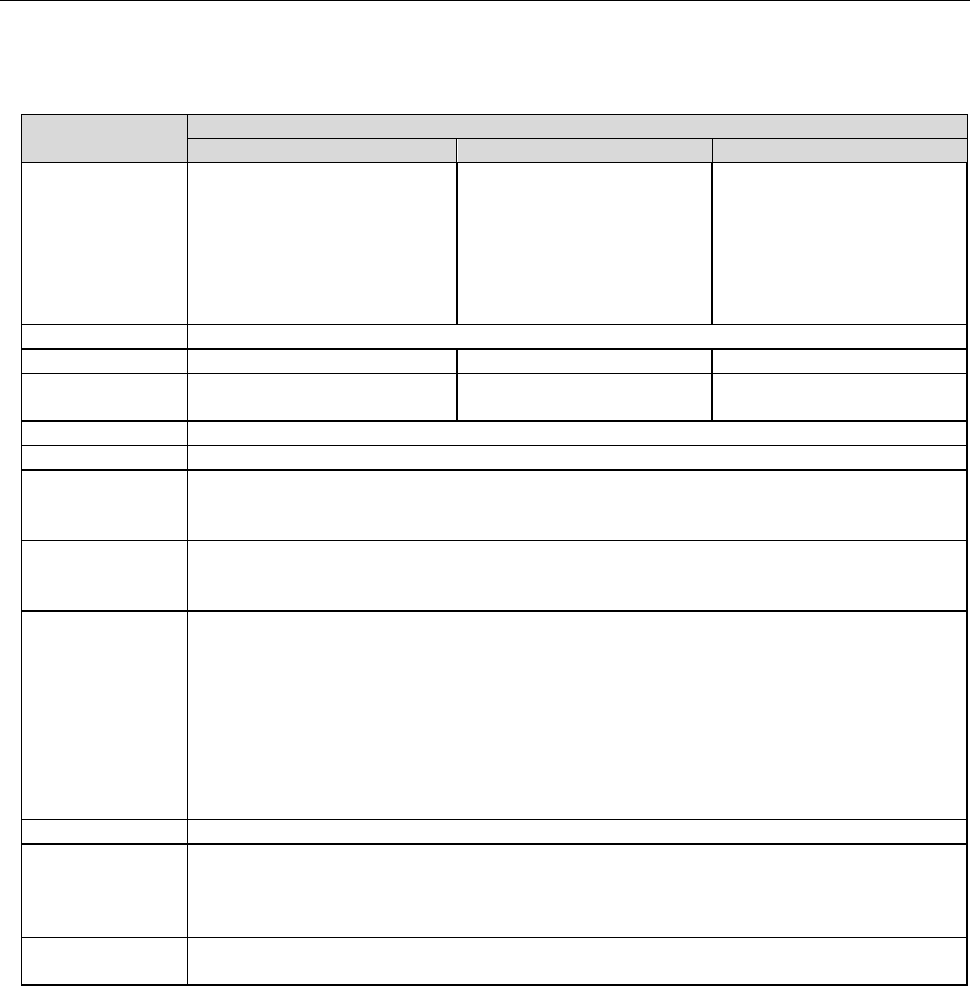
6-1-1-3 Server PC specification (the number of machines to be connected to the system: 26 to 35)
When the number of machines connected to the systme is from 26 to 35 units, the IFS server is
configured with three PCs.
Table 6-1-1-3 Server PC specifications (Number of machine units: 26 to 35 units)
Recommended specification
First PC
Second PC
Third PC
Function
CGS database
Cogiscan Web Server (for
Configurator, POI and
installation)
Cogiscan Web Server (for
Co-NECT Server)
TTC Server (for TTC-GO)
CGSDW database
Cogiscan Web Server (for
Reports)
Cogiscan Data Ware-
housing Service
CGSCX database
Cogiscan Web Server (for
CAMX Message Broker)
CPU
Quad Core CPU 2.00 GHz or more
RAM
16 GB or more
16 GB or more
8 GB or more
HDD
300GB RAID1HDD x 2 sets
*1
2TB RAID1HDD x 2 sets *1
300GB RAID1HDD x 2 sets
*1
DVD-ROM
One unit or more
Screen size
XGA 1024×768 pixcels or above *2
Interface
Standard mouse and keyboard
100BASE-TX/10BASE-T - capable, LAN connector (RJ-45) ×1
USB 2.0×1
OS
Windows Server 2012 R2 Standard (64bit)
Windows Server 2016 (64bit)
Windows Server 2019 Standard Edition (64bit)
Firewall
- The following ports need to be opened:
80 (Cogiscan Web Server)
7654 (Cogiscan PTU Shell Server)
50000 (IBM DB2)
56277 (Cogiscan CIMS Server)
56278 (Cogiscan TTC Server)- The following programs need to be opened:
\Program Files\Cogiscan\Server\Web Server\bin\cgsserver.exe
\Program Files\Cogiscan\Server\ttc\ttc.exe
\Program Files\Cogiscan\Server\ttc\orb\orb.exe
DB2
DB2 Community Edition V11.5.5 (Free)
The maximum
number of
connectable
client PCs
20 units *3
Uninterruptible
power system
3 units; Degree of 60 Minutes at 100VA, 70W (APC Smart-UPS 700 or equivalent)
*1 Physical HDDs are 4 units in total because RAID 1 configuration requires 2 sets. Recommended
configuration is the configuration with C-Drive and D-Drive in each RAID1. External HDD with USB
connection is usable to use.
*2 Only “the normal size (96 DPI)” is supported as the DPI setting of the screen.
*3 JaNets/IS client using IFX-NX function is also included in the number of connecting units.
IFS-NX Product Specifications
17
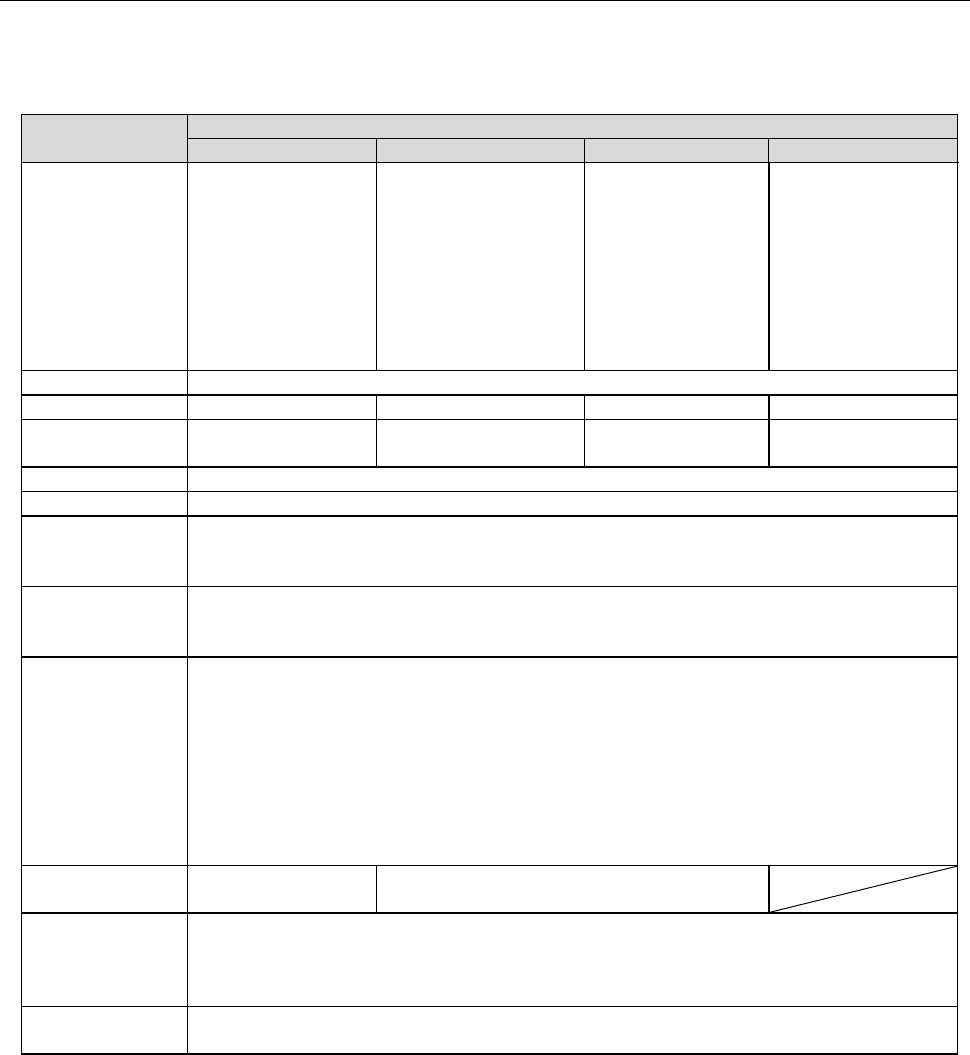
6-1-1-4 Server PC specification (the number of machines to be connected to the system: 26 to 70)
When the number of machines connected to the systme is from 26 to 70 units, the IFS server is
configured with four PCs.
Table 6-1-1-4 Server PC specifications (Number of machine units: 26 to 70 units)
Recommended specification
First PC
Second PC
Third PC
Fourth PC
Function
CGS database
CGSDW database
Cogiscan Web Server
(for Reports)
Cogiscan Data Ware-
housing Service
CGSCX database
Cogiscan Web
Server (for CAMX
Message Broker)
Cogiscan Web
Server (for
Co-NECT Server)
TTC Server (for
TTC-GO)
Cogiscan Web
Server (for
Configurator, POI
and installation)
CPU
Quad Core CPU 2.00 GHz or more
RAM
24 GB or more
16 GB or more
8 GB or more
12 GB or more
HDD
300GB RAID1HDD
x 2 sets *1
2TB RAID1HDD x 2
sets *1
300GB RAID1HDD
x 2 sets *1
100GB RAID1HDD
x 2 sets *1
DVD-ROM
One unit or more
Screen size
XGA 1024×768 pixcels or above *2
Interface
Standard mouse and keyboard
100BASE-TX/10BASE-T - capable, LAN connector (RJ-45) ×1
USB 2.0×1
OS
Windows Server 2012 R2 Standard (64bit)
Windows Server 2016 (64bit)
Windows Server 2019 Standard Edition (64bit)
Firewall
- The following ports need to be opened:
80 (Cogiscan Web Server)
7654 (Cogiscan PTU Shell Server)
50000 (IBM DB2)
56277 (Cogiscan CIMS Server)
56278 (Cogiscan TTC Server)- The following programs need to be opened:
\Program Files\Cogiscan\Server\Web Server\bin\cgsserver.exe
\Program Files\Cogiscan\Server\ttc\ttc.exe
\Program Files\Cogiscan\Server\ttc\orb\orb.exe
DB2
IBM Db2 Base
Edition V11.5.5
DB2 Community Edition V11.5.5 (Free)
The maximum
number of
connectable
client PCs
30 units *3
Uninterruptible
power system
4 units; Degree of 60 Minutes at 100VA, 70W (APC Smart-UPS 700 or equivalent)
*1 Physical HDDs are 4 units in total because RAID 1 configuration requires 2 sets. Recommended
configuration is the configuration with C-Drive and D-Drive in each RAID1. External HDD with USB
connection is usable to use.
*2 Only “the normal size (96 DPI)” is supported as the DPI setting of the screen.
*3 JaNets/IS client using IFX-NX function is also included in the number of connecting units.
IFS-NX Product Specifications
18
6-1-2 New Installation Configuration for IFS-NX Version 7.30 to 8.00 (DB2 Ver11.1)
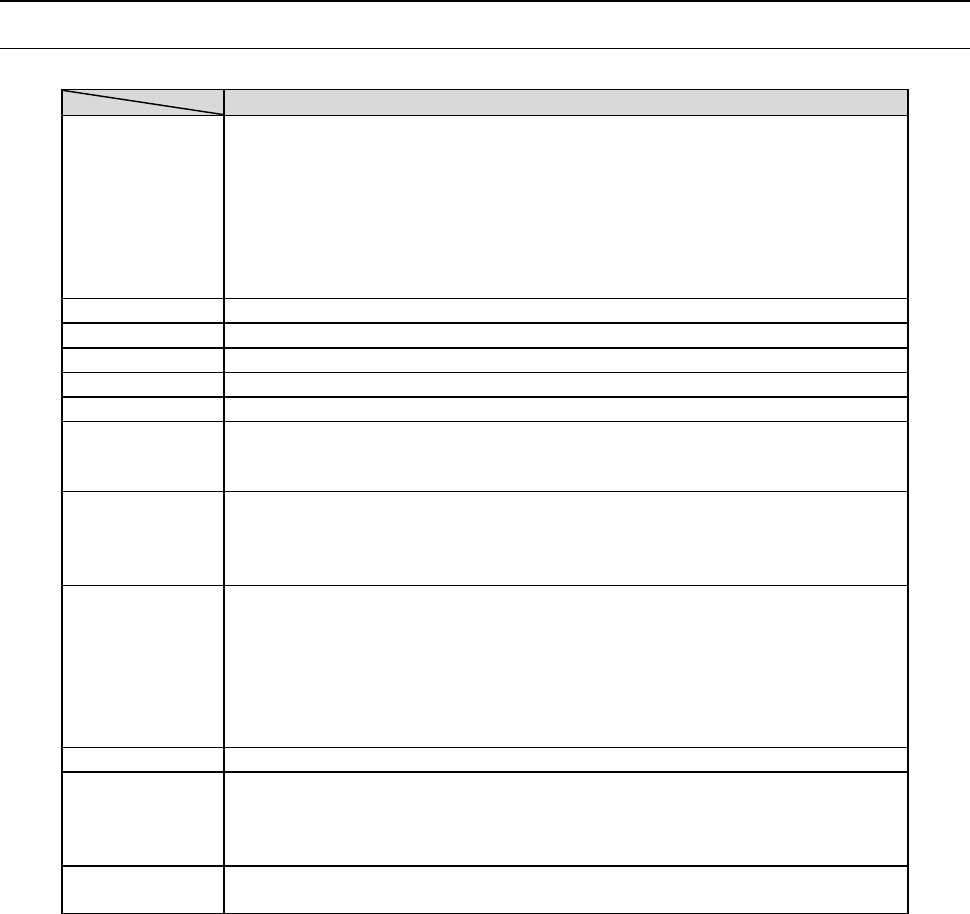
6-1-2-1 Server PC specification (the number of machines to be connected to the system: 1 to 10)
Table 6-1-2-1 Server PC specifications (Number of machine units: 1 to 10 units)
Recommended specification
Function
CGS/CGSDW/CGSCX database
Cogiscan Web Server (for Configurator, POI and installation)
Cogiscan Web Server (for Reports)
Cogiscan Web Server (for CAMX Message Broker)
Cogiscan Web Server (for Co-NECT Server)
TTC Server (for TTC-GO)
Cogiscan Data Warehousing Service
CPU
Quad Core CPU 2.00 GHz or higher (Hyper-Threading exists)
RAM
8GB or more
HDD
300 GB RAID1 HDD x 2 sets *1
DVD-ROM
1 unit or more
Screen size
15-inch monitor or bigger
Interface
Standard mouse and keyboard
100 BASE-TX/10 BASE-T - capable, LAN connector (RJ-45) ×1
USB 2.0×1
OS *2
Windows 10 Pro (64bit)
Windows Server 2012 R2 Standard (64bit)
Windows Server 2016 (64bits)
Windows Server 2019 Standard Edition (64bit)
Firewall
- The following ports need to be opened:
80 (Cogiscan Web Server), 7654 (Cogiscan PTU Shell Server), 50000 (IBM
DB2), 56277 (Cogiscan CIMS Server), and56278 (Cogiscan TTC Server)
- The following programs need to be opened:
\Program Files\Cogiscan\Server\Web Server\bin\cgsserver.exe
\Program Files\Cogiscan\Server\ttc\ttc.exe
\Program Files\Cogiscan\Server\ttc\orb\orb.exe
DB2
DB2 Express-C Edition V11.1 (Free)
The maximum
number of
connectable
client PCs
10 units *2
Uninterruptible
power system
Approximately 60 minutes at 100 VA, 70 W (APC Smart-UPS 700 or
equivalent)
*1 Physical HDDs are 4 units in total because RAID 1 configuration requires 2 sets.
Recommended configuration is the configuration with C-Drive and D-Drive in each RAID1.
*2 This number indicates how many devices having an IP address other than an access point, a
label printer and an MPC can be connected to the system.