IFS-NX_SPE_EN.pdf - 第51页
IFS - NX P rodu ct S pecificat ions 47 10 -4-3-3 Attachment an gle to a PWB The barcod e i s attach ed on a PWB as follo w s: Attachme nt angle An attachm ent angle is either parallel to a PWB (0 d egrees or 180 degrees)…
IFS-NX Product Specifications
46
10-4-3 PWB Barcode [Conveyor extension barcode reader method]
10-4-3-1 Usable Barcode Types
The usable barcodes are provided in the following three types of formats.
Barcode formats: CODE39, CODE128, and NW-7 (Check digit: None)
(Note) When a check digit exists, it is regarded as part of data.
Data expressed by a barcode is as follows. A start character and a stop character are not included, and
up to 32 characters can be used. The types of usable character on each barcode are as follows.
Item
Type of usable character
Type
CODE39
0 to 9, A to Z, -, ., space, $, /, +, %
43
CODE128
All of ASCII characters (a number, a capital/small
character, a symbol, a control character)
However, the following characters cannot be used:
"<" , ">", """, "'", and "&."
128
NW-7
0 to 9, - , $, /, ., +, :
(a to d are start/stop characters)
16
10-4-3-2 Readable barcode size
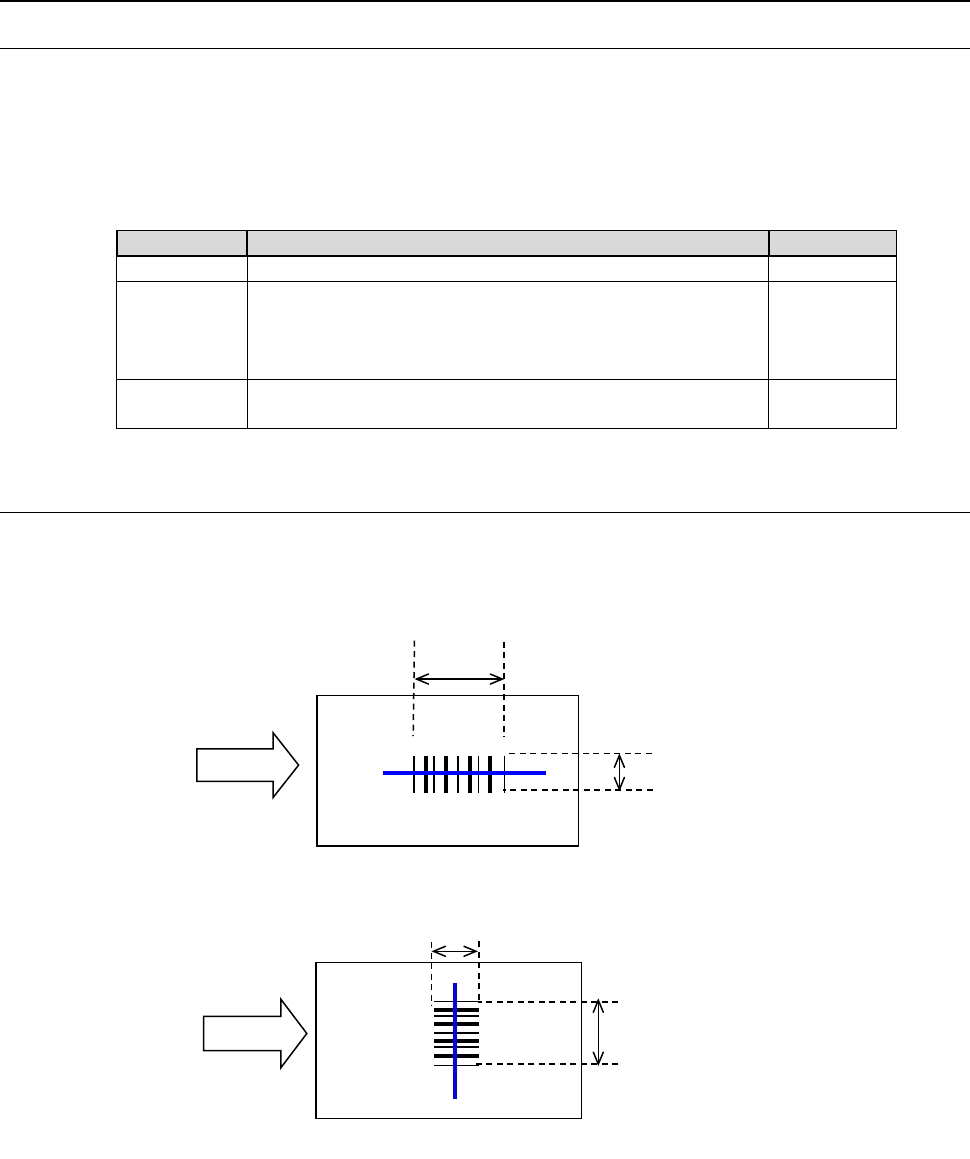
The following sizes can be read according to the PWB transport direction (width and length).
Transport direction: Width
T
ransport direction: Length
(N
ote) The length of a barcode includes a quiet zone.
A quiet zone indicates margins on either side of a barcode symbol, and requires the space
that is wider than 10 times the narrow bars on the right and left sides.
PWB transport direction
PWB transport direction
Max. 70 mm
Min.
3 mm
PWB
(Note)
The length of a barcode
includes a quiet zone.
(Note)
The length of a barcode
includes a quiet zone.
Max. 74 mm
Min. 7 mm
PWB
IFS-NX Product Specifications
47
10-4-3-3 Attachment angle to a PWB
The barcode is attached on a PWB as follows:
Attachment angle
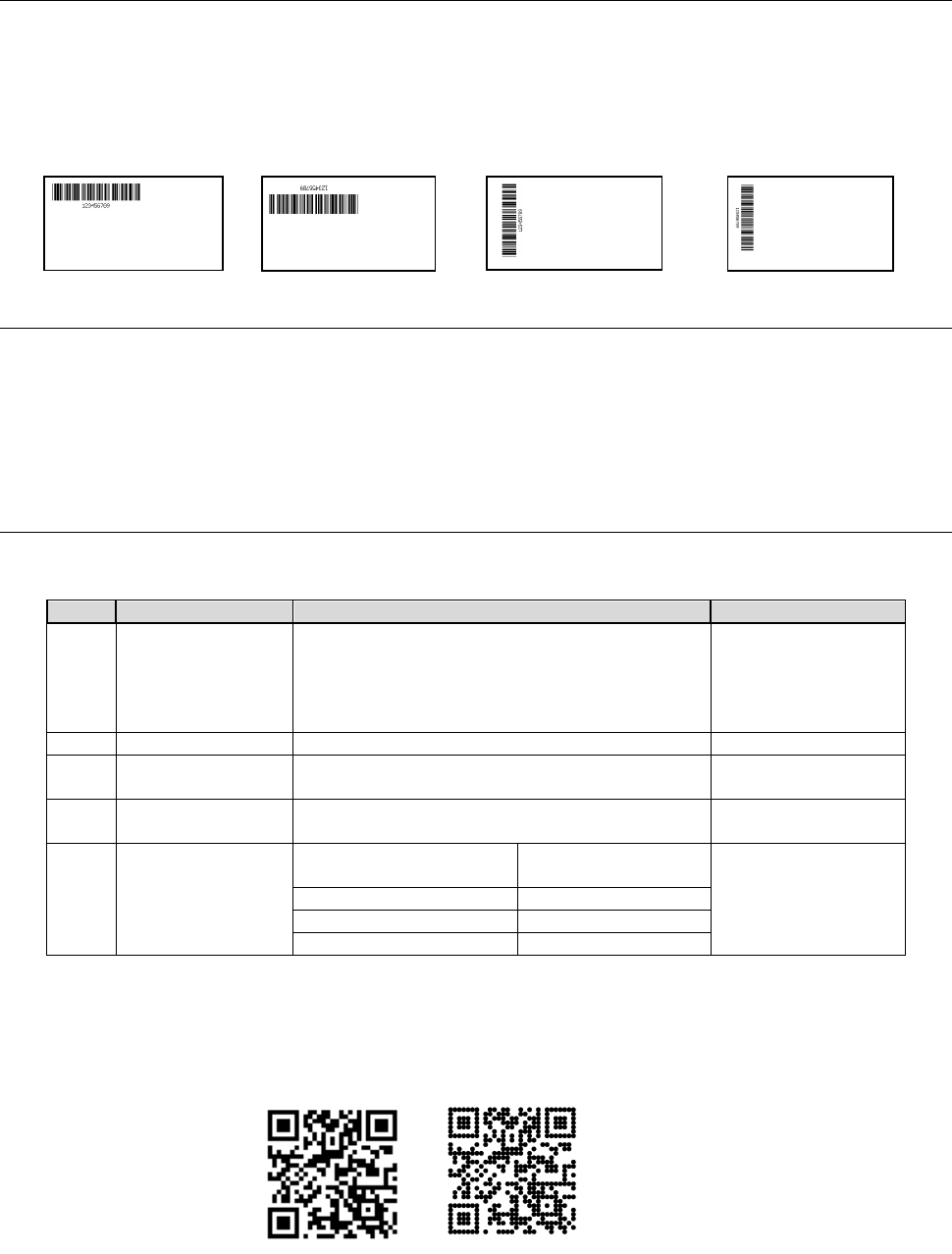
An attachment angle is either parallel to a PWB (0 degrees or 180 degrees) or perpendicular to a
PWB (90 degrees or 270 degrees) as follows:
Parallel (0 degrees)
Parallel (180 degrees)
Perpendicular (90 degrees)
Perpendicular (270 degrees)
10-4-3-4 Others
Reading bar width: 0.15 mm to 1.00mm
PCS (Print Contrast Signal): 0.6 (Reflectance of white: 75% or more)
(Reflectance of space) – (Reflectance of a bar)
PCS=―――――――――――――――――――――
(Reflectance of space)
10-4-4 PWB 2D code [OCC method]
(1) Readable marks
The specification of the marks that can be read as a PWB 2D barcode is as follows:
No.
Item
Remarks
1
Usable code
QR code (Version 1 to Version 7)
MicroQR code (Version M1 to M4)
DataMatrix (ECC50, 80, 100, 140, 200)
9 x 9 to 48 x 48
8 x 18 to 16 x 48
Version 1=21 x 21
Version 7=45 x 45
2
Cell size
0.065 mm (5 pixels) to 0.5 mm
3
Usable character
Alphanumeric character (Chinese character
and binary character cannot be used.)
4
Maximum number
of characters *1
250 characters
5
Code size
RX-6 series
RS-1 series
□9.5 mm or less
Quiet zone is
included.
RX-7/7R
□8.0 mm or less
JM-100
□6.3 mm or less
Other than the above.
□5.5 mm or less
*1 This is the number of digits of a serial number of a PWB that can be processed with the
IFS-NX.
The 2D codes in which a cell has been painted out completely and also those in which a black
cell has been drawn with dots can be recognized as shown in the following left figure. In this
case, the diameter of a dot should be the same as the cell size.
(2) Read-in method
The OCC is moved to the position of the code that offsets a PWB mark after a PWB is fixed to a
center buffer and shoots a picture of it.
The coordinates at which a mark is detected are saved with a KE-2050/ 2060/ 205R/ 2055R/
2060R series mounter as the values unique to the mounter (that is, stored in the Machine Setup
IFS-NX Product Specifications
48
data or other data).
These coordinates are saved with other type of mounters as part of a production program.
10-4-5 Multi Code Reader
A multi code reader is a device that reads both a barcode and a 2-D code. It is attached to the head unit
of a machine and reads the PWB code that is stuck on the top side of a PWB.
A large-size code can be read up to □26 mm.
10-4-5-1 Usable code types
The code that can be used is as follows:
No.
Item
Remarks
1
Usable code
QR code (Version 1 to Version 7)
2-D code
MicroQR code (Version M1 to M4)
2-D code
DataMatrix (ECC50,80,100,140,200)
2-D code
CODE39, CODE128, NW-7
1-D barcode
2
Usable character
Alphanumeric character (Chinese character and binary
character cannot be used.)
3
Maximum number of
characters
250 characters
The digit number which can be
processed through the IFS-NX
4
Code size
□
26.0 mm or less
* However, when a 2-D code is used on the bottom side
of a PWB, a recommended size of the 2-D code is □5.5
mm or less.
A quiet zone is included.
5
Minimum resolution
Head: 6 mil, Bottom: 6 mil
1 mil = 0.0254 mm
10-4-6 Bottom View Multi Code Reader
A bottom v
iew multi code reader is a device that reads both a barcode and a 2-D code a device that
is attached near the IN sensor on a transport path and reads a PWB code that is stuck on the
bottom side of the PWB during transport
The Code Setting screen of "Multi Code Reader" can be opened by setting up Traceability of the
Program Editor.
A PWB is set at the recognizable position using the Bottom View Multi Code Reader. After selection
of the "Code Type," pressing the "Auto Get Light Parameters" button optimizes a light parameter
automatically to perform recognition operation.
10-4-6-1 Usable code types
The code that can be used is the same as the code described in the Subsection "10-4-5-1 Usable code
types."
(Note)
- If a 2-D code larger than recommended size is recognized when the 2-D code is recognized using
the View Multi Code Reader, a recognition rate may fall. In that case, reducing transport speed at
the time of setup improves the recognition rate. So, adjust the transport speed if needed.
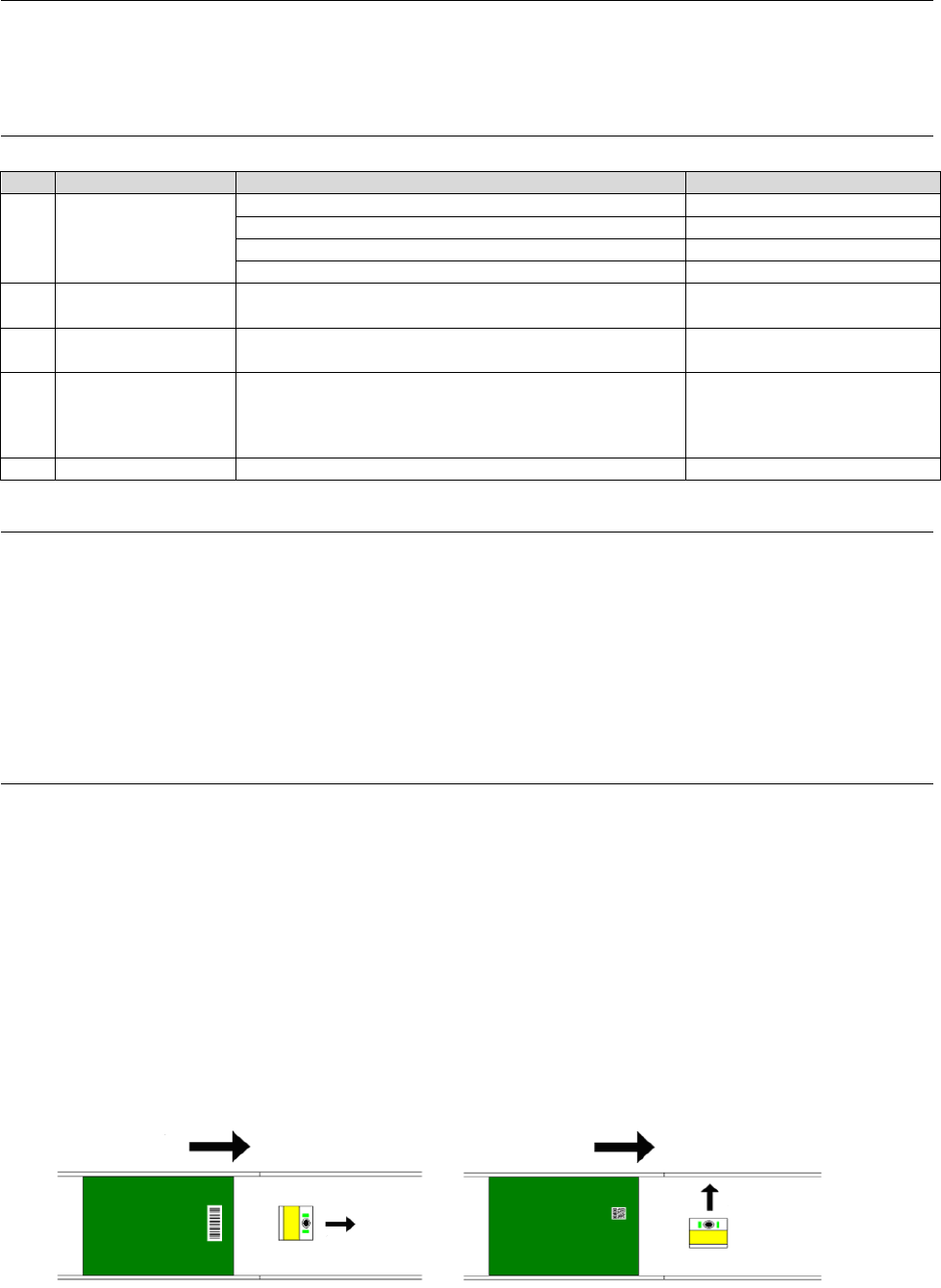
- When the View Multi Code Reader is used, if the direction of the View Multi Code Reader is
changed as follows according to the recognizing code type, it will ease recognition.
(The direction is changed to the same direction as transport direction when a 1-D barcode is used.
The direction is changed to a direction perpendicular to the transport direction when a 2-D code is
used.)
◆Camera direction when a 1-D barc
ode ◆Camera direction when a 2-D code
Is used (Recommendation) is used (Recommendation)
Transport direction
Transport direction
Camera direction
Camera direction