IFS-NX_SPE_EN.pdf - 第48页
IFS - NX P rodu ct S pecificat ions 44 Printi ng an IFS - N X label (with a serial numb er (uniqu e ID)) If you print and at tach IFS - NX labels ( with a seri al number) on a used ree l when compone nts are put in stora…
IFS-NX Product Specifications
43
Component code/PWB code specifications
The various code specifications used in IFS-NX are specified below:
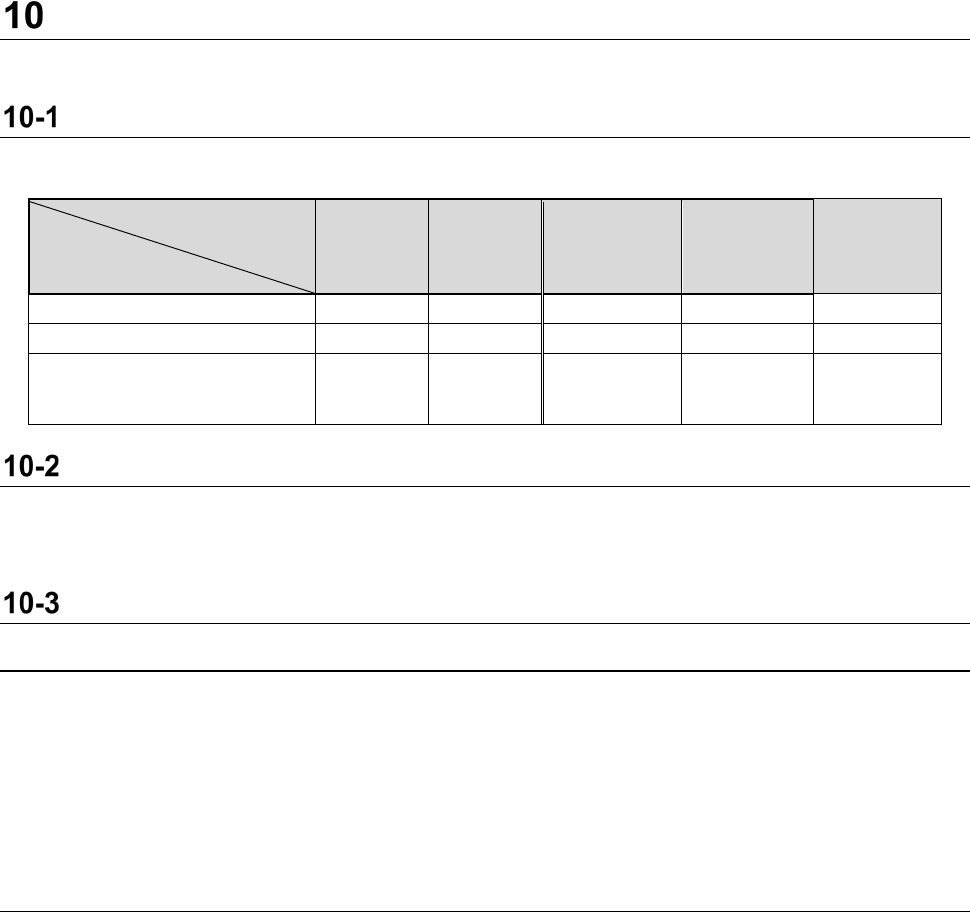
Code type and device to read a code
The relation between each code type and the device to read a code is as follows:
Reading device
Code type
1D 2D
Various
readers on a
machine side
Barcode
reader
Handy
terminal
Component code
○
○
-
○
○
PWB code
○
○
○
○
○
Other various codes
(Feeder, location, position
and others)
○ ○ - ○ ○
Unusable characters
The following seven characters are unsupported.
Unsupported characters: &, <, >, ·, “, ‘, #
Component code
10-3-1 Features
- A wide variety of component labels used in a factory can be supported. Component vender
labels and component user labels can be used regardless of existence of a unique ID.
- A user can select which label format is to be used: a label format currently pasted or a label
format defined with the IFS-NX. To create another original label format and print it, use a third
party’s software package.
- A barcode format including a header or two or more lines of data fields can be defined.
- 1D and 2D codes are supported.
10-3-2 Component labeling method
The method for labeling components supported with the IFS-NX is as follows:
No reattachment of a label
The label of a manufacturer or vendor of components is used in a factory, and a new label is
neither printed nor attached by a user. This label is called a "supplier" label.
Printing a user label (no serial number (unique ID))
Many users reattach component labels when components are put in storage or taken out from the
storage to the floor where they are to be mounted on boards. This “user” label contains a “user”
part number as well as other fields. In many cases, this differs from the part number (supplier part
number) on a supplier label. When this label does not contain any serial number, the system
cannot perform the “Traceability” function for each component, track the number of remaining
components for inventory control, or perform the “MSD Control” function. In many cases, a user
label is printed using a user's ERP/MRP/MES solution.
IFS-NX Product Specifications
44
Printing an IFS-NX label (with a serial number (unique ID))
If you print and attach IFS-NX labels (with a serial number) on a used reel when components are
put in storage, when they are taken out from the storage to the floor where they are to be mounted
on boards, or after a job finishes, the system can perform the “Traceability” function for each
component, track the number of remaining components for inventory control, or perform the “MSD
Control” function.
Printing a user label (with a serial number (unique ID))
Since a user label contains a serial number in this case, the system can perform the “Traceability”
function for each component, track the number of remaining components for inventory control, or
perform the “MSD Control” function. You do not have to attach any IFS-NX label additionally.
10-3-3 Usable component code type
The system can use component codes that can be read with a barcode reader and a handy terminal.
Refer to the specifications of each device for codes that can be read with it.
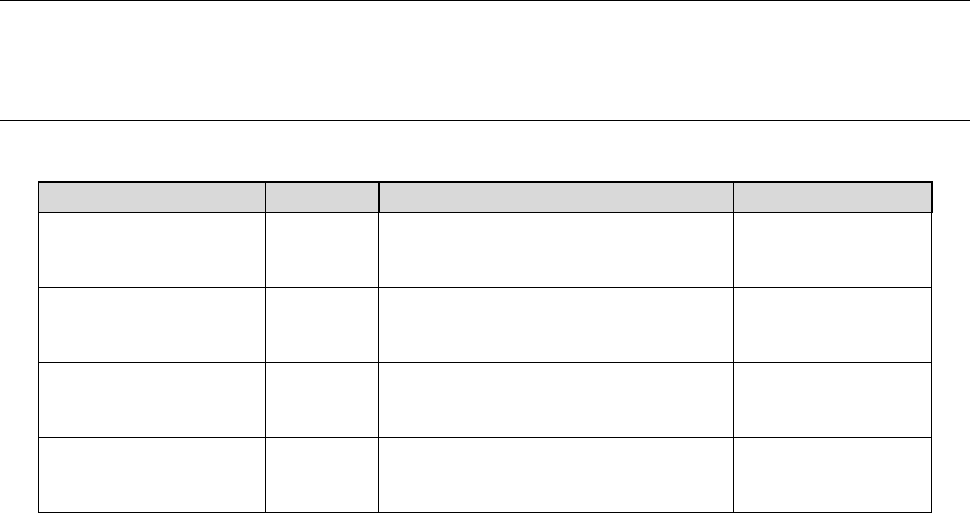
10-3-4 Component code field definition
The main examples of the definable fields in a component code are shown below:
Field name
Identifier
Description
Maximum length
Part Number
<PN>
Stands for a part number.t
corresponds to a component name
of a production program.
60 half-size
alphanumeric
characters
Supplier Part Number
<SPN>
Stands for a supplier part number.
250 half-size
alphanumeric
characters
Lot Number
<LOT>
Stands for a lot number (not
unique).
250 half-size
alphanumeric
characters
Unique Sequence
Number
<UID>
Stands for a unique sequence
number (a part of lot) and an item
that is combined with a lot number.
250 half-size
alphanumeric
characters
IFS-NX Product Specifications
45
PWB code
10-4-1 Common subject matter
10-4-1-1 Usable characters
The characters that can be used as a PWB code are half-size alphanumeric characters, and up to 250
characters can be used.
(* However, the number of characters varies depending on the code type.)
10-4-1-2 Notes when a code is pasted on a PWB
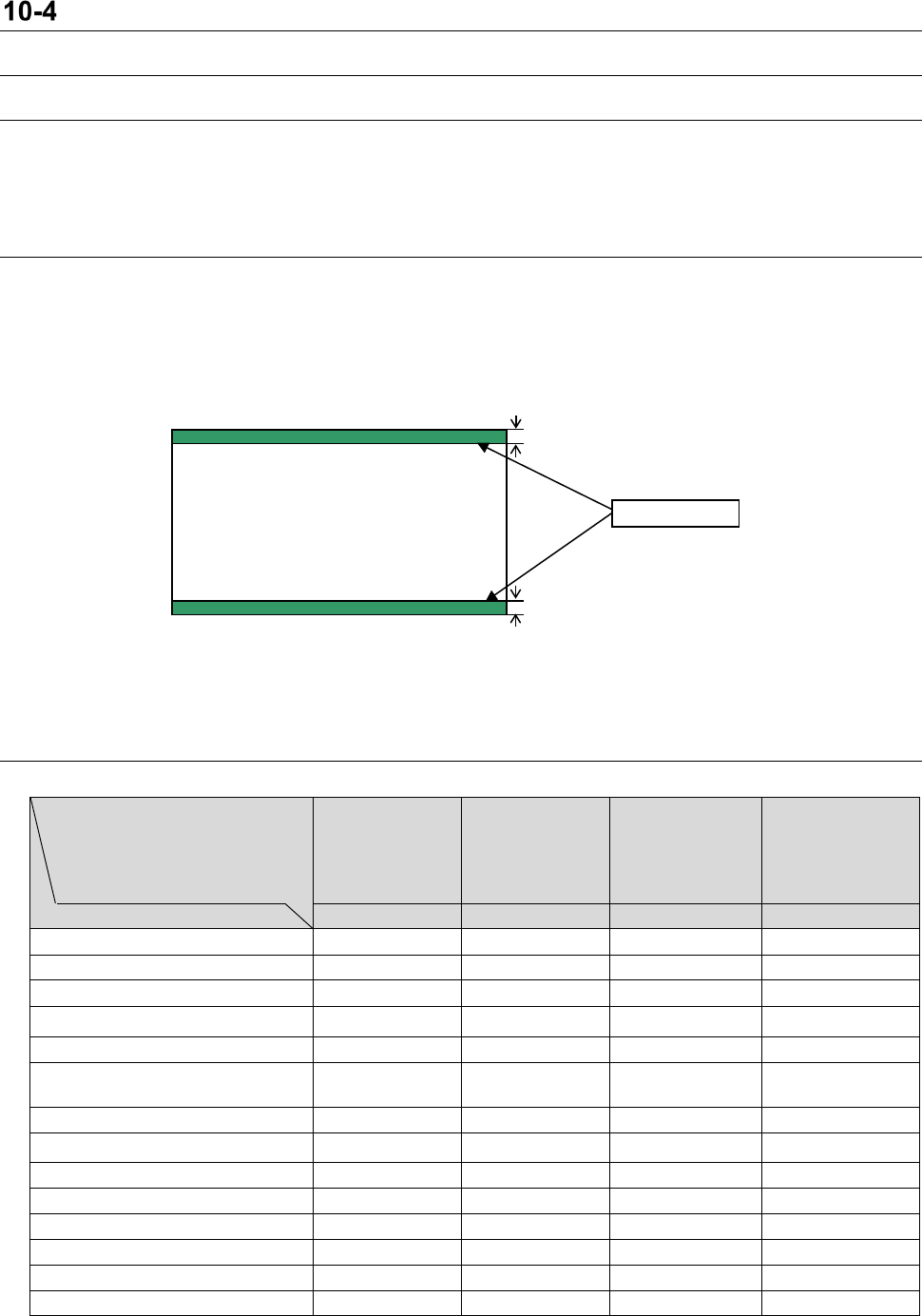
When you paste a code on a PWB, be careful of the following items.
- The whole code is attached on the PWB.
- The code covers neither the placed component nor a mark.
- The code is not overlapped with the clamp area of a PWB (See the following figure).
- For a barcode, pay attention to the pasting angle.
Since other specifications comply with the specification of a camera for reading codes, see each
section described below.
10-4-2 Applicable Machine Types
Reading system/PWB
code
Barcode reader
for conveyor
extension
OCC
Multi code
reader
Bottom view
multi code
reader
Applicable machine types
Barcode
2D code
Multi code
Multi code
KE-1070/1080
○
○
KE-2050/2060
○
○
KE-2050R/2055R/2060R
○
○
KE-2070/2070C/2080/2080R ○ ○
KE-3020/3020R
○
○
○
○
KE-3010/3020V/3020VR
KE-3010A/3020VA/20VRA
○ ○ ○ ○
FX-1R
○
○
FX-2
○
○
FX-3/3R/3RA
○
○
○
○
JM-20
○
○
○
○
JM-100
○
○
RX-6/6B/6R
○
○
RX-7/7R
○
RS-1/1R
○
3 mm
3 mm
Clamp area