KY Config_Manual_ENG_Final.pdf - 第11页
diamond, or cross. - CROSS_BLACK: Select this when a pad color is black and its shape is cross. - DIAMOND_BLACK: Select th is when a pad color is black and its shape is diamond. • Five fields are in the fiducial setup w …
• SPC Real Time Trend Chart: Select this item to use Save Path of Real Time Trend Chart.
Expansion Lot Information
This item is selected to save Solder, Stencil, Squeegee information forwarded by user on Lot information.
Defect View Use Barcode
When this is selected, the barcode is displayed on the Defect View.
Use SQL Scheduler
When this is selected, the ‘SQL Server Scheduler’ function is available. With the ‘SQL Server Scheduler’, it
is available to automatically collect the data and enter them to the SQL server.
Memoy Flip Check
When this is selected, the system automatically processes the entire panel as a bad panel if an error occurs
while the current pad is specified as a fiducial (Pad Type Local Fiducial).
Backup Unit
When this is selected, an alert message is displayed for warning the hazard that may occur while the width
of a conveyor is adjusted using the Backup Unit. Select this if you want to use 'Backup Unit' function.
Job Histogram
When this is selected, it is available to manage the histogram per JOB File.
Skip Qty
When this is selected, the JOB File quantity window does not appear while a JOB File is loaded.
Invisible Pass count
When this is selected, the statistics of the PASS PCBs is applied to the GOOD PCBs of the production
graph in the Defect View. In short, the statistics is not applied to the PASS PCBs.
Easy Use
When this is selected, the ‘Easy Use’ function is available.
Disabled Easy Use
Change Button
This item is selected only on Easy Use option. Select this to disable Change button when you want to
change to 3D Inspection System while using Easy Use function.
Use Inch unit
When this is selected, the basis unit is changed from millimeter (mm) to inch (inch).
AutoExport folder by
Month
When this is selected on running Auto Export, the folder will be created by Month.
PreInspection
This item is selected to optimize printer by pre-inspecting setting job file amount after loading.
Pad Referencing
When this is selected, one of the Warpage functions, Pad Referencing function is available.
Fiducial Wizard
When this is selected, the ‘Fiducial Wizard’ function is available.
Global Fiducial Shape
When this is selected, if the fiducial type is only one, the fiducial type is applied as a default value without
fiducial teaching and inspection is performed.
• Shape: Selects the fiducial type to be used as a default. 10 types are available:
- RECT_WHITE: Select this when a pad color is white and its shape is square.
- CIRCLE_WHITE: Select this when a pad color is white and its shape is circle.
- ETC_WHITE: Select this when a pad color is white and its shape is not one among square, circle,
diamond, or cross.
- CROSS_WHITE: Select this when a pad color is white and its shape is cross.
- DIAMOND_WHITE: Select this when a pad color is white and its shape is diamond.
- RECT_BLACK: Select this when a pad color is black and its shape is square.
- CIRCLE_BLACK: Select this when a pad color is black and its shape is circle.
- ETC_BLACK: Select this when a pad color is black and its shape is not one among square, circle,

diamond, or cross.
- CROSS_BLACK: Select this when a pad color is black and its shape is cross.
- DIAMOND_BLACK: Select this when a pad color is black and its shape is diamond.
• Five fields are in the fiducial setup window as follows:
- w1(mm): Enter the proper value in this field by referring to the figure on the side.
- w2(mm): Enter the proper value in this field by referring to the figure on the side.
- a1(mm): Enter the proper value in this field by referring to the figure on the side.
- a2(mm): Enter the proper value in this field by referring to the figure by its side.
- Acceptance[%]: Enter the proper value in this field by referring to the figure on the side of Acceptance
[%].
SECS GEM
SECS (SEMI Equipment Communication Standard) and GEM (Generic Equipment Model) are Semicon
Package system Interface protocols. This item is regulation for Data communicating between system and
host. When this is selected, choose the customer name.
Problem Report
Sets automatic data collecting when a problem occurs. There are two methods as follows:
• Report: Click this button; specific files where the necessary information is included are collected.
• Full Report: Click this button; all files (JOB File and database) are collected.
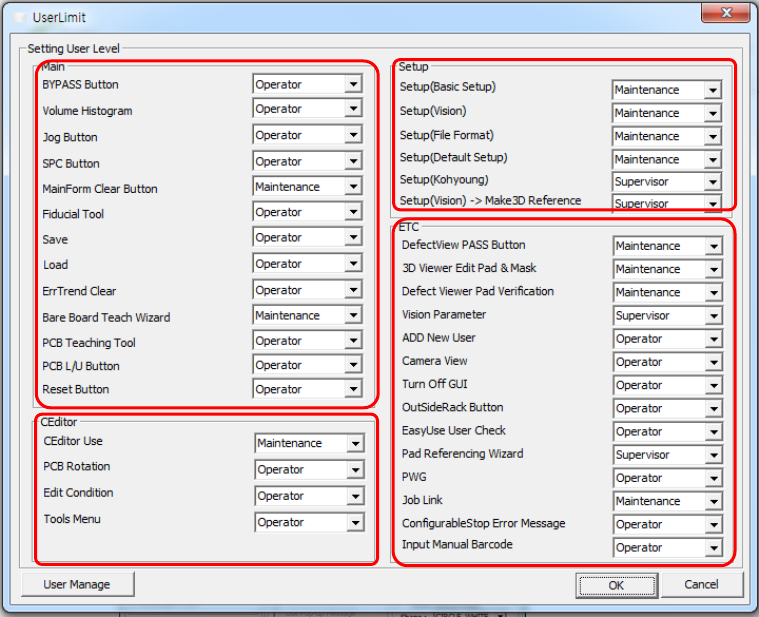
2. USER LIMIT
This chapter describes the items displayed by clicking the USER LIMIT button on the main screen.
1
2
4
3