KY Config_Manual_ENG_Final.pdf - 第17页
- Operat or - Maint enance - Supe rvisor • PWG - Operat or - Maint enance - Supe rvisor • Job Link - Operat or - Maint enance - Supe rvisor • Configurable S top Error Mess age - Operat or - Maint enance - Supe rvisor • I…

- Maintenance
- Supervisor
• Defect Viewer GOOD, NG Use
- Operator
- Maintenance
- Supervisor
• Vision Parameter
- Operator
- Maintenance
- Supervisor
• ADD New User
- Operator
- Maintenance
- Supervisor
• Camera View
- Operator
- Maintenance
- Supervisor
• Turn Off GUI
- Operator
- Maintenance
- Supervisor
• Outside Rack Button
- Operator
- Maintenance
- Supervisor
• Defect Viewer Pad Verification
- Operator
- Maintenance
- Supervisor
• Easy Use User Check
- Operator
- Maintenance
- Supervisor
• Pad Referencing Wizard

- Operator
- Maintenance
- Supervisor
• PWG
- Operator
- Maintenance
- Supervisor
• Job Link
- Operator
- Maintenance
- Supervisor
• Configurable Stop Error Message
- Operator
- Maintenance
- Supervisor
• Input Manual Barcode
- Operator
- Maintenance
- Supervisor
2.2. User Manage
This section describes User Manage among the items displayed by clicking the USER LIMIT button on the main screen.
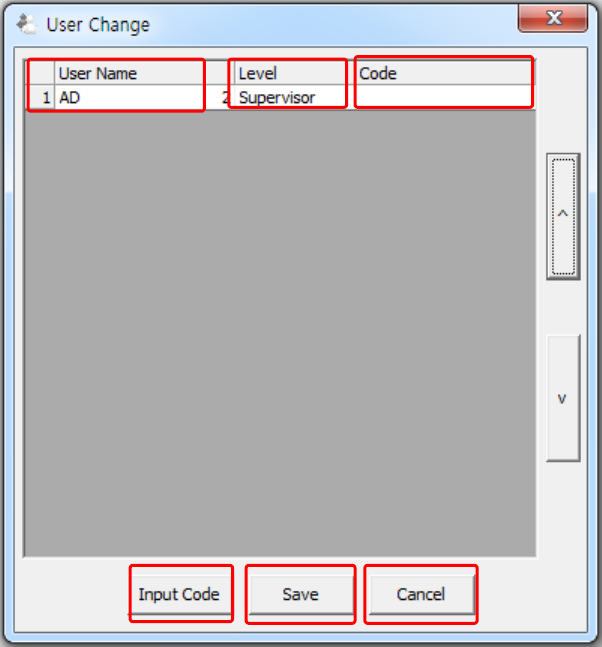
2.2.1. USER CHANGE WINDOW
This section describes how to use the User Change window.
The above figure is a pop-up window for managing the user accounts.
1
2
4
3
6
5