KY Config_Manual_ENG_Final.pdf - 第12页
2. U SER L IMIT This chapter describes the items displayed by clicking the USER LIMIT button on the main screen. 1 2 4 3

diamond, or cross.
- CROSS_BLACK: Select this when a pad color is black and its shape is cross.
- DIAMOND_BLACK: Select this when a pad color is black and its shape is diamond.
• Five fields are in the fiducial setup window as follows:
- w1(mm): Enter the proper value in this field by referring to the figure on the side.
- w2(mm): Enter the proper value in this field by referring to the figure on the side.
- a1(mm): Enter the proper value in this field by referring to the figure on the side.
- a2(mm): Enter the proper value in this field by referring to the figure by its side.
- Acceptance[%]: Enter the proper value in this field by referring to the figure on the side of Acceptance
[%].
SECS GEM
SECS (SEMI Equipment Communication Standard) and GEM (Generic Equipment Model) are Semicon
Package system Interface protocols. This item is regulation for Data communicating between system and
host. When this is selected, choose the customer name.
Problem Report
Sets automatic data collecting when a problem occurs. There are two methods as follows:
• Report: Click this button; specific files where the necessary information is included are collected.
• Full Report: Click this button; all files (JOB File and database) are collected.
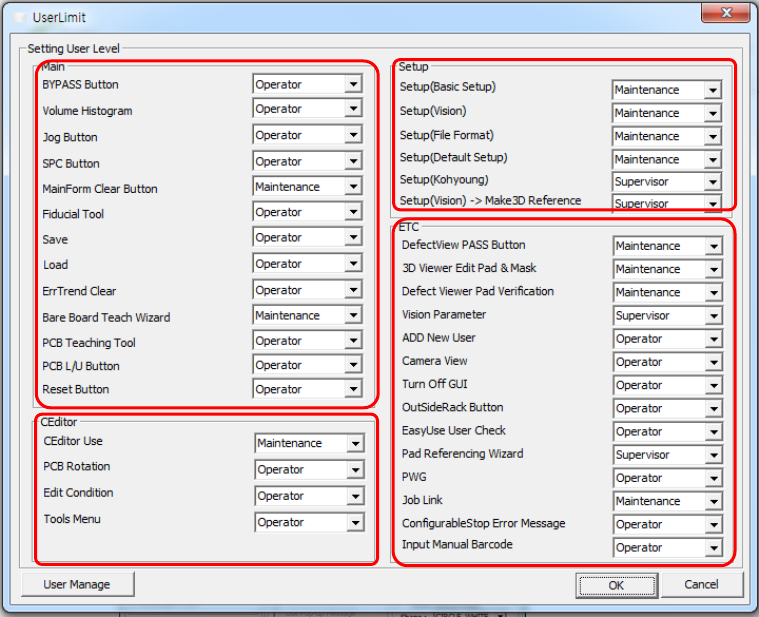
2. USER LIMIT
This chapter describes the items displayed by clicking the USER LIMIT button on the main screen.
1
2
4
3

2.1. Setting User Level
This section describes a window for specifying the authority to use the corresponding menu. Click the USER LIMIT button on the main screen and a pop-
up window appears; in this window, the user authority can be specified.
Caution: For more information, refer to the manual related to ‘User Limit’ function.
Field Name
Field Description
1.Main
• BYPASS Button
- Operator
- Maintenance
- Supervisor
• Volume Histogram
- Operator
- Maintenance
- Supervisor
• Jog Button
- Operator
- Maintenance
- Supervisor
• SPC Button
- Operator
- Maintenance
- Supervisor
• MainForm Clear Button
- Operator
- Maintenance
- Supervisor
• Fiducial Tool
- Operator
- Maintenance
- Supervisor
• Save
- Operator
- Maintenance
- Supervisor