KY Config_Manual_ENG_Final.pdf - 第13页
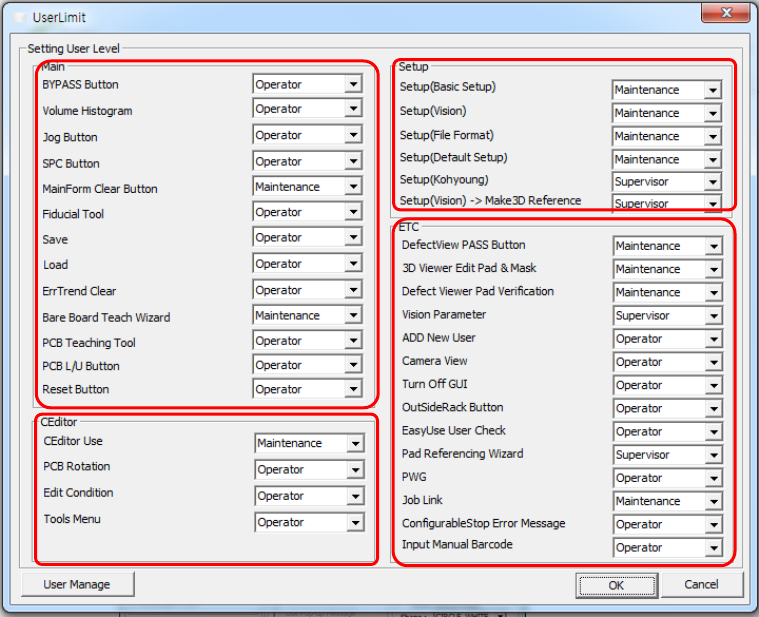
2.1. Setting User Level This section describes a window for specifying the authority to use the corresponding menu. Click the USER LIMIT butto n on the main screen and a pop - up window appears; in this window , the user…
2. USER LIMIT
This chapter describes the items displayed by clicking the USER LIMIT button on the main screen.
1
2
4
3

2.1. Setting User Level
This section describes a window for specifying the authority to use the corresponding menu. Click the USER LIMIT button on the main screen and a pop-
up window appears; in this window, the user authority can be specified.
Caution: For more information, refer to the manual related to ‘User Limit’ function.
Field Name
Field Description
1.Main
• BYPASS Button
- Operator
- Maintenance
- Supervisor
• Volume Histogram
- Operator
- Maintenance
- Supervisor
• Jog Button
- Operator
- Maintenance
- Supervisor
• SPC Button
- Operator
- Maintenance
- Supervisor
• MainForm Clear Button
- Operator
- Maintenance
- Supervisor
• Fiducial Tool
- Operator
- Maintenance
- Supervisor
• Save
- Operator
- Maintenance
- Supervisor

• Load
- Operator
- Maintenance
- Supervisor
• Err Trend Clear
- Operator
- Maintenance
- Supervisor
• Bare Board Teaching Wizard
- Operator
- Maintenance
- Supervisor
• PCB Teaching Tool
- Operator
- Maintenance
- Supervisor
• PCB L/U Button
- Operator
- Maintenance
- Supervisor
• Reset Button
- Operator
- Maintenance
- Supervisor
2.CEditor
• CEditor Use
- Operator
- Maintenance
- Supervisor
• PCB Rotation
- Operator
- Maintenance
- Supervisor
• Edit Condition
- Operator
- Maintenance