00198005-02_VD_SIPLACE_Pro_13.1_DE_EN.pdf - 第16页
SIPLACE Pro V13.1 / Softw are Version Descriptio n 05/2016 Edition 16 4.3.1 Activating MES Call backs The MES callback s for pro gram download and p roduct activation o n DEK printers can be a ctivated in the Line Contro…

SIPLACE Pro V13.1 / Software Version Description 05/2016 Edition
15
Verification method Description
For program downloads:
Ping Used for the ping test.
VerifyRecipeDownload Used for all downloads of recipes contained in a
production schedule.
The Line Control Server calls this method just after the
recipe data for all stations of the line has been created
successfully, but before this data is released for
production.
If two recipes are downloaded simultaneously (one for
the right and the other for the left lane), this method is
called once for both recipes and the MES service can
only accept or refuse both recipe downloads together.
VerifyStartAutoProgramDownload Used to verify a recipe of a job for starting the auto
program download mode (= barcode-controlled
production).
The Line Control Server calls this method just after the
recipe data for all stations of the line has been created
successfully, but before this data is released for
production.
VerifyRecipeForAutoProgramDownload Used to verify an additional recipe of a job or to re-verify
a modified recipe, when auto program download mode
has already been started.
The Line Control Server calls this method just after the
recipe data for all stations of the line has been created
successfully, but before this data is released for
production.
VerifyPcbForAutoProgramDownload When a board is moved into a station in auto program
download mode and the Line Control Server has
assigned a recipe to the uploaded board barcode, the
MES service can accept or refuse that the board with the
given board barcode is produced with this recipe.
For product activation on DEK
Printers:
Ping Used for the ping test.
VerifyRecipeActivationOnDekPrinter This callback is initiated by a DEK printer via the
VerifyRecipe callback.
Table 4-1: Verification methods
The Line Control Server calls the respective verification method of all registered MES services in
the order in which they are configured in SIPLACE OIB. This sequence is continued as long as the
current MES service confirms the program download. If the current MES service refuses the
program download, the sequence is aborted.
If only one MES service Asm.As.LineControl.Interceptor.Service is registered in OIB, Line Control
will call this MES service for any SIPLACE Pro line. If more than one MES services are registered
in OIB, Line Control will call these MES services only if the user has assigned them to SIPLACE
Pro lines via SIPLACE OIB Factory Explorer.
SIPLACE Pro V13.1 / Software Version Description 05/2016 Edition
16
4.3.1 Activating MES Callbacks
The MES callbacks for program download and product activation on DEK printers can be activated
in the Line Control GUI under Configuration – MES Verification.
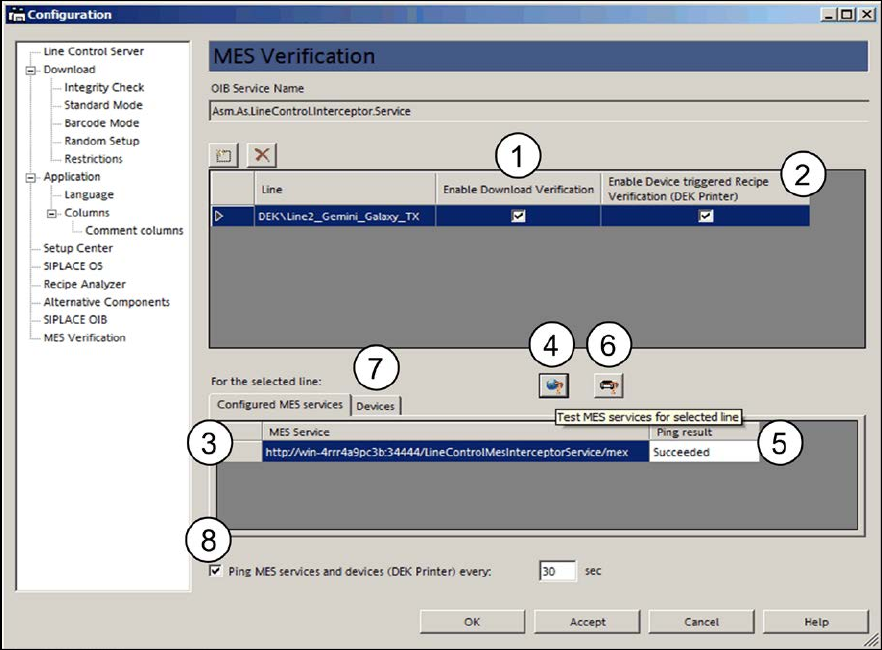
Figure 4-4: Activating MES callbacks
The MES callbacks for program download can be activated in the Enable Download Verification
checkbox (1) for a line that contains at least one device (= placement station) that supports the
program download by the Line Control Server.
The Line Control Server triggers the MES callback once per program download to a line. The MES
callback is sent to all MES services named Asm.As.LineControl.Interceptor.Service that have been
registered in SIPLACE OIB.
The MES callbacks for product activation on DEK printers can be activated in the Enable Device
triggered Recipe Verifications (DEK Printer) checkbox (2) for a line that contains DEK printers
only or DEK printers and placement stations.
The DEK printer triggers a lot of different callbacks to different MES services, amongst others the
VerifyRecipeActivationOnDekPrinter. The DEK printer sends a callback to the Line Control Server
that forwards this callback to all MES services named Asm.As.LineControl.Interceptor.Service.
The configured MES services for the selected line are displayed in table (3).
The connection to the MES services can be tested with the Test MES Services for selected line
button (4). The result is displayed under Ping result (5).
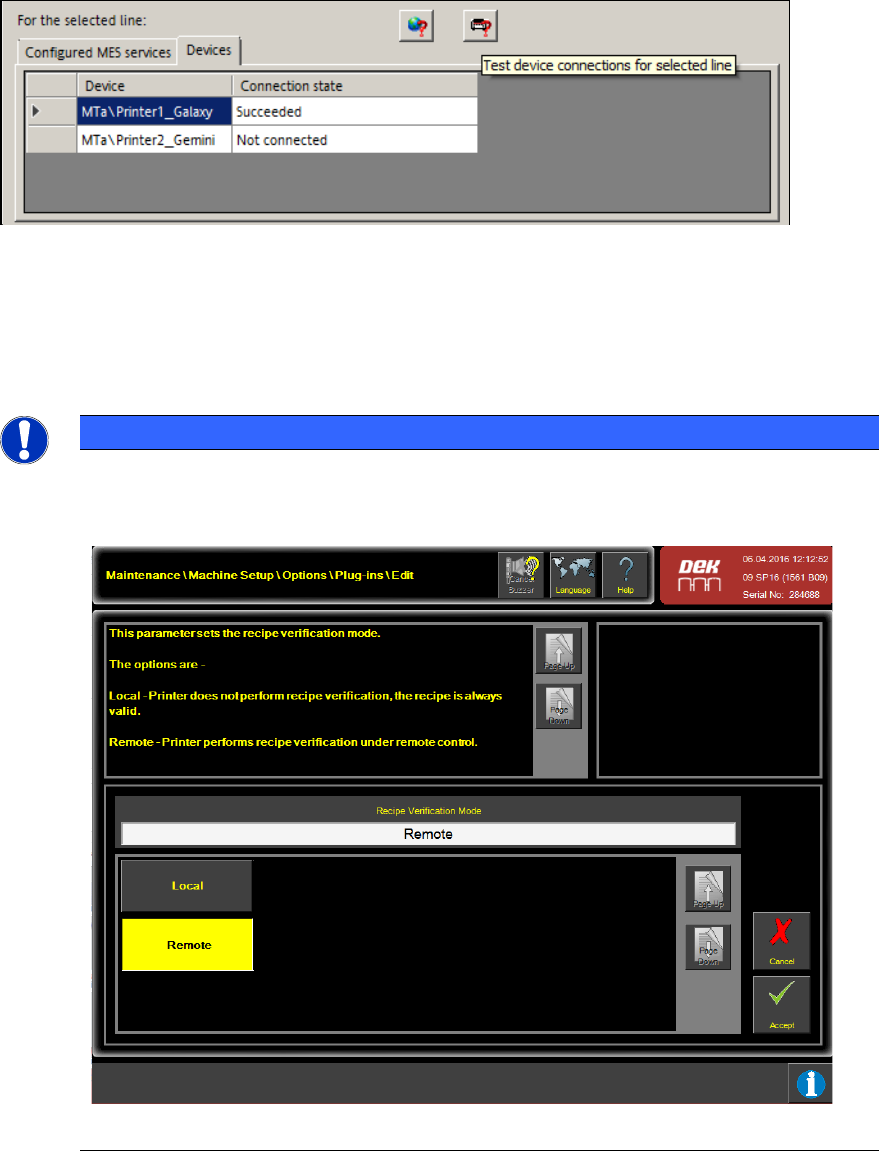
Additionally, the connection between the Line Control Server and the DEK printers can be tested
with the Test device connections for selected line button (6) in the Devices tab (7).
SIPLACE Pro V13.1 / Software Version Description 05/2016 Edition
17
Figure 4-5: Testing device connections
This test also includes the callback channel from the DEK printer to the Line Control Server. The
result is displayed under Connection state.
With the Ping MES services and devices (DEK printer) every nn sec option (8), it can be
configured that the connection tests to MES Services and DEK printers are performed periodically.
NOTICE
If the Enable Device triggered Recipe Verification (DEK Printer) mode is activated in
the Line Control GUI settings, it is also required to set the Recipe Verification Mode on
each DEK printer to value Remote for the DEK printers to be in remote control mode:
Figure 4-6: DEK printer in remote control