00198005-02_VD_SIPLACE_Pro_13.1_DE_EN.pdf - 第24页
SIPLACE Pro V13.1 / Softw are Version Descriptio n 05/2016 Edition 24 4.10 Manual Correction of the Feeder PuP SIPLACE Pro automat ically calculate s the feeder pickup posit ion (PuP) according to predef ined rules based…
SIPLACE Pro V13.1 / Software Version Description 05/2016 Edition
23
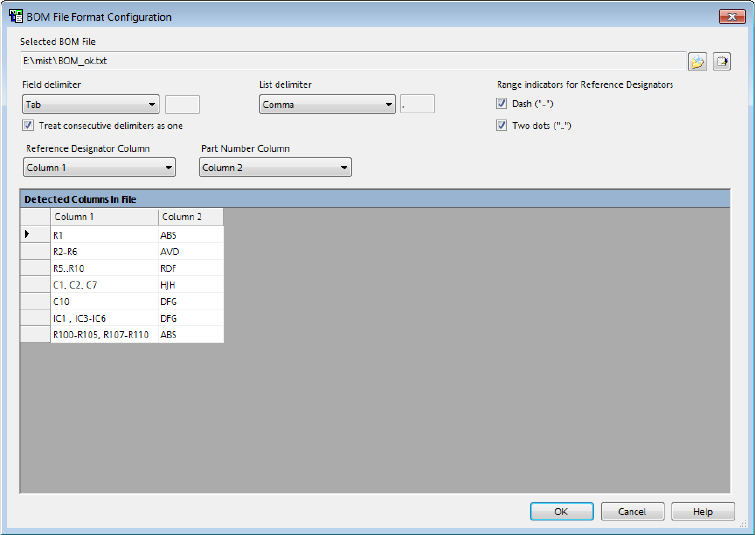
New controls for configuring the file format options have been added to the BOM File Format
Configuration dialog.
Figure 4-14: BOM File Format Configuration dialog
– Field and list delimiters can be defined for the BOM file. In some customer data the columns
are aligned in the text files so that they are human readable. For this reason, the BOM Merger
offers the Treat consecutive delimiters as one option. This option is available for all field
delimiters. For the SPACE and TAB-STOP field delimiters, the option will be automatically
detected and activated.
– The BOM Merger interprets a dash (-) and two consecutive dots (..) as names and not as range
delimiter symbols. These characters are disabled by default on the GUI. The user can enable
one of them or both as range delimiter characters.
– Additionally to lines beginning with the hash character (#), also lines beginning with two
consecutive slashes (//) will be interpreted as comment lines and ignored during import.
– The Reference Designator Column contains a list of names, separated by the selected list
delimiter character and cannot be configured.
– The BOM Merger will automatically save the selected delimiters and range indicators when the
application closes. At each start up, the last used preferences will be loaded.
SIPLACE Pro V13.1 / Software Version Description 05/2016 Edition
24
4.10 Manual Correction of the Feeder PuP
SIPLACE Pro automatically calculates the feeder pickup position (PuP) according to predefined
rules based on the described component width. Some components have a width that is close to the
boundary / threshold between two pickup positions, resulting in a calculated PuP that is not optimal
for the actual component.
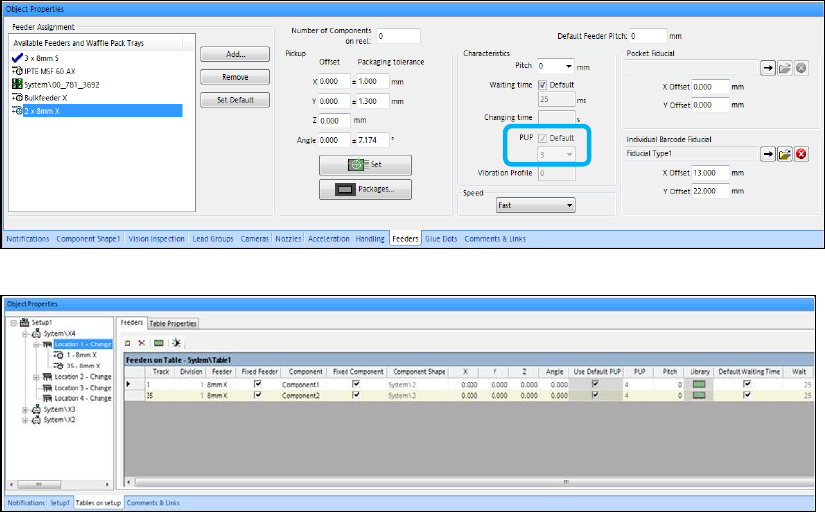
For such cases, SIPLACE Pro now supports manual correction of the PuP value in the
Component Editor and Component Shape Editor. If the component width is within 10% +/- of a
PuP threshold value, the calculated default PuP can be disabled and another PuP value selected.
Once the user has entered another PuP value, this value will remain regardless of changes to the
geometry or orientation of the component shape. In order to disable the new PuP value and return
to using automatically calculated PuP values, the Default value has to be enabled again.
Figure 4-15: Feeders tab of Component / Component Shape Editors
Figure 4-16: Feeders tab in Setup Editor
4.11 Improved Board Identification
The process for identifying a board when loading it into the placement machine has been improved
and now offers a more reliable barcode reading.
A board barcode is defined for one board side in the Board Editor of SIPLACE Pro Desk. This
board barcode is read by the board camera when this board side is produced. However, when the
other board side is produced, this board barcode shall be read by the barcode reader positioned
below the board.
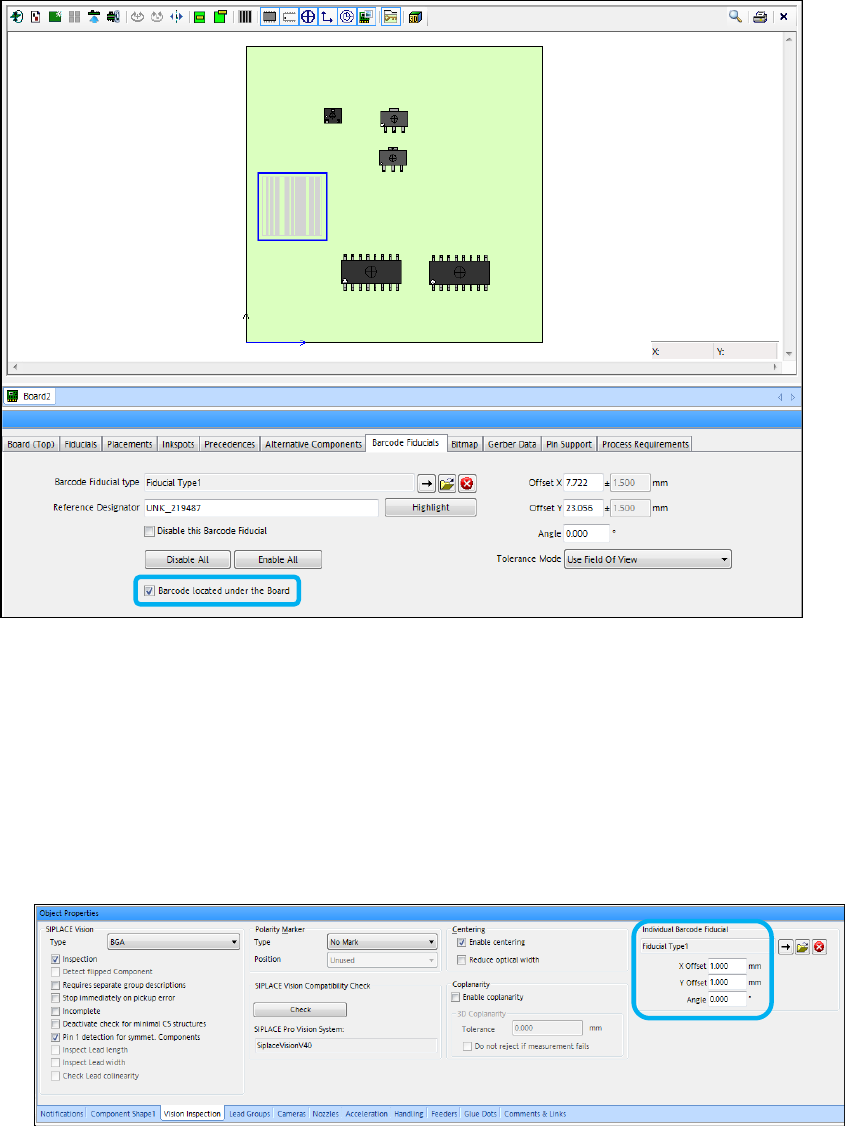
For this, it is now possible to define the Barcode located under the Board property for a board
barcode and send this information to the station. The barcode fiducial is displayed in gray if this
property is enabled.
SIPLACE Pro V13.1 / Software Version Description 05/2016 Edition
25
Figure 4-17: Defining barcode located under the board
4.12 Reading Individual Barcode Fiducials with Board Camera –
Enhancements
– Up til now, reading the individual barcode fiducials with the board camera was only possible for
components in a tape feeder. From this SIPLACE Pro version, the option can be used
independently of the packaging unit (tape, tray …). The individual barcode fiducial and its offset
have to be defined in the Vision Inspection tab of the Component Shape Editor.
Figure 4-18: Defining individual barcode fiducial
– If a component has a barcode positioned out of the focus height of the board camera and the
barcode cannot be recognized with good quality, the option has to be disabled for this
component.
– If reading the barcode fails, the component will be returned to the same position in the tray.