00198005-02_VD_SIPLACE_Pro_13.1_DE_EN.pdf - 第30页
SIPLACE Pro V13.1 / Softw are Version Descriptio n 05/2016 Edition 30 Figure 4-26:Changing grid panels 4.15 S IPLACE SiCluster P rofessional – Enhancements As of this SIPLACE Pro version, the existing CSV file import fun…
SIPLACE Pro V13.1 / Software Version Description 05/2016 Edition
29
4.14.5 Z Height for Grid Panels in Grid Board Editor
An offset for the Z direction can now be added to each individual panel on a grid board to describe
the additional height of a panel.
If the Z offset = 0, the panel on a grid board has no additional height, i.e. grid board height = grid
panel height.
If the Z offset is ≠ 0, the total panel height = grid board height + Z offset.
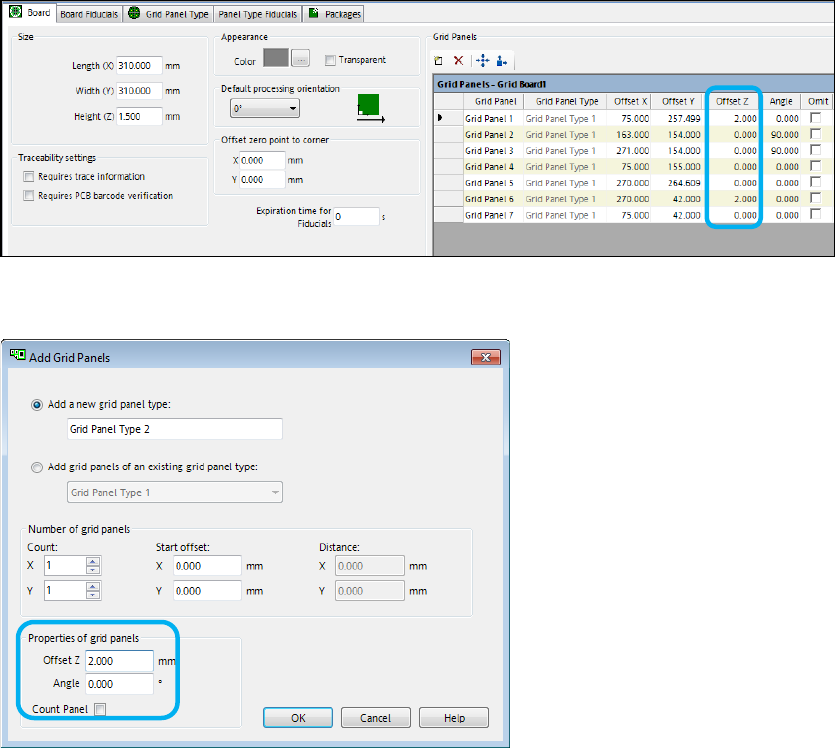
The Offset Z column has been added to the Grid Panels list in the grid board.
Figure 4-24: Grid Panels list
The Z height can be set when adding a grid panel in the Add Grid Panels dialog.
Figure 4-25: Adding grid panels
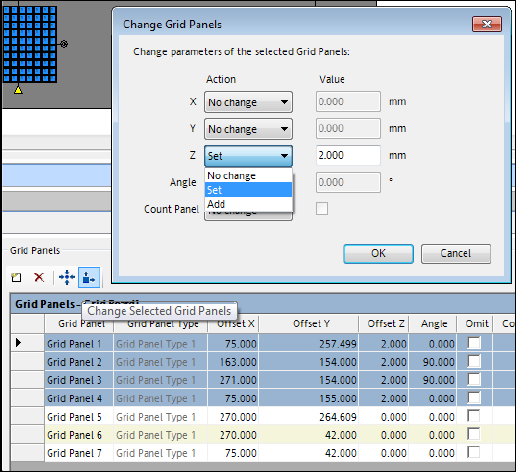
This value can also be set or added for several selected existing grid panels in the Change Grid
Panels dialog.
SIPLACE Pro V13.1 / Software Version Description 05/2016 Edition
30
Figure 4-26:Changing grid panels
4.15 SIPLACE SiCluster Professional – Enhancements
As of this SIPLACE Pro version, the existing CSV file import function as available for SIPLACE
SiCluster Multiline has been integrated into SIPLACE SiCluster Professional. Only the import mode
of the production order data is relevant for SIPLACE SiCluster Professional.
Each row of the CSV file will be imported as a Cluster Recipe of the Cluster Job opened in
SIPLACE SiCluster Professional.
4.16 SIPLACE SiCluster Multiline – Enhancements
As of this SIPLACE Pro version, the Line Specific Output Folders option has been introduced in
SIPLACE SiCluster Multiline.
If the option is enabled, the output objects are created in subfolders. The name of each subfolder is
the name of the line object (without the path) of the corresponding line.
The following further SIPLACE SiCluster MultiLine enhancements were added since the initial
release:
– A new "Different Line Rule" rule type allows selecting recipes that have to be assigned to
different lines.
– The CSV wizard supports automatic creation of SameJob groups.
– The CSV wizard is able to add board objects from subfolders.
– Ideal cycle times can be calculated or invalidated selectively.
– The rule and process requirement dialogs now supports object filtering.
SIPLACE Pro V13.1 / Software Version Description 05/2016 Edition
31
4.17 Discontinued Features
Aegis CAD parser is not available in the CAD Data Import wizard under Tools/Import/ in
SIPLACE Pro Desk any more.
4.18 SIPLACE Pro Installation
– SIPLACE Pro will be installed by using a new installation program based on Windows Installer
XML (short: WiX Toolset).
4.19 Exporting to Previous SIPLACE Pro Versions
SIPLACE Pro 13.1 supports the export of SiPro files to the following versions:
– SIPLACE Pro 12.1
– SIPLACE Pro 13.0
The export is only possible if compatible features to the target version are used, otherwise an error
message is displayed.
The target version of the export can be selected in the Save As file dialog of the Data Model
Export.